1. Introducció
Thank you for choosing the Tribesigns Computer Desk. This manual provides essential information for the safe assembly, proper use, and effective maintenance of your new desk. Designed for functionality and style, this desk offers a spacious work surface, an integrated monitor stand, and convenient storage solutions to enhance your workspace.
The Tribesigns Computer Desk is constructed with a robust metal frame and durable wooden panels, ensuring stability and longevity. Its industrial design complements various interior styles, making it a versatile addition to your home or office.

Un acabatview of the Tribesigns computer desk, showcasing its spacious desktop, integrated monitor stand, and side storage shelves, complete with a computer setup.

The Tribesigns computer desk positioned in a corner of a room, demonstrating its L-shaped configuration and how it fits into a modern home office environment with dual monitors.
2. Informació de seguretat
- Always assemble the desk on a soft, clean surface to prevent scratches or damage to the components.
- Assegureu-vos que tots els cargols i elements de fixació estiguin ben ajustats abans d'utilitzar-los. Comproveu-los periòdicament i torneu-los a apretar si cal.
- Mantingueu les peces petites i els materials d'embalatge fora de l'abast dels nens i les mascotes per evitar riscos d'asfíxia.
- Do not overload the desk or shelves beyond their weight capacity. Refer to the specifications section for details.
- Avoid standing or climbing on the desk.
- Use the desk on a level surface to prevent wobbling and instability.
- Es recomana el muntatge per dues persones per garantir la seguretat i la facilitat d'instal·lació.
3. Contingut del paquet
Si us plau, verifiqueu que tots els components que s'enumeren a continuació siguin presents abans de començar el muntatge. Si falta alguna peça o hi ha alguna peça danyada, poseu-vos en contacte amb el servei d'atenció al client.
- Desktop Panels (Main, Monitor Stand, Side Shelves)
- Metal Frame Components (Legs, Support Bars)
- CPU Stand Grid
- Maquinari de muntatge (cargols, perns, clau Allen)
- Manual d'instruccions
4. Instruccions de muntatge i instal·lació
Follow these steps carefully to assemble your Tribesigns Computer Desk. It is recommended to have a second person assist with assembly.
- Desempaquetar i identificar les peces: Carefully remove all components from the packaging. Lay them out on a soft, clean surface. Refer to the parts list in your included manual to identify each piece.
- Muntar el marc principal: Attach the metal legs to the main desktop support bars using the provided screws. Do not fully tighten screws at this stage.
- Adjunta els panells d'escriptori: Secure the main desktop panel to the assembled frame. Ensure proper alignment before proceeding.
- Instal·leu el suport del monitor: Attach the monitor stand panel to its designated support frame and then to the main desktop.
- Assemble Side Storage Unit: Connect the metal frame for the side storage shelves. Attach the wooden shelf panels to this frame.
- Integrate Side Unit: Connect the assembled side storage unit to the main desk frame.
- Install CPU Stand: Place the CPU stand grid into its designated slot within the side storage unit.
- Ajustament final: Once all components are correctly aligned and loosely assembled, gradually tighten all screws and bolts using the provided Allen wrench. Ensure the desk is stable and level.
Nota: If you encounter any difficulties, re-check the instruction manual included in your package or contact customer support.
5. Instruccions de funcionament
The Tribesigns Computer Desk is designed for optimal functionality and ergonomic comfort. Here are some tips for effective use:
- Ergonomic Monitor Placement: Utilize the integrated monitor stand to elevate your screen to an ergonomic height. This helps maintain a healthy posture, reducing strain on your neck and eyes.
- Emmagatzematge organitzat: The side shelves provide convenient storage for books, documents, office supplies, or decorative items. Keep your workspace tidy and efficient.
- Suport de CPU: The dedicated CPU stand keeps your computer tower off the floor, protecting it from dust and improving airflow.
- Escriptori espaiós: The large desktop accommodates your computer, keyboard, mouse, and other accessories, providing ample space for work or study.

An illustration comparing incorrect and correct ergonomic postures at a desk, highlighting the benefit of the integrated monitor stand for maintaining a healthy neck and back alignment.
6. Manteniment
Proper care will ensure the longevity and appearance of your Tribesigns Computer Desk.
- Neteja: Netegeu les superfícies amb un suau, damp cloth. For stubborn marks, use a mild, non-abrasive cleaner. Avoid harsh chemicals that may damage the finish.
- Resistència a l'aigua: The desk features a water-resistant surface, making it easy to clean spills. However, promptly wipe up any liquids to prevent potential damage.
- Comprovació de maquinari: Periodically inspect all screws and connections. Re-tighten any loose hardware to maintain stability.
- Eviteu la llum solar directa: Prolonged exposure to direct sunlight can cause fading or warping of the wooden panels.
- Protegir superfícies: Use coasters for drinks and mouse pads to protect the desktop surface from scratches and heat.

Close-up images demonstrating the waterproof surface of the desk and the robust 2.5cm heavy-duty metal frame, emphasizing durability and ease of maintenance.
7. Solució De Problemes
Si teniu algun problema amb el vostre escriptori, consulteu els següents problemes i solucions habituals:
- L'escriptori és tambaleant:
- Assegureu-vos que tots els cargols i perns estiguin completament apretats.
- Verify that the desk is placed on a level surface. Adjust floor glides if available.
- Check that all frame components are correctly aligned according to the assembly instructions.
- Les peces no s'alineen durant el muntatge:
- Loosen all screws slightly, adjust the components to align, then re-tighten.
- Double-check that you are using the correct parts for each step as indicated in the manual. Some parts may look similar but have subtle differences.
- Ensure components are oriented correctly (e.g., holes facing the right direction).
- Peces que falten o danyades:
- Reviseu acuradament tots els materials d'embalatge. De vegades, es poden passar per alt les peces petites.
- Contact Tribesigns customer support immediately with details of the missing or damaged part, including the part number from the manual.
8. Especificacions
| Característica | Detall |
|---|---|
| Marca | Signes de tribus |
| Model | Escriptori d'ordinador 140x50x91cm |
| Dimensions (L x A x A) | 140 cm x 50 cm x 91 cm (55.1" x 19.7" x 35.8") |
| Pes | 20.4 quilos (45 lliures) |
| Material | Wood (Top), Alloy Steel (Frame) |
| Color | Vintagi marró |
| Disseny | Computer Desk with Monitor Stand and Storage |
| Característica especial | Compact, Water-resistant Surface |
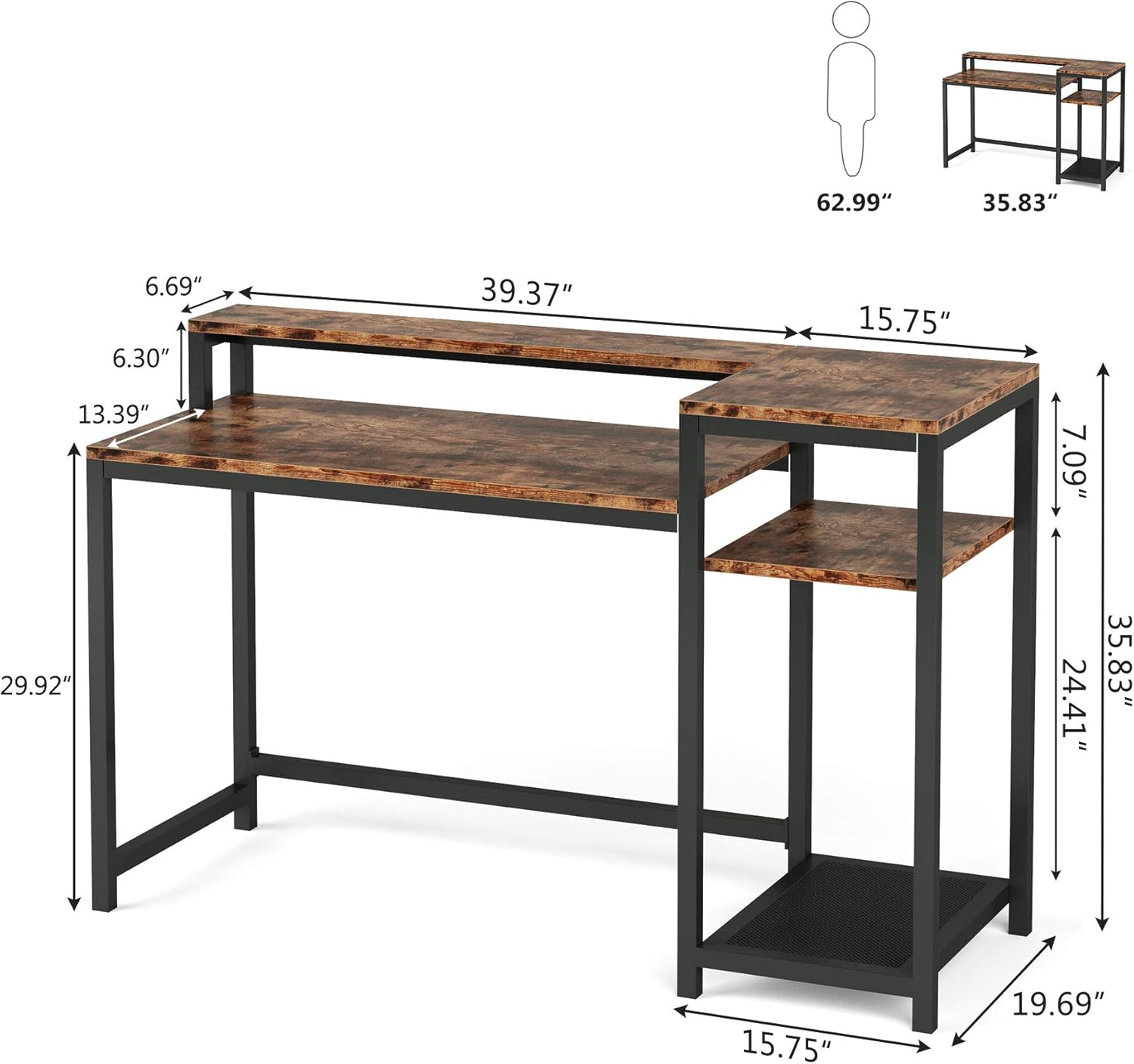
A detailed diagram illustrating the precise measurements of the Tribesigns computer desk, including the main desktop, monitor stand, and side storage unit, in inches.
9. Garantia i Suport
Tribesigns is committed to providing high-quality products and customer satisfaction. For any questions, concerns, or assistance with your Tribesigns Computer Desk, please contact our customer support team.
Please retain your purchase receipt for warranty purposes. Specific warranty details may vary; refer to the documentation provided at the time of purchase or contact Tribesigns directly for more information.
Informació de contacte: Please refer to the contact details provided on the Tribesigns official website or your purchase platform for the most up-to-date customer service information.


