1. Producte acabatview
The UBiBot SP1 WiFi Smart Plug is designed to provide remote control and monitoring capabilities for your electrical appliances. It integrates with the UBiBot IoT platform, allowing you to manage devices, monitor energy consumption, and set automation rules via a mobile application. This smart plug also supports external probes for environmental condition monitoring.
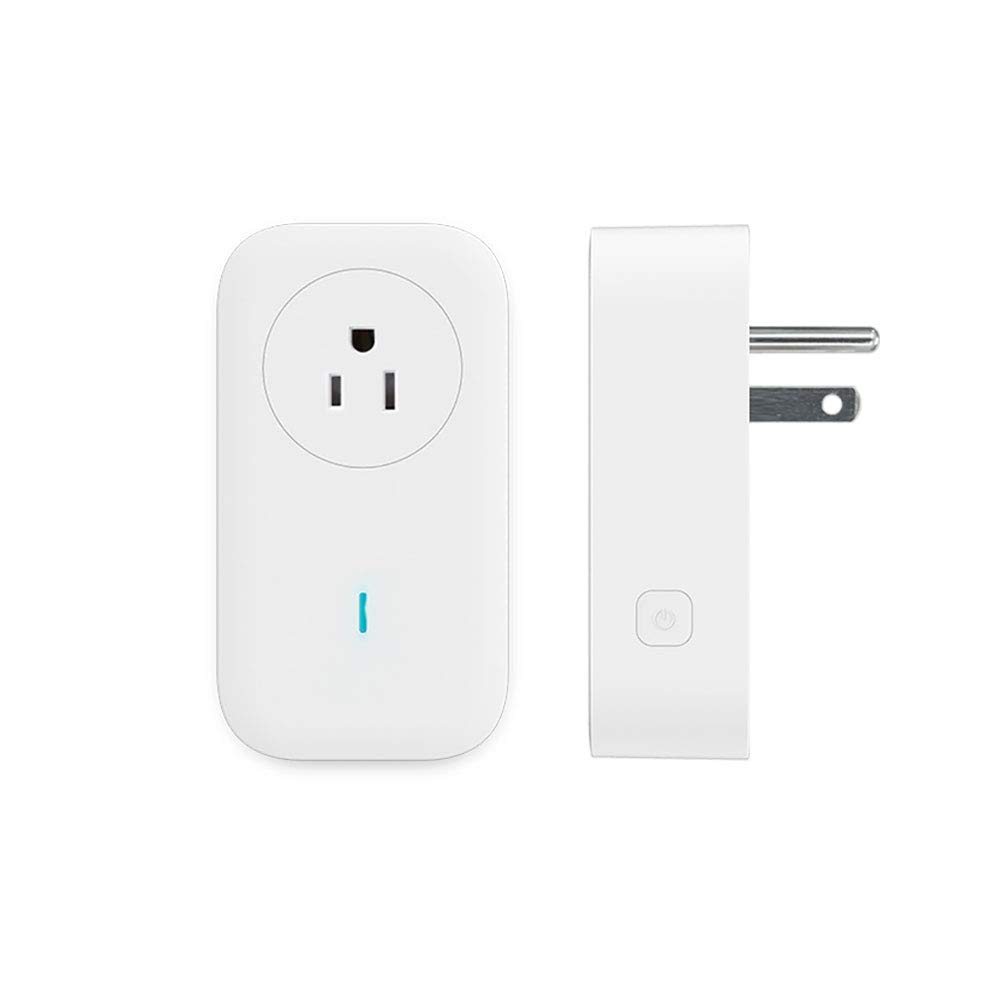
Figura 1: frontal i lateral view of the UBiBot SP1 WiFi Smart Plug. The front shows the standard US outlet type and an LED indicator. The side shows the power button and the plug prongs.
Components
- Endoll: Standard US type, for connecting appliances.
- Indicador LED: Displays the status of the smart plug (e.g., power, Wi-Fi connection).
- Botó d'encesa: Manual control for turning the plug on/off.
- External Probe Port: Connects to compatible external sensors (e.g., temperature, humidity probes).

Figura 2: Detallada view of the UBiBot SP1 WiFi Smart Plug highlighting the LED indicator, power button, and external probe port.

Figure 3: Close-up of the UBiBot SP1 WiFi Smart Plug's bottom, showing the RS485 and DS18B20 probe connection ports.
2. Característiques clau
- Comandament a distància: Manage connected appliances from anywhere using the UBiBot mobile application (Android & iOS).
- Funció de temporitzador: Schedule power on/off times for appliances.
- Monitorització energètica: Track and calculate energy usage of connected devices.
- Suport de sonda externa: Connect RS485 and DS18B20 probes for environmental monitoring (e.g., temperature, humidity).
- Automation Rules: Create rules to automatically control appliances based on environmental conditions detected by probes.
- Alertes: Receive notifications for extreme conditions via email, app, SMS, voice call, and web.
- Emmagatzematge de dades fora de línia: Built-in history recorder ensures data is saved even without continuous internet connection.
- Protecció contra sobreintensitat: Automatic power cut-off for safety.
- Connectivitat Wi-Fi: Supports 2.4 GHz Wi-Fi networks (5 GHz networks are not supported). No additional hub is required.

Figure 4: Visual representation of key features including 2.4GHz Wi-Fi support, history recorder, remote management, wireless control, scheduling, energy usage calculation, and external sensor support.

Figure 5: Diagram illustrating the multiple alert notification modes available: Web notification, Voice Call, Email, App notification, and SMS.
3. Guia de configuració
3.1. Configuració inicial
- Download the UBiBot App: Cerca "UBiBot" in the Apple App Store or Google Play Store and install the application on your smartphone.
- Crea un compte: Open the UBiBot app and follow the on-screen instructions to register a new account or log in if you already have one.
- Connecteu l'endoll intel·ligent: Insert the UBiBot SP1 WiFi Smart Plug into a standard electrical outlet. Ensure it is within range of your 2.4 GHz Wi-Fi network.
- Afegeix un dispositiu a l'aplicació:
- In the UBiBot app, tap the "+" icon to add a new device.
- Select "Smart Plug" or "SP1 WiFi" from the list of available devices.
- Follow the app's instructions to connect the smart plug to your 2.4 GHz Wi-Fi network. You will need to enter your Wi-Fi network name (SSID) and password.
- The LED indicator on the smart plug will change to confirm successful connection.
- Connecteu l'aparell: Plug the appliance you wish to control into the UBiBot SP1 WiFi Smart Plug.
3.2. Connecting External Probes (Optional)
The UBiBot SP1 WiFi Smart Plug supports external RS485 and DS18B20 probes for advanced environmental monitoring.
- Identify the correct probe port on the bottom of the smart plug (refer to Figure 3).
- Carefully insert the external probe into the corresponding port.
- Once connected, the probe data should automatically appear in the UBiBot app under the smart plug's device details. You may need to refresh the app or restart the smart plug.
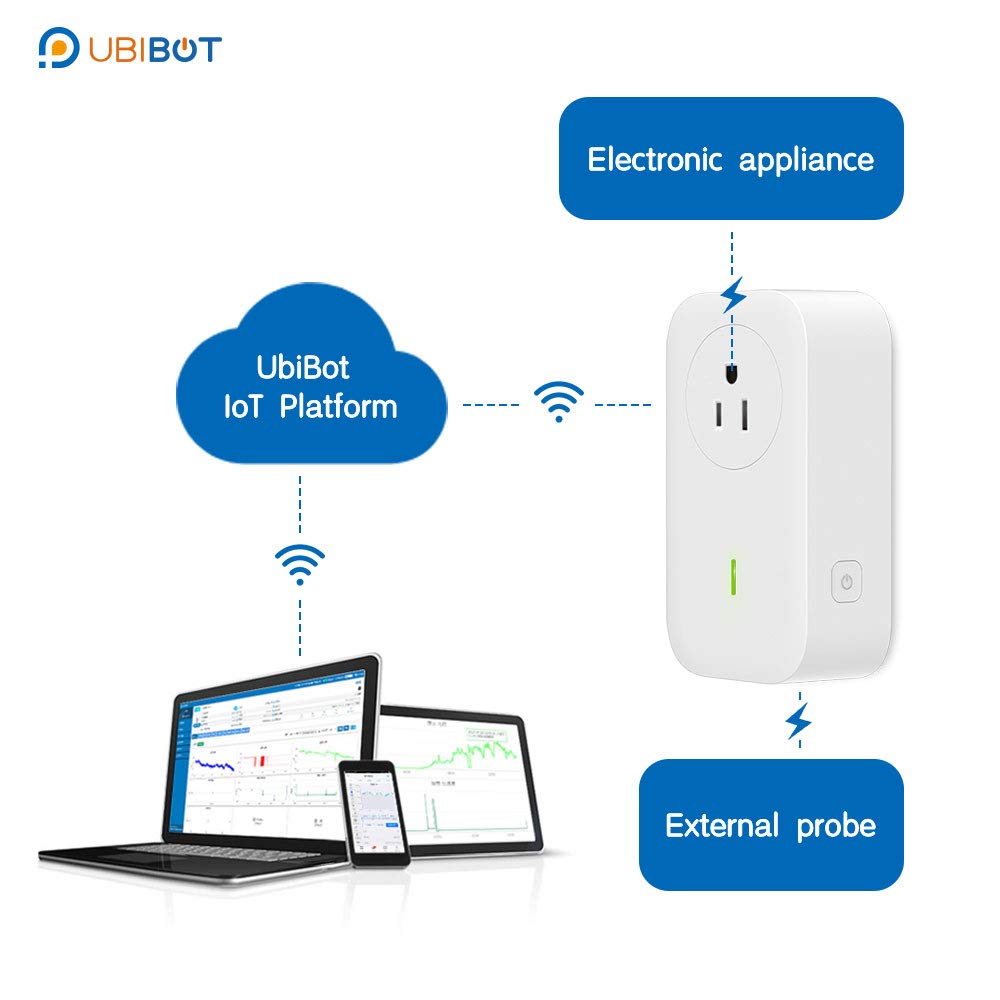
Figure 6: System diagram illustrating the UBiBot SP1 WiFi Smart Plug's connectivity to an electronic appliance, an external probe, and the UBiBot IoT Platform via Wi-Fi.
4. Funcionament
4.1. Control remot
Once the smart plug is connected to your Wi-Fi network and registered in the UBiBot app, you can control it remotely:
- Open the UBiBot app.
- Select your SP1 WiFi Smart Plug from the device list.
- Toqueu la icona d'engegada per activar o desactivar l'aparell connectat.
4.2. Timer and Schedule Functions
The app allows you to set schedules and timers for automatic operation:
- In the UBiBot app, navigate to your SP1 WiFi Smart Plug settings.
- Look for "Timer" or "Schedule" options.
- Set specific times for the plug to turn on or off daily, weekly, or for a countdown.
4.3. Monitorització energètica
View real-time and historical energy consumption data for devices connected to the smart plug:
- Access the SP1 WiFi Smart Plug details in the UBiBot app.
- Locate the "Energy Monitoring" or "Statistics" section to view ús d'energia.
4.4. Automation Rules with External Probes
Leverage external probes to create intelligent automation:
- In the UBiBot app, go to "Automation" or "Rules".
- Set conditions based on probe readings (e.g., "If temperature > 25°C").
- Define actions for the smart plug (e.g., "Turn on fan").
- Configure alert notifications for specific conditions.
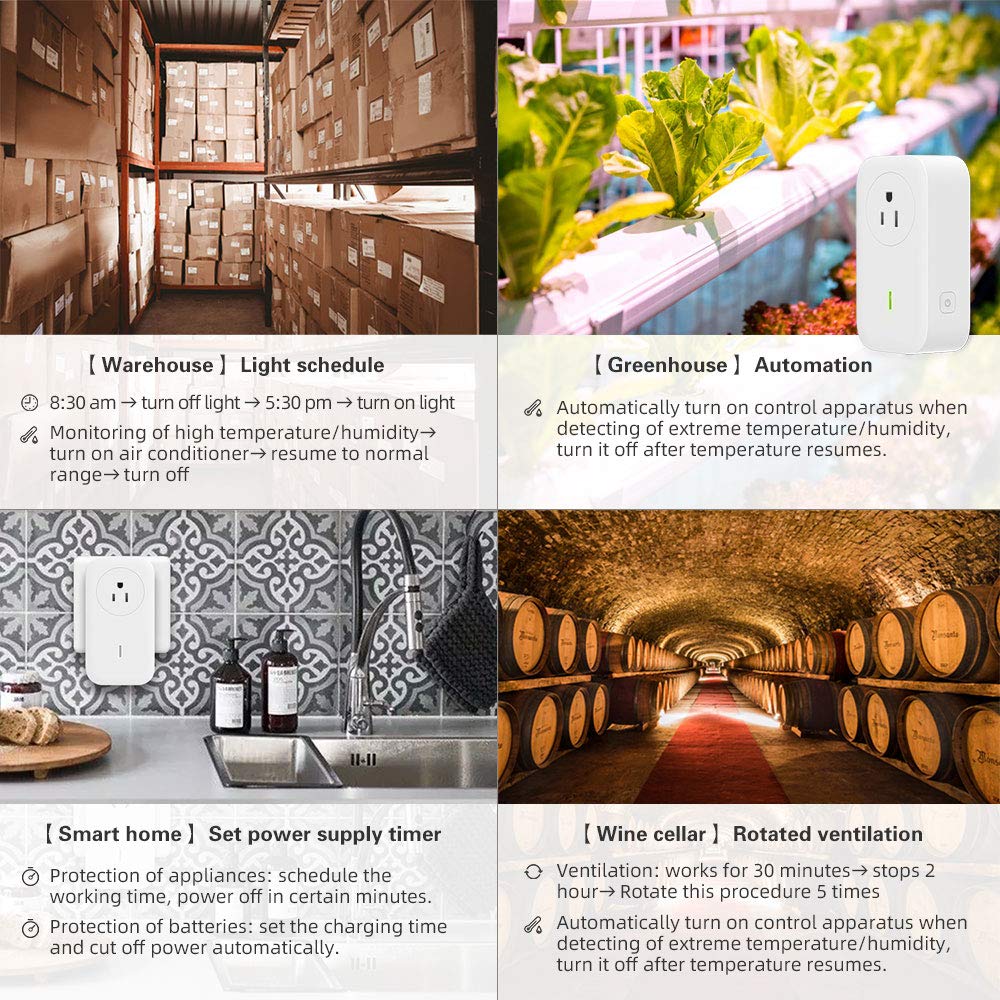
Figura 7: Examples of how the UBiBot SP1 WiFi Smart Plug can be used in various environments, including warehouse light scheduling, greenhouse automation, smart home power supply timers, and wine cellar rotated ventilation.
5. Manteniment
- Neteja: Disconnect the smart plug from the power outlet before cleaning. Use a dry, soft cloth to wipe the surface. Do not use liquid cleaners or sprays.
- Medi ambient: Ensure the smart plug is used in a dry environment, away from excessive heat, humidity, and direct sunlight.
- Actualitzacions de firmware: Regularly check the UBiBot app for available firmware updates for your smart plug to ensure optimal performance and security.
6. Solució De Problemes
| Problema | Causa possible | Solució |
|---|---|---|
| L'endoll intel·ligent no es connecta a la Wi-Fi. | Incorrect Wi-Fi password, 5 GHz network, out of range. |
|
| L'aparell no s'encén/apaga. | Smart plug offline, appliance not properly plugged in, appliance fault. |
|
| External probe not displaying data. | Probe not properly connected, incompatible probe, smart plug firmware outdated. |
|
| Alerts not received. | Incorrect alert settings, app notifications disabled, network issues. |
|
7. Especificacions
| Número de model | SP1 |
| Marca | UbiBot |
| Vol. Operatiutage | 250 volts (CA) |
| Mode d'operació | ON-ON-ON |
| Tipus de connector | Connectar-se |
| Tipus de circuit | 1 vies |
| Tipus d'actuador | Pulsador |
| Material de contacte | Metall |
| Classificació de protecció internacional | IP54 |
| Wi-Fi estàndard | 2.4 GHz (5 GHz not supported) |
| External Probe Support | RS485, DS18B20 |
| Dimensions | 5.04 x 3.98 x 3.19 polzades |
| Pes | 10.37 unces |
8. Garantia i Suport
For warranty information and technical support, please refer to the official UBiBot website or contact UBiBot customer service directly. Details can typically be found on the product packaging or the UBiBot official support page.
Recursos en línia: Visita el UbiBot Store on Amazon for additional product information and support links.