1. Introducció
Gràcies per la compraasing the Optoma X309ST projector. This manual provides essential information for safely installing, operating, and maintaining your device. Please read this manual thoroughly before using the projector to ensure optimal performance and longevity.
Què hi ha a la caixa
- Optoma X309ST Projector
- Cable d'alimentació
- Comandament a distància (amb piles)
- Cable VGA
- Manual d'usuari (aquest document)
- Targeta de garantia
2. Informació de seguretat
ADVERTÈNCIA: Per evitar incendis o descàrregues elèctriques, no exposeu aquest aparell a la pluja ni a la humitat.
- No bloquegeu les obertures de ventilació. Assegureu-vos que hi hagi prou espai al voltant del projector per a un flux d'aire adequat.
- No mireu directament a la lent del projector quan estigui encès.amp is on. The bright light can damage your eyes.
- Feu servir només el cable d'alimentació que s'inclou amb el projector.
- No intenteu atendre aquest producte vosaltres mateixos. Consulteu tots els serveis a personal de servei qualificat.
- Mantingueu el projector allunyat de l'aigua o la humitat.
- Eviteu col·locar el projector sobre superfícies inestables.
3. Producte acabatview
Components del projector

Figura 3.1: A dalt view of the Optoma X309ST projector. This image displays the control panel with buttons for power, menu navigation, and source selection, along with the focus and zoom adjustment rings located near the lens.

Figura 3.2: Davant view of the Optoma X309ST projector. The main projection lens is visible, flanked by ventilation grilles on either side, designed for efficient heat dissipation.
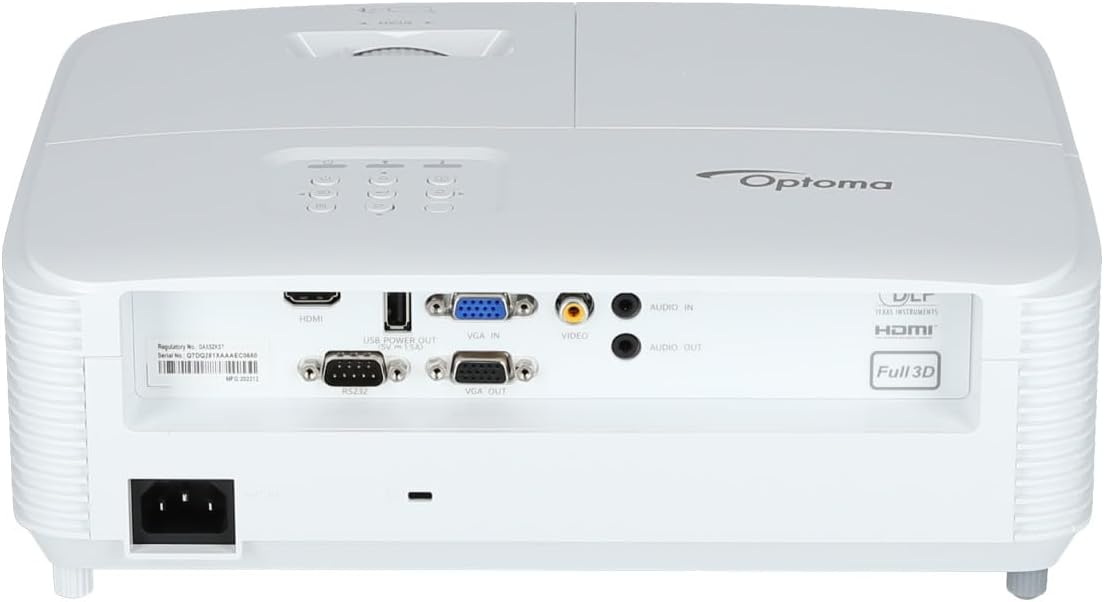
Figura 3.3: posterior view of the Optoma X309ST projector. This image highlights the various connectivity ports including HDMI, VGA In, VGA Out, USB Power Out, Audio In, Audio Out, Video (RCA Composite), and the RS-232 control port, along with the power input.
Tauler de control
The control panel on the top of the projector allows for basic operation without the remote control. It includes buttons for:
- Potència: Encén o apaga el projector.
- Menú: Accedeix al menú de visualització en pantalla (OSD).
- Fletxes de navegació: S'utilitza per navegar per les opcions del menú i ajustar la configuració.
- Font: Selects the input source (HDMI, VGA, etc.).
- Torna a sincronitzar: Optimizes the image for analog sources.
4. Configuració
4.1 Col·locació del projector
The Optoma X309ST is a short-throw projector, designed to project large images from a short distance. Place the projector on a stable, flat surface or mount it securely. Ensure the projection surface (screen or wall) is flat and clear of obstructions.
- Per obtenir una qualitat d'imatge òptima, col·loqueu el projector perpendicular a la pantalla.
- Maintain adequate ventilation space around the projector (at least 30 cm / 12 inches).
4.2 Connexió de potència
- Connect the power cord to the AC inlet on the rear of the projector.
- Connecteu l'altre extrem del cable d'alimentació a una presa de corrent amb connexió a terra.
- The power LED on the projector will illuminate, indicating standby mode.
4.3 Connexió de fonts d'entrada
The projector supports various input sources. Choose the appropriate cable for your device.
- HDMI: For digital video and audio. Connect an HDMI cable from your source device (e.g., laptop, Blu-ray player) to the HDMI port on the projector.
- VGA: For analog video. Connect a VGA cable from your computer to the VGA IN port on the projector. For audio, connect a 3.5mm audio cable from your computer's audio output to the AUDIO IN port.
- RCA Composite Video: For standard definition analog video. Connect an RCA composite video cable (yellow connector) to the VIDEO port. For audio, connect RCA audio cables (red/white) to the AUDIO IN ports.
- Sortida d'alimentació USB: This port provides 5V power for external devices like streaming sticks, but does not transmit data.
5. Funcionament del projector
5.1 Engegada/apagada
- Per encendre: Press the Power button on the control panel or remote control. The power LED will change from red (standby) to blue (on).
- Per apagar: Press the Power button twice. The first press will display a confirmation message; press again to confirm shutdown. The power LED will return to red.
Nota: Allow the projector to cool down for a few minutes after powering off before unplugging it or moving it.
5.2 Selecting an Input Source
Premeu el botó Font button on the control panel or remote control repeatedly to cycle through available input sources (HDMI, VGA, Video). Alternatively, use the dedicated input buttons on the remote control.
5.3 Ajust de la imatge
- Focus: Gireu l'anell d'enfocament de l'objectiu fins que la imatge aparegui nítida i clara.
- Zoom: Rotate the zoom ring on the lens to adjust the image size without moving the projector.
- Correcció Keystone: If the image appears trapezoidal, use the Keystone Correction function in the OSD menu to square the image. Access via the Menú botó.
5.4 Menú de visualització en pantalla (OSD)
Premeu el botó Menú button to access the OSD. Use the navigation arrows to browse categories and options. Press Entra or the right arrow to select an option, and the left arrow or Menú again to go back or exit.
La configuració habitual de l'OSD inclou:
- Configuració de la imatge: Brightness, Contrast, Color, Aspect Ratio, Picture Mode.
- Configuració de la pantalla: Keystone, Overscan, Wall Color.
- Setup Settings: Language, Auto Power Off, High Altitude Mode.
- Lamp Configuració: Lamp Hours, Lamp Mode (Bright, Eco).
6. Manteniment
Un manteniment regular garanteix un rendiment òptim i allarga la vida útil del projector.
6.1 Neteja del projector
- Exterior: Utilitzeu un drap suau i sense pelusa dampened with a mild, non-abrasive cleaner. Do not spray cleaner directly onto the projector.
- Lent: Use a lens cleaning cloth or lens paper with a specialized lens cleaning solution. Avoid touching the lens surface with your fingers.
- Reixes de ventilació: Use a soft brush or a vacuum cleaner with a brush attachment to remove dust from the ventilation grilles. Ensure the projector is powered off and unplugged before cleaning.
6.2 Lamp Substitució
WARNING: Projector lamps operate at high temperatures and pressures. Allow the projector to cool completely before attempting lamp replacement. Refer to the full service manual for detailed lamp replacement instructions or contact qualified service personnel.
El lamp life can vary depending on usage and lamp mode. A warning message will appear on screen when the lamp is nearing the end of its life. Only use genuine Optoma replacement lamps.
6.3 Neteja/substitució del filtre d'aire
The Optoma X309ST projector is designed with a sealed optical engine, which typically means it does not have user-serviceable air filters that require regular cleaning or replacement. However, ensure the ventilation grilles remain clear of dust and debris as described in section 6.1.
7. Solució De Problemes
Si teniu problemes amb el projector, consulteu els problemes i solucions més comuns següents:
| Problema | Causa possible | Solució |
|---|---|---|
| Cap imatge a la pantalla. |
|
|
| La imatge és borrosa. |
|
|
| Image is trapezoidal. |
|
|
| Projector overheats or shuts down. |
|
|
If the problem persists after trying these solutions, please contact Optoma customer support.
8. Especificacions
| Característica | Detall |
|---|---|
| Número de model | E9PD7DQ01EZ1 |
| Brillantor | 3700 lúmens ANSI |
| Resolució nativa | XGA (1024 x 768) |
| Relació de llançament | 0.617:1 Short Throw |
| Tecnologia de connectivitat | HDMI, USB, VGA |
| Entrades | HDMI, VGA, RCA Composite Video, Analog Audio (3.5mm) |
| Sortides | VGA Out (Loop-Through), Analog Audio (3.5mm) |
| Característiques especials | USB Power Output, Built-In 10-Watt Speaker, RS-232 Controllable, IR Remote Control Included, Full 3D content support |
| Pes de l'article | 6.61 lliures (aprox. 3 kg) |
| Dimensions del producte (L x A x A) | 15.42 x 10.35 x 13.52 polzades (aprox. 39.17 x 26.29 x 34.34 cm) |
| Usos recomanats | Business presentations, Education, Multimedia, Full 3D content |
9. Garantia i Suport
9.1 Informació de la garantia
Your Optoma X309ST projector comes with a standard manufacturer's warranty. Please refer to the warranty card included in your product packaging for specific terms, conditions, and duration. Keep your proof of purchase for warranty claims.
The product includes 1 year technical support as part of the purchase.
9.2 Atenció al client
For technical assistance, troubleshooting beyond this manual, or warranty inquiries, please contact Optoma customer support. Visit the official Optoma website for the most up-to-date contact information, FAQs, and driver downloads.
Podeu trobar més informació i recursos de suport a Optoma Store on Amazon or the official Optoma weblloc.


