1. Introducció
Gràcies per la compraasing the Audizio Rome Internet WiFi Stereo DAB+ Radio. This manual provides essential information for the safe and efficient operation of your device. Please read it thoroughly before use and retain it for future reference.
The Audizio Rome is a versatile audio system offering a wide range of listening options, including Internet Radio, DAB+, FM, and Bluetooth streaming. It features a clear color display, multiple presets, alarm functions, and various connectivity options for an enhanced audio experience.
2. Informació de seguretat
- Font d'alimentació: Feu servir només l'adaptador de corrent especificat. Assegureu-vos que el volumtage matches the requirements of your region (230Vac / 50Hz).
- Aigua i humitat: Do not expose the device to rain, moisture, or dripping/splashing liquids. Do not place objects filled with liquids, such as vases, on the apparatus.
- Ventilació: Assegureu-vos que hi hagi una ventilació adequada. No bloquegeu les obertures de ventilació.
- Fonts de calor: Mantingueu el dispositiu allunyat de fonts de calor com ara radiadors, registres de calor, estufes o altres aparells (inclosos amplificadors) que produeixen calor.
- Neteja: Disconnect from power before cleaning. Use a soft, dry cloth. Do not use liquid cleaners or aerosol cleaners.
- Manteniment: No intenteu atendre aquest producte vosaltres mateixos. Consulteu tots els serveis a personal de servei qualificat.
3. Contingut del paquet
En desempaquetar, assegureu-vos que tots els elements que s'enumeren a continuació hi siguin presents i estiguin en bon estat:
- Audizio Rome Internet WiFi Stereo DAB+ Radio
- Control remot
- Adaptador d'alimentació
- Manual d'usuari (aquest document)
4. Producte acabatview
The Audizio Rome radio features a sleek design with intuitive controls and a clear display for easy navigation.

Figura 4.1: Audizio Rome Internet Radio, front-angled view. This image shows the overall design of the radio, including the dual speakers, central control knob, and color display.
Controls i pantalla del panell frontal

Figura 4.2: Close-up of the Audizio Rome radio's display and control knob, showing menu options. The 2.4-inch TFT color screen provides clear information, while the central knob allows for tuning and selection.
- Pantalla TFT en color de 2.4 polzades: Shows station information, menus, time, and settings.
- Botó d'encesa: Encén/apaga la unitat.
- Tune/Select Knob: Rotate to navigate menus or tune stations; press to confirm selection.
- Botó de menú: Accedeix al menú principal.
- Preset/Favorite Button: Saves or recalls favorite stations.
- Local Button: Quickly access local radio stations.
- Navigation Buttons (Left/Right/Up/Down): Per a la navegació pel menú.
Connexions del panell posterior

Figura 4.3: Rear panel of the Audizio Rome radio, showing DC input, LAN port, AUX-IN, AUDIO OUT, headphone jack, and power switch. These ports allow for various wired connections.
- DC IN: Connexió de l'adaptador d'alimentació.
- Xarxa LAN (RJ45): Wired Ethernet connection for Internet Radio.
- AUX-IN (3.5mm jack): Connecteu dispositius d'àudio externs.
- AUDIO OUT (3.5mm jack): Connecteu-vos a l'exterior ampmés alt o altaveus.
- Headphone Jack (3.5mm jack): Per a una escolta privada.
- Interruptor ON / OFF: Interruptor d'alimentació principal.
5. Configuració
5.1 Engegada inicial
- Connecteu l'adaptador de corrent subministrat al port DC IN de la part posterior de la ràdio.
- Connecteu l'adaptador de corrent a una presa de corrent adequada.
- Gireu l'interruptor ON/OFF del panell posterior a la posició 'ON'.
- Press the Power button on the front panel or remote control to turn on the radio.
5.2 Network Connection (Wi-Fi or LAN)
For Internet Radio functionality, a stable internet connection is required.
Connexió Wi-Fi:
- Upon first power-up, the radio will guide you through the network setup. If not, navigate to Menu > System Settings > Network > Wi-Fi Network.
- La ràdio buscarà les xarxes Wi-Fi disponibles. Seleccioneu la vostra xarxa de la llista.
- Enter your Wi-Fi password using the control knob or remote control. Press 'OK' or 'Select' to confirm.
- Un cop connectat, la icona del Wi-Fi apareixerà a la pantalla.
LAN (Wired) Connection:
- Connect an Ethernet cable from your router to the LAN port on the rear of the radio.
- The radio will automatically detect the wired connection. No further setup is typically required.
6. Instruccions de funcionament
6.1 Selecció del mode
Press the 'Mode' button on the remote control or navigate through the main menu to select your desired listening mode:
- Ràdio per Internet: Access thousands of radio stations worldwide.
- DAB+: Digital Audio Broadcasting Plus for high-quality digital radio.
- FM: Traditional analog radio broadcasting.
- Bluetooth: Stream audio wirelessly from your compatible devices.
- AUX IN: Play audio from external devices connected via the AUX-IN port.
6.2 Ràdio per Internet

Figura 6.1: Audizio Rome radio displaying a list of internet radio stations, with the remote control in the foreground. This illustrates the user interface for station selection.
- Select 'Internet Radio' mode.
- You can browse stations by location, genre, or use the search function.
- Rotate the Tune/Select knob to scroll through the list and press to select a station.
- To save a favorite station, press and hold the 'Preset' button. Select a preset number (1-99) and confirm.
- To recall a preset, briefly press the 'Preset' button and select the desired number.
Ràdio 6.3 DAB+ / FM
- Select 'DAB+' or 'FM' mode.
- For DAB+, the radio will automatically scan for available stations. For FM, you can manually tune or use the auto-scan function.
- Use the Tune/Select knob to navigate through stations.
- Save and recall presets as described for Internet Radio.
6.4 Transmissió per Bluetooth
- Select 'Bluetooth' mode. The radio will enter pairing mode, indicated on the display.
- On your smartphone, tablet, or other Bluetooth device, enable Bluetooth and search for 'Audizio Rome'.
- Select 'Audizio Rome' to pair. Once connected, you can stream audio from your device to the radio.
6.5 Alarmes i temporitzador de son
The radio includes an alarm clock with two alarms and a sleep timer function.
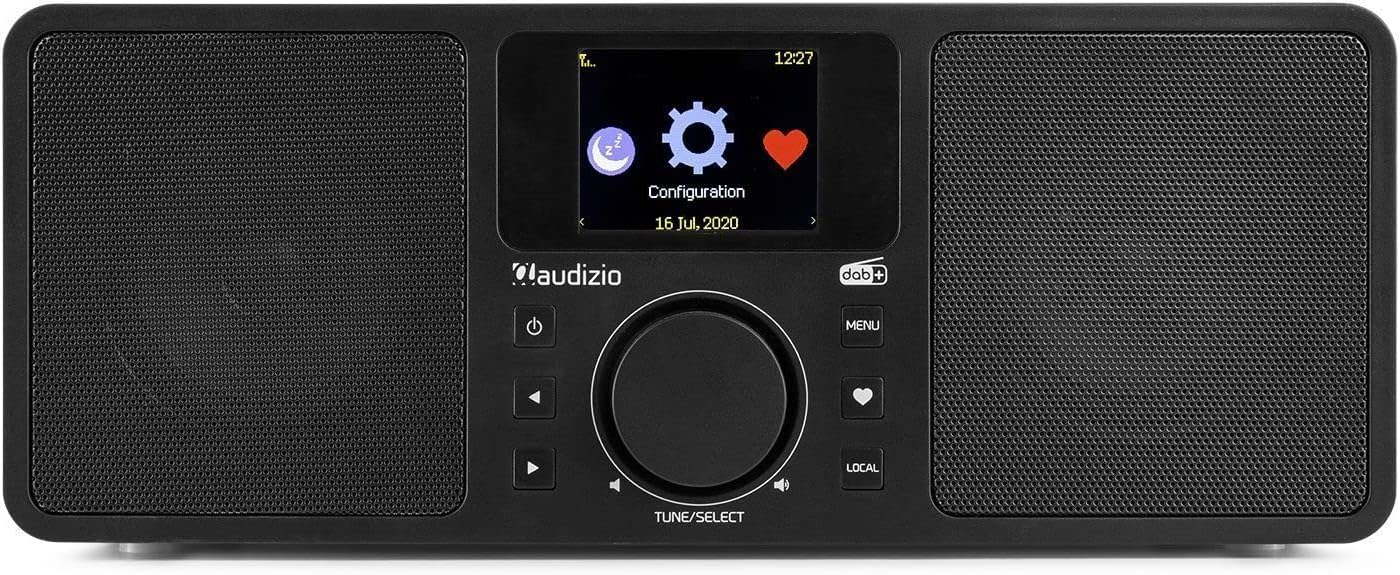
Figura 6.2: The Audizio Rome radio's display showing system configuration options, including settings for alarms and timers.
- Configuració d'alarmes: Navega a Menu > System Settings > Alarm. Configure Alarm 1 and Alarm 2 with desired time, source (buzzer, Internet Radio, DAB+, FM), and recurrence.
- Temporitzador de son: Navega a Menu > System Settings > Sleep Timer. Set the duration after which the radio will automatically turn off.
7. Ús del control remot
The included remote control provides convenient access to all functions of the Audizio Rome radio.
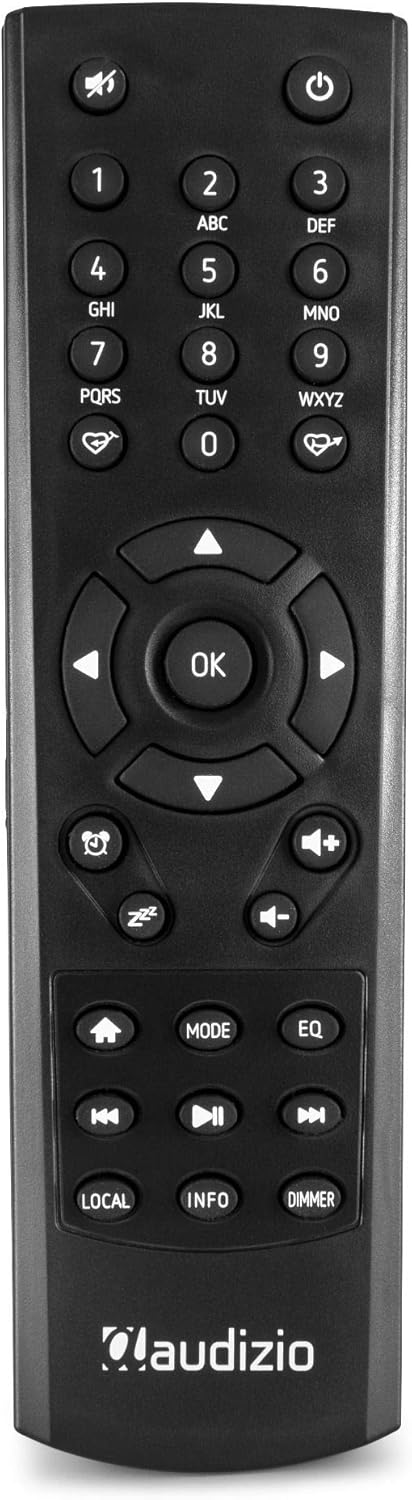
Figura 7.1: Detallada view of the Audizio Rome radio's remote control, showing various buttons for navigation, volume, mode, and presets. The remote allows for full control of the device from a distance.
- Potència: Encén/apaga la ràdio.
- Silenciar: Mutes/unmutes the audio.
- Botons numèrics (0-9): For direct input or selecting presets.
- Navigation (Arrows & OK): Per a la navegació i selecció de menús.
- Volum (+/-): Ajusta el nivell de volum.
- Menú: Accedeix al menú principal.
- Mode: Canvia entre diferents fonts d'àudio (ràdio per Internet, DAB+, FM, Bluetooth, AUX).
- Preset/Favorite: Saves or recalls favorite stations.
- Local: Accesses local radio stations.
- Informació: Displays detailed information about the current station or track.
- Atenuador: Ajusta la brillantor de la pantalla.
- Alarm/Sleep: Accesses alarm and sleep timer settings.
8. Manteniment
- Neteja: Always unplug the radio from the power outlet before cleaning. Use a soft, dry, lint-free cloth to wipe the surfaces. Do not use abrasive cleaners, waxes, or solvents.
- Antena: Ensure the telescopic antenna is fully extended for optimal DAB+ and FM reception. Handle with care to avoid damage.
- Emmagatzematge: Si guardeu la unitat durant un període prolongat, desconnecteu-la de la font d'alimentació i guardeu-la en un lloc fresc i sec.
9. Solució De Problemes
| Problema | Causa possible | Solució |
|---|---|---|
| Sense poder | Power adapter not connected; Main power switch off; Power outlet faulty. | Check power adapter connection; Ensure rear ON/OFF switch is ON; Try a different power outlet. |
| Sense so | Volum massa baix; Silenciament activat; Font d'àudio incorrecta seleccionada. | Increase volume; Press Mute button on remote; Select correct audio source (Internet Radio, DAB+, FM, Bluetooth, AUX). |
| No es pot connectar a la Wi-Fi | Contrasenya incorrecta; Encaminador massa lluny; Problema de xarxa. | Re-enter Wi-Fi password carefully; Move radio closer to router; Restart router; Check network settings (Menu > System Settings > Network). |
| Mala recepció DAB+/FM | Antena no estesa; Zona de senyal feble; Interferències. | Fully extend the telescopic antenna; Reposition the radio; Check for local interference sources. |
| L'aparellament de Bluetooth falla | Device not in pairing mode; Radio not in Bluetooth mode; Device already paired with another unit. | Assegureu-vos que la ràdio estigui en mode Bluetooth; assegureu-vos que el Bluetooth del dispositiu estigui activat i buscant; desconnecteu-vos d'altres dispositius. |
10. Especificacions
| Característica | Especificació |
|---|---|
| Marca | Audizio |
| Número de model | 102.228 |
| Color | Negre |
| Tecnologia de connectivitat | Bluetooth, Wi-Fi, LAN (RJ45) |
| Tecnologia del sintonitzador | DAB+, FM |
| Bandes de ràdio compatibles | FM |
| Característiques especials | Integrated Clock, 2.4-inch TFT Color Display, 99 Presets, 2 Alarms, Sleep Timer, DLNA (UPnP) compatible |
| Potència de sortida | 2 x 25 W (50 W total) |
| Connexió d'auriculars | Jack de 3.5 mm |
| Connexió de sortida de línia | Jack de 3.5 mm |
| Connexió d'entrada de línia | Jack de 3.5 mm |
| Wi-Fi estàndard | 802.11b/g/n |
| Connexió Voltage | 230Vac / 50Hz |
| Dimensions (L x A x A) | 300 x 135 x 120 mm |
| Pes | 2 kg |
| Components inclosos | Control remot |
| Dispositius compatibles | Headphones, Earphones, MP3 Player, Smartphone, Laptop, External Speakers (for Auxiliary and Bluetooth connectivity) |
11. Garantia i Suport
The Audizio Rome Internet WiFi Stereo DAB+ Radio comes with a 2 any de garantia des de la data de compra. Si us plau, conserveu el comprovant de compra per a reclamacions de garantia.
For technical support, service, or warranty inquiries, please contact your retailer or the Audizio customer service department. Information regarding spare parts availability and software updates is not available at this time.


