1. Introducció
Thank you for choosing the Ortizan X10 Wireless Portable Bluetooth Speaker. This manual provides essential information for setting up, operating, and maintaining your speaker to ensure optimal performance and longevity. The Ortizan X10 is designed for robust outdoor and indoor use, featuring IPX7 waterproofing, powerful 24W sound, extended battery life, and dynamic party lights.
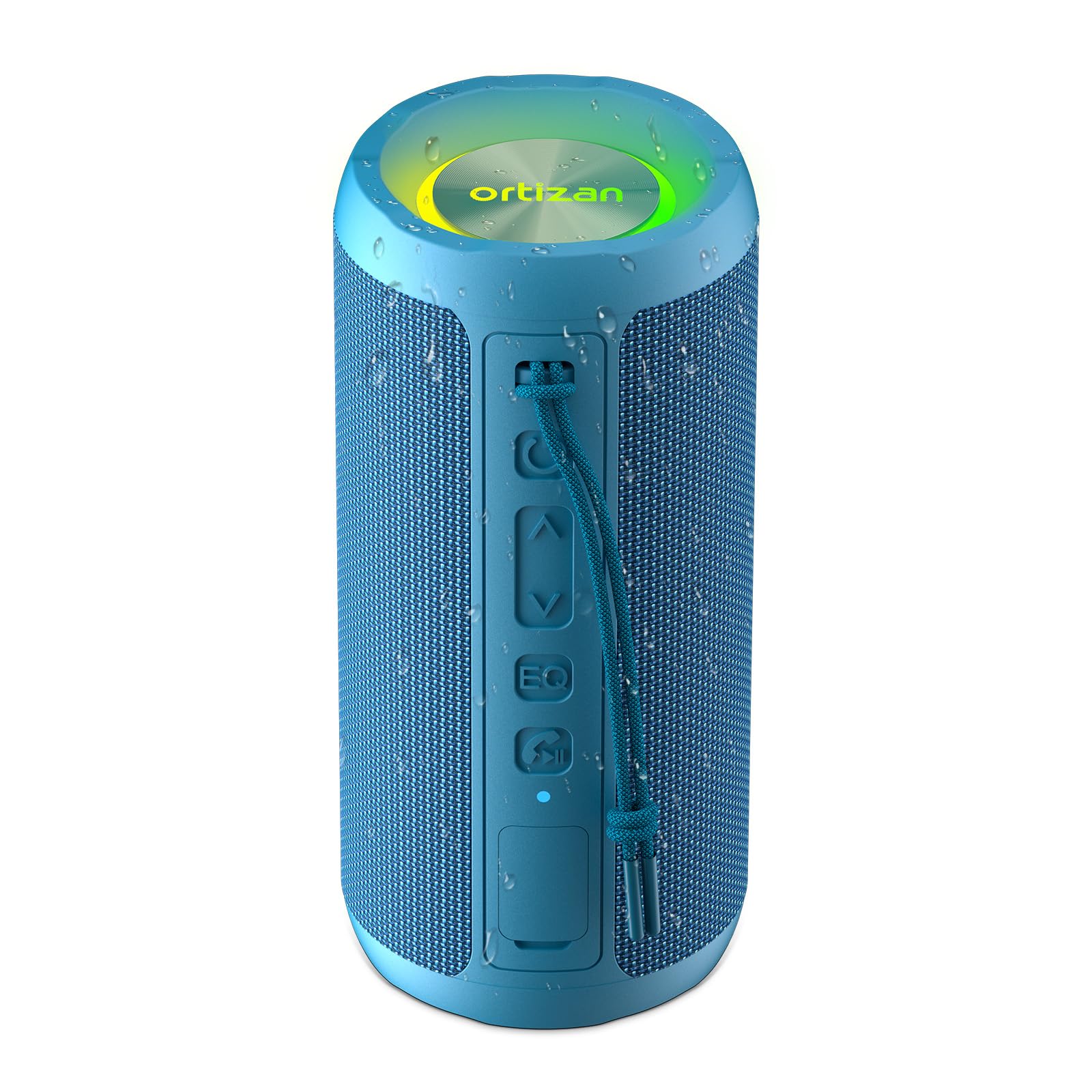
Image 1.1: Ortizan X10 Wireless Portable Bluetooth Speaker in Blue.
2. Contingut del paquet
Si us plau, comproveu el paquet per veure si hi ha els elements següents:
- 1 x Ortizan X10 Bluetooth Speaker
- 1 x cable de càrrega USB-C
- 1 x cable AUX
- 1 x Carabiner Strap
- 1 x Manual d'usuari (aquest document)
3. Producte acabatview
3.1 Controls i ports
Familiarize yourself with the buttons and ports on your Ortizan X10 speaker:
- Botó d'encesa: Manteniu premut per encendre/apagar.
- Botó per baixar el volum / pista anterior (-): Premeu curt per baixar el volum, premeu llargament per anar a la pista anterior.
- Play/Pause Button (►): Premeu per reproduir o posar en pausa la música.
- Botó Pujar volum / Pista següent (+): Premeu curt per pujar el volum, premeu llargament per passar a la següent pista.
- Botó EQ: Press to cycle through sound equalization modes (Vocal, 3D Deep Bass, Extra Bass). Double-click to turn on/off light effect.
- Botó Mode de llum (☀): Premeu per canviar els modes de llum.
- Call / TWS Button (☎): Press to answer/end calls. Long press to activate TWS pairing.
- Port de càrrega USB-C: Per carregar l'altaveu.
- Port d'entrada AUX: Per a connexió d'àudio amb cable.
- Ranura per a targetes TF: For playing music directly from a Micro SD card (up to 32GB).

Imatge 3.1: acabatview of speaker controls and connectivity options.
4. Configuració
4.1 Càrrega de l'altaveu
Before first use, fully charge the speaker. Connect the provided USB-C cable to the speaker's charging port and a compatible USB power adapter (not included). The charging indicator light will show charging status.
4.2 Engegada/apagada
- Per encendre: Press and hold the Power button (Ⓞ) for 2-3 seconds. You will hear an audible prompt, and the indicator light will flash.
- Per apagar: Press and hold the Power button (Ⓞ) for 2-3 seconds. You will hear an audible prompt, and the indicator light will turn off.
4.3 Vinculació Bluetooth
To connect your Ortizan X10 speaker to a Bluetooth-enabled device:
- Ensure the speaker is powered on and in Bluetooth pairing mode (the indicator light will be flashing blue).
- Al dispositiu (telèfon intel·ligent, tauleta, etc.), activeu el Bluetooth i cerqueu els dispositius disponibles.
- Select "Ortizan X10" from the list.
- Once connected, the speaker will emit an audible confirmation, and the indicator light will turn solid blue.
4.4 Emparellatge estèreo sense fil veritable (TWS)
For an immersive stereo experience, you can pair two Ortizan X10 speakers together:
- Ensure both Ortizan X10 speakers are powered on and not connected to any other Bluetooth device.
- On one speaker, long press the Call / TWS button (☎). This speaker will become the primary unit.
- The primary speaker will automatically search for the secondary speaker. Once connected, both speakers will emit an audible confirmation.
- Ara, connecteu el dispositiu a l'altaveu principal mitjançant Bluetooth tal com es descriu a la secció 4.3. L'àudio es reproduirà en estèreo a través dels dos altaveus.

Image 4.1: Two Ortizan X10 speakers configured for True Wireless Stereo (TWS) pairing.
5. Instruccions de funcionament
5.1 Basic Music Playback
- Reproduir/pausa: Press the Play/Pause button (►).
- Pujar el volum: Short press the Volume Up button (+).
- Baixar el volum: Short press the Volume Down button (-).
- Pista següent: Long press the Volume Up button (+).
- Pista anterior: Long press the Volume Down button (-).
5.2 modes d'equalització
The Ortizan X10 offers three equalization modes to optimize your listening experience:
- Press the EQ button to cycle through:
- Mode vocal: Enhances clarity for vocals.
- 3D Deep Bass Mode: Provides a rich, deep bass experience.
- Mode de baix extra: Delivers powerful, boosted bass.

Image 5.1: The EQ button allows switching between different sound modes.
5.3 Llums de festa
The speaker features dynamic RGB lights that can sync with your music:
- Canvia el mode de llum: Press the Light Mode button (☀) to cycle through various light effects.
- Encendre/apagar els llums: Double-click the EQ button to toggle the light effect on or off.

Image 5.2: The Ortizan X10 features vibrant RGB lighting.
5.4 Trucades mans lliures
When connected via Bluetooth, you can use the speaker for hands-free calls:
- Respon a la trucada: Press the Call / TWS button (☎).
- Finalitzar la trucada: Press the Call / TWS button (☎).
- Rebutja la trucada: Long press the Call / TWS button (☎).
5.5 Ús de l'entrada AUX
Connect an audio device directly to the speaker using the provided 3.5mm AUX cable. The speaker will automatically switch to AUX mode.
5.6 Ús de la targeta TF
Insert a Micro SD (TF) card (up to 32GB) with MP3 audio files into the TF card slot. The speaker will automatically detect the card and begin playing music.
6. Manteniment
6.1 Neteja
Netegeu l'altaveu amb un suau, damp cloth. Do not use harsh chemicals or abrasive cleaners. Ensure all ports are sealed before cleaning with water.
6.2 Cura impermeable (IPX7)
The Ortizan X10 is IPX7 waterproof, meaning it can be submerged in water up to 1 meter (3.3 feet) for 30 minutes. To maintain its waterproof integrity:
- Ensure the rubber flap covering the charging and AUX ports is securely closed before exposing the speaker to water.
- Do not expose the speaker to saltwater or other corrosive liquids.
- After exposure to water, especially chlorinated or saltwater, rinse the speaker with fresh water and dry thoroughly before charging or opening the port cover.

Image 6.1: The Ortizan X10 is designed with IPX7 waterproof protection.
6.3 Emmagatzematge
Store the speaker in a cool, dry place away from direct sunlight and extreme temperatures. If storing for an extended period, charge the battery to approximately 50% every few months to preserve battery health.
7. Solució De Problemes
| Problema | Causa possible | Solució |
|---|---|---|
| L'altaveu no s'encén | Bateria baixa | Carregueu l'altaveu completament. |
| No es pot emparellar per Bluetooth | Speaker not in pairing mode / Device Bluetooth off / Too far from device | Ensure speaker is in pairing mode. Turn on Bluetooth on your device. Move speaker closer to device (within 66ft/20m). |
| Sense so | Volume too low / Incorrect input mode / Device not playing | Increase speaker and device volume. Check if AUX or TF card is inserted. Ensure music is playing on your device. |
| L'aparellament de TWS falla | Altaveus ja connectats a altres dispositius / Massa allunyats | Disconnect both speakers from any other Bluetooth devices. Ensure speakers are close to each other during TWS pairing. |
| Els llums no funcionen | Llums apagades | Double-click the EQ button to turn lights on. |
8. Especificacions
| Característica | Detall |
|---|---|
| Nom del model | X10 |
| Marca | Ortizan |
| Tipus d'altaveu | A l'aire lliure |
| Tecnologia de connectivitat | Bluetooth, Wireless, AUX, TF Card |
| Tecnologia de comunicació sense fils | Bluetooth 5.3 |
| Potència de sortida màxima dels altaveus | 30 watts (24 W RMS) |
| Capacitat de la bateria | 2600 mAh |
| Hora de joc | Fins a 30 hores (amb un 30% de volum) |
| Nivell de resistència a l'aigua | IPX7 impermeable |
| Interval Bluetooth | 66 peus (20 metres) |
| Dimensions del producte | 3.11 "P x 3.11" W x 6.69" H |
| Pes de l'article | 0.45 quilograms (15.8 unces) |
| Característiques especials | Bass Boost, AUX, Hi-Res Audio, 3 EQ Modes, TF Card Port, Dual Passive Radiators, Hands-free, True Wireless Stereo, Shockproof, Stereo pairing |
8.1 Característiques de so
The Ortizan X10 features dual neodymium drivers and a bass radiator, delivering 24W RMS power for clear vocals and deep 60Hz bass with minimal distortion.

Imatge 8.1: Interna view highlighting the dual speakers and bass membrane for enhanced sound.
8.2 Durada de la bateria
Equipped with a 2600mAh battery and smart power management, the speaker provides up to 30 hours of playtime at 30% volume. USB-C fast charging allows use while charging.

Image 8.2: Visual representation of the speaker's 30-hour battery life.
9. Vídeo oficial del producte
Video 9.1: Official product video demonstrating the Ortizan X10 speaker's features and outdoor use.
10. Garantia i Suport
The Ortizan X10 Wireless Portable Bluetooth Speaker comes with a limited warranty. For detailed warranty information, product support, or technical assistance, please refer to the official Ortizan weblloc web o poseu-vos en contacte amb el servei d'atenció al client. Conserveu el rebut de compra per a reclamacions de garantia.
Fabricant: Ortizan


