1. Introducció
This manual provides comprehensive instructions for the installation, operation, and maintenance of your Aigo Warrior AK700 Max 700W Power Supply. Designed for high-performance desktop computers, this power supply unit (PSU) delivers stable and efficient power to your system components. Please read this manual thoroughly before installation and use to ensure proper functionality and safety.
2. Informació de seguretat
Always observe the following safety precautions to prevent injury or damage to the product and other components:
- Ensure the power supply is disconnected from the main power outlet before installation or handling.
- No obriu la font d'alimentació casing. Alt volumtages are present inside, even when disconnected, and can cause electric shock.
- Instal·leu la font d'alimentació en una zona ben ventilada per evitar el sobreescalfament.
- Feu servir només els cables que s'inclouen amb la font d'alimentació.
- Eviteu exposar la unitat a la humitat o a temperatures extremes.
- Aquest producte està dissenyat només per a ús interior.
3. Contingut del paquet
Verifiqueu que tots els elements siguin presents al vostre paquet:
- Aigo Warrior AK700 Max 700W Power Supply Unit
- Cable d'alimentació CA
- Modular Cables (if applicable, otherwise fixed cables)
- Cargols de muntatge
- Manual d'usuari (aquest document)
4. Producte acabatview
The Aigo Warrior AK700 Max is a 700-watt power supply designed to meet the demands of modern gaming and high-performance computing systems. It features an energy-efficient design with a silent 12cm hydraulic bearing fan for optimal cooling and quiet operation. The unit incorporates a built-in Power Factor Correction (PFC) and a dual magnetic ring magnetic amplifier circuit, along with high-frequency low-resistance filter capacitors, to ensure a pure and stable current output. Multiple protection circuits are integrated to safeguard against overvoltage, overcurrent, overload, undervoltage, i curtcircuits.
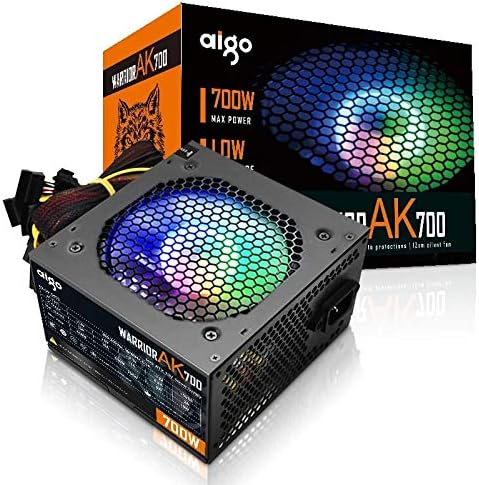
Figure 4.1: The Aigo Warrior AK700 Max 700W Power Supply, showcasing its RGB fan and retail packaging.
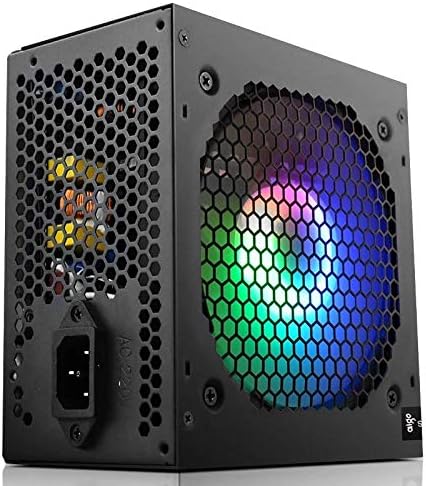
Figura 4.2: lateral view of the power supply, highlighting the 12cm RGB cooling fan and honeycomb grille.

Figura 4.3: posterior view of the power supply, illustrating the exhaust grille and AC power input socket.
5. Configuració i instal·lació
Follow these steps to properly install the Aigo Warrior AK700 Max power supply into your computer system:
- Preparació: Assegureu-vos que l'ordinador estigui completament apagat i desendollat de la presa de corrent. Obriu la carcassa de l'ordinador.
- Traieu la font d'alimentació antiga (si escau): Desconnecta tots els cables de la font d'alimentació antiga i retira els cargols de muntatge. Fes-la lliscar amb cura fora de la carcassa.
- Instal·leu una nova font d'alimentació: Gently slide the Aigo Warrior AK700 Max into the power supply bay of your computer case. Ensure the fan is oriented correctly for optimal airflow (usually facing down or up, depending on your case design).
- Font d'alimentació segura: Align the screw holes on the power supply with those on your case. Secure the power supply using the provided mounting screws.
- Connectar els cables:
- Connector de placa base ATX de 24 pins: Connect the main 24-pin cable to your motherboard.
- CPU Power Connector (4+4 pin or 8-pin EPS): Connect the CPU power cable to the appropriate socket on your motherboard.
- PCIe Power Connectors (6+2 pin): Connect these to your graphics card(s) if required.
- Connectors d'alimentació SATA: Connect to your storage drives (HDDs, SSDs) and optical drives.
- Connectors perifèrics (Molex): Connecteu-vos a altres perifèrics segons calgui.
- Gestió de cables: Col·loca els cables amb cura per millorar el flux d'aire i l'estètica dins de la carcassa.
- Tanca el cas: Un cop fetes i verificades totes les connexions, tanqueu la carcassa de l'ordinador.
- Connecteu l'alimentació de CA: Connecteu el cable d'alimentació de CA a la font d'alimentació i després a una presa de corrent.
6. Instruccions de funcionament
After successful installation, follow these steps to operate your computer system with the Aigo Warrior AK700 Max power supply:
- Encès: Ensure the power switch on the back of the PSU is in the 'ON' (I) position. Press the power button on your computer case.
- Arrencada del sistema: Your computer should now power on and begin its boot sequence. The RGB fan on the power supply will illuminate.
- Apagar: To turn off your computer, use the operating system's shutdown function. For a complete power cycle, switch the PSU to the 'OFF' (O) position after shutting down the computer.
The intelligent temperature control design automatically adjusts the fan speed to maintain optimal cooling and extend the lifespan of the unit, ensuring quiet operation under various loads.
7. Manteniment
Un manteniment adequat garanteix la longevitat i el rendiment òptim de la vostra font d'alimentació:
- Neteja de pols: Netegeu periòdicament la pols del ventilador i les reixetes de ventilació de la font d'alimentació amb aire comprimit. Assegureu-vos que l'ordinador estigui apagat i desendollat abans de netejar-lo.
- Flux d'aire: Ensure that the power supply's intake and exhaust vents are not obstructed by cables or other components within the computer case.
- Condicions ambientals: Feu funcionar la font d'alimentació en un entorn net i sec amb una ventilació adequada.
- No desmunteu: Never attempt to open the power supply unit. There are no user-serviceable parts inside, and doing so will void your warranty and poses a risk of electric shock.
8. Solució De Problemes
If you encounter issues with your Aigo Warrior AK700 Max power supply, refer to the following common problems and solutions:
| Problema | Causa possible | Solució |
|---|---|---|
| L'ordinador no s'encén. |
|
|
| El sistema s'encén però s'apaga immediatament. |
|
|
| Fan is not spinning or is excessively loud. |
|
|
If the problem persists after attempting these solutions, please contact Aigo customer support for further assistance.
9. Especificacions
Detailed technical specifications for the Aigo Warrior AK700 Max 700W Power Supply:
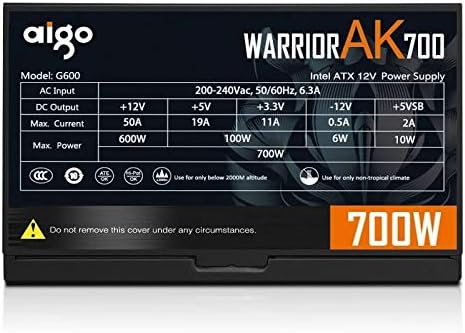
Figure 9.1: The specifications label found on the Aigo Warrior AK700 Max Power Supply.
| Característica | Detall |
|---|---|
| Model | AK700 Max |
| Wattage | 700 watts |
| Factor de forma | ATX, ATX12V |
| Entrada Voltage | 220V (Minimum 220V, Maximum 220V) |
| Mètode de refrigeració | Refrigeració per aire |
| Mida del ventilador | 120 Millimeters (Hydraulic Bearing) |
| Dispositius compatibles | Ordinador personal |
| Tipus de connector | SATA, PCIe (6+2 pin), ATX 24-pin, EPS 4+4 pin |
| Característiques de protecció | Overvoltage, Overcurrent, Overload, Undervoltage, Short Circuit, Light Protection |
| Pes de l'article | 1.9 quilos |
| Dimensions del paquet | 5 x 5 x 5 cm (aproximadament) |
10. Garantia i Suport
For warranty information and technical support, please refer to the official Aigo weblloc web o poseu-vos en contacte amb el vostre distribuïdor local. Conserveu el comprovant de compra per a reclamacions de garantia.
Aigo Official Weblloc: www.aigocorp.com (Nota: Això és un marcador de posició) URL as no official website was provided in the product data. Please refer to actual product documentation for correct contact information.)


