1. Introducció
The CERAGEM Goodle MaxiPad CHN-M950 Mini Mat is a thermal mat designed for personal home use. It incorporates Ceratonic ceramic components, which are a unique blend of 40% natural mineral jade, 40% yellow clay, and 20% patented Ceragem composition. These ceramic elements are fired at 1200 °C, resulting in a durable material. When heated, the Ceratonic ceramic emits long-wave infrared heat.
This manual provides essential information for the safe operation, maintenance, and understanding of your Mini Mat. Please read it thoroughly before first use and retain it for future reference.
2. Instruccions de seguretat importants
Per garantir un funcionament segur i evitar danys, si us plau, seguiu les següents pautes de seguretat:
- Read all instructions carefully before using the mat.
- Do not disassemble the thermoregulator (controller).
- During use, ensure the thermoregulator is not covered by blankets or other materials to prevent overheating.
- Unplug the mat from the power outlet when not in use or before cleaning.
- Keep the mat and controller away from water or excessive moisture.
- Do not use the mat if the power cord or plug is damaged.
- Children should be supervised when using the mat.
- Individuals with specific medical conditions, including digestive disorders, gastritis, joint pain, or those recovering from injuries, should consult a healthcare professional before using this product.
- Eviteu plegar o arrugarasing the mat excessively during storage or use.
3. Característiques del producte
- Ceratonic Ceramic Composition: Contains 40% natural mineral jade, 40% yellow clay, and 20% patented Ceragem composition.
- Infrared Heat Emission: Emits long-wave infrared heat when heated.
- Control de temperatura: Equipped with an adjustable controller for personalized heat settings.
- Disseny compacte: Suitable for various home environments.
- Odor Absorption: Yellow clay components are designed to absorb odors and inhibit bacterial growth.

Figura 1: superior view of the CERAGEM Goodle MaxiPad CHN-M950 Mini Mat, showing the mat surface with ceramic elements and the attached wired controller.
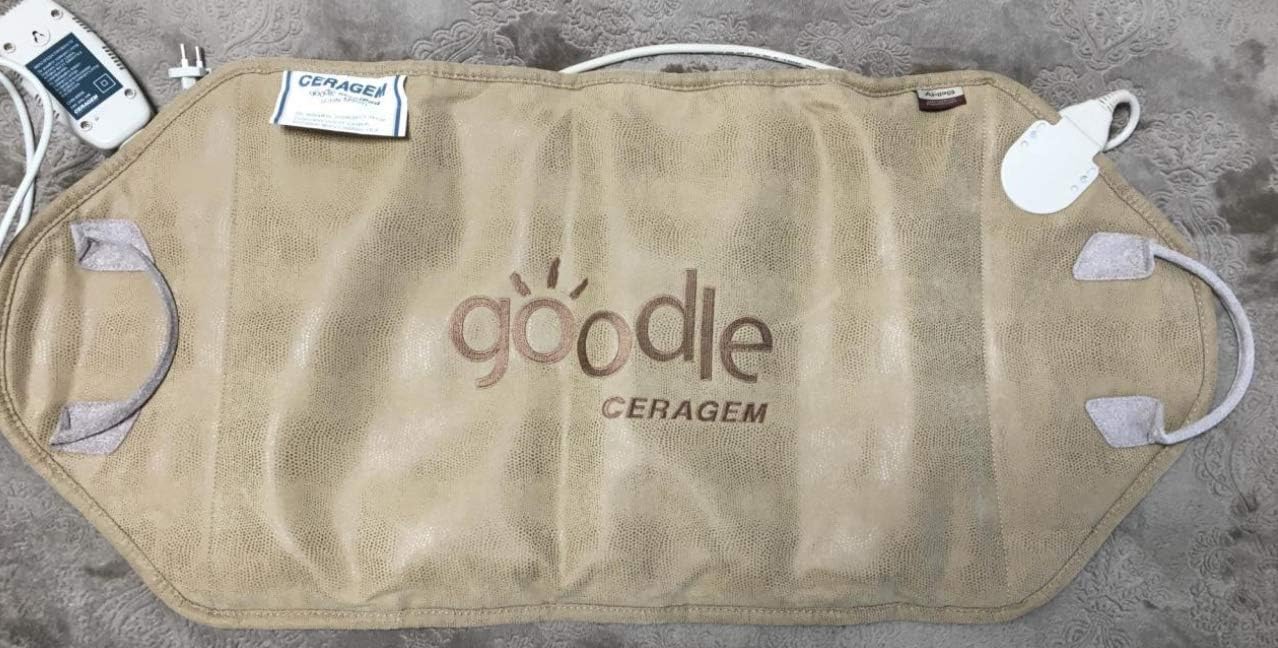
Figure 2: Back side of the CERAGEM Goodle MaxiPad CHN-M950 Mini Mat, featuring the 'goodle CERAGEM' embroidered logo.
4. Configuració
Follow these steps to set up your Mini Mat:
- Desembalar: Carefully remove the mat and its components from the packaging.
- Col·locació: Lay the mat flat on a stable, heat-resistant surface. Ensure there is adequate space around the mat for air circulation.
- Connectar el controlador: Connect the controller cable securely to the designated port on the mat.
- Connexió d'alimentació: Plug the power cord into a standard electrical outlet (220V, 50Hz).
- Posicionament: Ensure the controller is placed in an easily accessible location and is not covered during operation.
5. Instruccions de funcionament
To operate your CERAGEM Goodle MaxiPad CHN-M950 Mini Mat:
- Encès: Press the power button on the controller to turn on the mat. The indicator light will illuminate.
- Ajustar la temperatura: Use the temperature control buttons or dial on the controller to select your desired heat level. Start with a lower setting and gradually increase if needed.
- Ús: Position yourself comfortably on or against the mat. The mat is designed for use by adults and children, with children requiring adult supervision.
- Apagar: After use, press the power button to turn off the mat. Unplug the power cord from the wall outlet.
6. Manteniment
Proper maintenance ensures the longevity and performance of your mat:
- Neteja: Before cleaning, ensure the mat is unplugged and cool. Wipe the surface of the mat with a soft, slightly damp cloth. Do not use harsh chemicals, abrasive cleaners, or immerse the mat in water.
- Emmagatzematge: When not in use, store the mat in a clean, dry place, away from direct sunlight and extreme temperatures. Avoid placing heavy objects on the mat.
- Inspecció: Periodically inspect the power cord, plug, and controller for any signs of damage, such as cuts, fraying, or discoloration. If any damage is found, discontinue use and contact customer support.
7. Solució De Problemes
If you encounter any issues with your Mini Mat, refer to the following common problems and solutions:
- Mat is not heating:
- Assegureu-vos que el cable d'alimentació estigui ben connectat a una presa de corrent funcional.
- Verify that the controller cable is firmly connected to the mat.
- Check if the power button on the controller is pressed and the indicator light is on.
- Controller is unresponsive:
- Unplug the mat from the wall outlet, wait a few seconds, and then plug it back in.
- Ensure the controller is not damaged.
- Olors inusuals:
- The yellow clay components are designed to absorb odors. A new product may have a slight initial scent that dissipates with use.
- Ensure the mat is used in a well-ventilated area.
If problems persist after attempting these solutions, please contact CERAGEM customer support for further assistance.
8. Especificacions

Figure 3: Product label displaying key specifications including model number, voltage, frequency, and power.
| Paràmetre | Valor |
|---|---|
| Model | CHN-M950 |
| Pes | 4.5 kg |
| Dimensions | 87 x 45 x 3 cm |
| Poder | 84 watts |
| Voltage | 220 V |
| Freqüència | 50 Hz |
| Farciment | Unique Ceratonic therapeutic ceramic beads (40% natural mineral jade, 40% yellow clay, 20% patented Ceragem composition) |
| Color | Beix |
| Material | Jade |
| UPC | 301638069750 |
9. Garantia i Suport
For detailed warranty information, product registration, or customer support, please refer to the documentation included with your original purchase. You may also visit the official CERAGEM website or contact their customer service department directly for assistance.


