1. Introducció
This user manual provides comprehensive instructions for the Dragon Touch 10 Inch WiFi Digital Picture Frame. It covers setup, operation, maintenance, and troubleshooting to ensure optimal performance and longevity of your device. Please read this manual thoroughly before using the product.
2. Característiques del producte
- Unique Magnetic Stand Design: Features an adjustable magnetic stand and built-in auto rotation for easy horizontal and vertical placement without screws.
- Sensor de moviment intel·ligent: Automatically turns on the screen when detecting people within 5 meters, conserving power.
- High Definition Touch Screen: 10-inch IPS touch screen with 1280x800 HD display resolution and 4:3 aspect ratio for clear viewing at any angle. Brightness is adjustable.
- Large 16GB Internal Storage: Capable of storing approximately 40,000 photos (300KB/pc). Note: This frame does not have USB or SD card slots.
- Multifuncional: Includes built-in calendar, clock, alarm, and weather functions. Supports customizable sleep schedules and user management settings.
- Easy Photo Sharing: Share photos and videos via the OurPhoto app, E-mail, or FTP.
- Interfície fàcil d'utilitzar: Designed for ease of use across all ages, with a quick navigation key (suspended ball) for common functions.
3. Contingut del paquet
Si us plau, comproveu el contingut del paquet en desembalar-lo per assegurar-vos que hi hagi tots els elements:
- Dragon Touch 10 Inch WiFi Digital Picture Frame
- Adaptador d'alimentació
- Manual d'usuari
4. Producte acabatview
Familiarize yourself with the main components of your digital picture frame.

Figura 4.1: Frontal view of the Dragon Touch 10 Inch WiFi Digital Picture Frame.
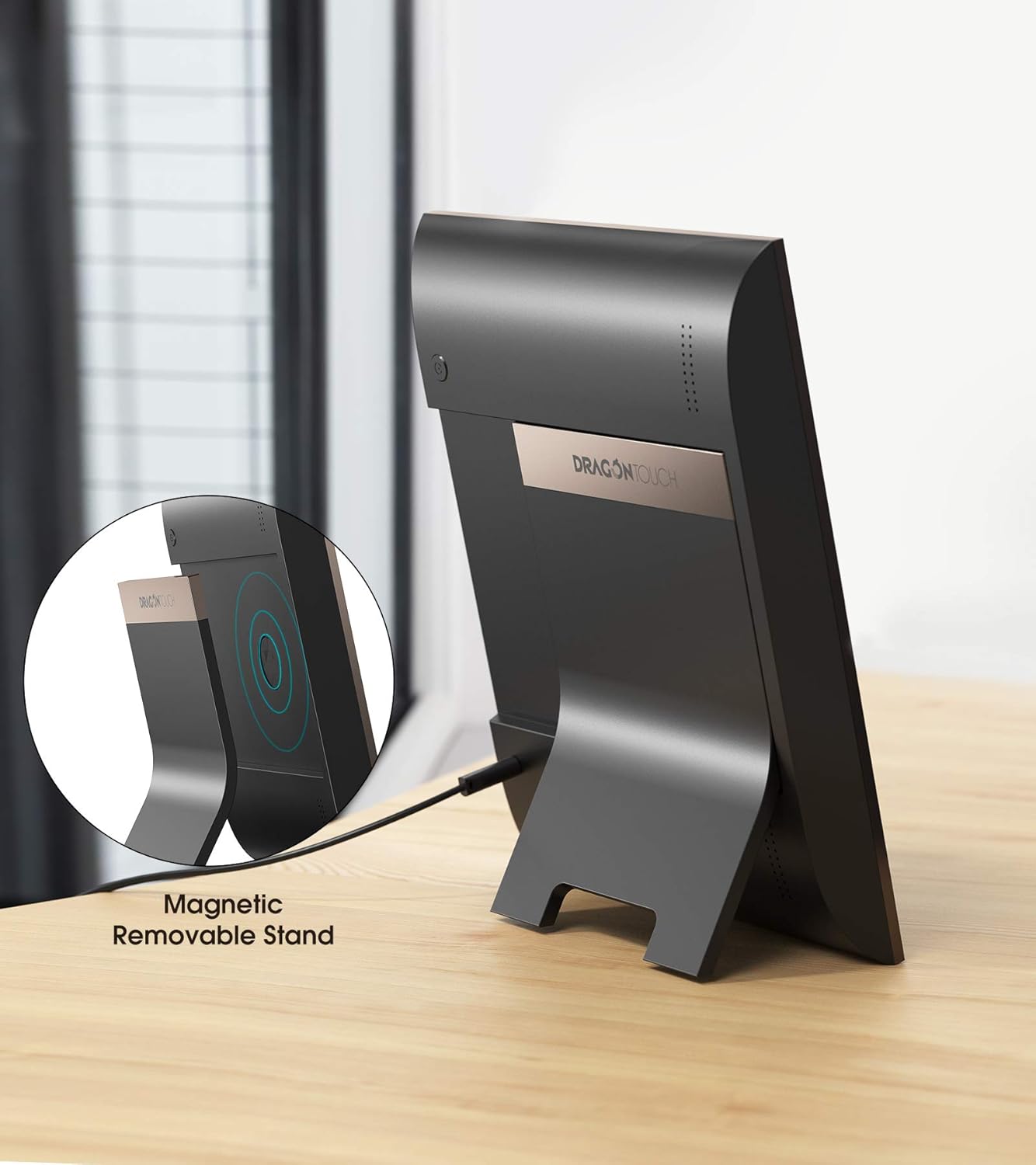
Figura 4.2: posterior view illustrating the magnetic removable stand and power connection.
- Pantalla de visualització: 10-inch IPS touch screen for viewfent fotos i vídeos.
- Suport magnètic: Adjustable and removable stand for flexible placement.
- Port d'alimentació: Connects the power adapter to the frame.
- Sensor de moviment: Detects movement to automatically turn the screen on/off.
- Suspended Ball (Quick Navigation Key): Provides quick access to Home, volume adjustment, and power controls.
5. Guia de configuració
Segueix aquests passos per configurar el teu marc de fotos digital Dragon Touch:
- Encès: Connect the power adapter to the frame and a power outlet. The frame will automatically power on.
- Configuració inicial: Follow the on-screen prompts to select your language, time zone, and connect to your Wi-Fi network.
- Download OurPhoto App: Download the "OurPhoto" app from your smartphone's app store (available for iOS and Android).
- Parella el dispositiu: Open the OurPhoto app and follow the instructions to pair your smartphone with the digital picture frame. This typically involves scanning a QR code displayed on the frame or entering a device ID.
- Invite Users: Once paired, you can invite family and friends to share photos directly to your frame through the app or via email/FTP.

Figure 5.1: Simple steps to get your frame ready for use.
6. Instruccions de funcionament
6.1 Navegació per la pantalla tàctil
The frame features an intuitive touch screen interface. You can swipe through photos, browse the gallery, delete photos, or pause the slideshow with a simple tap.

Figure 6.1: Interacting with the 10-inch touch screen.
6.2 Compartir fotos i vídeos
There are multiple ways to share your memories to the frame:
- OurPhoto App: The primary method for sharing. Select photos/videos from your phone and send them directly to the frame.
- Correu electrònic: Each frame has a unique email address. You can send photos as attachments to this address.
- FTP: For advanced users, FTP allows direct transfer of files des d'un ordinador.

Figure 6.2: Wireless sharing via the OurPhoto app.
6.3 Sensor de moviment intel·ligent
The built-in motion sensor detects presence within 5 meters. When motion is detected, the screen will automatically turn on. When no motion is detected for a set period, the screen will turn off to save power.
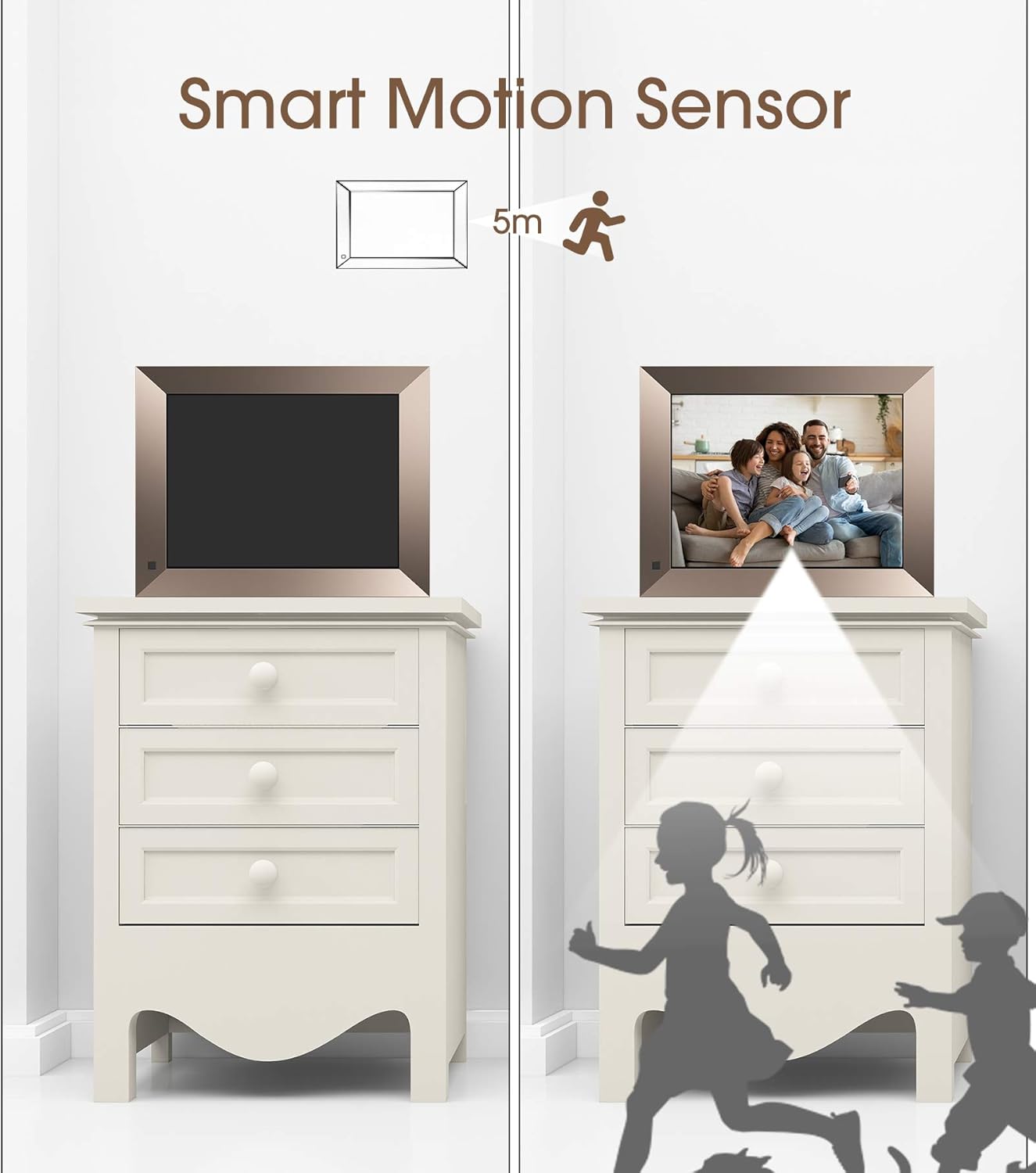
Figure 6.3: Smart Motion Sensor operation.
6.4 Personalització de la configuració
Access the settings menu to customize various aspects of your frame:
- Encès/apagat automàtic: Set a schedule for the frame to automatically turn on and off.
- Rotació automàtica: The frame automatically adjusts orientation based on its physical position (horizontal or vertical).
- Alarma: Estableix alarmes per als recordatoris.
- Brillantor: Ajusta la brillantor de la pantalla per a una òptima viewen diferents condicions d'il·luminació.
- Configuració de la presentació de diapositives: Configure transition effects, display duration, and playback order.
- Rellotge i calendari: Mostra la data i l'hora actuals.
- Temps: View local weather information.

Figure 6.4: Customized settings interface.
7. Manteniment
Proper maintenance ensures the longevity and optimal performance of your digital picture frame.
- Neteja de la pantalla: Feu servir un drap suau i sense borrissol per netejar suaument la pantalla. Per a taques difícils, fregueu lleugeramentampRenta el drap amb aigua o una solució netejadora de pantalles. Evita materials abrasius o productes químics agressius.
- Neteja general: Wipe the frame's body with a dry, soft cloth.
- Col·locació: Place the frame on a stable, flat surface away from direct sunlight, excessive heat, or moisture. Ensure adequate ventilation around the device.
- Apagar: Quan no l'utilitzeu durant períodes prolongats, desconnecteu l'adaptador de corrent.
8. Solució De Problemes
If you encounter issues with your digital picture frame, refer to the following common problems and solutions:
| Problema | Causa possible | Solució |
|---|---|---|
| El marc no s'encén. | L'adaptador de corrent no està connectat o està defectuós; problema amb la presa de corrent. | Assegureu-vos que l'adaptador de corrent estigui connectat correctament tant al marc com a una presa de corrent que funcioni. Proveu una altra presa de corrent. |
| No es pot connectar a la Wi-Fi. | Incorrect Wi-Fi password; weak signal; router issue. | Double-check the Wi-Fi password. Move the frame closer to the router. Restart your Wi-Fi router. |
| Les fotos/vídeos no apareixen a l'enquadrament. | Incorrect sharing method; app not synced; frame not connected to internet. | Ensure the frame is connected to Wi-Fi. Verify the correct frame ID/email is used in the app. Check the OurPhoto app for upload status. Restart both the app and the frame. |
| Screen is blank or turns off unexpectedly. | Motion sensor activated (no motion); sleep schedule enabled. | Check motion sensor settings. Verify sleep schedule settings in the menu. Tap the screen to wake it up. |
| La pantalla tàctil no respon. | Error temporal de programari. | Restart the frame by holding the power button or disconnecting and reconnecting power. |
9. Especificacions
| Característica | Detall |
|---|---|
| Marca | Toc de Drac |
| Número de model | TOMPOL-0518-1131-6 |
| Mida de la pantalla | 10 polzades |
| Resolució | 1280x800 HD (4:3 Aspect Ratio) |
| Emmagatzematge intern | 16 GB |
| Connectivitat | Wi-Fi |
| Característiques especials | Magnetic Stand, Motion Sensor, Auto-Rotate, Touch Screen |
| Dimensions | 11.81 x 9.68 x 0.99 polzades |
| Pes de l'article | 2.94 lliures |
| Color | Daurat |
10. Garantia i Suport
For warranty information and technical support, please refer to the official Dragon Touch website or contact their customer service directly. You can also find additional resources and FAQs on the product support page.
Hi ha disponible una versió PDF del manual d'usuari per descarregar: Manual d'usuari (PDF)


