1. Introducció
Gràcies per la compraasing the FOL DVB-1416 Digital Decoder. This device is designed to receive digital television broadcasts, providing high-quality video and audio. This manual provides essential information for the proper installation, operation, and maintenance of your decoder. Please read it thoroughly before use and retain it for future reference.
Contingut del paquet:
- FOL DVB-1416 Digital Decoder
- Adaptador d'alimentació
- Manual d'usuari (aquest document)
- Note: Remote control is not included with this model.
2. Informació de seguretat
Per garantir un funcionament segur i evitar danys, observeu les següents precaucions de seguretat:
- No exposeu el dispositiu a la pluja, la humitat ni a temperatures extremes.
- No obriu la c.asing. Demaneu totes les tasques de manteniment a personal qualificat.
- Assegureu-vos una ventilació adequada al voltant del dispositiu per evitar el sobreescalfament.
- Utilitzeu només l'adaptador d'alimentació subministrat.
- Desconnecteu l'endoll durant tempestes amb llamps o quan no l'utilitzeu durant períodes prolongats.
3. Producte acabatview
Panell frontal
The front panel features the brand and model name, a display, and essential control buttons.
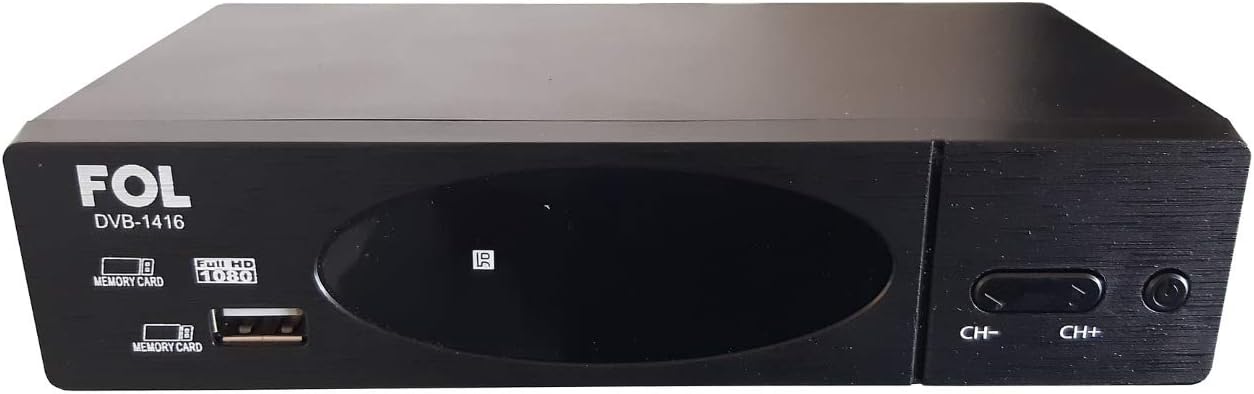
Imatge 3.1: Davant view of the FOL DVB-1416 Digital Decoder. Visible features include the 'FOL DVB-1416' branding, a central display, a USB port, and 'CH-' and 'CH+' buttons for channel navigation.
Panell posterior
The rear panel provides all necessary connection ports for your television and antenna.

Imatge 3.2: posterior view of the FOL DVB-1416 Digital Decoder. Ports include RF IN, RF THROUGH, HDMI, YPbPr (Component Video), L/R Audio, Video (Composite), and Coaxial Digital Audio Out. The power input is also visible.
4. Configuració
4.1 Connexió de l'antena
- Connect your terrestrial antenna cable to the RF IN port on the rear panel of the decoder.
- If you wish to pass the antenna signal through to another device (e.g., a TV with its own tuner), connect a coaxial cable from the RF THROUGH port to that device.
4.2 Connexió al televisor
Trieu un dels mètodes de connexió següents:
HDMI Connection (Recommended for High Definition)
- Connecteu un cable HDMI des del HDMI port on the decoder to an HDMI input port on your television.
- Select the corresponding HDMI input on your TV using its remote control.
RCA (Composite Video) Connection
- Connect an RCA cable (yellow for video, red for right audio, white for left audio) from the VÍDEO, R, i L ports on the decoder to the corresponding input ports on your television.
- Select the corresponding AV input on your TV using its remote control.
4.3 Encès
- Connect the power adapter to the decoder's power input.
- Connecteu l'adaptador de corrent a una presa de corrent.
- The decoder will power on automatically or enter standby mode.
4.4 First-Time Setup and Channel Scan
Upon first power-on, the decoder will typically guide you through an initial setup process. Follow the on-screen instructions to:
- Seleccioneu el vostre idioma preferit.
- Perform an automatic channel scan to find available digital TV channels. This process may take several minutes.
5. Instruccions de funcionament
Since this model does not include a remote control, all operations are performed using the buttons on the front panel.
5.1 Funcions bàsiques
- Encès/apagat: Premeu el botó Poder button (usually on the right side of the front panel) to turn the decoder on or off (standby mode).
- Canvi de canal: Utilitza el CH+ i CH- botons per navegar pels canals.
- Control de volum: (Information not available for front panel volume control. Volume typically controlled via TV remote.)
5.2 USB Media Playback / Recording
The decoder features a USB port for media playback and potentially recording (PVR function).
- Insert a USB flash drive or external hard drive into the USB port on the front panel.
- The decoder's display or on-screen menu (if accessible via TV) may indicate the presence of the USB device.
- Per accedir als mitjans files or initiate recording, you may need to use the TV's remote control to navigate the decoder's on-screen menu, if available. Consult your TV's manual for controlling external devices.
6. Manteniment
6.1 Neteja
- Always unplug the decoder from the power outlet before cleaning.
- Utilitzeu un drap suau i sec per netejar l'exterior del dispositiu.
- Do not use liquid cleaners, aerosols, or abrasive materials, as they may damage the finish or internal components.
6.2 Emmagatzematge
If storing the decoder for an extended period, ensure it is unplugged, clean, and stored in a cool, dry place away from direct sunlight and extreme temperatures.
7. Solució De Problemes
If you encounter issues with your FOL DVB-1416 decoder, refer to the following common problems and solutions:
| Problema | Causa possible | Solució |
|---|---|---|
| No picture/No signal |
|
|
| Sense so |
|
|
| Decoder does not power on |
|
|
8. Especificacions
| Característica | Especificació |
|---|---|
| Marca | FOL |
| Model | DVB-1416 |
| Número de part | DVB-1416 |
| Tipus de sortida d'àudio | Speakers (via TV connection) |
| Piles necessàries | No |
| Comandament a distància inclòs | No |
| Dimensions del paquet | 20.4 x 14.6 x 5.9 cm |
| Pes | 400 g |
| ASIN | B08R123VR3 |
| Primera data disponible | 9 de febrer de 2021 |
9. Garantia i Suport
For warranty information and technical support, please refer to the documentation provided at the point of purchase or contact your retailer. As specific warranty details are not provided in this manual, it is recommended to retain your purchase receipt for any warranty claims.
For further assistance, please contact the manufacturer or your local distributor.


