1. Introducció
The Zmodo Mini Pro 1080P WiFi Security Camera provides a comprehensive solution for indoor surveillance. This camera features 1080p Full HD video, a 130° wide-angle lens, two-way audio, and advanced night vision. It is designed for easy monitoring of your home, pets, or children, offering real-time alerts and remote access via a mobile application.
Les característiques clau inclouen:
- Vídeo Full HD 1080p: Captura imatges clares i detalladestage.
- Gran angular de 130° View: Provides extensive coverage of your space.
- Àudio bidireccional: Allows for real-time communication through the camera's built-in microphone and loudspeaker.
- Detecció de moviment per IA: Sends instant alerts and records video clips upon detecting movement, with optional identification of people, pets, and vehicles (cloud subscription may be required for AI features).
- Visió nocturna: Automatic infrared (IR) night vision allows visibility up to 16 feet in low-light conditions.
- Control d'aplicacions mòbils: Gestionar i view your camera from anywhere using the Zmodo app.
- Compatibilitat amb la llar intel·ligent: Works with Alexa and Google Assistant for voice control and integration.
2. Contingut del paquet
Verifiqueu que tots els components siguin presents al vostre paquet:
- Zmodo Mini Pro 1080P WiFi Security Camera
- Font d'alimentació (adaptador de CA)
- Suport de muntatge a la paret
- Cargols de muntatge a la paret
- Instruccions de configuració

Image: Zmodo Mini Pro camera with labels indicating 1080p camera, built-in microphone, enhanced light sensor, advanced infrared light, status light, and loudspeaker.
3. Configuració
Follow these steps to set up your Zmodo Mini Pro camera:
- Encès: Connect the camera to the power supply using the provided AC adapter. The camera will power on automatically.
- Download the Zmodo App: Download and install the Zmodo app on your smartphone from your device's app store.
- Crea un compte: Open the Zmodo app and create a new user account or log in if you already have one.
- Afegeix un dispositiu: In the app, select the option to add a new device. Follow the on-screen prompts to connect your camera to your home's 2.4GHz WiFi network. The app will guide you through scanning a QR code displayed on your phone with the camera lens for easy pairing. Note: The camera is incompatible with 5GHz WiFi networks.
- Col·locació: Install the camera using the wall mount bracket and screws, or place it on a flat surface like a shelf. Ensure the camera has a clear line of sight to the area you wish to monitor.

Imatge: Examples of Zmodo Mini Pro camera placement on a wall, shelf, and table, demonstrating its versatility.
4. Instruccions de funcionament
Once your Zmodo Mini Pro camera is set up, you can begin monitoring and utilizing its features:
4.1 Viu View i àudio bidireccional
- Open the Zmodo app to access the live feed from your camera.
- Use the microphone icon in the app to speak through the camera's loudspeaker, and listen to audio from the camera's environment.

Image: A Zmodo Mini Pro camera mounted on a wall, demonstrating two-way audio with a cat in the room.
4.2 Detecció de moviment i alertes
- The camera will send push notifications to your smartphone when motion is detected.
- A 10-second video clip of the event will be automatically recorded and stored for 12 hours (free tier).
- Customize motion detection zones within the app to focus on specific areas and reduce unnecessary alerts.
- AI motion detection can differentiate between people, pets, and vehicles, providing more relevant alerts (requires cloud subscription).

Image: A smartphone screen showing an 'Animal Detected' notification from the Zmodo app, indicating motion detection.
Image: A smartphone screen showing a 'People Detected' notification from the Zmodo app, indicating advanced motion detection.
4.3 Visió nocturna
- The camera automatically switches to night vision in low-light conditions, providing clear black and white images.
- Adjust IR sensitivity in the app for optimal night viewing.

Image: A dog in a low-light environment, illustrating the camera's night vision capabilities and adjustable settings.
4.4 Multiple Camera View
- If you have multiple Zmodo cameras, the app allows you to view up to four camera feeds simultaneously.

Image: A smartphone displaying a grid of four live camera feeds from different Zmodo cameras.
4.5 Integració de la llar intel·ligent
- Connect your Zmodo Mini Pro camera with Amazon Alexa or Google Assistant for voice-controlled monitoring.
- Use commands like "Alexa, show me the living room" to view your camera feed on compatible smart displays.

Image: An Amazon Echo Show device displaying a live feed from a Zmodo camera, demonstrating Alexa integration.
4.6 Cloud Service and Storage
- The Zmodo app offers options for cloud storage, allowing you to review foo gravattage and time-lapse videos.
- Cloud subscription plans are available for extended recording history and advanced features like AI motion detection.
Image: A smartphone screen displaying a timeline of motion alerts and recorded events within the Zmodo app.
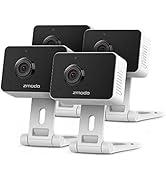
Image: A smartphone screen showing a 'Flashback' video playback feature in the Zmodo app, allowing review of past events.
5. Manteniment
To ensure optimal performance and longevity of your Zmodo Mini Pro camera, consider the following maintenance tips:
- Neteja: Netegeu suaument la lent i el cos de la càmera amb un drap suau i sec per eliminar la pols i les taques. Eviteu utilitzar productes químics agressius o materials abrasius.
- Col·locació: Assegureu-vos que la càmera estigui col·locada en un lloc estable, allunyat de la llum solar directa, de temperatures extremes i d'alta humitat.
- Actualitzacions de programari: Regularly check the Zmodo app for firmware updates for your camera. Keeping the firmware updated ensures access to the latest features and security enhancements.
- Font d'alimentació: Feu servir només l'adaptador de corrent original que s'inclou amb la càmera per evitar danys.
6. Solució De Problemes
If you encounter issues with your Zmodo Mini Pro camera, refer to the following common solutions:
- Camera Not Connecting to WiFi:
- Assegureu-vos que la vostra xarxa Wi-Fi sigui de 2.4 GHz. La càmera no admet xarxes de 5 GHz.
- Verify that your WiFi password is entered correctly in the app.
- Move the camera closer to your WiFi router to improve signal strength.
- Reinicieu el router i la càmera.
- No Live Feed or Offline Status:
- Comproveu la connexió d'alimentació de la càmera.
- Confirm your internet connection is active and stable.
- Reinicieu la càmera desendollant-la i tornant-la a connectar.
- Alertes de moviment no rebudes:
- Ensure motion detection is enabled in the Zmodo app settings for your camera.
- Check your phone's notification settings to ensure the Zmodo app has permission to send notifications.
- Verify that the motion detection sensitivity and zones are configured appropriately.
- Problemes d'àudio bidireccional:
- Check the volume settings in the Zmodo app and on your smartphone.
- Assegureu-vos que no hi hagi cap obstacle que bloquegi el micròfon o l'altaveu de la càmera.
- A weak network connection can affect audio quality.
- If unable to add device after setup:
- If the camera shows a blue light but fails to add, use the "Me / Contact Support" option within the Zmodo app to chat with support.
7. Especificacions
| Característica | Especificació |
|---|---|
| Número de model | SD-H2927-A |
| Resolució de vídeo | 1080p Full HD |
| Viewangle ing | 130 graus |
| Gamma de visió nocturna | Fins a 16 peus |
| Connectivitat | Wi-Fi de 2.4 GHz (IEEE 802.11b/g/n) |
| Font d'alimentació | Corded Electric (110 Volts AC, 5 Watts) |
| Ús interior/exterior | Interior |
| Àudio bidireccional | Sí |
| Sensor de moviment | Yes (with AI detection options) |
| Dispositius compatibles | Amazon Alexa, Google Assistant |
| Dimensions (L x A x A) | 6.25 x 3.75 x 2.25 polzades |
| Pes de l'article | 0.01 unces |
| UPC | 889490021470 |
8. Informació de la garantia
For detailed warranty information regarding your Zmodo Mini Pro camera, please refer to the documentation included with your purchase or visit the official Zmodo website. Warranty terms typically cover manufacturing defects for a specified period from the date of purchase. For refurbished products, a minimum 90-day warranty may apply.
9. Suport
If you require further assistance or have questions not covered in this manual, Zmodo offers dedicated customer support:
- Assistència integrada a l'aplicació: Access US-based technical support directly through the Zmodo mobile application via the "Me / Contact Support" option.
- Suport telefònic: Zmodo provides dedicated telephone technical support. Refer to the Zmodo weblloc web per obtenir números de contacte actuals i horaris d'atenció.
- Recursos en línia: Visit the official Zmodo weblloc (user.zmodo.com) for FAQs, troubleshooting guides, and additional product information.


