1. Introducció
This manual provides detailed instructions for the Symcode Portable Barcode Clip with Bluetooth. This device is designed for efficient and versatile barcode scanning, offering portability and multiple connectivity options. It can be directly clipped to the back of a smartphone, used independently via Bluetooth, or connected via a 2.4G dongle.
Contingut del paquet:
- 1x 2D Clip-Back Barcode Scanner
- 1x Charge Cable
- 1 x manual d'usuari
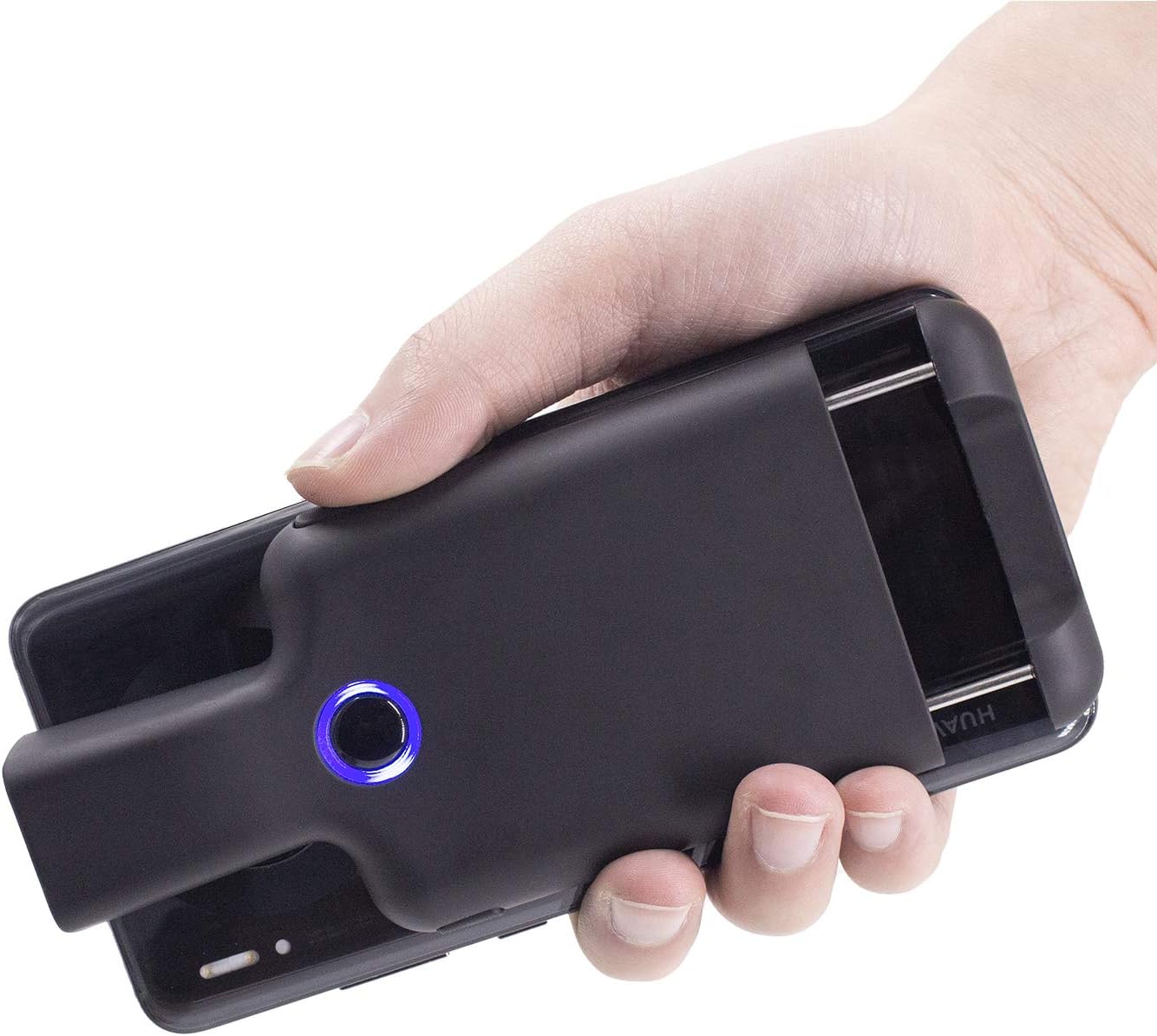
Figure 1.1: Symcode Portable Barcode Clip attached to a smartphone, demonstrating its compact design and ease of handling.
2. Característiques clau
- Direct Phone Attachment: Designed to clip directly onto the back of a smartphone for integrated use. Features protective flannel to prevent scratches.
- Automatic Bluetooth Connection: Bluetooth activates automatically upon powering on, simplifying the connection process.
- Àmplia compatibilitat: Works with phones, iPads, computers, and is compatible with POS systems, iOS, Android, Windows, Mac OS, and Linux. Supports US/DE/FR/IT/ES keyboard layouts.
- Disseny lleuger: Weighs approximately 90g (3.1oz) for enhanced portability.
- Durada de la bateria ampliada: Equipped with a 1600mAh rechargeable battery (some models may feature 1800mAh or 3000mAh), providing up to 7.5 hours of continuous operation or 25,000 scans on a full charge. Charging time is approximately 1.5 hours.
- Comprehensive Barcode Support: Scans most 1D and 2D barcodes, including those displayed on screens.
- 1D Barcode Types: UPC-A, UPC-E, UPC-E1, EAN-8, EAN-13, EAN-14, EAN-128, UCC128, ISBN/ISSN, CODE11, CODE32, CODE39, CODE39 Full ASCII, CODE93, CODE128, Interleaved 2 of 5, Industrial 2 of 5, Matrix 2 of 5, China Postcode, UK/Plessey, GS1, etc.
- 2D Barcode Types: QR, DataMatrix, PDF417, Aztec, Hanxin, Micro PDF417, and others.
- Botons d'escaneig múltiples: Features left, middle, and right scanning buttons for user convenience.
- Estalvi d'energia: Automatically shuts down after 5 minutes of inactivity (configurable).
- Optional Phone Charging: Some models feature a built-in 3000mAh battery that can also charge the connected mobile phone.

Figure 2.1: Barcode scanning capabilities, including various 1D and 2D formats and challenging barcode conditions.

Figure 2.2: Physical dimensions and weight of the barcode clip.

Figure 2.3: The scanner's capability to charge a mobile phone, highlighting its built-in 3000 mAh battery.
3. Configuració inicial
3.1 Càrrega del dispositiu
Before first use, fully charge the barcode scanner. Connect the provided charge cable to the scanner's charging port and a suitable USB power source. A full charge typically takes approximately 1.5 hours. The indicator light will change to show charging status and completion.
3.2 Engegada/apagada
- Per encendre: Press and hold the middle scanning button until the blue signal light flashes.
- Per apagar: The scanner will automatically shut down after 5 minutes of no operation by default to conserve power. This setting can be adjusted or canceled.
4. Connectivitat i emparellament
4.1 Vinculació Bluetooth
The Symcode barcode clip connects wirelessly via Bluetooth. Follow these steps to pair it with your device:
- Activate Scanner Bluetooth: Press the middle scanning button on the barcode clip. The Bluetooth signal light will flash, indicating it is ready for pairing.
- Open Device Bluetooth Settings: On your phone, tablet, or computer, navigate to the Bluetooth settings menu. Ensure Bluetooth is turned on.
- Cerca i connecta: Cerca available devices. Locate and click on "FSC-BarcodeScanner" in the list of found devices to initiate the pairing process.
- Confirmació: Once connected successfully, you will hear a beep from the scanner, and the blue indicator light on the left side of the scanner will remain solid (always on). The scanner will automatically reconnect to the last paired device upon restart.

Figure 4.1: Step-by-step guide for Bluetooth pairing.
4.2 Modes de connexió
The scanner offers flexible connection options:
- Installed with Phone: Clip the scanner directly to the back of your smartphone for a compact, integrated scanning solution.
- Used Alone (Bluetooth): The scanner can be used as a standalone Bluetooth device, transmitting scanned data wirelessly to any compatible Bluetooth-enabled host device.
- Paired with 2.4G Dongle: For devices without Bluetooth or for a dedicated wireless connection, the scanner can be paired with a 2.4G USB dongle (sold separately or included with specific models) for use with laptops or desktop computers.

Figure 4.2: Three primary ways to use the Symcode barcode scanner.
5. Instruccions de funcionament
5.1 Escaneig de codis de barres
To scan a barcode, point the scanner's window at the barcode you wish to read. Ensure the barcode is within the scanner's field of view. Press one of the scanning buttons to activate the scan engine. A successful scan will typically be indicated by a beep and/or a change in the indicator light.
5.2 Scanning Buttons
The scanner features three distinct scanning buttons for user convenience:
- Left Scanning Button: Located on the left side of the scanner.
- Middle Scanning Button: Located centrally on the scanner, also used for power on/off and Bluetooth activation.
- Right Scanning Button: Located on the right side of the scanner.
Any of these buttons can be used to trigger a scan.

Figure 5.1: Location and use of the three scanning buttons.
5.3 Opcions de configuració
The scanner supports various customizations, which can typically be configured by scanning specific setup barcodes found in the full user manual (not included in this summary). These options may include:
- Automatic sensing mode
- Ocultar caràcters de codi de barres
- Adding prefixes or suffixes to scanned data
- Ajust de volum
- Setting or canceling automatic shutdown time
6. Manteniment
6.1 Neteja
To maintain optimal performance and appearance, clean the scanner regularly:
- Feu servir un drap suau, sec i sense borrissol per netejar l'exterior del dispositiu.
- For the scanning window, use a lens cleaning cloth or a soft cloth lightly dampNetegeu amb un netejador suau i no abrasiu. Eviteu productes químics agressius o materials abrasius.
- Assegureu-vos que no entri líquid a les obertures del dispositiu.
6.2 Emmagatzematge
When not in use, store the scanner in a cool, dry place, away from direct sunlight, extreme temperatures, and high humidity. Protect it from physical impact.
7. Solució De Problemes
This section addresses common issues you might encounter with your Symcode barcode scanner.
| Problema | Causa possible | Solució |
|---|---|---|
| L'escàner no s'encén. | Bateria baixa; Mal funcionament del dispositiu. | Charge the scanner fully. If issue persists, contact support. |
| No es pot emparellar per Bluetooth. | Scanner not in pairing mode; Bluetooth off on host device; Interference; Already paired to another device. | Ensure scanner's blue light is flashing. Turn Bluetooth off/on on host device. Move closer to host device. Disconnect from other devices. |
| L'escàner no llegeix codis de barres. | Barcode damaged/unreadable; Incorrect barcode type setting; Scanning window dirty; Insufficient lighting. | Ensure barcode is clear and flat. Check scanner's configuration for supported barcode types. Clean scanning window. Provide adequate lighting. |
| Scanned data is slow or incorrect. | Bluetooth signal interference; Incorrect keyboard layout setting; Data format issue. | Reduce distance to host device. Ensure no strong interference sources. Check keyboard layout settings (e.g., US/DE/FR). Review data formatting options. |
| Scanner automatically shuts down too quickly. | Configuració d'estalvi d'energia per defecte. | Refer to the full manual for instructions on how to adjust or disable the auto-shutdown timer. |
8. Especificacions
| Característica | Detall |
|---|---|
| Model | B08R78W41N |
| Tecnologia de connectivitat | Bluetooth (BLE, SPP, HID) |
| Dispositius compatibles | Smartphone, Tablet, Computer (iOS, Android, Windows, Mac OS, Linux) |
| Font d'alimentació | Funciona amb bateria |
| Tipus de bateria | Polímer de liti (inclòs) |
| Capacitat de la bateria | 1600mAh (some models 1800mAh/3000mAh) |
| Temps de càrrega | Aprox. 1.5 hores |
| Temps de treball continu | Up to 7.5 hours / 25,000 scans (on full charge) |
| Resolució del sensor | 648 x 488 píxels |
| Camp del sensor de View | 66 ° horitzontalment, 50 ° verticalment |
| Light Resistance | 0-10,000 Lux |
| Earthquake Resistance | 1.2m (4ft) drop on cement surface |
| Pes de l'article | 7.8 ounces (approx. 90g / 3.1oz) |
| Dimensions (aprox.) | 147mm (5.8in) length, 68mm (2.7in) width, 20.25mm (0.8in) card buckle thickness |
9. Informació de la garantia
Warranty details for the Symcode Portable Barcode Clip are typically provided with your purchase documentation or can be found on the official Symcode weblloc web. Si us plau, conserveu el comprovant de compra per a qualsevol reclamació de garantia.
10. Atenció al client
For further assistance, technical support, or inquiries not covered in this manual, please refer to the contact information provided with your product or visit the official Symcode website. You may also find additional resources and FAQs on their support pages.