1. Introducció
The GTMEDIA V8 TURBO is a versatile Full HD 1080P TV receiver designed to provide a comprehensive viewing experience. It supports multiple digital video broadcasting standards including DVB-S2/S2X, DVB-T2, Cable, and J.83B, ensuring compatibility with various signal sources. Featuring H.265 video decoding, a built-in WiFi module, and a CA card slot, this set-top box offers advanced functionality for home entertainment.
This manual provides detailed instructions for setting up, operating, and maintaining your GTMEDIA V8 TURBO TV Receiver. Please read it thoroughly before use to ensure proper installation and optimal performance.
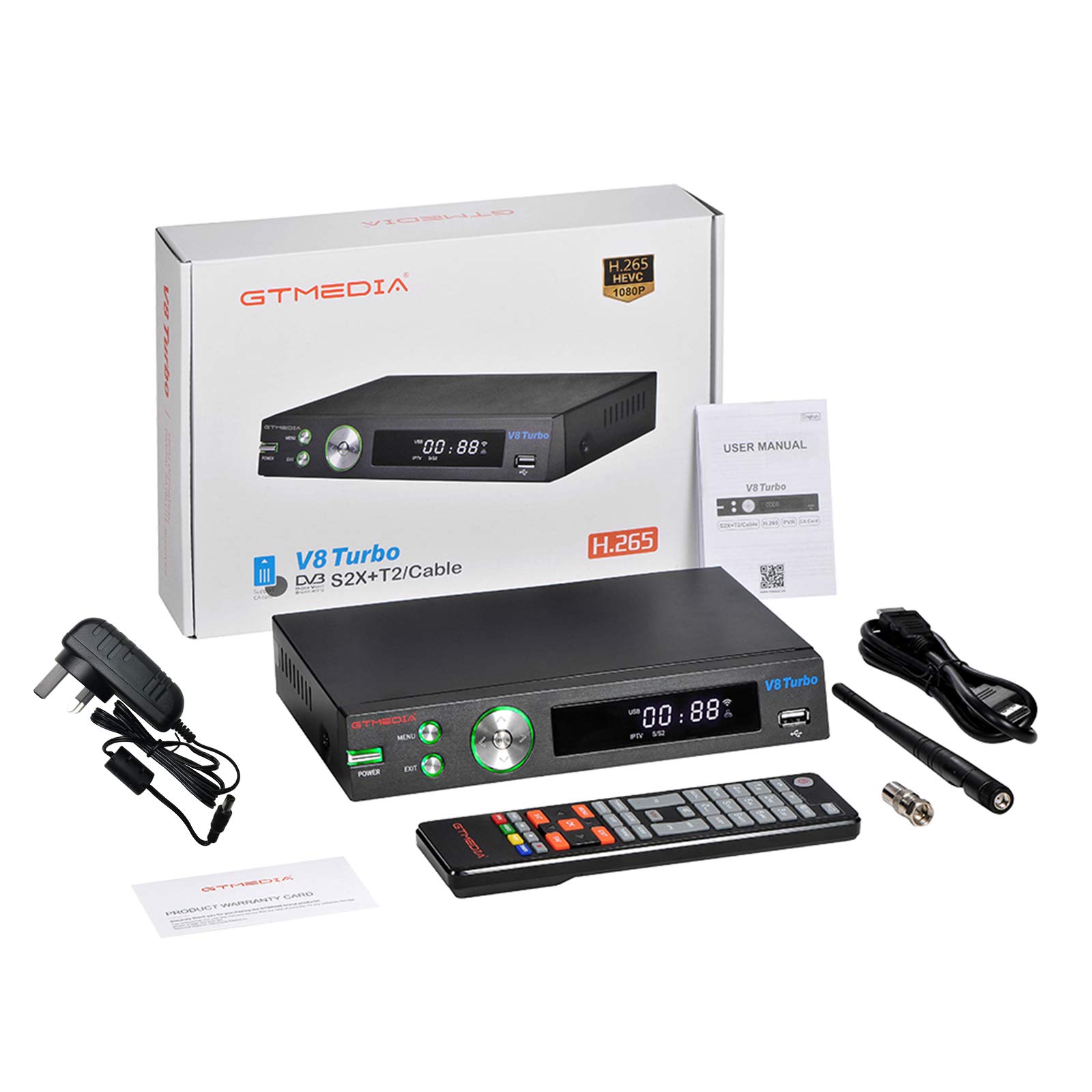
Image 1.1: GTMEDIA V8 TURBO TV Receiver in a home entertainment setup.
2. Contingut del paquet
Please check the package carefully to ensure all items are present and in good condition. If any item is missing or damaged, contact your retailer.
- 1 x GTMEDIA V8 TURBO TV Receiver
- 1 x comandament a distància
- 1 x adaptador d'alimentació
- 1 cable HD (HDMI)
- 1 x Manual d'usuari

Image 2.1: All components included in the GTMEDIA V8 TURBO package.
3. Producte acabatview
3.1 Tauler frontal
The front panel of the GTMEDIA V8 TURBO features essential controls and indicators for easy access.
- Botó d'encendre: Encén o apaga el dispositiu.
- Botó MENÚ: Accedeix al menú principal.
- Botó EXIT: Surt del menú o pantalla actual.
- Navigation Buttons (Left/Right/Up/Down/OK): S'utilitza per a la navegació i selecció de menús.
- Port USB: For connecting USB storage devices for media playback or software upgrades.
- Pantalla LED: Shows channel number, time, or operational status.

Image 3.1: Front panel layout of the GTMEDIA V8 TURBO receiver.
3.2 Panell posterior
The rear panel provides all necessary connection ports for external devices.
- LNB IN: Connects to a satellite dish.
- FORMIGA A: Connects to a terrestrial antenna or cable TV signal.
- HD OUT (HDMI): Connects to your TV for high-definition video and audio output.
- SCART: Connects to older TVs or video equipment.
- ETHERNET: Connects to a wired network for internet access.
- RS232: For advanced software upgrades or debugging.
- CC 12V: Port d'entrada d'alimentació.
- ANT WIFI: Connector for the external WiFi antenna.
- Interruptor d'alimentació: Main power toggle switch.
- CA Card Slot: For inserting Conditional Access (CA) cards.

Image 3.2: Rear panel connections of the GTMEDIA V8 TURBO receiver.
4. Configuració
Follow these steps to set up your GTMEDIA V8 TURBO TV Receiver.
4.1 Connexió al televisor
- Ensure your TV and the V8 TURBO receiver are turned off.
- Connect one end of the provided HD Cable (HDMI) to the SORTIDA HD port on the receiver and the other end to an available HDMI input on your TV.
- Alternatively, for older TVs, connect a SCART cable (not included) from the SCART port on the receiver to the SCART input on your TV.
4.2 Connecting Antenna/Satellite
- For satellite reception, connect your satellite dish cable to the LNB IN port.
- For terrestrial or cable reception, connect your antenna or cable TV signal to the FORMIGA EN port.
4.3 Connexió de potència
- Connect the power supply adapter to the DC 12V port al receptor.
- Connecteu l'adaptador de corrent a una presa de corrent.
- Ensure the main Interruptor d'alimentació on the rear panel is in the 'ON' position.
4.4 Connexió de xarxa
- WiFi: Screw the external WiFi antenna onto the WIFI ANT connector on the rear panel. Once powered on, you can configure WiFi settings through the system menu.
- Ethernet: Connecteu un cable Ethernet des del vostre encaminador al ETHERNET port al receptor.
4.5 CA Card Insertion
If you have a Conditional Access (CA) card for encrypted channels, insert it into the CA Card Slot on the rear panel, ensuring correct orientation as indicated on the slot.
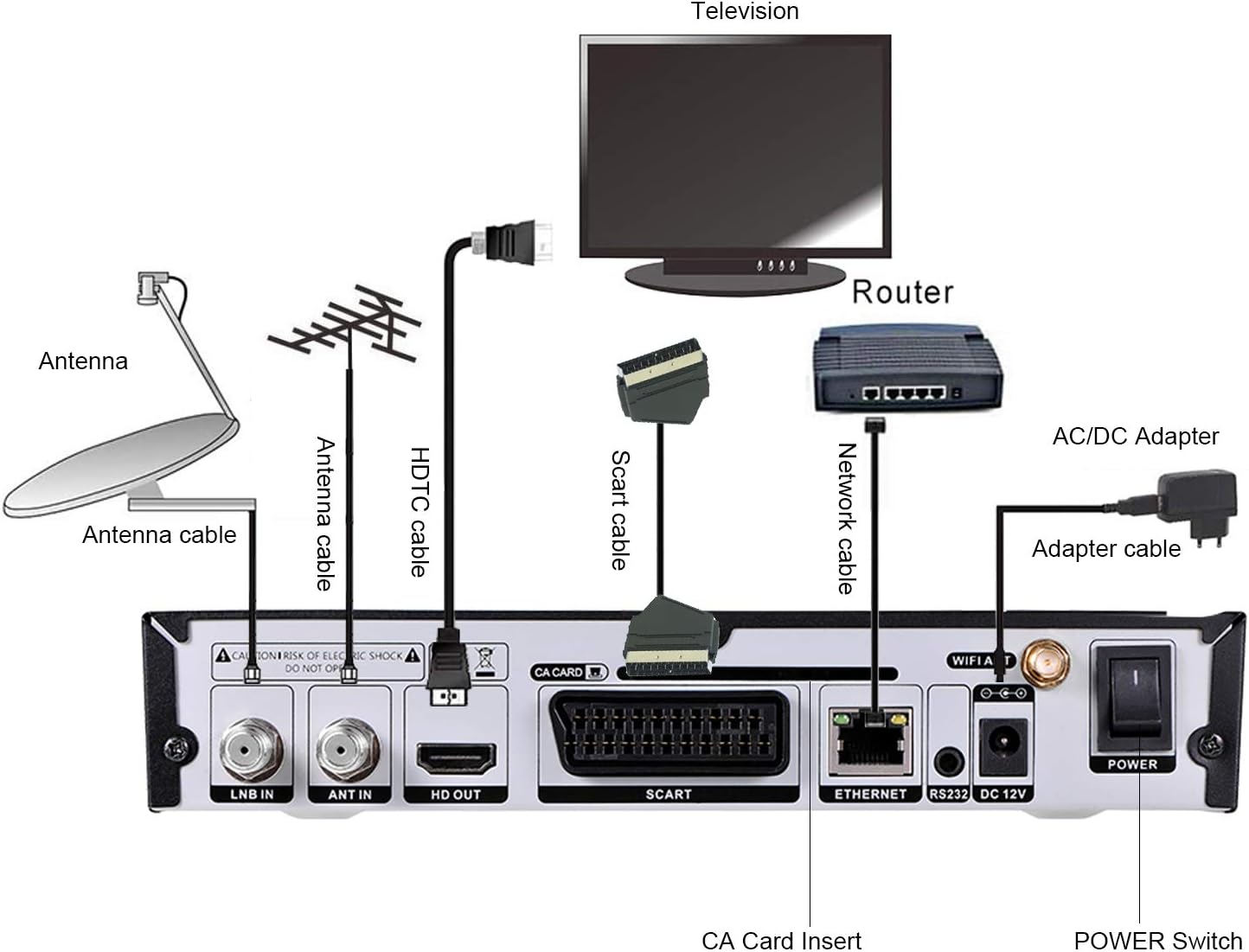
Image 4.1: Connection diagram for the GTMEDIA V8 TURBO receiver.
5. Instruccions de funcionament
This section covers basic operation and key features of your receiver.
5.1 Engegada inicial i configuració inicial
- Turn on your TV and select the correct HDMI or SCART input.
- Premeu el botó PODER button on the receiver or remote control.
- The receiver will boot up. Follow the on-screen instructions for initial setup, which typically includes language selection, region, and antenna/satellite configuration.
5.2 Escaneig de canals
After initial setup, you will need to scan for channels.
- Premeu el botó MENÚ botó del comandament a distància.
- Navigate to 'Installation' or 'Channel Search'.
- Select your signal type (Satellite, Terrestrial, or Cable) and initiate an 'Auto Scan' or 'Manual Scan'.
- Wait for the scan to complete. This may take several minutes.
5.3 Gestió de canals
The receiver offers various channel editing functions:
- Preferit: Create custom lists of your preferred channels.
- Moure: Reorder channels in your list.
- Bloqueig: Protect channels with a password.
- Omet: Hide unwanted channels from the main list.
- Suprimeix: Remove channels permanently.
- Canvia el nom: Change channel names.
- Troba: Quickly locate channels by name.
- Ordena: Arrange channels by various criteria (e.g., alphabetical, transponder).
Access these functions via the 'Channel Manager' or 'Edit Channel' menu option.
5.4 Reproducció multimèdia
Connect a USB storage device to the front USB port to play media files.
- Inseriu una unitat USB que contingui suports compatibles files (e.g., video, audio, images).
- Premeu el botó MENÚ button and navigate to 'Multimedia' or 'USB'.
- Seleccioneu el desitjat file type and browse your USB drive to play content.
5.5 Funcions avançades
- BISS Auto Roll, Full PowerVu, DRE & Biss Key Support: The receiver supports automatic key updates for certain encrypted channels.
- Unicable, DiSEqC1.0/1.1/1.2/USALS Motor Support: Advanced satellite dish control for multi-LNB or motorized systems. Configure these settings in the 'Satellite Setup' menu.
- Multi-room Support: Allows sharing of CA card access across multiple receivers (requires specific network configuration and compatible devices).
6. Manteniment
Proper maintenance ensures the longevity and optimal performance of your GTMEDIA V8 TURBO receiver.
- Neteja: Feu servir un drap suau i sec per netejar l'exterior del receptor. No utilitzeu netejadors líquids ni materials abrasius.
- Ventilació: Assegureu-vos que el receptor estigui col·locat en una zona ben ventilada. No bloquegeu les obertures de ventilació.
- Apagar: If the receiver will not be used for an extended period, disconnect it from the power outlet.
- Actualització de programari: Periodically check for software updates on the GTMEDIA official website. Updates can be performed via the USB port or RS232 port as described in the system menu.
7. Solució De Problemes
If you encounter issues with your GTMEDIA V8 TURBO, refer to the following common problems and solutions.
| Problema | Causa possible | Solució |
|---|---|---|
| Sense poder | Power cable disconnected; Power switch off; Faulty power adapter | Check power cable connection; Ensure rear power switch is ON; Try a different power outlet. |
| Sense senyal / Pantalla negra | Incorrect TV input; Antenna/satellite cable loose or disconnected; No channels scanned; Weak signal | Select correct HDMI/SCART input on TV; Check antenna/satellite cable connections; Perform a channel scan; Adjust antenna/dish for better signal. |
| El comandament a distància no funciona | Batteries depleted; Obstruction between remote and receiver; Remote sensor blocked | Replace batteries; Remove any obstructions; Ensure remote is pointed at the receiver's front panel. |
| Mala qualitat d'imatge/so | Weak signal; Incorrect video/audio settings | Check signal strength in menu; Adjust antenna/dish; Verify video/audio output settings in system menu. |
| Problemes de connexió Wi-Fi | WiFi antenna loose; Incorrect password; Router too far; Internal WiFi module issue | Ensure WiFi antenna is securely attached; Re-enter WiFi password; Move receiver closer to router or use Ethernet; Contact support if issue persists. |
8. Especificacions
Detailed technical specifications for the GTMEDIA V8 TURBO TV Receiver.
- Freqüència de la CPU: 770MHz Dual Core HEVC 10Bit
- Memòria flaix: Flash SPI de 64 MB
- DDR2 Memory: 1G bit RAM
- Demultiplexer: ISO/IEC 13818-1
- Input Bit Rate: Max 100Mbit/s
- Descodificació de vídeo: HEVC main profile@level 4.1 and main10 profile@L4.1, High tier MPEG-2 MP@ML, H.264 BP, MP&HP@L3/L4.1/L4.2, AVS Jizhun profile and broadcast profile, MPEG-4 SP profile, advanced simple profile@L5, VC1 SP@ML, MP@HL, AP@L0-3, H263 baseline profile, JPEG decoder
- PAL/NTSC: Automatic PAL/NTSC conversion
- Relació d'aspecte: Auto, 16:9 Pillar box, 4:3 Pan & Scan, 4:3 Letter Box
- Descodificació d'àudio: MPEG-1/2 Layer 1/2/3, MPEG-2/4 LC-AAC, MPEG-4 HE-AAC, Dolby AC3/AC3+, DRA CH/5.1CH
- Panel Display: Pantalla LED de 4 dígits
- WiFi: Built-in 2.4G WiFi Support IEEE 802.11b/g/n
- Actualització de programari: Through USB port and RS232
- Funcions del canal: Recording one channel, view another channel under same TP, various editing functions (favorite, move, lock, skip, delete, rename, find, sort)
- Entrada Voltage: CA 100V-250V, 50 / 60Hz
- Consum d'energia: 10W (operation), ≤1W (standby)
- Dimensions del producte: 27.1 x 19.6 x 5.9 cm (10.7 x 7.7 x 2.3 polzades)
- Pes del producte: 890 g (30.9 oz)
- Tecnologia de connectivitat: USB, HDMI, Ethernet, SCART
- Tipus de controlador: Control remot
- Característiques especials: Multi-room, Advanced Signal Processing
- Dispositius compatibles: Televisió
- Ports HDMI totals: 1
- Mode de sortida d'àudio: Estèreo, Envoltant
- Configuració del canal de so envoltant: 5.1
- Codificació de vídeo: HEVC Main 10

Image 8.1: Physical dimensions of the GTMEDIA V8 TURBO receiver.
9. Informació de la garantia
GTMEDIA products are manufactured to high-quality standards. This product comes with a standard manufacturer's warranty against defects in materials and workmanship. The specific terms and duration of the warranty may vary by region and retailer. Please retain your proof of purchase for warranty claims.
The warranty typically covers manufacturing defects but does not cover damage caused by misuse, accidents, unauthorized modifications, or normal wear and tear. For detailed warranty information, please refer to the warranty card included in your package or contact your point of purchase.
10. Suport
For technical assistance, troubleshooting beyond this manual, or warranty inquiries, please contact GTMEDIA customer support or your retailer.
- Refer to the official GTMEDIA website for the latest support information, FAQs, and software updates.
- Contact details for customer service may be found on the product packaging or the GTMEDIA weblloc.


