Introducció
This manual provides essential information for the proper installation, operation, and maintenance of your Zebronics Zeb-D370S DVD Player. Please read this manual thoroughly before using the device to ensure safe and efficient operation. Keep this manual for future reference.
Informació important de seguretat
- No exposeu el dispositiu a la pluja ni a la humitat per evitar incendis o descàrregues elèctriques.
- No obriu la c.asing. Demaneu totes les tasques de manteniment a personal qualificat.
- Assegureu-vos que hi hagi una ventilació adequada al voltant de la unitat. No bloquegeu les obertures de ventilació.
- Use only the power adapter supplied with the unit or specified by the manufacturer.
- Eviteu col·locar la unitat sobre superfícies inestables.
- Desconnecteu el cable d'alimentació durant tempestes amb llamps o quan no l'utilitzeu durant períodes prolongats.
Contingut del paquet
Verifiqueu que tots els elements siguin presents al paquet:
- Zebronics Zeb-D370S DVD Player Unit
- Control remot
- Cable AV
- Cable d'alimentació
- Manual d'instruccions
Producte acabatview
The Zebronics Zeb-D370S is a versatile DVD player featuring a built-in stereo speaker and amplifier, HDMI, USB, and SD card support, and dual karaoke microphone inputs. It supports multiple formats and offers 5.1 channel, coaxial, and optical audio outputs.
Controls i ports del panell frontal
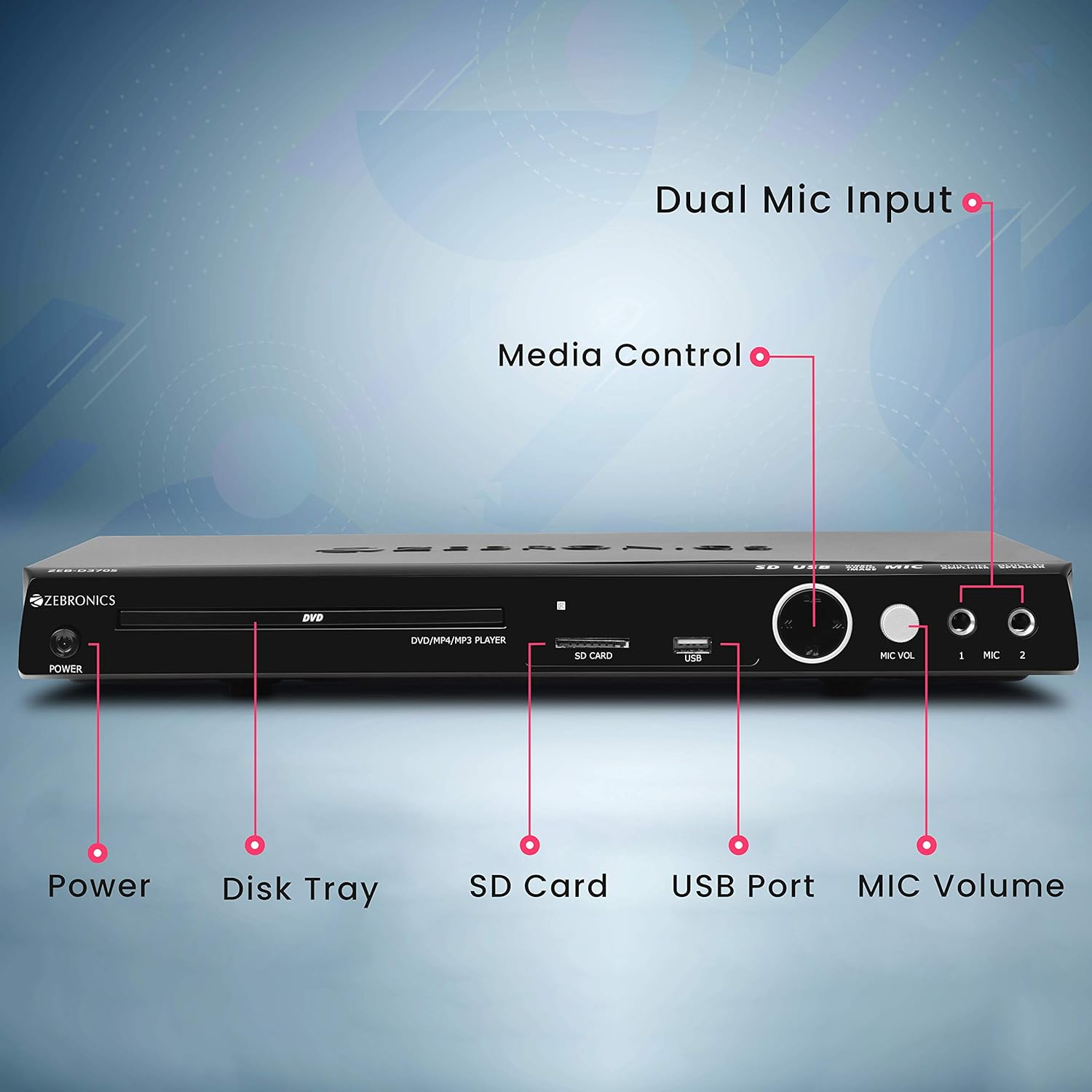
Front panel of the Zebronics Zeb-D370S DVD Player, showing the Power button, Disk Tray, SD Card slot, USB Port, MIC Volume control, and two Microphone inputs (MIC 1, MIC 2).
- Botó d'encesa: Encén o apaga la unitat.
- Disk Tray: For inserting DVDs, CDs, VCDs, and SVCDs.
- Ranura per a targeta SD: Per reproduir mitjans files d'una targeta SD.
- Port USB: Per reproduir mitjans files d'una unitat USB.
- Volum MIC: Ajusta el volum dels micròfons connectats.
- MIC 1 & MIC 2: Inputs for connecting microphones for karaoke.
- Botons de control multimèdia: Play/Pause, Stop, Skip, etc.
Connexions del panell posterior

Rear panel of the Zebronics Zeb-D370S DVD Player, detailing the Coaxial Output, Optical Output, 5.1 Channel Output, HDMI port, Composite video output, Component video output, S-Video output, and Ext-Audio Output.
- Sortida HDMI: For high-definition video and audio connection to a TV or display.
- Sortida de vídeo compost: Standard definition video output.
- Component Video Output: Higher quality analog video output (YPbPr).
- Sortida de S-vídeo: Improved analog video output.
- Digital Audio Output (Optical & Coaxial): For connecting to external audio receivers or sound systems.
- Analog 5.1 Channel Output: For connecting to a 5.1 channel speaker system.
- Ext-Audio Output: Additional audio output connections.
- Sortida de l'altaveu: Terminals for connecting external speakers, utilizing the built-in ampmés viu.

posterior view of the Zebronics Zeb-D370S DVD Player highlighting the built-in amplifier, built-in speaker, and speaker output terminals.
Instruccions de configuració
1. Connexió d'alimentació
- Ensure the DVD player is placed on a stable, flat surface with adequate ventilation.
- Connect the power cable to the AC input on the rear of the DVD player.
- Plug the other end of the power cable into a standard electrical outlet (110V - 260V AC).
2. Video Connection to TV/Display
Trieu un dels mètodes de connexió següents:
- HDMI (Recommended for best quality): Connect an HDMI cable from the HDMI output on the DVD player to an HDMI input on your TV.
- Vídeo component: Connect component video cables (Red, Green, Blue) from the DVD player's component outputs to the corresponding inputs on your TV.
- Vídeo compost: Connect a composite video cable (Yellow) from the DVD player's composite output to the yellow video input on your TV.
- Vídeo S: Connect an S-Video cable from the DVD player's S-Video output to the S-Video input on your TV.
3. Connexió d'àudio
Choose one of the following audio connection methods:
- HDMI: If using HDMI for video, audio will also be transmitted via the HDMI cable.
- 5.1 Channel Analog Output: Connect RCA cables from the 5.1 channel outputs (Front Left, Front Right, Center, Subwoofer, Surround Left, Surround Right) on the DVD player to a compatible 5.1 channel amplificador o sistema d'altaveus.
- Digital Audio (Optical/Coaxial): Connect an optical or coaxial cable from the respective output on the DVD player to a digital audio input on your amplifier or home theater system for surround sound.
- Built-in Speaker Output: If using the built-in speakers, ensure no external speakers are connected to the 5.1 channel outputs unless desired.
4. Microphone Connection (Optional)
- Plug your microphones into the MIC 1 and/or MIC 2 inputs on the front panel.
- Adjust the MIC Volume knob to control microphone audio levels.
Instruccions de funcionament

Zebronics Zeb-D370S DVD Player with a disc inserted, remote control, and a visual representation of content playing on a screen, illustrating its multimedia capabilities.
1. Reproducció de disc
- Premeu el botó Poder button to turn on the DVD player.
- Premeu el botó Obrir/Tancar button (usually on the remote or front panel) to open the disc tray.
- Place a compatible disc (DVD Video, DVD+RW/-RW/+R/-R, Dual Layer Disc, CD Audio, CD-R/-RW, VCD, SVCD) onto the disc tray with the label side facing up.
- Premeu el botó Obrir/Tancar button again to close the tray. The player will automatically begin playback or display a menu.
- Use the remote control for playback functions such as Play, Pause, Stop, Fast Forward, Rewind, and Chapter Skip.
2. USB/SD Media Playback
- Inseriu una unitat USB al port USB o una targeta SD a la ranura per a targetes SD del panell frontal.
- The player should automatically detect the media and display a menu to browse files. If not, select the USB or SD source using the remote control's Font or Entrada botó.
- Navega pel teu files (VOB, MP4, DIVX, AVI, MPEG-1, MPEG-2, 3GP, MP3, WMA, AAC, JPEG, TXT) using the remote control and press Jugar per iniciar la reproducció.
3. Funció de karaoke
- Connect one or two microphones to the MIC 1 and MIC 2 inputs.
- Play a karaoke disc or a media file with instrumental tracks.
- Adjust the MIC Volume knob on the front panel to control the microphone audio level.
4. Funcions avançades
- CD Ripping: Convert audio CDs to digital formats (refer to on-screen menu for options).
- Picture Slideshow: View JPEG images from disc, USB, or SD card as a slideshow.
- Escaneig progressiu: Provides a smoother, flicker-free image on compatible displays.
- Zoom IN/OUT: Magnify or reduce the displayed image during playback.
- High Speed Search: Quickly scan through disc or media content.
- Bloqueig parental: Restrict playback of certain content based on ratings.
- Repetició instantània: Jump back a few seconds during playback.
- Disc Resume: Resume playback from where it was last stopped on a disc.
Manteniment
- Neteja de la unitat: Use a soft, dry cloth to clean the exterior of the DVD player. Do not use liquid cleaners or abrasive materials.
- Cura del disc: Manipuleu els discs per les vores. Manteniu-los nets i sense ratllades. Feu servir un drap suau i sense borrissol per netejar els discs des del centre cap a fora.
- Ventilació: Assegureu-vos que les obertures de ventilació no estiguin bloquejades per evitar el sobreescalfament.
Resolució de problemes
If you encounter issues with your DVD player, refer to the table below for common problems and solutions:
| Problema | Causa possible | Solució |
|---|---|---|
| Sense poder | Cable d'alimentació no connectat; presa de corrent no funciona | Comproveu la connexió del cable d'alimentació; proveu una presa de corrent diferent |
| Sense sortida de vídeo | Incorrect video cable connection; Incorrect input selected on TV | Ensure video cables are securely connected; Select the correct input source on your TV (e.g., HDMI 1, AV) |
| Sense sortida d'àudio | Incorrect audio cable connection; TV/amplifier volume too low; Mute activated | Check audio cable connections; Increase volume; Deactivate mute function |
| El disc no es reprodueix | Disc is dirty or scratched; Disc format not supported; Disc inserted incorrectly | Clean the disc; Ensure disc is compatible; Insert disc with label side up |
| USB/SD media not detected | USB drive/SD card not inserted correctly; Incompatible file format; Corrupted media | Reinsert USB/SD; Check supported file formats; Try a different USB/SD device |
Especificacions

Dimensions of the Zebronics Zeb-D370S DVD Player: 360mm (width), 220mm (depth), and 50mm (height).
| Característica | Detall |
|---|---|
| Nom del model | Zeb D370S |
| Marca | ZEBRONNICA |
| Dimensions del producte | 28 x 39 x 82 mm (1.4 kg) |
| Resolució | 1920 x 1080 (Supported resolutions: 480i/576i/480p/576p/720p/1080i/1080p) |
| Característiques especials | Surround Sound, Built-in Amplifier, Built-in Stereo Speaker, Karaoke Mic Input |
| Mode de sortida d'àudio | Stereo, Surround (2CH / 5.1CH / Virtual Surround Sound) |
| Configuració del canal de so envoltant de l'altaveu | 5.1 |
| Formats d'àudio compatibles | Dolby Digital, MP3, WMA, AAC |
| Video Playback System | NTSC / PAL / AUTO |
| Tipus de connector | HDMI, USB, SD Slot, MIC 1 & MIC 2, Composite, Component, S-Video, Digital Audio Output (Optical & Coaxial), Analog 5.1Ch Output, Ext-Audio Output x 2 |
| Media Type (Playback Disc) | DVD Video, DVD+RW/-RW/+R/-R, Dual Layer Disc, CD Audio, CD-R/-RW, VCD, SVCD |
| Mitjans de comunicació Files Admet | VOB, MP4, DIVX, AVI, MPEG-1, MPEG-2, 3GP, MP3, WMA, AAC, JPEG, TXT |
| Vol. Operatiutage | 110V - 260V CA |
| Funcions | CD Ripping, Picture SlideShow, Progressive scan, Zoom IN/OUT, High speed search, Parental lock, Instant replay, Disc resume |
Garantia i Suport
For warranty information, technical support, or service inquiries, please refer to the warranty card included with your product or visit the official Zebronics weblloc web. No intenteu reparar el dispositiu vosaltres mateixos.


