1. Introducció
Thank you for choosing the Moukey MEK-200 61-Key Electronic Piano Keyboard. This versatile instrument is designed for beginners and experienced players alike, offering a rich array of features including 300 rhythms, 300 tones, 50 demo songs, and an intelligent teaching mode. This manual provides detailed instructions for setup, operation, maintenance, and troubleshooting to ensure you get the most out of your new keyboard.

Image: The Moukey MEK-200 61-Key Electronic Piano Keyboard with a music stand holding a tablet displaying sheet music.
2. Instruccions de seguretat
- No exposeu el teclat a l'aigua ni a una humitat excessiva.
- Avoid placing the keyboard near heat sources such as radiators, heat registers, stoves, or other apparatus (including amplificadors) que produeixen calor.
- Feu servir només l'adaptador de corrent subministrat pel fabricant.
- Unplug the keyboard during lightning storms or when unused for long periods.
- Do not attempt to disassemble or modify the keyboard. Refer all servicing to qualified service personnel.
- Mantenir fora de l'abast dels nens petits per evitar la ingestió accidental de peces petites.
3. Contingut del paquet
Si us plau, reviseu el paquet acuradament per assegurar-vos que tots els articles hi són i estan en bon estat:
- Moukey MEK-200 61-Key Electronic Piano Keyboard
- Atril de música
- Musical Note Sticker
- Adaptador d'alimentació
- Headphones (may be included depending on package variant)

Imatge: Una imatge superior view showing the Moukey MEK-200 keyboard along with its accessories: a music stand, a musical note sticker, and a power adapter.
Nota important:

Image: A diagram illustrating that accessories might be located within the white foam packaging at either end of the keyboard box.
Accessories such as the power adapter, music stand, and note sticker are often located within the foam packaging at one or both ends of the keyboard box. Please check these areas thoroughly before discarding the packaging.
4. Configuració
4.1 Connexió d'alimentació
The MEK-200 keyboard supports dual power supply modes:
- Alimentació CA: Connect the supplied power adapter to the DC 9V input jack on the rear of the keyboard and plug the other end into a standard wall outlet.
- Potència de la bateria: For portable use, the keyboard can be powered by 8 x 1.5V 'D' type batteries (not included). Open the battery compartment on the bottom of the keyboard and insert the batteries, ensuring correct polarity.

Image: The Moukey MEK-200 keyboard illustrating its dual power supply capabilities, showing both an AC power plug and a battery icon with 'x8' indicating the use of eight D-type batteries.
4.2 Instal·lació del faristol
Insert the music stand into the designated slots on the top panel of the keyboard. This stand is designed to hold sheet music, tablets, or smartphones.
4.3 Connecting Peripherals (Headphones, Microphone)
The MEK-200 features various input/output ports on its rear panel:
- AURICULARS (connector de 3.5 mm): Connect headphones here for private practice. When headphones are plugged in, the built-in speakers will automatically mute.
- Micròfon (connector de 3.5 mm): Connect a microphone to this port to sing along while playing.
- USB A HOST: Per connectar-se a un ordinador.
- USB A DISPOSITIU: Per connectar dispositius d'emmagatzematge USB.
- ENTRADA/SORTIDA MIDI: For connecting to other MIDI devices.
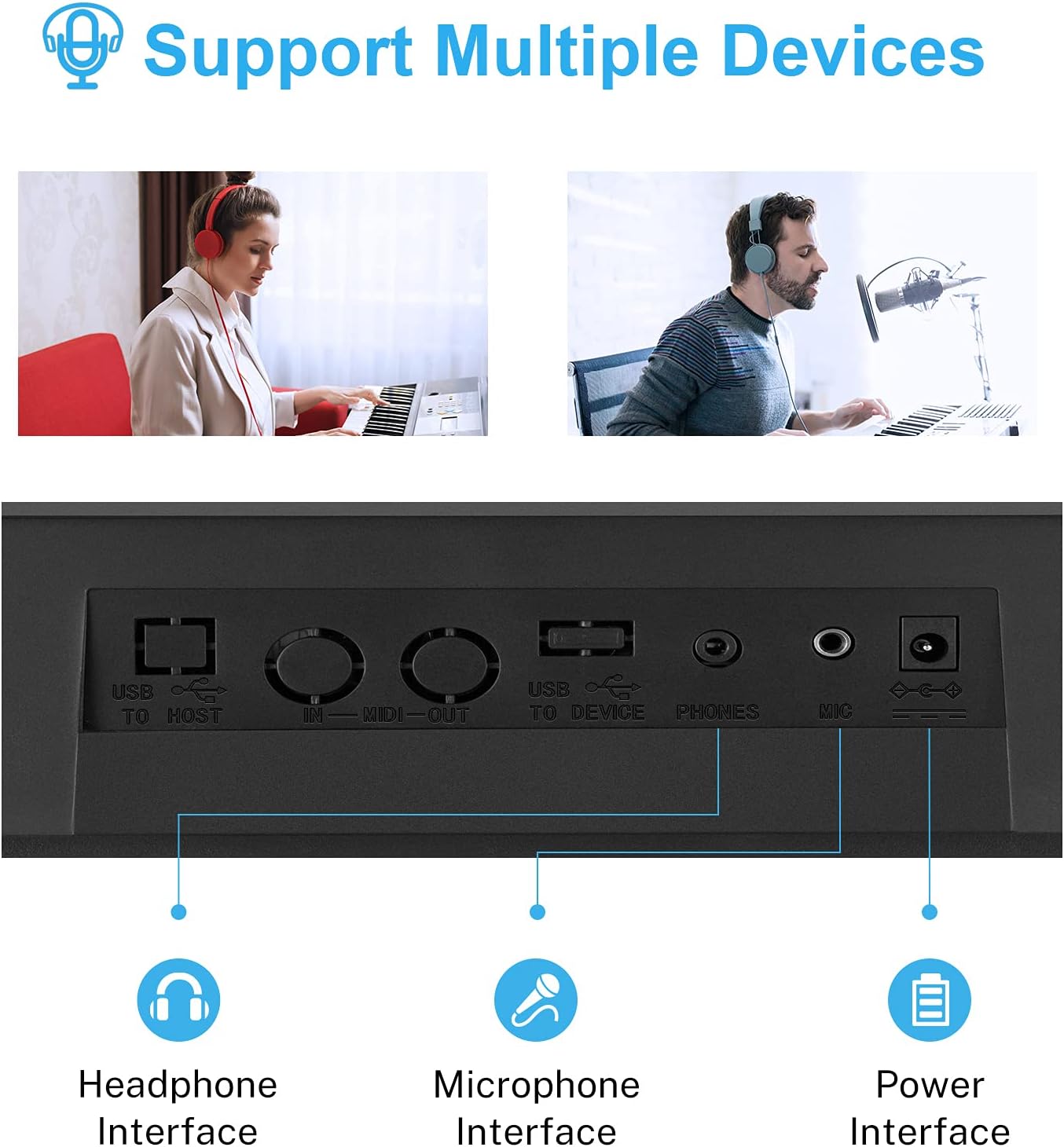
Imatge: Un primer pla view of the rear panel of the Moukey MEK-200, highlighting the headphone, microphone, and power input interfaces, along with USB and MIDI ports.
5. Instruccions de funcionament
5.1 Engegada/Apagada i control de volum
- Potència: Premeu el botó PODER botó per encendre o apagar el teclat.
- Volum: Utilitza el MÀSTER VOLUM knob to adjust the overall output volume.
5.2 Tone (Voice) Selection
The keyboard features 300 different tones (voices). To select a tone:
- Premeu el botó VEU botó.
- Feu servir el teclat numèric o el +/- buttons to enter the desired tone number (e.g., 000 for Grand Piano). The selected tone number will be displayed on the LED screen.
5.3 Rhythm Selection
Choose from 300 built-in rhythms to accompany your playing:
- Premeu el botó RITME botó.
- Feu servir el teclat numèric o el +/- buttons to select a rhythm number.
- Premeu INICI/PARA per començar o acabar el ritme.
- Adjust the rhythm tempo using the TEMPO +/- botons.
5.4 cançons de demostració
The keyboard includes 50 demo songs for listening pleasure or practice:
- Premeu el botó CANÇÓ DEMO botó.
- Utilitza el +/- buttons to cycle through the demo songs.
- Premeu CANÇÓ DEMO de nou per aturar la reproducció.

Image: A close-up of the Moukey MEK-200's control panel, emphasizing the sections for 300 rhythms, 300 voices (tones), 50 demo songs, and 8 percussion sounds.
5.5 Sons de percussió
Access 8 different percussion sounds directly from the keyboard keys:
- Premeu el botó PERCUSSIÓ botó.
- Certain keys on the keyboard will now trigger percussion sounds. Refer to the keyboard's panel markings for specific key assignments.
5.6 Intelligent Teaching Mode
The MEK-200 offers two teaching modes to assist beginners:
- One-Key Mode: Premeu el botó UNA CLAU button. The keyboard will play a melody, and you can press any key to advance the song. This helps with rhythm and timing.
- Mode de seguiment: Premeu el botó SEGUIR button. The keyboard will wait for you to play the correct note before proceeding. This helps with learning specific melodies.

Image: A young child playing the Moukey MEK-200 keyboard, demonstrating the intelligent teaching mode feature.
5.7 Enregistrament i reproducció
Record your performances and play them back:
- Premeu el botó REGISTRAR button to start recording. The LED screen will indicate recording status.
- Reprodueix la melodia que vulguis.
- Premeu JUGAR to listen to your recorded performance.
5.8 Chord Functions
The keyboard supports various chord modes:
- Acorde d'un sol dit: Premeu el botó DIT ÚNIC button. Play a single bass note in the lower section of the keyboard, and the keyboard will automatically generate a corresponding chord.
- Corda amb els dits: Premeu el botó ACORD DE DITS button. Play a full chord in the lower section of the keyboard, and the keyboard will recognize and play the chord.
5.9 Headphone and Microphone Use
As mentioned in the setup section, connect headphones to the TELÈFONS jack for silent practice. The internal speakers will automatically mute. Connect a microphone to the MIC jack to sing along with your music.

Image: The Moukey MEK-200 keyboard with a pair of headphones connected, indicating the private practice feature.
6. Manteniment
- Neteja: Netegeu el teclat amb un drap suau i sec. Per a la brutícia resistent, utilitzeu un drap lleugerament sec.amp cloth and then dry thoroughly. Do not use abrasive cleaners, waxes, or solvents.
- Emmagatzematge: When not in use, store the keyboard in a cool, dry place away from direct sunlight and extreme temperatures. If storing for an extended period, remove the batteries to prevent leakage.
- Manipulació: Avoid dropping or subjecting the keyboard to strong impacts, as this can damage internal components.
7. Solució De Problemes
| Problema | Causa possible | Solució |
|---|---|---|
| Sense poder | Power adapter not connected, batteries drained or incorrectly inserted. | Ensure power adapter is securely connected and plugged into a working outlet. If using batteries, check polarity and replace if drained. |
| No hi ha so dels altaveus | Volume too low, headphones connected, or tone volume set to zero. | Increase MASTER VOLUME. Disconnect headphones. Check individual tone volume settings if applicable. |
| Les claus no responen | Keyboard may be in a specific mode (e.g., teaching mode waiting for input). | Try turning the keyboard off and on again. Ensure no specific teaching or demo mode is active. |
| Rhythm/Demo song not playing | Rhythm/Demo not started, or volume too low. | Press START/STOP for rhythm or DEMO SONG button to initiate playback. Increase volume. |
8. Especificacions
| Característica | Especificació |
|---|---|
| Número de model | MEK-200 |
| Nombre de claus | 61 |
| Dimensions (L x A x A) | 101.3 x 17.3 x 43.8 cm (39.9 x 6.8 x 17.2 polzades) |
| Pes de l'article | 5.4 quilos (11.9 lliures) |
| Tones (Voices) | 300 |
| Ritmes | 300 |
| Cançons de demostració | 50 |
| Percussion Sounds | 8 |
| Mostra | Pantalla LED |
| Conector d'auriculars | Jack de 3.5 mm |
| Connector de micròfon | Jack de 3.5 mm |
| Connectivitat | USB (to Host, to Device), MIDI IN/OUT |
| Font d'alimentació | AC Power Adapter (included) or 8 x 1.5V 'D' Type Batteries (not included) |
| Característiques especials | Recording, Playback, Teaching Mode, Single/Fingered Chord |
9. Garantia i Suport
Moukey products are manufactured to high-quality standards. For specific warranty information, please refer to the warranty card included with your product or contact Moukey customer support directly. Keep your purchase receipt as proof of purchase for any warranty claims.
For technical support, troubleshooting assistance, or inquiries about replacement parts, please visit the official Moukey weblloc web o poseu-vos en contacte amb el seu departament d'atenció al client. La informació de contacte normalment es pot trobar a l'embalatge del producte o a la presència oficial en línia de la marca.