Introducció
The NITECORE TINI 2 is a compact, high-performance dual LED rechargeable keychain light. It features two OSRAM P8 LEDs and a total reflective optic lens, providing a maximum output of 500 lumens and a beam distance of up to 89 meters. This device incorporates a multifunctional OLED real-time display that shows essential information such as battery level, voltage, brightness level, current user mode, and remaining runtime. Designed for convenience and durability, the TINI 2 includes a built-in 280mAh Li-ion battery, offering up to 60 hours of runtime, and supports USB-C charging with multiple safeguards.
This manual provides detailed instructions for the proper setup, operation, and maintenance of your NITECORE TINI 2 keychain light.
Configuració
Càrrega inicial
Before first use, fully charge the NITECORE TINI 2. Connect the included USB-C charging cable to the charging port on the side of the device and to a USB power source. The OLED display will indicate charging status. Charging is complete when the display shows a full battery icon.

Image: The NITECORE TINI 2 showing its USB-C charging port with the protective cover lifted, indicating where to connect the charging cable.
Attaching to Keychain
The TINI 2 features a robust screw post design for securing the included key clasp. This design is engineered to withstand significant weight, up to 30kg (66lbs), ensuring secure attachment to your keys or other gear.

Image: The NITECORE TINI 2 keychain light with a metal key clasp attached to its integrated screw post, ready for use on a keychain.
Instruccions de funcionament
Dual Switch Operation
The TINI 2 utilizes a dual switch interface for intuitive control:
- Botó d'encesa: Controls power on/off and mode switching.
- Botó de mode: Adjusts brightness levels and accesses special modes.
Encès/Apagat
- Encendre: Manteniu premut el botó d'engegada durant 1 segon.
- Apagar: Press and hold the Power Button for 1 second while the light is on.
Nivells de brillantor
The TINI 2 offers 5 brightness levels: Ultralow, Low, Mid, High, and Turbo. The Turbo level is independently controlled for immediate maximum output.
- While the light is on, short press the Mode Button to cycle through brightness levels: Ultralow → Low → Mid → High.
- Accés directe a Turbo: While the light is on or off, press and hold the Mode Button to instantly activate Turbo mode. Release to return to the previous state.
- Direct Access to Ultralow: While the light is off, press and hold the Power Button to instantly activate Ultralow mode. Release to return to off.

Image: A visual representation of the NITECORE TINI 2's five brightness levels, ranging from 1 Lumen (Ultralow) to 500 Lumens (Turbo), with corresponding light output illustrations.
User Modes (Daily/Demo)
The TINI 2 features two user modes: Daily Mode and Demo Mode. Daily Mode provides continuous illumination, while Demo Mode automatically turns off after a short period to conserve battery.
- To switch between Daily Mode and Demo Mode, press and hold both the Power Button and Mode Button simultaneously for 2 seconds. The OLED display will indicate the current mode.
Modes de bloqueig
The TINI 2 offers two lockout modes to prevent accidental activation:
- Lockout 1 (Half Lockout): Press and hold the Power Button until the OLED display shows the lockout icon. In this mode, only direct access to Turbo is available by holding the Mode Button.
- Lockout 2 (Full Lockout): Press and hold both buttons until the OLED display shows the full lockout icon. All buttons are disabled.
- Per desbloquejar: In either lockout mode, press and hold both buttons simultaneously until the lockout icon disappears and the light flashes once.
Pantalla OLED en temps real
The integrated OLED display provides real-time information about the flashlight's status:
- Nivell i volum de la bateriatage: Shows the current battery charge and voltage.
- Nivell de brillantor: Indicates the active brightness setting (e.g., ULTRALOW, LOW, MID, HIGH, TURBO).
- Mode d'usuari: Displays whether Daily Mode or Demo Mode is active.
- Runtime Remaining: Estimates the remaining operating time at the current brightness level.

Imatge: Quatre examples of the NITECORE TINI 2's multifunctional OLED display, illustrating battery level and voltage, current brightness level, active user mode (Demo/Daily), and estimated runtime remaining.
Manteniment
Carregant
Regularly charge the TINI 2 to maintain optimal battery performance. The USB-C charging port is designed with multiple safeguards to ensure a safe charging process. Always ensure the charging port cover is securely closed when not charging to protect against water and dust.
Neteja
Netegeu l'exterior de la llanterna amb un drap suau iamp cloth as needed. Avoid using abrasive cleaners or solvents that could damage the finish or internal components.
Emmagatzematge
When storing the TINI 2 for extended periods, ensure it is fully charged and activate a lockout mode to prevent accidental activation and battery drain. Store in a cool, dry place away from direct sunlight and extreme temperatures.
Resolució de problemes
La llum no s'encén
- Check if the device is in a lockout mode. Refer to the "Lockout Modes" section to unlock the device.
- Ensure the battery is charged. Connect the TINI 2 to a USB-C power source and observe the OLED display for charging indication.
Dim Light Output or Short Runtime
- The battery may be low. Recharge the device fully.
- Ensure the lens is clean. Dust or debris on the lens can reduce light output.
- The Advanced Temperature Regulation (ATR) technology may be reducing output to prevent overheating. This is normal operation.
La pantalla OLED no funciona
- Ensure the battery is charged. A critically low battery may not power the display.
- Si el problema persisteix després de la càrrega, contacteu amb l'atenció al client.
Especificacions
| Característica | Detall |
|---|---|
| LEDs | 2 x OSRAM P8 |
| Brillantor màxima | 500 lúmens |
| Peak Beam Distance | 89 metres (97 iardes) |
| Intensitat de feix de pic | 2000 cd |
| Classificació IP | IP54 (Resistent a l'aigua) |
| Resistència a l'impacte | 1 metre |
| Tipus de bateria | Built-in 280mAh Li-ion |
| Port de càrrega | USB-C |
| Material | Alumini |
| Dimensions (L x A x A) | 1.83 x 0.98 x 0.49 polzades |
| Pes | 0.99 unces (28 grams) |
Sortida i temps d'execució
| Mode | Sortida | Temps d'execució |
|---|---|---|
| Turbo | 500 lúmens | 15 minuts * |
| Alt | 200 lúmens | 45 minuts |
| Mitjana | 65 lúmens | 2.5 hores |
| Baixa | 15 lúmens | 8 hores |
| Ultrabaix | 1 lumens | 60 hores |
*The runtime for Turbo mode is tested without temperature regulation. Stated data is measured in accordance with international flashlight testing standards ANSI/PLATO FL1-2019, using the built-in 280mAh Li-ion battery under laboratory conditions. Actual data may vary due to battery usage and environmental factors.
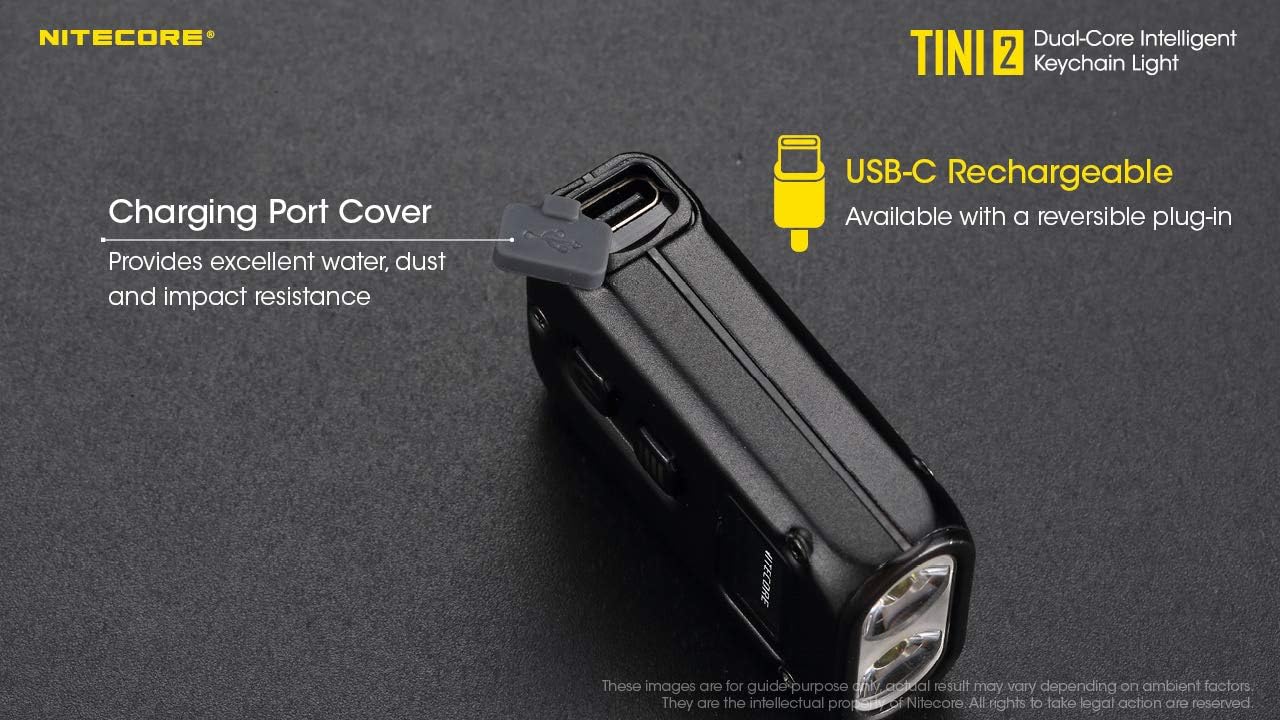
Image: A detailed table outlining the NITECORE TINI 2's technical data according to FL1 Standard, including output, runtime, beam distance, and peak beam intensity for each brightness level, along with impact resistance and IP rating.
Garantia i Suport
Informació de la garantia
Nitecore products are covered by a warranty against defects in materials and workmanship. For specific warranty terms and conditions, please refer to the warranty card included with your product or visit the official Nitecore weblloc.
Atenció al client
For technical assistance, troubleshooting, or warranty claims, please contact Nitecore customer support through their official website or the retailer from whom the product was purchased. You can visit the Botiga Nitecore a Amazon per a més informació.


