Introducció
Thank you for choosing the havit RGB Gaming Mouse HV-MS733. This manual provides detailed instructions on how to set up, operate, and maintain your new gaming mouse. Please read this manual carefully before use to ensure optimal performance and longevity of your device.

Davant-superior view of the havit RGB Gaming Mouse, showcasing its pink color, ergonomic design, and RGB lighting.
Configuració
Connexió del ratolí
- Unpack the havit RGB Gaming Mouse from its packaging.
- Locate an available USB port on your computer (PC or laptop).
- Connecteu el connector USB del ratolí al port USB.
- Your operating system should automatically detect and install the necessary drivers. No additional software installation is typically required for basic functionality.
- El ratolí ja està llest per al seu ús.

The havit RGB Gaming Mouse connected to a computer, ready for use.
Instruccions de funcionament
Funcions del botó
The havit RGB Gaming Mouse features 7 programmable buttons for enhanced control and customization.
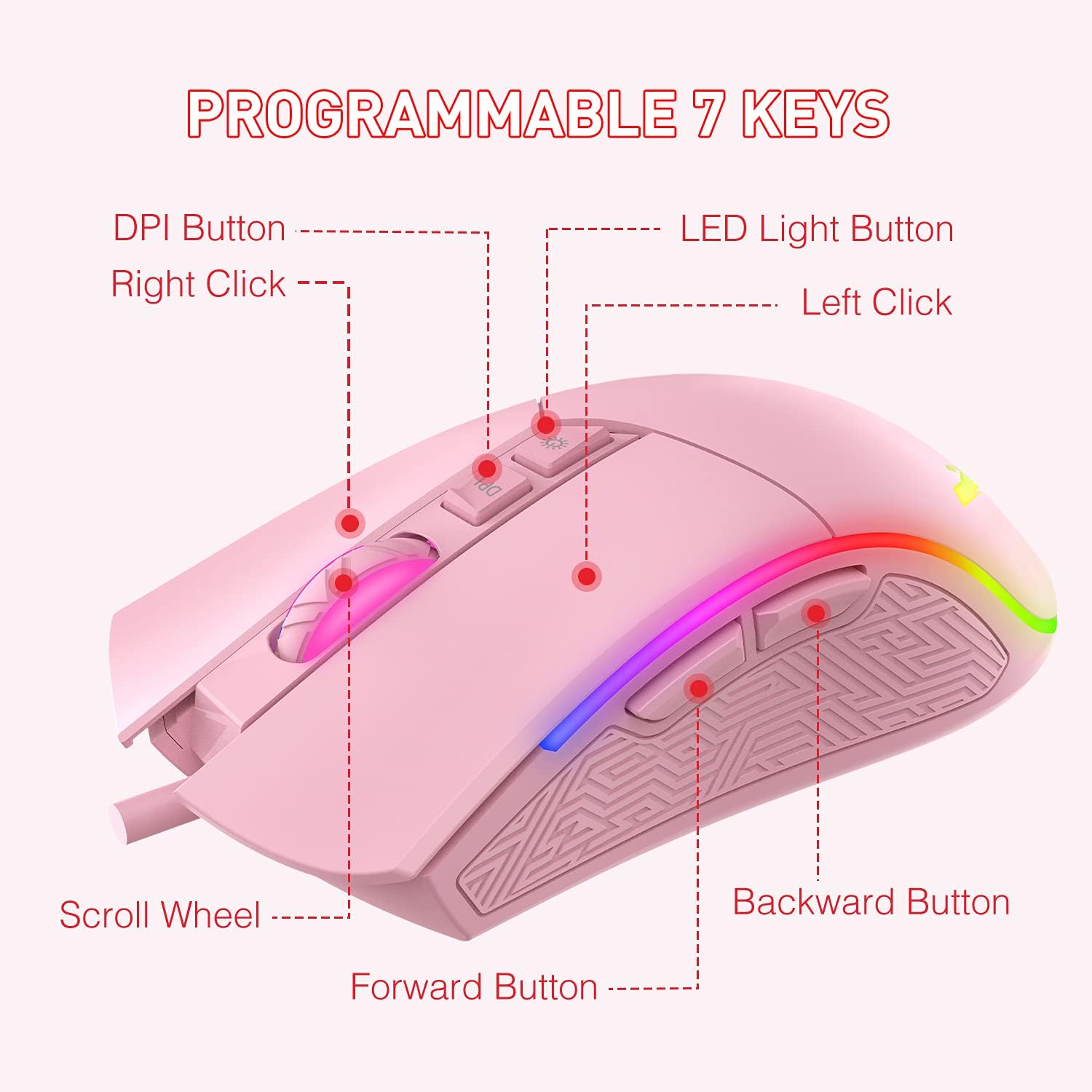
A diagram illustrating the function of each of the 7 programmable buttons on the mouse: Left Click, Right Click, Scroll Wheel, DPI Button, LED Light Button, Forward Button, and Backward Button.
- Clic esquerre: Standard primary mouse button.
- Clic dret: Standard secondary mouse button.
- Roda de desplaçament: For vertical scrolling and as a clickable middle button.
- Botó DPI: Canvia ciclísticament pels nivells de sensibilitat de DPI.
- Botó de llum LED: Changes RGB lighting modes.
- Botó Endavant: Navega cap endavant web navegadors o file exploradors.
- Botó enrere: Navega cap enrere web navegadors o file exploradors.
Ajust de DPI
The mouse offers 6 adjustable DPI (Dots Per Inch) levels, allowing you to customize cursor sensitivity to your preference. Press the Botó DPI to cycle through the available settings. Each DPI level is indicated by a specific LED color:

A visual representation of the six DPI levels (800, 1600, 2400, 3200, 4000, 4800) and their corresponding LED colors (Green, Purple, Blue, Red, Cyan, Yellow).
- 800 DPI: LED verd
- 1600 DPI: LED de color porpra
- 2400 DPI: LED blau
- 3200 DPI: LED vermell
- 4000 DPI: LED cian
- 4800 DPI: LED groc
Modes d'il·luminació RGB
The mouse features 7 distinct RGB lighting modes. Press the Botó de llum LED to switch between these modes or to turn the lighting off.

An image displaying the seven different RGB lighting modes available on the havit gaming mouse: Breathing, Colorful Streaming, Rainbow, Floe Light, Waltz, 4-Seasons, and LED Off.
- Modalitat de respiració
- Colorful Streaming Mode
- Mode arc de Sant Martí
- Floe Light Mode
- Waltz Mode
- 4-Seasons Mode
- LED apagat
Manteniment
Proper care and maintenance will extend the life of your gaming mouse.
- Neteja: Feu servir un drap suau i sec per netejar la superfície del ratolí. Per a la brutícia persistent, netegeu lleugerament.ampRenta el drap amb aigua. Evita utilitzar productes químics agressius o materials abrasius.
- Cura del cable: Do not pull or yank the USB cable. Store the cable neatly to prevent tangling and damage.
- Emmagatzematge: Quan no l'utilitzeu, guardeu el ratolí en un entorn net i sec, allunyat de temperatures extremes.
- Eviteu líquids: Keep the mouse away from liquids to prevent internal damage.
Resolució de problemes
If you encounter any issues with your havit RGB Gaming Mouse, please refer to the following common solutions:
| Problema | Solució |
|---|---|
| El ratolí no respon |
|
| La configuració de DPI no canvia |
|
| La il·luminació RGB no funciona o està bloquejada |
|
| El moviment del cursor és irregular |
|
Especificacions
Below are the technical specifications for the havit RGB Gaming Mouse HV-MS733:

A diagram showing the physical dimensions of the mouse: 132mm length, 68mm width, and 42.5mm height.
| Característica | Detall |
|---|---|
| Número de model | HV-MS733 |
| Connectivitat | USB per cable |
| Nivells de DPI | 800, 1600, 2400, 3200, 4000, 4800 |
| Nombre de botons | 7 (programable) |
| Il·luminació | RGB Backlit (7 modes) |
| Orientació de la mà | Ambidextre |
| Característica especial | Disseny ergonòmic |
| Pes de l'article | 7 unces (aproximadament 198 grams) |
| Dimensions (L x A x A) | 132 mm x 68 mm x 42.5 mm (5.2 x 2.68 x 1.67 polzades) |
Garantia i Suport
For warranty information and customer support, please refer to the documentation included with your purchase or visit the official havit weblloc web. Conserveu el comprovant de compra per a reclamacions de garantia.


