1. Introducció
This user manual provides detailed instructions for the OIVO PS5/Slim/Pro Stand and Cooling Station. This multifunctional accessory is designed to enhance your PlayStation 5 gaming experience by providing efficient cooling, convenient controller charging, and organized storage for your console and accessories. It is compatible with all PS5 console versions, including the original PS5 Digital Edition, Disc Edition, 2023 PS5 Slim, and PS5 Pro.
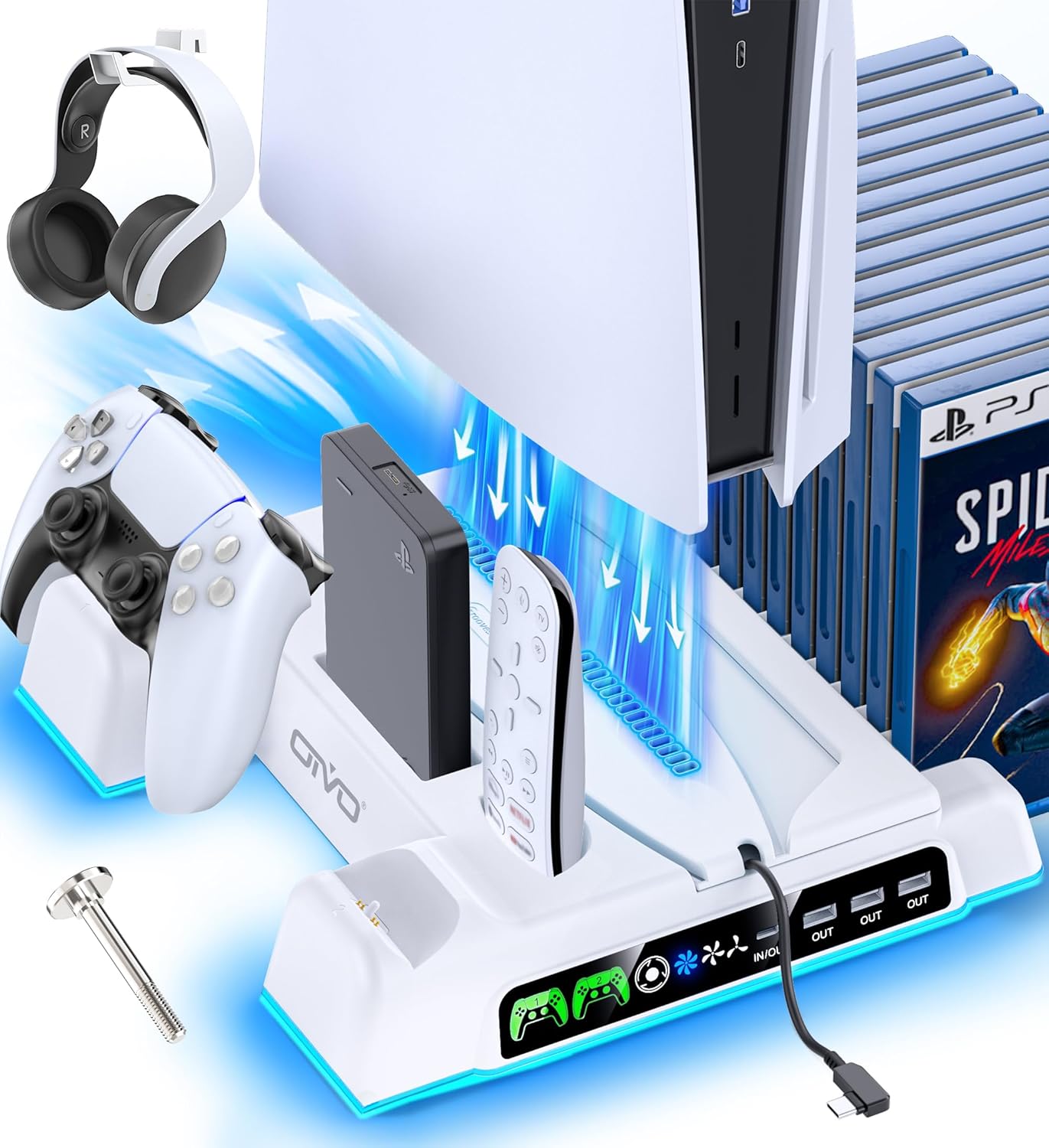
Image: The OIVO PS5 Cooling and Charging Station in white, featuring a vertical PS5 console, two white DualSense controllers, a media remote, and a headset. The station has blue LED lighting and a screw for console stability.
2. Característiques clau
- Compatibilitat universal: Designed to fit all PS5 console models, including original PS5 (Digital and Disc), PS5 Slim (CFI-2000A01, CFI-2000B01), and PS5 Pro (CFI-7019B01X). Includes a screw for secure console attachment and a PS5 Slim adapter.
- Sistema de refrigeració eficient: Features a powerful 1.63-inch enlarged turbo fan with 3 adjustable speed levels (3500 RPM, 3300 RPM, 3100 RPM) to effectively dissipate heat from the console. Controlled via a touch switch.
- Dual High-Speed Controller Charging: Two dedicated charging ports for PS5 DualSense controllers, capable of fully charging two controllers simultaneously in less than 2 hours.
- Indicadors LED de càrrega: Breathing LED lights indicate controller charging status: flashing light for charging, blue light for fully charged/standby.
- Concentrador USB integrat: Includes 3 USB-A ports and 1 USB-C port for data transfer, charging additional devices, or connecting accessories while gaming.
- Emmagatzematge organitzat: Provides slots for up to 14 PS5 game discs, a headset holder, and dedicated spaces for a media remote and external hard drive, keeping your gaming area tidy.
- Característiques de seguretat avançades: Built-in protection against overcharging, overheating, overvoltage, and short circuits to ensure the safety and longevity of your controllers.
3. Instruccions de configuració
3.1 Contingut del paquet
Abans de la configuració, assegureu-vos que hi hagi tots els components:
- 1 x OIVO PS5 Stand with Type-C Cable
- 1 x Customized Panel for PS5 Slim & Pro
- 1 x Customized Panel for PS5 Original
- 1 x suport per a auriculars
- 1 x Fixed Screw
- 1 x Manual d'usuari (aquest document)

Imatge: Una explosió view diagram illustrating all components included with the OIVO PS5 Cooling and Charging Station, including the main stand, two console panels, headset holder, screw, and USB-C cable.
3.2 Console Installation
- Select the Correct Panel: Choose the appropriate panel for your PS5 console version (Original PS5 or PS5 Slim/Pro). The panels are designed to ensure a snug fit and proper airflow.
- Place Console onto Station: Carefully align your PS5 console with the stand and place it onto the cooling station. Ensure it sits securely in the designated slot.
- Fixar amb cargol: Locate the fixed screw provided. Insert the screw through the bottom of the cooling station into the console's base to firmly secure the PS5. This prevents accidental tipping.
- Connexió d'alimentació: Connect the provided Type-C cable from the cooling station to the front USB-C port of your PS5 console. This powers the cooling fans, charging ports, and LED lights.

Image: A diagram illustrating the two different console panels provided, one for the original PS5 and another for the PS5 Slim/Pro, highlighting their compatibility.

Image: A three-step visual guide showing how to place the PS5 console onto the OIVO cooling station, tighten the securing screw from the base, and connect the power cable.
4. Instruccions de funcionament
4.1 Funcionament del ventilador de refrigeració
The cooling fan helps maintain optimal console temperature. Use the touch switch on the front of the station to control the fan speed.
- Tap the fan icon to cycle through 3 speed levels (Low, Medium, High).
- Tap and hold to turn the fan On/Off.

Imatge: Una imatge detallada view of the OIVO PS5 Cooling Station's fan system, showing the 1.63-inch enlarged turbo fan, three fan speed settings (3500, 3300, 3100 RPM), and the touch on/off switch for fan control.
4.2 Controller Charging
Place your DualSense controllers into the designated charging slots. The station can charge two controllers simultaneously.
- Indicador de càrrega: A flashing LED light indicates the controller is charging.
- Fully Charged/Standby Indicator: A solid blue LED light indicates the controller is fully charged or in standby mode.
Note: Due to the PS5 controller's built-in automatic protective chip, it may stop charging at approximately 70% battery volume to preserve battery health.

Image: The OIVO PS5 Cooling and Charging Station with two DualSense controllers docked for charging. LED indicators show red for charging and green for fully charged/standby. The image also highlights the 5V/3A power supply mode.
4.3 Funcionalitat del concentrador USB
The integrated USB hub allows for versatile connectivity.
- Connect external storage devices for data transfer.
- Charge additional accessories or mobile devices.
- Connect wired controllers or other USB peripherals.

Image: The OIVO PS5 Cooling and Charging Station with a PS5 console, two controllers, a headset, and game cases. The image highlights the USB hub with a smartphone and an additional controller connected via USB cables, demonstrating charging and data transmission capabilities.
4.4 Setting Charging & Cooling in Standby Mode
To enable charging and cooling functions while your PS5 console is in Rest Mode, adjust the console settings:
- Vés a "Configuració" a la teva consola PS5.
- Seleccioneu "System".
- Tria "Power Saving".
- Seleccioneu "Features Available in Rest Mode".
- Assegureu-vos "Supply Power to USB Ports" està configurat a "Always".

Image: A flowchart illustrating the steps within the PS5 system settings to enable power supply to USB ports in rest mode, ensuring the cooling station can charge controllers and operate fans while the console is in standby.
5. Manteniment
To ensure the longevity and optimal performance of your OIVO PS5 Cooling and Charging Station, follow these simple maintenance guidelines:
- Neteja: Regularly wipe the surface of the station with a soft, dry cloth to remove dust and fingerprints. For stubborn dirt, slightly dampNetegeu el drap amb aigua. No utilitzeu productes químics agressius ni netejadors abrasius.
- Neteja del ventilador: Periodically inspect the fan vents for dust accumulation. Use a can of compressed air to gently clear any dust from the fan blades and vents to maintain efficient airflow.
- Gestió de cables: Keep all cables neatly organized to prevent tangles and damage. Avoid bending cables sharply or placing heavy objects on them.
- Emmagatzematge: If storing the station for an extended period, disconnect it from power and store it in a cool, dry place away from direct sunlight and extreme temperatures.
6. Solució De Problemes
If you encounter issues with your OIVO PS5 Cooling and Charging Station, please refer to the following common troubleshooting steps:
- Station Not Powering On:
- Ensure the USB-C cable is securely connected to both the cooling station and the front USB-C port of your PS5 console.
- Verify that your PS5 console is powered on or in Rest Mode with "Supply Power to USB Ports" set to "Always" (refer to Section 4.4).
- Els controladors no es carreguen:
- Ensure controllers are correctly seated in the charging slots. The LED indicator should flash.
- Check if the PS5 console is providing power to the USB ports (refer to Section 4.4).
- Try charging one controller at a time to isolate if the issue is with a specific charging port or controller.
- Note that controllers may stop charging at 70% to protect battery health.
- Cooling Fan Not Working:
- Ensure the station is powered on.
- Press the touch switch on the front of the station to activate the fan. Cycle through speeds to ensure it's not just on a very low setting.
- Check for any obstructions in the fan vents.
- Ports USB que no funcionen:
- Verify the station is powered on.
- Try connecting different devices to confirm if the issue is with the port or the device.
If these steps do not resolve the issue, please contact OIVO customer support for further assistance.
7. Especificacions
| Característica | Detall |
|---|---|
| Número de model | IV-P5235 |
| Dimensions del producte | 4.02 x 1.02 x 4.33 polzades |
| Pes de l'article | 2 lliures |
| Fabricant | OIV |
| País d'origen | Xina |
| Cooling Fan Speeds | 3 Levels (3500 RPM, 3300 RPM, 3100 RPM) |
| Controller Charging Time | Less than 2 hours (for two controllers simultaneously) |
| Ports USB | 3 x USB-A, 1 x USB-C |
| Game Disc Slots | 14 |
8. Garantia i Suport
Specific warranty information for the OIVO PS5 Cooling and Charging Station is not provided in the product details. Please refer to the product packaging or the official OIVO weblloc web per conèixer els termes i condicions de la garantia.
For technical support, troubleshooting assistance beyond this manual, or warranty claims, please contact OIVO customer service through their official channels. Contact information can typically be found on the product packaging or on the OIVO brand store page on Amazon.
Visit the OIVO Store: OIVO Amazon Store


