Introducció
This manual provides comprehensive instructions for the setup, operation, maintenance, and troubleshooting of your Mecool Mechanical Gaming Keyboard. Please read this manual thoroughly before using the product to ensure optimal performance and longevity.
The Mecool Mechanical Gaming Keyboard features 104 keys with Red Switches, designed for a responsive and tactile typing experience. It includes white backlighting with multiple customizable modes and anti-ghosting technology for precise input during gaming or typing.
Contingut del paquet
- Mecool Mechanical Gaming Keyboard (Red Switch Pink)
- Cable USB
Configuració
The Mecool Mechanical Gaming Keyboard is a plug-and-play device, requiring no additional driver installation for basic functionality.
- Desembalatge: Carefully remove the keyboard and USB cable from the packaging.
- Connexió: Insert the USB-A connector of the provided USB cable into an available USB port on your computer.
- Reconeixement inicial: Your operating system (Windows 2000, ME, XP, 7, 8, or 10) will automatically detect and install the necessary generic drivers. This process may take a few moments.
- Col·locació: Place the keyboard on a stable, flat surface. Adjust the kickstands on the underside of the keyboard for a preferred typing angle, if desired.
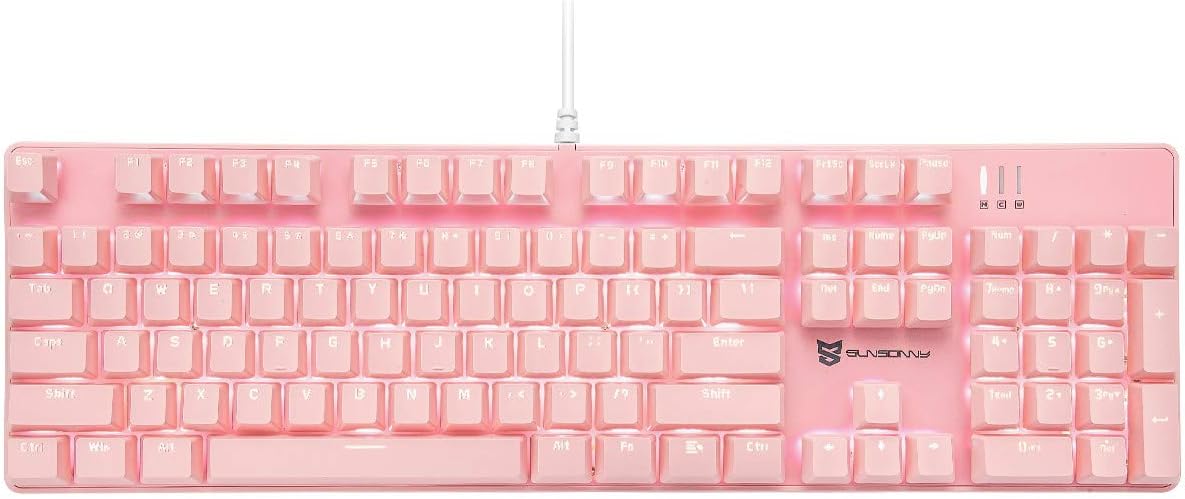
Imatge: De dalt a baix view of the Mecool Mechanical Gaming Keyboard in pink, showcasing its full 104-key US layout and white backlighting. The wired connection is visible at the top center.
Instruccions de funcionament
Funcions bàsiques del teclat
The keyboard operates as a standard 104-key US layout keyboard. All keys are anti-ghosting, ensuring accurate registration of multiple simultaneous key presses.
Control de la llum de fons
The keyboard features white backlighting with various modes and intensity levels. Use the Function (FN) key in combination with other keys to control the backlighting.
| Combinació de tecles | Funció |
|---|---|
| FN + INS | Canvia entre 21 modes de retroiluminació diferents. |
| FN + ↑ | Increase backlight intensity (5 levels). |
| FN + ↓ | Decrease backlight intensity (5 levels). |
| FN + ← | Decrease backlight flow velocity (6 levels). |
| FN + → | Increase backlight flow velocity (6 levels). |

Imatge: Examples of the keyboard's white backlighting in various modes, demonstrating different illumination patterns and intensities.
Multimèdia i tecles de drecera
The keyboard includes dedicated multimedia and shortcut functions accessible via the FN key combinations.
| Combinació de tecles | Funció |
|---|---|
| FN + F1 | El meu ordinador |
| FN + F2 | Cerca |
| FN + F3 | Calculadora |
| FN + F4 | Reproductor multimèdia |
| FN + F5 | Pista anterior |
| FN + F6 | Pista següent |
| FN + F7 | Reproduir/Pausa |
| FN + F8 | Atureu-vos |
| FN + F9 | Silenciar |
| FN + F10 | Baixa el volum |
| FN + F11 | Puja el volum |
| FN + F12 | Bloquejar el teclat |
| FN + GUANYA | Bloquejar/Desbloquejar la clau de Windows |
Configuració de macro
The keyboard supports macro settings, particularly for the number pad, to enhance efficiency. Specific software or detailed instructions for macro programming are typically provided by the manufacturer. Refer to the official Mecool website or support resources for advanced macro setup guides.

Imatge: Un primer pla view highlighting the mechanical red switches, which offer a smooth and consistent keystroke, ideal for gaming and fast typing.
Manteniment
Un manteniment adequat garanteix la longevitat i el rendiment del teclat.
- Neteja:
- Desconnecteu el teclat de l'ordinador abans de netejar-lo.
- Utilitzeu un drap suau i sense pelusa lleugerament dampEsbandiu amb aigua o una solució netejadora suau per netejar la superfície del teclat.
- Per a la pols i les restes entre les tecles, feu servir aire comprimit.
- Eviteu l'ús de productes químics agressius, netejadors abrasius o humitat excessiva.
- Keycap Removal (if applicable): If you need to clean under the keycaps or replace switches, use a keycap puller (not included) to gently remove the keycaps. Be careful not to damage the switches.
- Emmagatzematge: Quan no l'utilitzeu durant períodes prolongats, guardeu el teclat en un lloc net i sec, allunyat de la llum solar directa i de temperatures extremes.
Resolució de problemes
| Problema | Causa possible | Solució |
|---|---|---|
| El teclat no respon. | Connexió USB fluixa, port USB defectuós, problema amb el controlador. | Assegureu-vos que el cable USB estigui connectat correctament. Proveu un port USB diferent. Reinicieu l'ordinador. |
| La retroiluminació no funciona o està enganxada. | Backlight turned off, low intensity, software glitch. | Premeu FN + ↑ to increase brightness. Cycle through modes with FN + INS. Disconnect and reconnect the keyboard. |
| Keys not registering or ghosting. | Restes sota la tecla, conflicte de programari. | Clean under the affected keycap using compressed air. Ensure no other software is interfering with keyboard input. The keyboard features N-Key Rollover for anti-ghosting. |
| Incorrect key layout (e.g., @ and " swapped). | Operating system keyboard language setting is incorrect. | Ensure your operating system's keyboard input language is set to "English (United States)" or "US QWERTY". |
If the issue persists after attempting these solutions, please contact Mecool customer support for further assistance.
Especificacions
| Característica | Detall |
|---|---|
| Marca | MECOOL |
| Model | Mechanical Gaming Keyboard (Red Switch Pink) |
| Connectivitat | Amb cable (USB) |
| Tipus de canvi | Mechanical Red Switches |
| Disseny de claus | US Layout, 104 Keys, Full Size |
| Il·luminació de fons | White Backlit, 21 Modes, 5 Intensity Levels, 6 Flow Velocities |
| Anti-fantasma | All Keys Rollover |
| Vida útil de la clau | 50 milions de pulsacions de tecles |
| Dimensions (L x A x A) | 43 x 13 x 3 cm (16.9 x 5.1 x 1.2 polzades) |
| Pes | 1.19 kg (2.62 lliures) |
| Compatibilitat | Win2000, WinME, WinXP, Win7, Win8, Win10 |

Image: Diagram illustrating the dimensions of the keyboard, measuring approximately 16.9 inches in length and 5.1 inches in width.
Garantia i Suport
Mecool products are designed for durability and performance. For information regarding warranty coverage, technical support, or service, please refer to the official Mecool weblloc web o contacteu directament amb el seu departament d'atenció al client.
Per obtenir la informació d'assistència més actualitzada, visiteu: Mecool Official Store on Amazon


