1. Introducció
This manual provides detailed instructions for the installation, operation, and maintenance of your Gaoducash Wireless Smart Motion Sensor (Model S-M). This device is designed to enhance your home security and smart automation by detecting motion and sending alerts via the Tuya Smart or Smart Life application. Please read this manual thoroughly before using the product to ensure proper function and safety.
2. Producte acabatview
The Gaoducash S-M is a PIR (Passive Infrared) motion detector that operates wirelessly via 2.4G Wi-Fi. It features a 110° detection angle and a range of up to 40 feet (12 meters). Key features include:
- Connectivitat sense fils: Connects directly to 2.4G Wi-Fi networks without a separate hub.
- Alertes en temps real: Sends notifications to your smartphone via the Tuya Smart or Smart Life app upon motion detection or low battery.
- Detecció avançada: Utilizes dual-element infrared technology to minimize false alarms from small pets (under 25KG) and effectively detect crawling motion.
- Light Intensity Compensation: Maintains accurate detection even in strong sunlight (up to 6500 Lux anti-white light).
- Integració de la llar intel·ligent: Compatible with other Tuya/Smart Life devices for creating automated scenarios (e.g., turning on lights when motion is detected).
- Funciona amb bateria: Operates on 2 AAA batteries (not included) with an estimated battery life of up to 6 months.
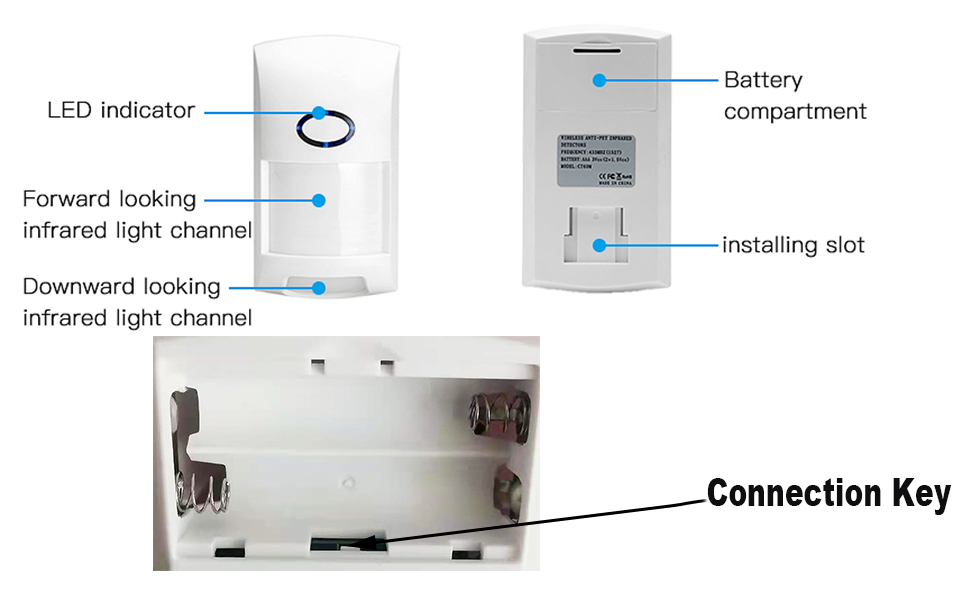
2.1. Components

- Indicador LED: Provides status feedback (e.g., pairing mode, motion detection).
- Infrared Light Channels: Detects changes in infrared radiation caused by movement.
- Compartiment de la bateria: Conté 2 piles AAA.
- Installing Slot: Used for mounting the sensor to a wall or surface.
- Connection Key: Button inside the battery compartment for pairing.
3. Instruccions de configuració
3.1. Instal·lació de la bateria
- Obriu la tapa del compartiment de la bateria a la part posterior del sensor.
- Introduïu dues (2) piles AAA, assegurant-vos de la polaritat correcta (+/-).
- Tanqueu bé la tapa del compartiment de la bateria.
3.2. Instal·lació de l'aplicació i emparellament de dispositius
- Descarrega't el Tuya Smart or Vida intel·ligent aplicació des de la botiga d'aplicacions del teu telèfon intel·ligent (disponible per a iOS i Android).
- Registreu-vos o inicieu sessió al vostre compte.
- Assegureu-vos que el vostre telèfon intel·ligent estigui connectat a un Xarxa Wi-Fi de 2.4 GHz. The sensor does not support 5GHz Wi-Fi. If you have a dual-band router, ensure the 2.4GHz channel is separate or temporarily disable the 5GHz channel during pairing.
- A l'aplicació, toca "Afegeix dispositiu" o la icona "+".
- Select "Security & Video Surveillance" then "Motion Sensor (Wi-Fi)".
- Follow the on-screen instructions to put the sensor into pairing mode. This usually involves pressing and holding the "Connection Key" inside the battery compartment until the LED indicator blinks rapidly.
- Confirm the LED indicator is blinking rapidly in the app and proceed with network configuration.
- Once successfully paired, the device will appear in your app.
3.3. Muntatge del sensor
The sensor can be mounted on a wall using the provided screws. Choose a location that provides optimal detection coverage for the area you wish to monitor.
- Mount the sensor at a height of approximately 2 meters (6.5 feet) for optimal performance.
- Avoid placing the sensor directly facing heat sources, air conditioning vents, or direct sunlight, as these can cause false alarms.
- Ensure the detection area is clear of obstructions.
- Fix the mounting bracket to the desired wall location using screws.
- Align the sensor with the bracket's installing slot and slide it down to secure it in place.
4. Instruccions de funcionament
4.1. Detecció de moviment
The sensor uses passive infrared technology to detect movement by sensing changes in heat. When motion is detected within its 110° field of view and up to 40 feet range, it will trigger an alert.


4.2. Funcions de l'aplicació
Through the Tuya Smart or Smart Life app, you can:
- Receive Real-time Notifications: Get instant alerts on your smartphone when motion is detected.
- View Alarm History: Access a log of all detection events for monitoring.
- Monitor de l'estat de la bateria: The app will notify you when the battery level is low.
- Create Smart Scenarios: Link the motion sensor with other compatible smart devices. For example, you can configure it to automatically turn on smart lights when motion is detected in a room.

5. Manteniment
5.1. Substitució de la bateria
The sensor is powered by 2 AAA batteries. The estimated battery life is up to 6 months, but actual duration may vary based on usage frequency and environmental factors. The app will send a low battery notification when replacement is needed.
- Obriu la tapa del compartiment de la bateria.
- Traieu les piles velles.
- Insert two new AAA batteries, observing correct polarity.
- Tanqueu la tapa del compartiment de la bateria.
5.2. Neteja
To ensure optimal performance, periodically clean the sensor's lens and casing. Use a soft, dry cloth. Avoid using abrasive cleaners or solvents, as these can damage the device.
6. Solució De Problemes
| Problema | Causa possible | Solució |
|---|---|---|
| Sensor not connecting to Wi-Fi. | Incorrect Wi-Fi band (5GHz not supported), weak Wi-Fi signal, incorrect password, sensor not in pairing mode. |
|
| No motion detection or delayed alerts. | Low battery, sensor obstructed, incorrect mounting height, environmental interference (heat sources, direct sunlight). |
|
| Falses alarmes freqüents. | Pets, drafts, direct sunlight, rapid temperature changes, sensor placed near windows or vents. |
|
| App not receiving notifications. | App notification settings disabled, phone not connected to internet, sensor offline. |
|
7. Especificacions
| Característica | Detall |
|---|---|
| Marca | Gaoducash |
| Número de model | SM |
| Connectivitat | Wi-Fi (només 2.4 GHz) |
| Angle de detecció | 110° |
| Interval màxim de detecció | 12 metres (40 peus) |
| Font d'alimentació | 2 piles AAA (no incloses) |
| Durada estimada de la bateria | Fins a 6 mesos (182.5 dies) |
| Anti-White Light Intensity | 6500 lux |
| Anti-Pet Immunity | Pets under 25KG |
| Temperatura de funcionament | 14 graus centígrads |
| Dimensions del producte (A x A x P) | 4.13" x 2.28" x 1.69" (105 mm x 58 mm x 43 mm) |
| Pes de l'article | 89 grams (3.14 unces) |
| Aplicacions compatibles | Tuya Smart, Smart Life |
8. Garantia i Suport
Gaoducash offers an industry-leading 2 any de garantia for this product. If you encounter any issues or have questions regarding your Wireless Smart Motion Sensor, please contact Gaoducash customer support. Refer to your purchase documentation for specific contact details or visit the official Gaoducash weblloc web per obtenir informació de suport.


