1. Introducció
This manual provides detailed instructions for the assembly, operation, and programming of the Yahboom Nano-DOFBOT 6DOF AI Vision Robot Arm Kit. This kit is designed for enthusiasts and developers interested in artificial intelligence, robotics, and programming with the Jetson Nano platform. It features a 6-degree-of-freedom robotic arm equipped with a camera for advanced vision capabilities.
2. Producte acabatview
The Yahboom Nano-DOFBOT is an advanced robotic arm kit that integrates artificial intelligence and vision processing. Key features include:
- 6-Degree-of-Freedom (6DOF) Robotic Arm: Provides flexible movement for various tasks.
- Càmera integrada: Enables First-Person View (FPV) video transmission and AI vision functions.
- Capacitats d'IA: Supports color recognition, gesture recognition, face detection, tracking, and object grasping.
- Múltiples mètodes de control: Operable via a multi-function mobile app (Android/iOS), USB gamepad, PC software, ROS system, and Jupyter Lab online programming.
- Construcció robusta: Made from fully anodized aluminum alloy with 15kg smart serial bus metal gear digital servos for precise control.
- Disseny expandible: Equipped with a functional expansion board for future enhancements.

Figure 2.1: The Yahboom Nano-DOFBOT 6DOF AI Vision Robot Arm Kit, showcasing its green robotic arm, base, and integrated electronics.
3. Contingut del paquet
Verify that all components listed below are present in your package. The kit includes the following items:
- DOFBOT robot arm (Assembled)
- MAP (for color recognition activities)
- USB handle (gamepad)
- Cable adaptador
- Adaptador d'alimentació
- Robot arm expansion board
- I2C communication line
- Blocks (x4)
- Suction cups (x6)
- 32G TF card (pre-installed with software)
- Lector de targetes
- Screw nut copper pillar parts package
- Active radiator
- Manual d'usuari
- Caixa de paquets
- Pantalla OLED
- 30W USB camera
- Suport fix (x2)
- MICRO USB cable
- Power supply expansion board package
- Double-head Type-C board adapter
- Cable de connexió de la càmera
- Tornavís
- Black ties (x6)
- Jetson Nano 4GB SUB (Optional, not included in this specific kit variant)
- 40PIN cable
- Targeta de xarxa sense fil
- Disc U
- Ventilador de refrigeració

Figure 3.1: Visual representation of the components included in the Nano-DOFBOT kit.
4. Instruccions de configuració
The Nano-DOFBOT robotic arm comes pre-assembled. Initial setup primarily involves connecting the necessary components and establishing network connectivity.
- Desembalatge: Carefully remove all components from the package.
- Muntatge de la base: Attach the robotic arm and the main control board to the base plate using the provided screws and copper pillars. Ensure the suction cups are attached to the base for stability.
- Connexió de la càmera: Connect the 30W USB camera to the designated port on the control board.
- Connexió d'alimentació: Connect the power adapter to the robotic arm's power input.
- Engegada inicial: Power on the device. The pre-burned image on the TF card should initiate the system.
- Connexió de xarxa:
- Connect your mobile phone to the DOFBOT's hotspot.
- Open the multi-function APP and enter the DOFBOT's IP address to connect.
- Alternatively, use the WiFi learning mode by pressing the button on the main board and scanning a QR code generated by the app with the camera.
- Calibratge del servo: Perform servo calibration through the mobile app or PC software to ensure accurate movement. This involves reading and adjusting the angle of each steering gear.
- Calibració del color: Utilize the basic and professional color calibration functions in the software to minimize environmental factors affecting color recognition.

Figure 4.1: Assembly of the robotic arm onto its base, showing the suction cups for stability.

Figure 4.2: Mobile application interface for device connection and calibration procedures.
5. Instruccions de funcionament
The Nano-DOFBOT offers multiple methods for control and interaction:
5.1 Control d'aplicacions mòbils
The dedicated mobile application (Android/iOS) provides comprehensive control over the robotic arm's functions, including:
- Direct movement control.
- Access to fixed action groups.
- Custom action group recording and playback.
- Real-time FPV video feed from the camera.
- AI functions like color, gesture, and face recognition.

Figure 5.1: Controlling the robotic arm via the mobile application.
5.2 USB Gamepad Control
For tactile control, connect the included USB gamepad. This method allows for precise manual manipulation of the arm's movements.

Figure 5.2: Operating the robotic arm with a USB gamepad for enhanced control.
5.3 PC Upper Computer View i Programació
Connect the robotic arm to a PC to utilize the upper computer software for image transmission and advanced programming. This interface is suitable for detailed control and development tasks.
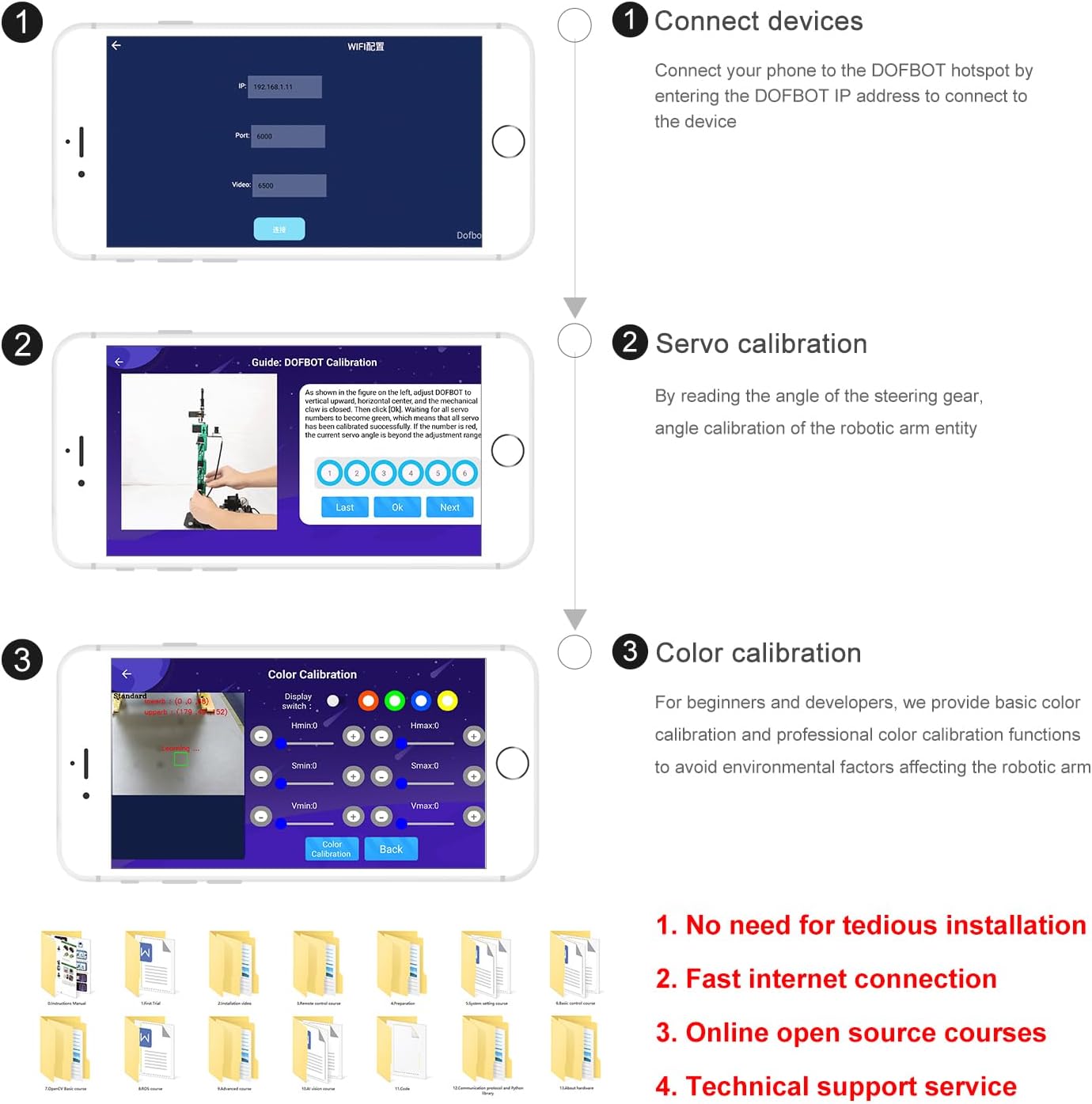
Figure 5.3: PC-based control and programming interface for the robotic arm.
5.4 Master-Slave Machine Control
The system supports a master-slave configuration, allowing one robotic arm (master) to control another (slave) in real-time, replicating gestures and movements. This enables remote operation and complex task execution.
Video 5.1: Demonstration of the master-slave control feature, where one robotic arm's movements are mirrored by another.
6. Advanced Features and Programming
The Nano-DOFBOT is designed for advanced applications, leveraging AI and robotics operating systems.
6.1 AI Vision Capabilities
The integrated camera enables the robotic arm to perform various AI-driven tasks:
- Color Recognition and Tracking: The arm can identify and track specific colors, allowing it to interact with color-coded objects.
- Reconeixement de gestos: The arm can recognize predefined human gestures and execute corresponding actions.
- Face Recognition and Tracking: The system can detect and track human faces, responding to their movements.
- Object Grasping: Based on recognition, the arm can grasp designated objects.

Figure 6.1: Demonstrations of AI vision features including color recognition, tracking, and interaction.

Figure 6.2: Gesture interaction capability of the robotic arm.
Video 6.1: Demonstration of the robotic arm performing color recognition and tracking tasks.
Video 6.2: Demonstration of the robotic arm performing gesture recognition and interaction.
Video 6.3: Demonstration of the robotic arm performing face recognition and tracking.
6.2 ROS-MoveIt Control and Programming
The Robotic Operating System (ROS) provides a robust framework for controlling the DOFBOT. ROS-MoveIt can be used to build obstacle models, enabling the robotic arm to navigate and operate in complex environments while avoiding collisions. Jupyter Lab offers an online programming environment for developing custom applications.

Figure 6.3: ROS-MoveIt control interface for advanced robotic arm programming and simulation.
7. Manteniment
Proper maintenance ensures the longevity and optimal performance of your Nano-DOFBOT.
- Neteja: Regularly clean the robotic arm and its components with a soft, dry cloth. Avoid using liquid cleaners directly on electronic parts.
- Inspecció conjunta: Periodically check all joints and connections for looseness. Tighten any loose screws to maintain structural integrity and movement precision.
- Actualitzacions de programari: Keep the system software and mobile application updated to the latest versions to benefit from performance improvements and new features. Refer to the official Yahboom weblloc per a actualitzacions.
- Emmagatzematge: When not in use for extended periods, store the robotic arm in a dry, dust-free environment.
8. Solució De Problemes
This section addresses common issues you might encounter with your Nano-DOFBOT.
| Problema | Causa possible | Solució |
|---|---|---|
| Robotic arm does not power on. | Power adapter not connected or faulty; power switch off. | Ensure the power adapter is securely connected and the power switch is in the 'ON' position. Verify the power adapter is functional. |
| Cannot connect to the robotic arm via Wi-Fi/App. | Incorrect IP address; Wi-Fi hotspot not active; network configuration issues. | Confirm the correct IP address is entered in the app. Ensure the DOFBOT's Wi-Fi hotspot is active. Try re-configuring the network connection using the QR code method. |
| Servos are not moving correctly or are erratic. | Loose servo connections; incorrect servo calibration; software malfunction. | Check all servo connections. Perform a servo calibration through the mobile app or PC software. If issues persist, re-flash the system software from the provided U-disk or download the latest version from Yahboom's official weblloc. |
| Camera image is blurry or recognition functions fail. | Camera focus issue; poor lighting; incorrect color calibration. | Adjust the camera's focal length manually. Ensure adequate and consistent lighting. Perform color calibration again. |
| Joystick control is unresponsive. | Joystick not properly connected; driver issues; software configuration. | Ensure the USB gamepad is securely connected. Check for any specific driver requirements or software settings for gamepad control. Refer to the online documentation for detailed joystick setup. |
9. Especificacions
Detailed technical specifications for the Nano-DOFBOT robotic arm:
| Característica | Detall |
|---|---|
| Microprocessador | Quad-core ARM A57+128-core Maxwell (for Jetson Nano) |
| AI Computing Power | 472 GFLOPS |
| Sistema operatiu | Ubuntu 18.04 LTS + ROS Melodic |
| Llenguatge de programació | Python |
| Steering Gear Scheme | 15kg*5 + 6*1 Serial Bus Smart Servo |
| Entrada | Wide-angle camera / Emergency stop button / Distribution network / 1 button / Reset button / 2*IIC interface / 5V fan interface |
| Sortida | RGB indicator / OLED display buzzer / 6 bus servo / 6-channel PWM servo interface |
| Esquema d'energia | Adaptador de corrent de 12V/5A |
| Connector d'alimentació | Interfície de connector T |
| Mètode de control remot | Mobile APP/PC upper computer/PS2 handle/PC port |
| Via de Comunicació | W network |
| Protecció de seguretat | Overcurrent protection / Reverse connection protection |
| Mechanical Arm Material | Alumini anoditzat |
| Diameter of Grabbed Object | 0.39-2.36 polzades |
| Weight After Assembly | 125 g |
| Graus de Llibertat | 5 degrees of freedom + gripper (6DOF) |
| Càrrega útil | 200g (Straightenable weight) / 500g (Clamppes de manipulació) |
| Arm Span | 150 mm |
| Effective Crawl Range | Radius < 32cm, area with the central axis as a semicircle |
| Repetibilitat | ± 0.5 mm |
| Voltage | 100-240V 50/60 Hz |
| Càmera | Càmera gran angular de 500,000 píxels de 110 graus |
| Resolució | 480p (640x480) |
| Velocitat de fotogrames | 30 fps |
| Mètode d'enfocament | La distància focal es pot ajustar manualment |

Figure 9.1: Product dimensions of the Nano-DOFBOT robotic arm.
10. Garantia i suport tècnic
Yahboom provides comprehensive online technical support and a wealth of course materials to assist users. If you encounter any difficulties during assembly, operation, or programming, please contact Yahboom's customer support for assistance.
- Recursos en línia: Access detailed course materials, tutorials, and sample code on the official Yahboom weblloc.
- Assistència tècnica: For direct support, contact Yahboom's technical support team. Contact information can typically be found on the product packaging or the official weblloc.


