1. Introducció
This user manual provides comprehensive instructions for the LVWIT Smart Light Bulb, Model LV-5.3WB10-E12-ZF. This smart candelabra LED bulb features color changing capabilities, dimmable functions, and seamless integration with voice assistants like Alexa and Google Home. It operates on a 2.4 GHz Wi-Fi network and requires no additional hub.
Please read this manual thoroughly before installation and operation to ensure proper use and to maximize the product's features.
2. Informació de seguretat
- Seguretat elèctrica: Assegureu-vos que l'interruptor estigui apagat abans d'instal·lar o treure la bombeta.
- Només per a ús interior: This bulb is designed for indoor use in dry locations.
- Voltage Compatibilitat: Use only with 100-120V, 60Hz power supply.
- Interruptors de regulació: Do not use with traditional dimmer switches. The bulb is dimmable via the app or voice control.
- Ventilació: Ensure adequate ventilation around the bulb. Do not enclose in fixtures that restrict airflow.
- Eliminació: Elimineu els residus electrònics de manera responsable d'acord amb la normativa local.
3. Contingut del paquet
The package for the LVWIT Smart Light Bulb (Model LV-5.3WB10-E12-ZF) typically includes:
- LVWIT Smart Light Bulb(s) (B11-4.9w, 2 Count)
- Manual d'usuari (aquest document)

Figure 3.1: LVWIT Smart Light Bulbs (2-pack).
4. Guia de configuració
4.1 Instal·lació física
- Ensure the power to the light fixture is turned off at the wall switch before installation.
- Carefully screw the LVWIT Smart Light Bulb into a standard E12 candelabra base socket.
- Turn on the power to the light fixture. The bulb should flash rapidly, indicating it is in pairing mode. If not, turn the bulb off and on 3 times until it flashes.
4.2 Instal·lació de l'aplicació i connexió Wi-Fi
The LVWIT Smart Light Bulb works with the Tuya Smart or Smart Life app.
- Download the "Tuya Smart" or "Smart Life" app from the Apple App Store or Google Play Store.
- Registreu-vos o inicieu sessió al vostre compte.
- Assegureu-vos que el dispositiu mòbil estigui connectat a un Xarxa Wi-Fi de 2.4 GHz. The bulb does not support 5 GHz Wi-Fi.
- A l'aplicació, toca la icona "+" a la cantonada superior dreta per afegir un dispositiu.
- Select "Lighting" > "Light Source (Wi-Fi)".
- Confirm that the bulb is flashing rapidly. If it is not, turn the bulb off and on 3 times until it flashes rapidly.
- Enter your 2.4 GHz Wi-Fi network password and confirm.
- The app will begin connecting to the bulb. Once connected, you can rename the bulb for easier control.
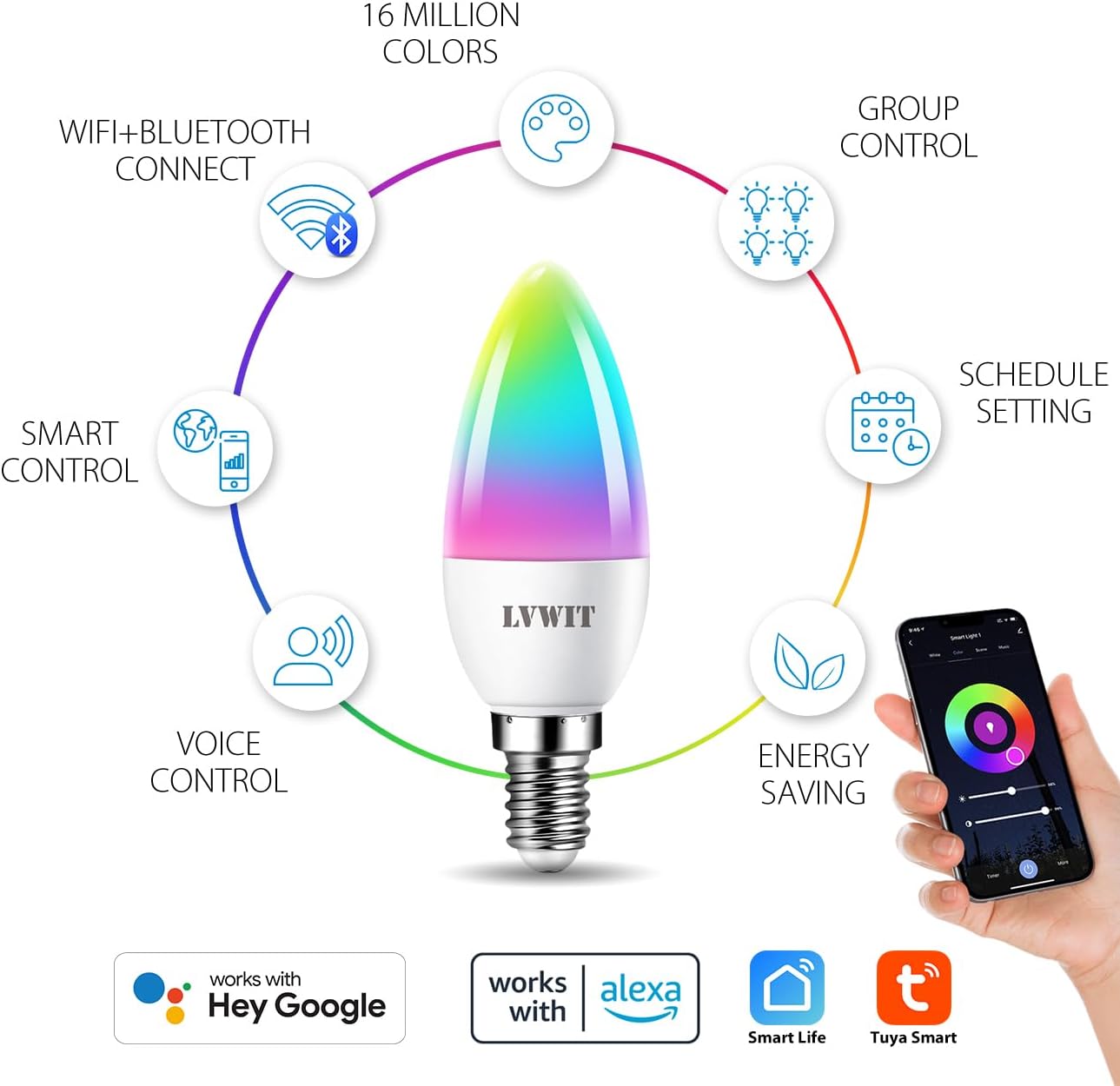
Figura 4.1: Mésview of smart bulb features and app compatibility.
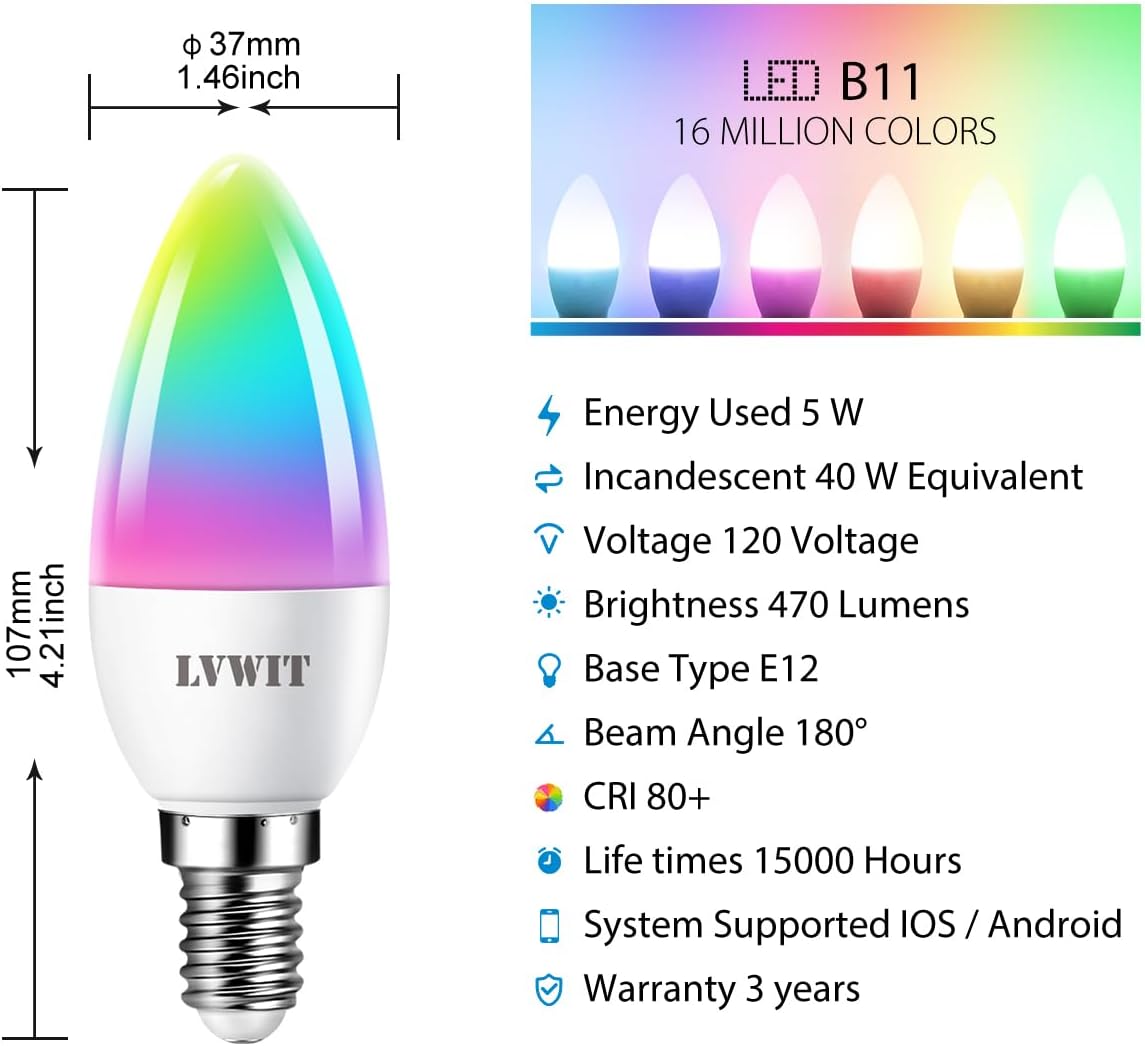
Figure 4.2: Detailed specifications and dimensions of the smart bulb.
4.3 Voice Assistant Integration (Alexa/Google Home)
To control your LVWIT Smart Light Bulb with voice commands, link your Smart Life/Tuya Smart account to your Amazon Alexa or Google Home app.
Per a Amazon Alexa:
- Obriu l'aplicació Alexa.
- Tap "More" (hamburger menu) > "Skills & Games".
- Cerca "Smart Life".
- Select "Smart Life" and tap "ENABLE TO USE".
- Enter your Smart Life account credentials (email/phone and password) and select your region. Tap "Link Now".
- Once linked, tap "DISCOVER DEVICES". Alexa will find your smart bulb(s).
- You can now control your bulb(s) with voice commands (e.g., "Alexa, turn on [Bulb Name]", "Alexa, set [Bulb Name] to pink").
Per a Google Home:
- Obriu l'aplicació Google Home.
- Toca "+" > "Configura el dispositiu" > "Funciona amb Google".
- Cerca "Smart Life".
- Select "Smart Life" and link your account using your Smart Life credentials.
- Assign your bulb(s) to a room for easier control.
- You can now control your bulb(s) with voice commands (e.g., "Hey Google, turn on [Bulb Name]", "Hey Google, change [Bulb Name] to blue").

Figure 4.3: Voice control with smart home hubs.
Video 4.1: Demonstration of voice control for the smart light bulb, showing how to change light color and brightness using voice commands.
5. Instruccions de funcionament
5.1 Basic Control (On/Off, Brightness, Color Temperature)
Once connected, you can control your smart bulb directly from the Tuya Smart or Smart Life app:
- On/Off: Tap the power icon in the app to turn the bulb on or off.
- Brillantor: Adjust the brightness slider to dim or brighten the light.
- Temperatura de color: Change the color temperature from 2700K (warm white) to 6500K (daylight white) using the dedicated slider or preset options.
5.2 Canvi de color (RGB)
The bulb offers 16 million colors. In the app, navigate to the "Color" tab to select your desired hue from the color wheel or choose from predefined color scenes.
5.3 Control de grup
If you have multiple LVWIT Smart Light Bulbs, you can group them together in the app to control them simultaneously.
- In the app, select one of the bulbs you wish to group.
- Tap the "..." or "Settings" icon (usually top right).
- Look for "Create Group" or "Group Management".
- Select the bulbs you want to include in the group and confirm.
- You can now control the entire group (e.g., turn on/off, change color, adjust brightness) with a single command.

Figure 5.1: Grouping smart bulbs for unified control across different areas.
5.4 Programació i temporitzadors
Set schedules for your bulbs to turn on/off or change settings automatically at specific times.
- In the app, select the bulb or group you want to schedule.
- Busca l'opció "Programació" o "Temporitzador".
- Set the desired time, action (on/off, color, brightness), and repetition (daily, specific days).
- Guarda l'horari.

Figure 5.2: Setting automated schedules for your smart light bulbs.
5.5 modes d'escena
The app provides various preset scene modes (e.g., Working, Leisure, Soft, Colorful, Dazzling) to instantly change the ambiance of your room. You can also create custom scenes.

Figure 5.3: Exploring and applying multi-access scene modes.
6. Manteniment
- Neteja: Assegureu-vos que la bombeta estigui apagada i freda abans de netejar-la. Netegeu-la amb un drap suau i sec. No utilitzeu netejadors líquids ni materials abrasius.
- Emmagatzematge: Si guardeu la bombeta durant un període prolongat, guardeu-la en un lloc fresc i sec, allunyat de la llum solar directa.
- Actualitzacions de firmware: Periodically check the Smart Life/Tuya Smart app for firmware updates to ensure optimal performance and security.
7. Solució De Problemes
| Problema | Causa possible | Solució |
|---|---|---|
| Bulb not connecting to Wi-Fi / App cannot find bulb. |
|
|
| Bulb is unresponsive to voice commands (Alexa/Google Home). |
|
|
| Bulb does not dim or change color. |
|
|
8. Especificacions del producte
| Característica | Detall |
|---|---|
| Marca | LVWIT |
| Número de model | LV-5.3WB10-E12-ZF |
| Tipus de llum | LED |
| Mida de la forma del bulb | B11 (Espelma) |
| Base del bulb | E12 |
| Wattage | 4.9W (5 watts) |
| Equivalent incandescent | 40 watts |
| Brillantor | 470 lúmens |
| Temperatura de color | 2700K - 6500K (Warm White to Daylight) |
| Opcions de color | 16 milions de colors (RGB) |
| Voltage | 100-120 volts, 60 hertz |
| Tecnologia de connectivitat | Wi-Fi (només 2.4 GHz) |
| Tipus de controlador | App (Tuya Smart/Smart Life), Google Assistant, Amazon Alexa |
| Característiques especials | Dimmable, Color Changing, Group Control, Scheduling |
| Vida Mitjana | 15,000 hores |
| Material | Plàstic |
| Dimensions del producte | 0.01 cm d'amplada x 4.41 cm d'alçada |
| Pes de l'article | 3.2 unces (0.09 quilograms) |
9. Garantia i assistència
9.1 Informació de la garantia
The LVWIT Smart Light Bulb (Model LV-5.3WB10-E12-ZF) comes with a 3 any de garantia des de la data de compra. Aquesta garantia cobreix els defectes de materials i fabricació en condicions d'ús normal. No cobreix els danys causats per un mal ús, accidents, modificacions no autoritzades o instal·lació incorrecta.
Conserveu el vostre comprovant de compra per a reclamacions de garantia.
9.2 Atenció al client
For technical assistance, troubleshooting, or warranty inquiries, please contact LVWIT customer support. You can typically find contact information on the product packaging, the official LVWIT weblloc web o a través del venedor on es va comprar el producte.
LVWIT aims to provide outstanding products and services. For technical or service support, they typically reply within 24 hours.
For more information, visit the official LVWIT store: LVWIT Store on Amazon


