1. Acabatview
The Logitech C505/C505e HD Wired Business Webcam is designed to enhance your video communication experience. It provides crisp, smooth, and colorful widescreen HD 720p video with a 60° diagonal field of view. El webcam features fixed focus and automatic light correction, adapting to various lighting conditions. Its single, omnidirectional microphone incorporates noise-reduction technology, supporting clear conversations up to 3 meters away, even in noisy environments. The extra-long USB-A cable and universal clip offer flexible placement options on your computer or up to 7 feet away.
2. Instruccions de configuració
Setting up your Logitech C505/C505e webcam is a straightforward plug-and-play process. No additional software installation or charging is required.
- Connecteu el Weblleva: Connecteu el cable USB-A de la webcam into an available USB port on your desktop or laptop computer.
- Col·loca el Weblleva: Use the universal clip to securely mount the webcam on your monitor, laptop screen, or place it on a flat surface. The extra-long cable allows for flexible positioning.
- Seleccioneu el Weblleva: El vostre ordinador hauria de detectar automàticament webcam. If you have multiple cameras or microphones, you may need to select the "Logitech C505/C505e" in your application's settings (e.g., video conferencing software, recording applications) or your operating system's device settings.

Image: The Logitech C505/C505e webcam easily clips onto a monitor for convenient placement.
3. Funcionament del Weblleva
Once connected, the Logitech C505/C505e is ready for use with most video conferencing and recording applications.
- Qualitat del vídeo: El webcam delivers HD 720p video at 30 frames per second, providing clear visuals for your calls and recordings.
- Camp de View: Un camp diagonal de 60° view ensures you are framed appropriately without capturing excessive background.
- Enfocament fix: The fixed focus lens maintains sharpness for subjects within its optimal range, simplifying operation.
- Correcció automàtica de la llum: El webcam automatically adjusts to the lighting conditions of your environment, helping to ensure you appear well-lit even in varying light. Optimal lighting conditions will yield the best video quality.
- Micròfon: The integrated omnidirectional microphone with noise-reduction technology is designed to capture your voice clearly from up to 3 meters away, minimizing background distractions.

Image: The Logitech C505/C505e provides HD 720p widescreen video for clear communication.
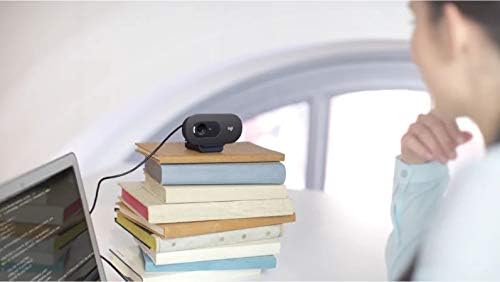
Image: Flexible placement options allow the webcam to be positioned on various surfaces.
4. Manteniment
To ensure optimal performance and longevity of your Logitech C505/C505e webcàmera, seguiu aquestes senzilles pautes de manteniment:
- Neteja de la lent: Netegeu suaument el webNetegeu l'objectiu de la càmera amb un drap suau i sense borrissol. Eviteu utilitzar productes químics agressius o materials abrasius que puguin ratllar l'objectiu.
- Emmagatzematge: Quan no s’utilitzi, emmagatzemeu el fitxer webguardeu-ho en un lloc net i sec, allunyat de temperatures extremes i de la llum solar directa.
- Cura del cable: Avoid sharply bending or crimping the USB cable to prevent internal damage.
5. Solució De Problemes
If you encounter issues with your Logitech C505/C505e webcàmera, proveu els passos següents per resoldre problemes:
- Sense vídeo/àudio:
- Assegureu-vos que el cable USB estigui ben connectat a tots dos webla càmera i el teu ordinador.
- Proveu de connectar el webcam a un port USB diferent.
- Check your application's settings (e.g., Zoom, Microsoft Teams) to confirm the Logitech C505/C505e is selected as the active camera and microphone.
- Verify your operating system's privacy settings allow applications to access the camera and microphone.
- Poca qualitat de vídeo:
- Assegureu-vos d'una il·luminació adequada al vostre entorn. webcam performs best with good illumination.
- Netegeu el weblent de la càmera amb un drap suau.
- Check for any obstructions in front of the lens.
- Mala qualitat d'àudio:
- Assegureu-vos el webcam's microphone is selected in your application and system audio settings.
- Redueix el soroll de fons del teu entorn.
- Ensure you are within the 3-meter optimal range of the microphone.
- Webcam Not Recognized:
- Reinicieu l'ordinador.
- Consulteu el Gestor de dispositius (Windows) o la Informació del sistema (macOS) de l'ordinador per veure si webcam is listed. You may need to update or reinstall drivers, though typically the webcam is plug-and-play.
6. Especificacions
| Marca | Logitech |
| Número de model | Logitech C505/C505e |
| Resolució de captura de vídeo | 720p |
| Resolució de vídeo | 720p |
| Tecnologia de connectivitat | Cablejat (USB-A) |
| Tipus d'enfocament | Enfocament fix |
| Viewangle ing | 60 graus |
| Micròfon | Omnidirectional with Noise-Reduction |
| Sistema operatiu | Multiple (Windows 8 or later, macOS 10.10 or later, ChromeOS) |
| Mitjans integrats | USB Cable, Universal Clip |
| Característiques | Automatic Light Correction, Low Light Performance |
7. Garantia i Suport
Per obtenir informació detallada sobre la garantia i assistència tècnica, visiteu el lloc web d'assistència oficial de Logitech. weblloc web. Hi podeu trobar controladors, preguntes freqüents i informació de contacte per al servei d'atenció al client.


