1. Introducció
This manual provides comprehensive instructions for the Technical Pro Dual 21 Band Professional Stereo Equalizer, model EQ7153. This device is engineered to offer precise control over audio frequencies, allowing for detailed sound shaping and enhancement in various audio environments. Please read this manual thoroughly before operating the unit to ensure proper usage and to maximize its performance.
2. Instruccions de seguretat importants
- Font d'alimentació: Connecteu la unitat només a la font d'alimentació especificada del voltage as indicated on the rear panel. Ensure the power switch is set to the correct voltage (110V or 220V) for your region before connecting to power.
- Ventilació: Ensure adequate ventilation around the unit. Do not block ventilation openings. Avoid placing the unit on carpets or in enclosed spaces that restrict airflow.
- Humitat: No exposeu la unitat a la pluja, la humitat, les goteges o les esquitxades. No col·loqueu objectes plens de líquids, com ara gerros, sobre l'aparell.
- Calor: Mantingueu la unitat allunyada de fonts de calor com ara radiadors, registres de calor, estufes o altres aparells (inclosos amplificadors) que produeixen calor.
- Neteja: Disconnect the power cord from the outlet before cleaning. Use only a dry cloth for cleaning.
- Manteniment: No intenteu fer la reparació d'aquest producte vosaltres mateixos. Envieu totes les tasques de manteniment a personal de servei qualificat. Cal fer la reparació quan l'aparell s'hagi fet malbé de qualsevol manera, com ara si el cable d'alimentació o l'endoll estan malmesos, si s'ha vessat líquid o si han caigut objectes a l'aparell, si l'aparell ha estat exposat a la pluja o la humitat, si no funciona correctament o si s'ha caigut.
- Entrada d'objectes i líquids: No introduïu mai cap objecte dins d'aquest producte a través de les obertures, ja que poden tocar un volum perillóstage punts o curtcircuitar peces que podrien provocar un incendi o una descàrrega elèctrica.
3. Contingut del paquet
En desempaquetar, comproveu que hi hagi els elements següents:
- Technical Pro EQ7153 Dual 21 Band Professional Stereo Equalizer
- Cable d'alimentació
- Removable Rack-Mount Brackets
- Manual d'instruccions (aquest document)
4. Producte acabatview
The EQ7153 is a dual 21-band graphic equalizer designed for precise audio frequency adjustment. It features individual LED indicators for each frequency band, a fluorescent spectrum display, and multiple input/output options.
4.1 Tauler frontal

- Botó d'encesa: Encén o apaga la unitat.
- Selectors d'entrada: Buttons for MP3, DVD, TAPE, TUNER, MP3/AUX, LOW, HIGH, DIRECT, EQ to select the desired audio source or processing mode.
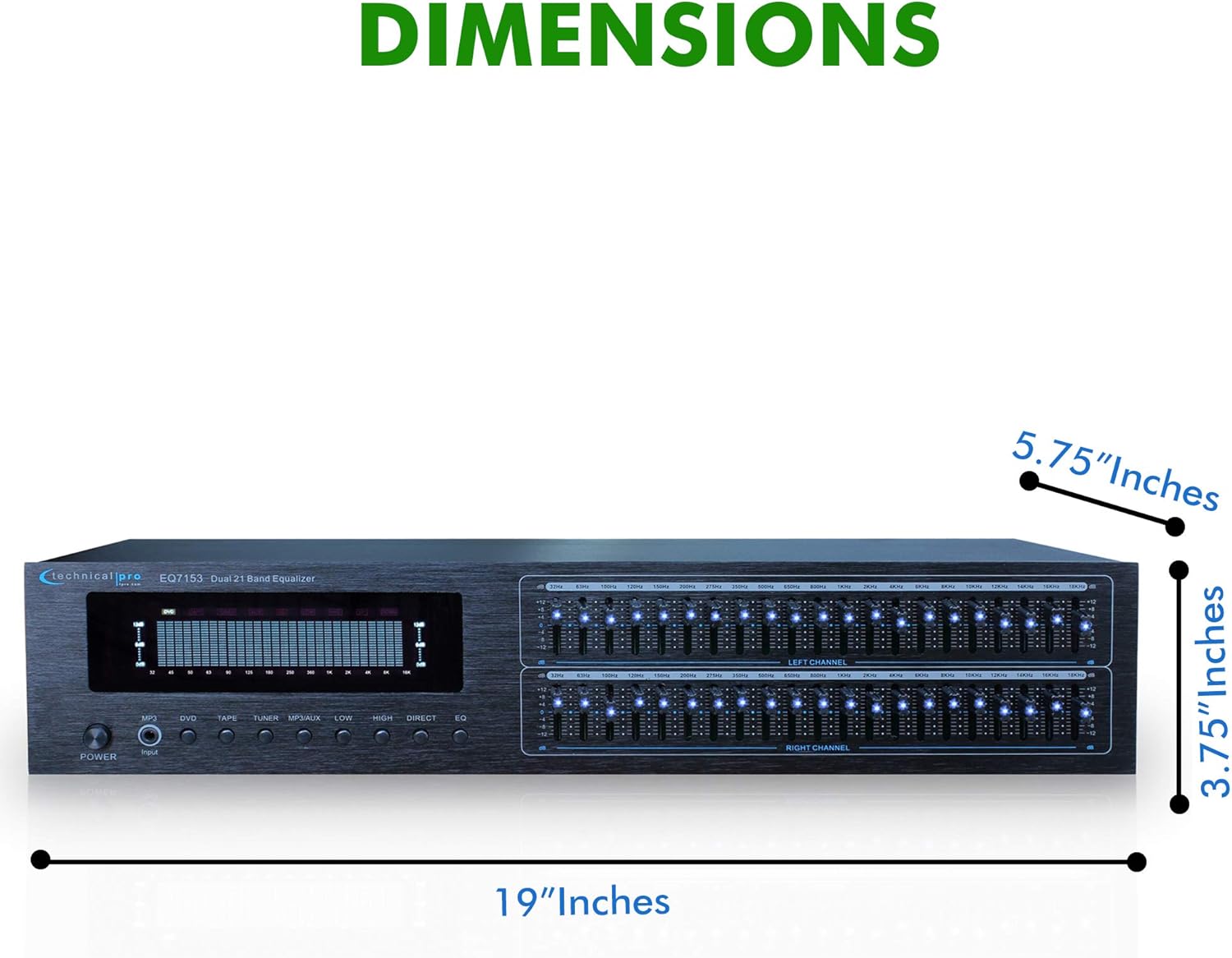
- Dual 21-Band Equalizer Sliders: Individual sliders for Left and Right channels, each with 21 frequency bands for precise audio adjustment. Each slider has an individual LED indicator.
- Fluorescent Spectrum Display: Visual representation of the audio frequency spectrum.
- Amplificador de baix: Increases low-frequency levels.
- Loudness Booster: Increases both low and high-frequency levels.
- Direct / Equalizer Function: Allows for an unfiltered pass-through of the audio signal or engages the equalizer processing.
4.2 Panell posterior
- RCA Audio Inputs: Connect up to four audio sources (DVD, TAPE, TUNER, AUX) using RCA cables. An additional 1/8'' MP3 input is available on the front panel.
- RCA Audio Outputs: Connecta't al teu amplifier or recording device via the RECORD and MAIN RCA outputs.
- Entrada d'alimentació: Standard AC power connection with a voltage selector switch (110V/220V).
4.3 Característiques clau

- Dual 21-Band Equalization: Offers precise control over 21 frequency bands per channel.
- Equalization Points: 32Hz, 63Hz, 100Hz, 120Hz, 150Hz, 200Hz, 275Hz, 350Hz, 500Hz, 1KHz, 1.5KHz, 2KHz, 2.5KHz, 3KHz, 4KHz, 5KHz, 6KHz, 8KHz, 10KHz, 12KHz, 14KHz.
- Interval d'ajust: ±12dB for each frequency band.
- Resposta de freqüència: 20Hz-20kHz.
- Fluorescent Spectrum Display: Provides real-time visual feedback of audio levels across frequencies.
- Bass Booster & Loudness Booster: Dedicated functions to enhance low and high frequencies.
- Múltiples entrades: RCA (4 audio sources) and 1/8'' MP3 input.
- Sortides RCA: For main audio and recording.
- Removable Rack-Mount Brackets: For easy integration into a standard audio rack.
5. Instruccions de configuració
5.1 Desembalatge i col·locació
- Carefully remove the EQ7153 from its packaging.
- Place the unit on a stable, flat surface or install it into a standard 19-inch audio rack using the provided brackets.
- Ensure there is adequate space around the unit for proper ventilation to prevent overheating.
5.2 Connexions d'àudio
The EQ7153 typically connects between your audio source(s) and your amplificador/receptor.
- Connectar fonts d'àudio: Use RCA cables to connect your audio sources (e.g., DVD player, tape deck, tuner, auxiliary device) to the corresponding RCA INPUT jacks on the rear panel (DVD, TAPE, TUNER, AUX). For MP3 players or other portable devices, use a 1/8'' stereo cable to the front panel MP3 input.
- Connecta't a Amplificador/receptor: Use RCA cables to connect the MAIN OUTPUT jacks on the rear panel of the EQ7153 to an available input on your amplifier or receiver (e.g., AUX IN, CD IN).
- Connect to Recording Device (Optional): If you wish to record the processed audio, connect the REC OUTPUT jacks on the EQ7153 to the input of your recording device.
5.3 Connexió d'alimentació
- Before connecting the power cable, verify that the 110V/220V voltage selector switch on the rear panel is set to match your local power supply.
- Connect the provided power cable to the AC IN socket on the rear panel of the EQ7153.
- Connecteu l'altre extrem del cable d'alimentació a una presa de corrent de CA adequada.
6. Instruccions de funcionament
6.1 Engegada/apagada
Premeu el botó PODER button on the front panel to turn the unit on or off. The fluorescent spectrum display and individual LED indicators will illuminate when the unit is powered on.
6.2 Selecció d'entrada
Press the corresponding input button on the front panel (MP3, DVD, TAPE, TUNER, MP3/AUX) to select the audio source you wish to process. Ensure only one input is selected at a time.
6.3 Ajust de l'equalitzador
- Engage Equalizer: Premeu el botó EQ button to activate the equalizer function. If you prefer an unprocessed signal, press the DIRECTE botó.
- Adjust Frequency Bands: Use the individual sliders for the Left and Right channels to boost or cut specific frequency bands. Moving a slider up boosts the frequency, while moving it down cuts the frequency. The range of adjustment is ±12dB.
- Pantalla del monitor: Observe the fluorescent spectrum display to visually monitor the frequency distribution of your audio signal as you make adjustments.
6.4 Using Boost Functions
- Amplificador de baix: Premeu el botó BAIXA button to engage the Bass Booster, which will increase the overall low-frequency levels in your audio.
- Loudness Booster: Premeu el botó ALTA button to engage the Loudness Booster, which will simultaneously increase both low and high-frequency levels, providing a fuller sound at lower volumes.
7. Manteniment
7.1 Neteja
To maintain the appearance and longevity of your EQ7153:
- Desconnecteu sempre el cable d'alimentació abans de netejar.
- Feu servir un drap suau i sec per netejar les superfícies exteriors.
- Do not use liquid cleaners, aerosol cleaners, or strong chemicals, as they may damage the finish or internal components.
- For dust accumulation around sliders or buttons, use a soft brush or compressed air, being careful not to force dust into the unit.
7.2 Atenció general
- Eviteu col·locar objectes pesats a la part superior de la unitat.
- Protect the unit from extreme temperatures and direct sunlight.
- Ensure all cable connections are secure and free from strain.
8. Solució De Problemes
If you encounter issues with your EQ7153, refer to the following common problems and solutions:
| Problema | Causa possible | Solució |
|---|---|---|
| La unitat no s'encén. | Power cable not connected; Power outlet faulty; Voltage selector incorrect. | Ensure power cable is securely connected. Test power outlet with another device. Verify 110V/220V switch matches local voltage. |
| Sense sortida de so. | Incorrect input selected; Cables not connected properly; Amplifier input not selected. | Select the correct input source on the EQ7153. Check all RCA cable connections. Ensure your amplifier is set to the correct input connected to the EQ7153. |
| So distorsionat o de mala qualitat. | Input signal too high; Equalizer settings extreme; Faulty cables. | Reduce the input level from your source device. Adjust equalizer sliders to a more neutral position. Replace audio cables if suspected faulty. |
| LED indicators are too bright. | This is a characteristic of the product design. | While there is no built-in brightness adjustment, some users have applied light-dimming films or paint to the LEDs for personal preference. This is not officially supported and may void warranty. |
9. Especificacions

- Model: TPEQA7153
- Bandes d'igualització: Dual 21-band per channel
- Equalization Points: 32Hz, 63Hz, 100Hz, 120Hz, 150Hz, 200Hz, 275Hz, 350Hz, 500Hz, 1KHz, 1.5KHz, 2KHz, 2.5KHz, 3KHz, 4KHz, 5KHz, 6KHz, 8KHz, 10KHz, 12KHz, 14KHz
- Interval d'ajust: ± 12 dB
- Resposta de freqüència: 20Hz-20kHz
- Entrades: RCA (4 audio sources), 1/8'' MP3
- Sortides: RCA (Record, Main)
- Dimensions del producte (L x P x A): 19 x 5.75 x 3.75 polzades
- Pes de l'article: 4 lliures
- Fabricant: Tècnic Pro
10. Garantia i Suport
Per obtenir informació sobre la garantia i assistència tècnica, consulteu la documentació que s'inclou amb la compra o visiteu el lloc web oficial de Technical Pro. weblloc web. Conserveu el comprovant de compra per a qualsevol reclamació de garantia.


