1. Introducció
This manual provides essential information for the safe and effective use of your Sharp IG-NX15-W Plasmacluster NEXT Ion Generator. Please read these instructions thoroughly before operating the device and retain them for future reference. The IG-NX15-W is designed to improve air quality by generating Plasmacluster ions, effectively reducing odors, pet dander, and pollen in enclosed spaces such as vehicle interiors or personal workspaces.
2. Informació de seguretat
- Always use the specified power source (AC/DC adapter or USB car adapter) to prevent damage or malfunction.
- Do not block the air intake or outlet vents during operation.
- Mantingueu el dispositiu allunyat de l'aigua o de la humitat excessiva.
- Do not disassemble or attempt to repair the unit yourself. Contact qualified service personnel for assistance.
- Ensure the device is securely placed, especially in a vehicle, to prevent it from falling and causing injury or damage during sudden stops or turns.
3. Producte acabatview
The Sharp IG-NX15-W is a compact Plasmacluster NEXT Ion Generator designed for portability and effective air purification in small environments. It features a cup holder friendly design, touch controls, and multiple operating modes.
3.1 Components
- Main Unit (Ion Generator)
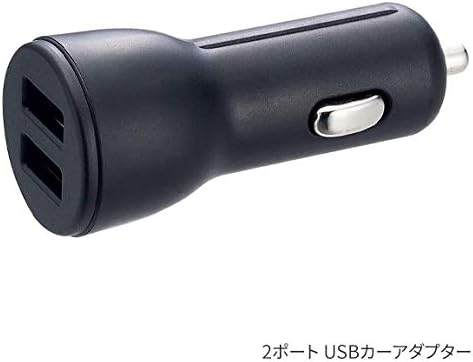
- USB Car Adapter (for vehicle use)
- Cleaning Brush (located inside the unit)
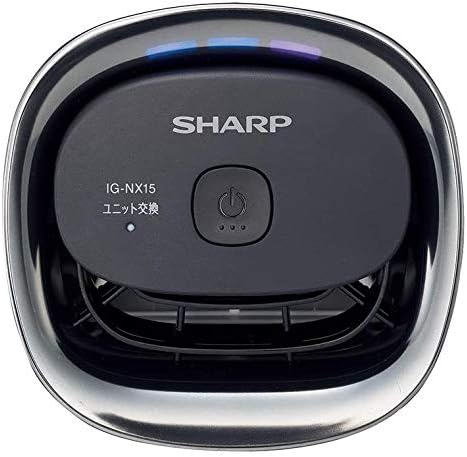
3.2 Tauler de control
The top of the unit features a power button and indicator lights for various modes and unit status.
4. Configuració
4.1 In-Vehicle Installation
- Locate a suitable cup holder in your vehicle. The IG-NX15-W is designed to fit standard cup holders.
- Insert the main unit into the cup holder, ensuring it is stable and upright.
- Connect the provided USB car adapter to your vehicle's 12V accessory socket (cigarette lighter).
- Connect the USB cable from the ion generator to the USB car adapter.

4.2 Desktop/Personal Use
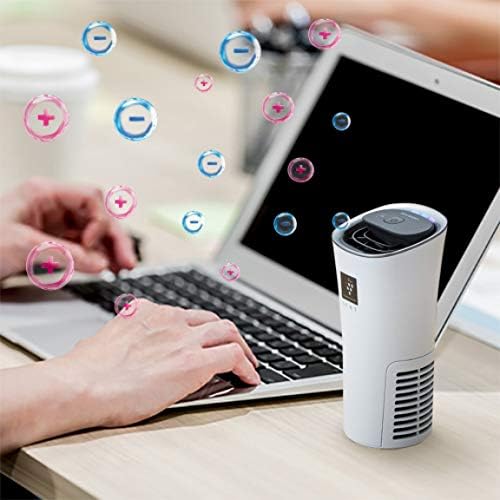
- Place the unit on a flat, stable surface, such as a desk.
- Connect the unit to a compatible USB power source (e.g., computer USB port, USB wall adapter) using a USB cable (not always included, check packaging).
5. Instruccions de funcionament
5.1 Encès/Apagat
Press the power button located on the top of the unit to turn the device on or off.
5.2 Selecció del mode
After powering on, repeatedly press the power button to cycle through the available operating modes. Indicator lights on the control panel will change to reflect the selected mode.
- Mode estàndard: Provides continuous ion generation for general air purification.
- Mode turbo: Offers enhanced ion generation for 25 minutes, followed by a return to medium power. This mode is suitable for quickly addressing strong odors or high contaminant levels.
Refer to the indicator lights on the unit for the specific mode currently active.
6. Manteniment
Regular maintenance ensures optimal performance and longevity of your Plasmacluster NEXT Ion Generator.
6.1 Neteja de la unitat
The unit includes a cleaning brush for maintenance. The device can be easily disassembled without tools for cleaning.
- Ensure the unit is powered off and disconnected from its power source.
- Gently separate the top and bottom sections of the unit.
- Use the provided cleaning brush to remove any dust or debris from the air intake/outlet vents and the internal components, especially around the ion generating unit.
- Netegeu l'exterior amb un drap suau i sec. No utilitzeu netejadors líquids ni materials abrasius.
- Reassemble the unit, ensuring all parts are securely fitted.
6.2 Ion Generating Unit Replacement
The ion generating unit has a limited lifespan. A small, unilluminated indicator light on the control panel signifies the end-of-life for the ion generator module, indicating it needs replacement. The typical lifespan is approximately 19,000 hours of use.
Replacement ion generating units may be available through authorized Sharp service centers or retailers. Follow the instructions provided with the replacement unit for proper installation.
7. Solució De Problemes
- La unitat no s'encén:
- Ensure the power cable is securely connected to both the unit and the power source.
- Verify that the power source (e.g., car adapter, USB port) is functioning correctly.
- No noticeable air purification effect:
- Check if the unit is operating in the correct mode. Consider using Turbo Mode for stronger effects.
- Ensure the air intake and outlet vents are not obstructed.
- Clean the unit as described in the Maintenance section.
- Check the ion generating unit's end-of-life indicator. If illuminated, the unit may need replacement.
- Soroll o olor inusuals:
- Power off the unit immediately and disconnect it from the power source.
- Inspect for any foreign objects or damage.
- If the issue persists after inspection, contact customer support.
8. Especificacions
| Característica | Detall |
|---|---|
| Nom de marca | Afilat |
| Número de model | IG-NX15-W |
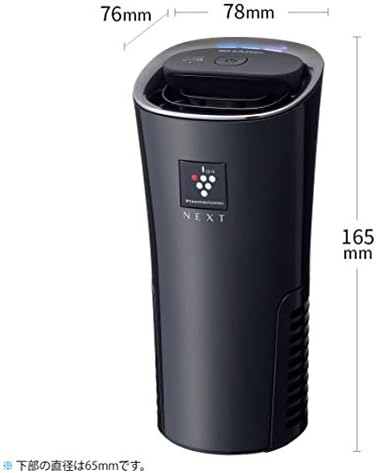
| Dimensions del producte | 2.56 x 2.56 x 6.5 polzades (65 x 65 x 165 mm) |
| Pes de l'article | 0.43 quilograms (15.17 unces) |
| Color | Blanc |
| Font d'alimentació | AC/DC |
| Wattage | 15 watts |
| Mètode de control | Control tàctil i de botó |
| Tipus de filtre | Ionitzador |
| Capacitat de filtració de contaminants | Odors, Pet Dander, Pollen |
| Característiques especials | Plasmacluster NEXT Ion Generator |
9. Garantia i Suport
Per obtenir informació sobre la garantia, consulteu la documentació inclosa amb la compra o visiteu el lloc web oficial de Sharp. website. For technical support, replacement parts, or service inquiries, please contact Sharp customer service.


