Introducció
This manual provides essential information for the installation, operation, and maintenance of your HP 8GB DDR4 SDRAM Memory Module, model 286H8UT#ABA. This module is designed to enhance your computer's performance by providing additional memory for efficient multitasking and application execution.
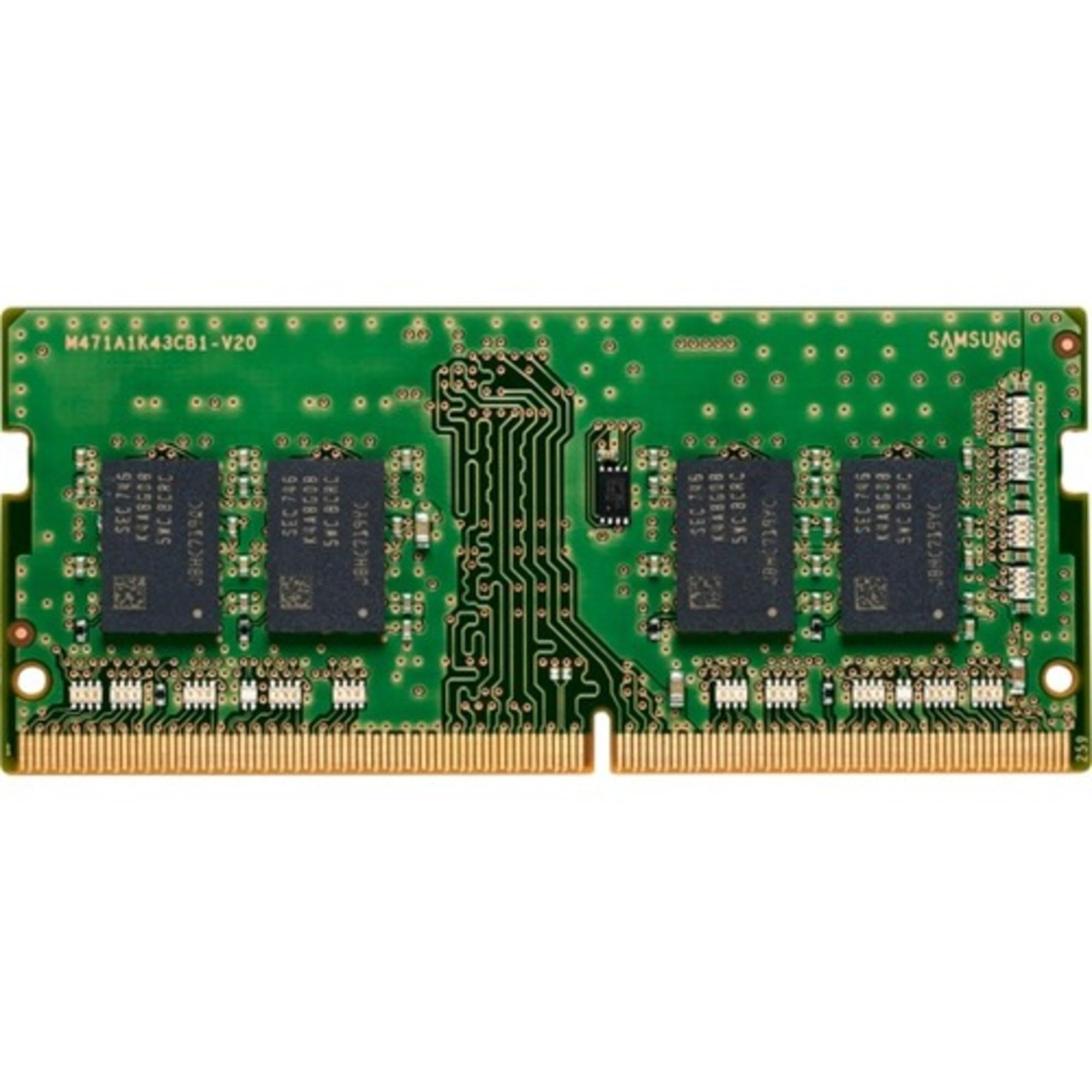
Image: The HP 8GB DDR4 SDRAM Memory Module. This image displays the physical appearance of the memory module, which is a DIMM (desktop memory module).
Informació de seguretat
Please read and follow these safety guidelines to prevent damage to the memory module or your computer, and to ensure personal safety:
- Apagar: Always ensure your computer is completely powered off and unplugged from the wall outlet before installing or removing any internal components.
- Electricitat estàtica: Electronic components are sensitive to electrostatic discharge (ESD). Wear an anti-static wrist strap or frequently touch a grounded metal object (like the computer chassis) to discharge static electricity before handling the memory module.
- Manejar amb cura: Hold the memory module by its edges, avoiding contact with the gold connectors or the chips.
- Ventilació: Ensure proper ventilation around your computer to prevent overheating, which can affect component lifespan.
- Instal·lació professional: Si no esteu segurs de cap pas, consulteu un tècnic qualificat.
Contingut del paquet
Verifiqueu que el vostre paquet conté el següent article:
- One (1) HP 8GB DDR4 SDRAM Memory Module (Model: 286H8UT#ABA)
Configuració i instal·lació
Follow these steps to install the HP 8GB DDR4 SDRAM Memory Module into your computer. The process may vary slightly depending on your computer's make and model (desktop or laptop). The product image indicates a DIMM (desktop memory module). Please verify your system's memory form factor (DIMM for desktops, SO-DIMM for laptops) before proceeding.
Llista de verificació prèvia a la instal·lació:
- Ensure your computer supports DDR4 SDRAM memory.
- Check your computer's motherboard manual for available RAM slots and maximum supported memory capacity.
- Gather necessary tools: typically a Phillips head screwdriver.
Passos d'instal·lació (generals):
- Prepareu l'ordinador:
Shut down your computer completely. Disconnect the power cable and any other peripherals (monitor, keyboard, mouse, etc.). For laptops, remove the battery if possible.
- Obriu la caixa de l'ordinador:
For desktops, remove the side panel. For laptops, locate and open the memory access panel, usually on the bottom.
- Localitza les ranures de memòria:
Identify the DDR4 memory slots on your motherboard. They are typically long slots with clips on each end. Consult your motherboard manual for exact locations and preferred slot configurations.
- Install the Memory Module:
Align the notch on the memory module with the key in the memory slot. Gently push the module straight down into the slot until the clips on both sides snap into place, securing the module. Do not force it, as improper alignment can cause damage.
- Tanqueu la carcassa de l'ordinador:
Replace the computer's side panel or memory access panel and secure it.
- Torneu a connectar i engegueu:
Reconnect all cables and power on your computer. The system should automatically detect the new memory.
Operating and Verification
After installation, verify that the new memory module is recognized by your system:
- Comprovació de la BIOS/UEFI: During startup, enter your computer's BIOS/UEFI settings (usually by pressing Del, F2, F10, or F12). Look for a system information or memory section to confirm the total installed RAM.
- Operating System Check:
- Windows: Right-click "This PC" or "My Computer," select "Properties." The installed RAM will be displayed.
- macOS: Click the Apple menu, then "About This Mac." The memory information will be listed.
- Linux: Open a terminal and type
free -horcat /proc/meminfo.
If the memory is not recognized, refer to the Troubleshooting section.
Manteniment
Memory modules generally require minimal maintenance. Follow these guidelines for optimal performance and longevity:
- Mantenir net: Periodically clean the interior of your computer case to prevent dust buildup, which can impede airflow and cause overheating. Use compressed air to gently remove dust from around the memory modules and slots.
- Tractament adequat: When handling the module, always hold it by the edges to avoid touching the gold contacts or integrated circuits.
- Condicions ambientals: Operate your computer in a cool, dry environment to prevent damage from extreme temperatures or humidity.
Resolució de problemes
If you encounter issues after installing your HP 8GB DDR4 SDRAM Memory Module, consider the following:
- System Does Not Boot or Beeps:
- Ensure the memory module is fully seated in its slot. Re-seat the module firmly until the clips lock.
- Verify that the module is installed in the correct slot according to your motherboard manual (some motherboards require specific slot configurations for dual-channel memory).
- If you have multiple modules, try installing only the new module to isolate the issue.
- Incorrect Amount of RAM Detected:
- Check BIOS/UEFI settings to confirm the detected memory.
- Ensure your operating system is 64-bit to fully utilize more than 4GB of RAM.
- Verify that your motherboard supports the full capacity of the installed memory.
- Inestabilitat o errors del sistema:
- Run a memory diagnostic tool (e.g., Windows Memory Diagnostic, MemTest86) to check for errors.
- Ensure your motherboard's BIOS/UEFI is updated to the latest version, as this can improve memory compatibility.
If problems persist, contact HP support or a qualified technician.
Especificacions
| Marca | HP |
| Número de model | 286H8UT#ABA |
| Capacitat RAM | 8 GB |
| Tecnologia de RAM | SDRAM DDR4 |
| Velocitat de memòria | 1600 MHz (DDR4-3200 MT/s) |
| Voltage | 1.2 Volts |
| Factor de forma | DIMM (Desktop) - The product image indicates a DIMM form factor. Please verify compatibility with your system. |
| Dispositius compatibles | Desktop Computers (Based on visual inspection of the product image. While "Laptop" is listed in some specifications, the physical appearance and typical dimensions suggest a desktop DIMM. Always confirm with your system's requirements.) |
| Pes de l'article | 0.15 unces |
| Dimensions del producte (embalatge) | 7.4 x 5.6 x 0.7 polzades |
| Fabricant | HP Business |
| Data de primera disponibilitat | 29 de gener de 2021 |
Note: Specifications are subject to change without notice. Please refer to HP's official weblloc per obtenir la informació més actualitzada.
Garantia i Suport
Your HP 8GB DDR4 SDRAM Memory Module comes with a 1 anys de garantia des de la data de compra. Aquesta garantia cobreix els defectes de materials i de mà d'obra en ús normal.
For warranty claims, technical support, or further assistance, please contact HP Customer Support through their official weblloc:
Assistència oficial d'HP Weblloc
Please have your product model number (286H8UT#ABA) and proof of purchase ready when contacting support.
Reciclatge i eliminació
Electronic waste (e-waste) should not be disposed of with general household waste. Please follow local regulations for the proper disposal and recycling of electronic components. Many regions offer collection points for e-waste. Recycling helps conserve natural resources and prevents potential environmental and health hazards.
For more information on recycling, visit your local government's waste management website or an authorized e-waste recycling facility.