Introducció
Thank you for choosing the JOYACCESS Wireless Bluetooth Keyboard. This multi-device keyboard is designed for seamless connectivity across various operating systems, including Mac, Windows, iOS, and Android. Featuring an ergonomic design, quiet scissor-switch keys, and a full number pad, it enhances your productivity and comfort. This manual provides detailed instructions for setup, operation, maintenance, and troubleshooting to ensure optimal performance of your keyboard.

Image: The JOYACCESS Wireless Bluetooth Keyboard in turquoise color, showcasing its full layout with a number pad.
Guia de configuració
1. Instal·lació de la bateria
The keyboard requires two AA batteries (not included).
- Localitzeu el compartiment de la bateria a la part inferior del teclat.
- Obriu la tapa del compartiment de la bateria.
- Introduïu dues piles AA, assegurant-vos de la polaritat correcta (+/-).
- Tanqueu bé la tapa del compartiment de la bateria.
- Power on the keyboard using the switch, usually located on the top right edge.
2. Connexió mitjançant un receptor USB de 2.4G
For a stable 2.4G wireless connection:
- Assegureu-vos que el teclat estigui encès.
- Locate the USB receiver, typically stored in the battery compartment slot.
- Connecteu el receptor USB a un port USB disponible de l'ordinador o dispositiu.
- El teclat s'hauria de connectar automàticament.

Image: A close-up of the compact USB receiver.
3. Connecting via Bluetooth (BT3.0 + BT5.0)
The keyboard supports two Bluetooth channels (BT1 and BT2) for multi-device connectivity.
- Assegureu-vos que el teclat estigui encès.
- Mantén premut Fn + 1 (per a BT1) o Fn + 2 (for BT2) for 3 seconds. The corresponding LED indicator will blink, indicating pairing mode.
- Al dispositiu (ordinador, tauleta, telèfon intel·ligent), activeu el Bluetooth i cerqueu els dispositius disponibles.
- Selecciona "Teclat BT3.0" or "Teclat BT5.0" de la llista.
- Seguiu les indicacions de la pantalla per completar el procés de vinculació.
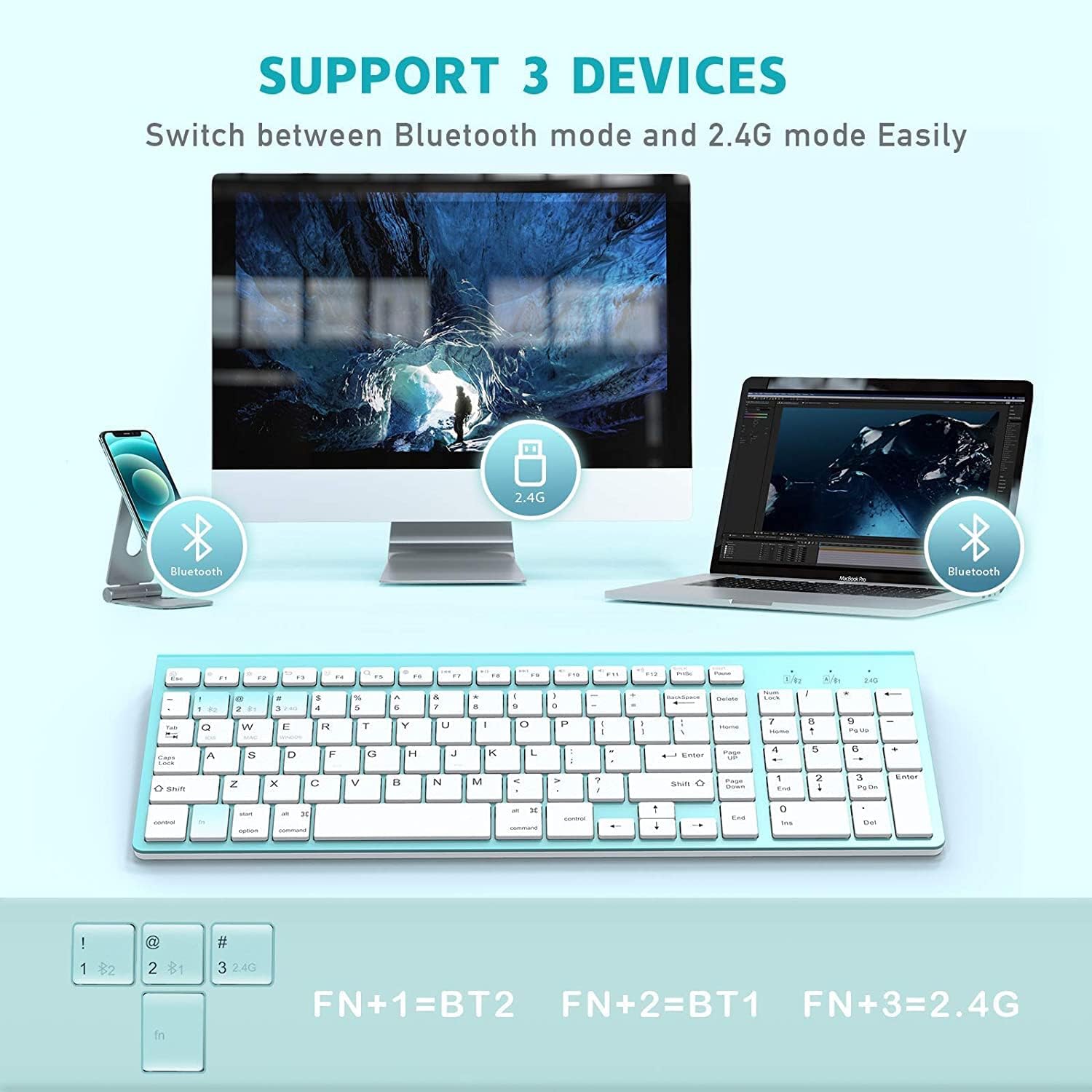
Image: Diagram illustrating the keyboard's ability to connect to three different devices (two via Bluetooth, one via 2.4G USB).
4. Selecció del sistema
To optimize keyboard functionality for your specific operating system:
- For iOS devices: Press and hold Fn + Q durant 3 segons.
- For Mac devices: Press and hold Fn + W durant 3 segons.
- For Windows devices: Press and hold Fn + E durant 3 segons.
The LED indicator will blink to confirm the system selection.

Image: Close-up of the keyboard showing the Fn+Q, Fn+W, Fn+E keys for system selection.
Instruccions de funcionament
Canvi entre dispositius connectats
Once multiple devices are paired, you can easily switch between them:
- To switch to Bluetooth Device 1: Press Fn + 1.
- To switch to Bluetooth Device 2: Press Fn + 2.
- To switch to 2.4G USB Receiver connection: Press Fn + 3.
Claus multimèdia
The keyboard features convenient multimedia keys accessible via the Function (F) row. These keys are designed to work across Windows and Mac systems.
| clau | Funció |
|---|---|
| F1 | Disminució de la brillantor |
| F2 | Augment de la brillantor |
| F3 | Tornar |
| F4 | Seleccioneu Tot |
| F5 | Cerca File |
| F6 | Switching Input |
| F7 | Pista anterior |
| F8 | Reprodueix i posa en pausa |
| F9 | Pista següent |
| F10 | Silenciar |
| F11 | Baixa el volum |
| F12 | Puja el volum |
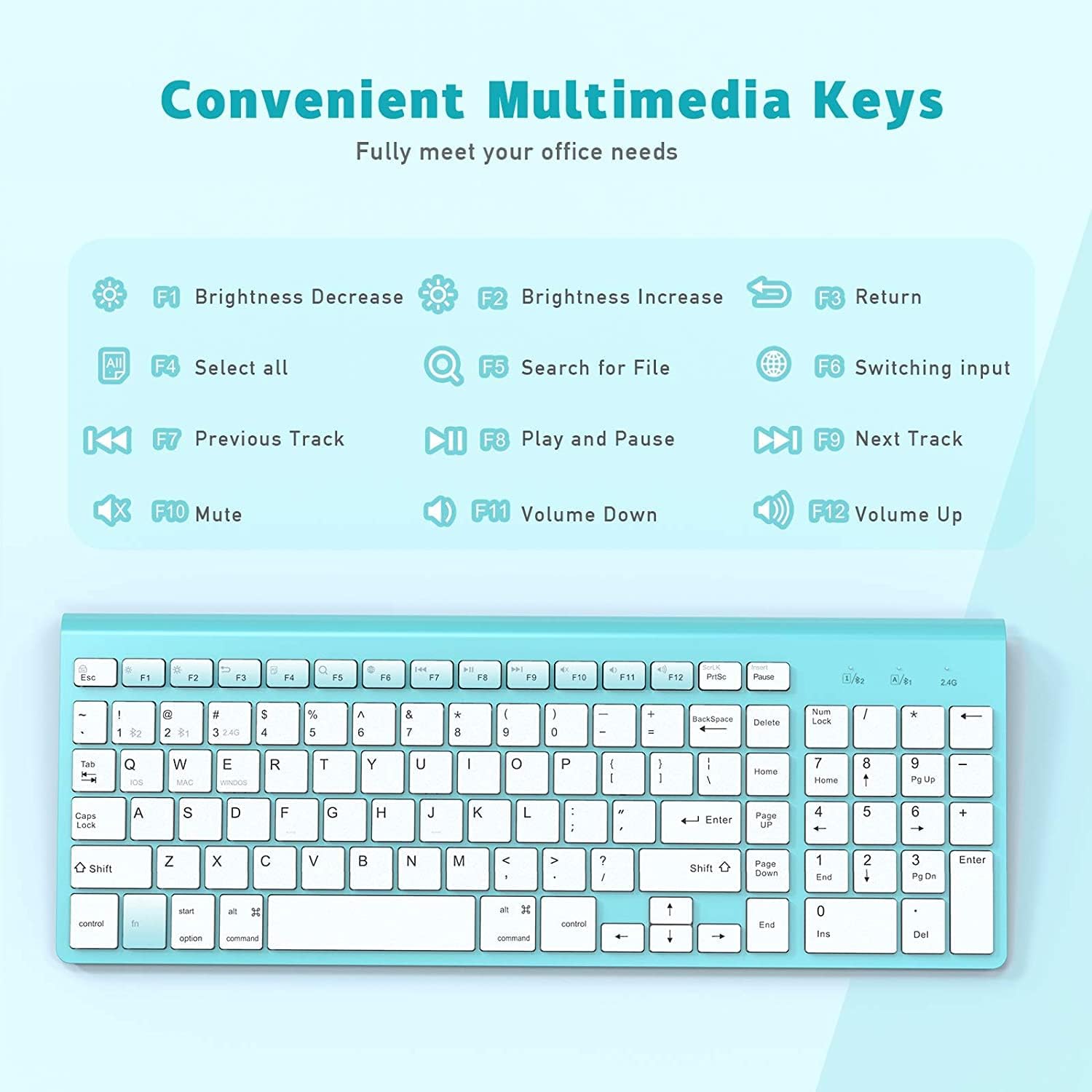
Image: A visual representation of the keyboard's multimedia keys and their corresponding functions.
Mode de repòs automàtic
To conserve battery life, the keyboard will automatically enter power-saving mode if there is no operation for 30 minutes. To reactivate the keyboard, simply click any button.

Image: Icon indicating the auto-sleep feature and how to activate the keyboard.
Manteniment
Proper maintenance ensures the longevity and optimal performance of your JOYACCESS keyboard.
Neteja
- Apagueu el teclat abans de netejar-lo.
- Utilitzeu un drap suau i sense pelusa lleugerament dampesbandida amb aigua o una solució netejadora suau per netejar la superfície.
- Eviteu l'ús de productes químics agressius, netejadors abrasius o humitat excessiva.
- Per netejar entre les tecles, feu servir aire comprimit per eliminar la pols i les restes.
Canvi de bateria
When the keyboard's performance degrades or it stops responding, it may be time to replace the batteries. Follow the battery installation steps outlined in the "Setup Guide" section.
Resolució de problemes
Si teniu problemes amb el teclat, consulteu els passos habituals següents per a la resolució de problemes:
Keyboard Fails to Connect via Bluetooth
- Check Battery and Power: Ensure the batteries are charged and correctly installed, and the keyboard's power switch is turned on.
- Proximitat: Make sure the keyboard and your electronic device are within close proximity (recommended range is typically up to 10 meters or 33 feet).
- Device Bluetooth Stability: Verify that your electronic device's Bluetooth signal is stable and functioning correctly. Try restarting your device's Bluetooth.
- Reemparella el dispositiu: On your device, delete any existing "BT3.0 Keyboard" or "BT5.0 Keyboard" entries from your Bluetooth device list. Then, re-pair the keyboard by following the Bluetooth connection steps in the "Setup Guide".
- Selecció del sistema: Confirm you have selected the correct operating system mode (Fn+Q for iOS, Fn+W for Mac, Fn+E for Windows).
Keyboard Not Responding (2.4G Connection)
- Check Battery and Power: Ensure the batteries are charged and correctly installed, and the keyboard's power switch is turned on.
- Receptor USB: Ensure the 2.4G USB receiver is securely plugged into a working USB port on your device. Try a different USB port.
- Proximitat: Ensure the keyboard is close to the USB receiver.
- Interferència: Allunyeu-vos d'altres dispositius sense fil que puguin causar interferències.
Especificacions
| Característica | Detall |
|---|---|
| Dimensions del producte | 14.17 x 5.51 x 0.91 polzades (36 x 14 x 2.3 cm) |
| Pes de l'article | 1.29 lliures (0.58 kg) |
| Número de model | JKBBU |
| Piles necessàries | 2 piles AA (no incloses) |
| Tecnologia de connectivitat | Bluetooth (BT3.0, BT5.0), 2.4G USB-A Wireless |
| Dispositius compatibles | Laptop, PC, Smartphone, iPhone, iPad, Tablet, iMac, Macbook |
| Descripció del teclat | Wireless, Bluetooth Keyboard with Number Pad |
| Característiques especials | Ergonomic, Hotkeys and Media Keys, Multi-OS, Multi-devices, Scissor-Switch |
| Color | Turquesa |
| Nombre de claus | 102 |
| Mode de repòs automàtic | Després de 30 minuts d'inactivitat |

Image: Diagram showing the ultra-slim design and dimensions of the keyboard.
Garantia i Suport
For warranty information and customer support, please refer to the product packaging or visit the official JOYACCESS weblloc.
JOYACCESS Official Store: https://www.amazon.com/stores/JOYACCESS/page/873A5C55-9CBB-48E4-A0D1-6141798955D4
