1. Introducció
Welcome to the user manual for your new Q Link Wireless Serrano 3 Smartphone. This guide provides essential information on setting up, operating, maintaining, and troubleshooting your device. Please read this manual thoroughly to ensure optimal performance and longevity of your smartphone.

Figura 1: Davant i darrere view of the Serrano 3 Smartphone.
2. Què hi ha a la caixa
Upon unboxing your Serrano 3 Smartphone, please verify that all the following items are included:
- Serrano 3 Smartphone
- Protector de pantalla
- Cable de càrrega (USB)
- Adaptador d'alimentació
- Guia d'inici ràpid

Figure 2: Serrano 3 Smartphone and accessories within its packaging.
3. Configuració
3.1. Càrrega del dispositiu
Before first use, fully charge your Serrano 3 Smartphone. Connect the charging cable to the phone's charging port and the power adapter to a wall outlet. The battery indicator on the screen will show charging progress.
3.2. Inserció de la targeta SIM i la targeta SD
To insert your SIM card (for cellular service) and an optional microSD card (for expanded storage):
- Locate the SIM/SD card tray on the side of the phone.
- Feu servir l'eina d'expulsió de la SIM proporcionada per obrir la safata.
- Place your SIM card(s) and microSD card into their respective slots, ensuring correct orientation.
- Empenyeu suaument la safata cap al telèfon fins que encaixi al seu lloc.
3.3. Encès / apagat
- Per encendre: Press and hold the Power button (usually on the right side) until the Q Link Wireless logo appears.
- Per apagar: Premeu i manteniu premut el botó d'engegada fins que aparegui el menú d'opcions d'engegada. Seleccioneu "Apagar" i confirmeu.
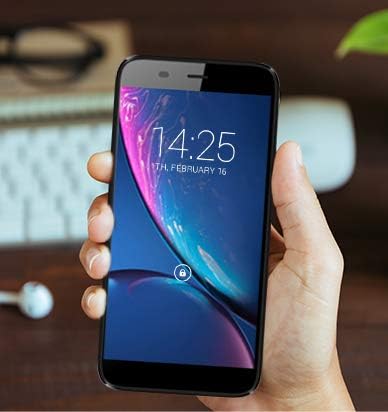
Figure 3: The Serrano 3 Smartphone being held, demonstrating its size and display.
4. Funcionament del vostre dispositiu
4.1. Navegació
The Serrano 3 features a responsive touchscreen for all interactions. Use gestures such as tapping, swiping, pinching, and spreading to navigate menus, open applications, and control content.
4.2. Fer trucades i enviar missatges
Access the Phone app to make calls by dialing numbers or selecting contacts. Use the Messages app to send and receive SMS/MMS messages. Ensure your SIM card is properly inserted and activated for cellular services.
4.3. Connexió a Wi-Fi
Per connectar-se a una xarxa Wi-Fi:
- Vés a Configuració > Xarxa i Internet > Wi-Fi.
- Activa la Wi-Fi.
- Seleccioneu la xarxa desitjada de la llista i introduïu la contrasenya si se us demana.
4.4. Ús de la càmera
The Serrano 3 is equipped with a 2MP front camera and a 5MP rear camera. Open the Camera app to capture photos and videos. Tap the screen to focus and press the shutter button to take a picture.
5. Manteniment
Proper care will extend the life of your Serrano 3 Smartphone:
- Neteja: Feu servir un drap suau i sense borrissol per netejar la pantalla i la carcassa. Eviteu materials abrasius o productes químics agressius.
- Resistència a l'aigua: Aquest dispositiu no és resistent a l'aigua. Eviteu l'exposició a líquids.
- Temperatura: No exposeu el dispositiu a temperatures extremes (calor o fred).
- Cura de la bateria: Avoid fully discharging the battery frequently. Charge the device regularly.
- Actualitzacions de programari: Keep your device's software updated to ensure optimal performance and security.
6. Solució De Problemes
If you encounter issues with your Serrano 3 Smartphone, refer to the table below for common problems and their solutions.
| Problema | Possible solució |
|---|---|
| El dispositiu no s'encén. | Assegureu-vos que la bateria estigui carregada. Connecteu-la a un carregador i espereu uns minuts abans d'intentar tornar-la a engegar. |
| La pantalla no respon. | Restart the device by holding the Power button. If unresponsive, force restart by holding Power button for 10-15 seconds. |
| No es pot connectar a la Wi-Fi. | Check Wi-Fi settings, ensure Wi-Fi is enabled, and re-enter the password. Restart your Wi-Fi router. |
| Mala qualitat de trucada o absència de senyal. | Check SIM card insertion. Move to an area with better network coverage. Contact your service provider. |
| Device is stuck in a boot loop or shows "corrupt" message. | This indicates a potential software or hardware issue. Try a factory reset (consult online resources for your specific model's reset procedure, as it may vary). If the issue persists, contact customer support for further assistance. |
7. Especificacions
Key technical specifications for the Q Link Wireless Serrano 3 Smartphone:
| Característica | Detall |
|---|---|
| Nom del model | Q Link Wireless Connecting America Serrano 3 |
| Número de model de l'article | Serrano H6 |
| Sistema operatiu | Android Go |
| Mida de la pantalla | 5.5 polzades |
| Resolució | 566 x 319 |
| RAM | 2 GB |
| Capacitat d'emmagatzematge de memòria | 16 GB |
| Càmera posterior | 5 MP |
| Càmera frontal | 2 MP |
| Capacitat de la bateria | 2200 milionsampabans de l'hora (mAh) |
| Temps de càrrega | 2 hores |
| Dimensions del producte | 6 x 2.48 x 0.42 polzades |
| Pes de l'article | 3.53 unces (100 grams) |
| Color | Negre |
| Tecnologies de comunicació sense fil | Cel·lular (4G LTE) |
| Tecnologies de connectivitat | Wi-Fi, GPS |
| Jack d'àudio | 3.5 mm |
8. Garantia i Suport
Q Link Wireless provides support for its products. For specific warranty details, please refer to the documentation included with your purchase or visit the official Q Link Wireless weblloc.
Política de devolució: This product typically has a 30-day return policy for refund or replacement, subject to the retailer's terms and conditions.
For technical assistance or further inquiries, please contact Q Link Wireless customer support through their official channels.


