1. Informació important de seguretat
Please read this manual carefully before using the Neewer RGB190 video light. Keep this manual for future reference.
- Do not expose the device to water or high humidity.
- Eviteu l'exposició directa dels ulls a la llum LED.
- No desmunteu ni modifiqueu el producte. Les reparacions només les ha de realitzar personal autoritzat.
- Use only the specified battery type (NP-F550) and charger.
- Mantenir fora de l'abast dels nens.
2. Contingut del paquet
Verifiqueu que tots els elements que s'enumeren a continuació s'inclouen al vostre paquet:
- Llum de vídeo LED RGB190
- NP-F550 Li-ion Battery (2600mAh)
- Carregador de bateria
- Cable de càrrega micro USB
- Difusor blanc
- Adaptador de muntatge de sabates fredes
- Manual d'usuari

3. Producte acabatview
3.1 Components i controls
The Neewer RGB190 features a compact design with an intuitive control panel and display.

- Power On/Off/Standby Button: Press and hold to power on or off. Short press for standby.
- Botó de mode (M): Short press to cycle through HSI, CCT, and Scene modes.
- Adjust / SET Dial: Rotate to adjust values (e.g., brightness, hue, color temperature). Press to confirm selection or switch between parameters.
- Port d'entrada d'alimentació: For external AC power adapter (12-15V, not included).
- Compartiment de la bateria: Houses the NP-F series battery.
- Panell LCD: Displays current settings such as mode, brightness, color temperature, hue, saturation, and battery level.
3.2 Dimensions i especificacions

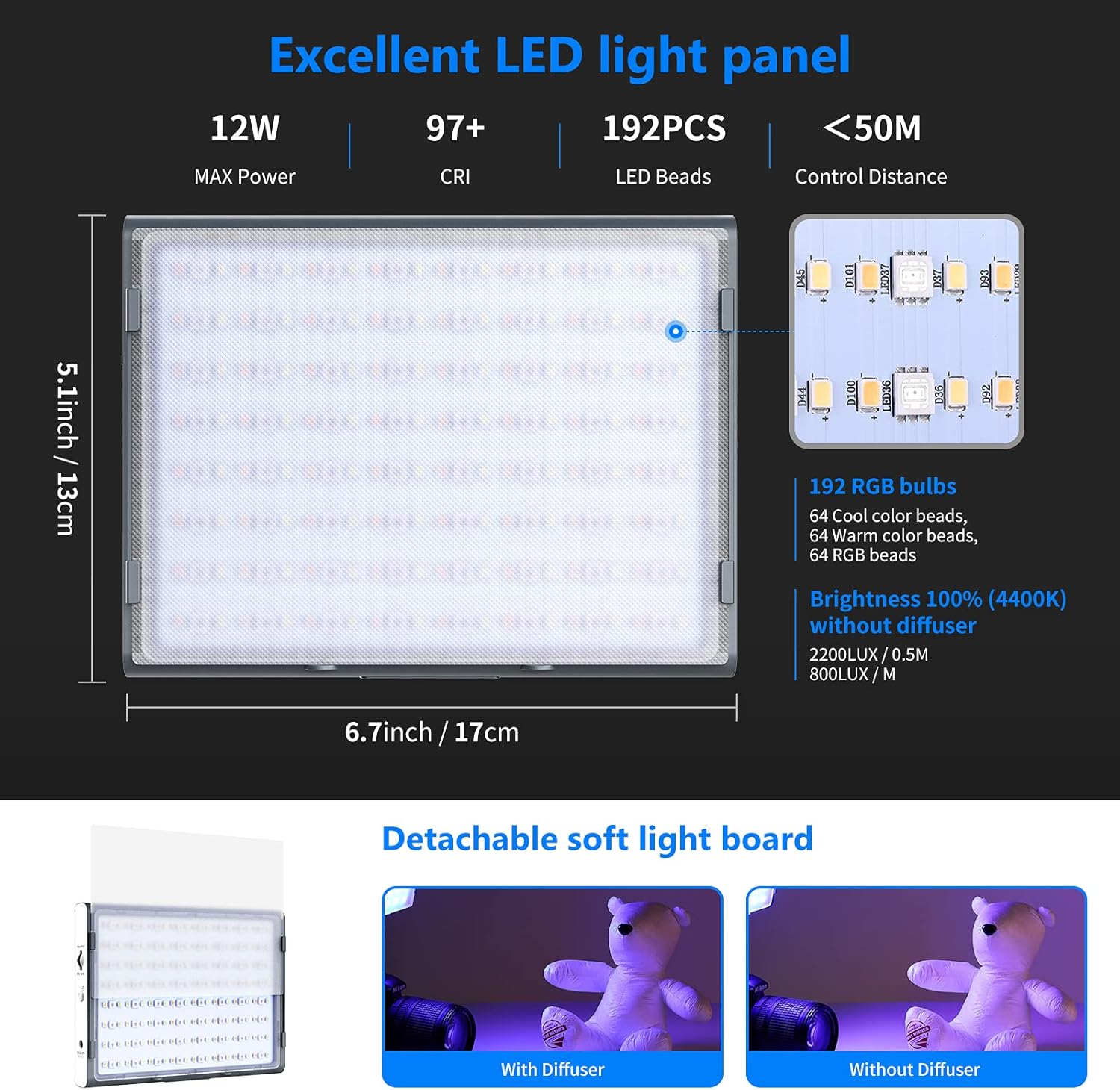
- Dimensions: 6.7" de llargada x 1.3" d'amplada x 5.1" d'alçada (17 cm x 3.3 cm x 13 cm)
- Pes: Aproximadament 1.7 lliures (0.7 kg)
- Potència màxima: 12W
- CRI: 97+
- Perles LED: 192 (64 Cool, 64 Warm, 64 RGB)
- Distància de control: Up to 50 meters (via App)
4. Configuració
4.1 Instal·lació de la bateria
- Ensure the light is powered off.
- Open the battery compartment cover on the back of the light.
- Insert the NP-F550 battery, aligning the contacts correctly.
- Tanqueu bé la tapa del compartiment de la bateria.
4.2 Muntatge de la llum
The RGB190 can be mounted on various photographic equipment using the cold shoe mount adapter.

- Attach the cold shoe mount adapter to the 1/4" screw hole at the bottom of the RGB190 light.
- Secure the cold shoe mount adapter onto your camera's hot shoe, a stabilizer, or a tripod.
- Adjust the angle of the light using the adapter's tilt mechanism.
5. Instruccions de funcionament
5.1 Engegada/apagada
Press and hold the Power On/Off button for approximately 2 seconds to turn the light on or off. A short press will put the light into standby mode.
5.2 Mode Selection and Adjustment
Short press the 'M' (Mode) button to switch between the available lighting modes: HSI, CCT, and Scene.

HSI Mode (Hue-Saturation-Intensity)
- In HSI mode, rotate the Adjust/SET dial to change the Hue (0-360°).
- Press the Adjust/SET dial to switch to Saturation adjustment (0-100%). Rotate the dial to change saturation.
- Press the Adjust/SET dial again to switch to Brightness adjustment (0-100%). Rotate the dial to change brightness.
Mode CCT (temperatura de color)
- In CCT mode, rotate the Adjust/SET dial to change the Color Temperature (3200K-5600K).
- Press the Adjust/SET dial to switch to Brightness adjustment (0-100%). Rotate the dial to change brightness.
Mode d'escena
The RGB190 offers 9 pre-programmed scene effects to enhance your creative lighting.
- In Scene mode, rotate the Adjust/SET dial to cycle through the 9 scene effects: Lightning 1, Lightning 2, Display Screen, Party, Fireworks, Candlelight, Squad Car, Ambulance, Fire Engine.
- Some scenes may have adjustable parameters (e.g., speed or intensity) which can be changed by pressing the Adjust/SET dial and then rotating it.
5.3 Control d'aplicacions
The Neewer RGB190 can be controlled wirelessly via the Neewer app (Android 4.3 / iOS 11.1 or above).

- Download the 'Neewer' app from your device's app store (Apple App Store or Google Play Store).
- Assegureu-vos que el Bluetooth estigui habilitat al vostre dispositiu mòbil.
- Open the Neewer app and select 'NEEEWER-RGB190' from the device list to connect.
- Once connected, you can adjust color temperature, brightness, hue (0-360°), and saturation (0-100%) directly from the app.
- The app also includes an RGB wheel for quick color selection, allows saving two presets, and supports controlling up to eight lights simultaneously.
6. Battery and Power Options
The RGB190 offers flexible power options for both indoor and outdoor use.

- Potència de la bateria: The light is powered by the supplied 2600mAh NP-F550 Li-ion battery. This battery is removable and interchangeable with other NP-F series batteries (NP-F550/NP-F750/NP-F970).
- Alimentació CA: For continuous indoor use, the light can be powered by an AC adapter (12-15V, not included) connected to the power input port.
- Càrrega: Use the provided battery charger and Micro USB charging cable to recharge the NP-F550 battery.
7. Manteniment
- Clean the light panel and body with a soft, dry cloth. Do not use abrasive cleaners or solvents.
- Guardeu la llum en un lloc fresc i sec, allunyat de la llum solar directa i de temperatures extremes.
- Remove the battery if the light will not be used for an extended period.
8. Solució De Problemes
8.1 La llum no s'encén
- Comproveu si la bateria està correctament instal·lada i carregada.
- If using an AC adapter, ensure it is properly connected and providing power.
- Press and hold the power button for 2 seconds to ensure it's not in standby mode.
8.2 Problemes de connexió de l'aplicació
- Ensure Bluetooth is enabled on your mobile device and the light.
- Make sure the light is within the 50-meter control range.
- Restart the Neewer app and try reconnecting.
- Assegura't que la versió de l'aplicació estigui actualitzada.
8.3 Inconsistent Light Output
- Check the battery level; low battery can affect performance.
- Ensure no obstructions are blocking the light panel.
- Verify settings in HSI or CCT mode are as desired.
9. Garantia i Suport
Neewer products are designed for reliability and performance. For warranty information or technical support, please refer to the official Neewer weblloc web o contacteu directament amb el servei d'atenció al client. Conserveu el rebut de compra com a comprovant de compra per a reclamacions de garantia.


