Introducció
Gràcies per la compraasing the Bytech True Wireless Bluetooth Boost Link True Speaker. This manual provides essential information for setting up, operating, and maintaining your new speakers. Please read this manual thoroughly before use to ensure proper operation and to maximize your listening experience. These speakers feature True Wireless Stereo (TWS) functionality, Bluetooth connectivity, FM Radio, and Bass Boost for rich audio.
Informació de seguretat
- No exposeu els altaveus a temperatures extremes, humitat ni llum solar directa.
- Eviteu deixar caure els altaveus ni sotmetre'ls a impactes forts.
- Do not disassemble, repair, or modify the speakers yourself. Refer all servicing to qualified personnel.
- Mantingueu els altaveus allunyats de l'aigua i altres líquids.
- Feu servir només el cable de càrrega i l'adaptador de corrent especificats.
- Netegeu els altaveus amb un drap suau i sec. No utilitzeu productes de neteja abrasius ni dissolvents.
- Listen at moderate volume levels to avoid hearing damage.
Contingut del paquet

Image: The Bytech Boost Link True Wireless Speakers shown in their retail packaging, highlighting the two speakers and the Bluetooth connectivity feature.
Si us plau, comproveu que tots els elements siguin presents i en bon estat:
- 2 x Bytech Boost Link True Wireless Speakers
- 1 cable de càrrega (USB)
- 1 x Manual d'usuari (aquest document)
Producte acabatview

Imatge: Primer pla frontal view of the two Bytech Boost Link True Wireless Speakers, showing the speaker grilles and control buttons at the bottom.
Familiaritzeu-vos amb els components i els controls de l'altaveu:
- Reixa de l'altaveu: Protects the speaker driver.
- Botons de control:
- Botó d'encesa: Power On/Off, Play/Pause.
- Botó de mode: Switch between Bluetooth, FM Radio, etc.
- Botó Pista anterior/Abaixar el volum: Premeu curt per a la pista anterior, premeu llargament per baixar el volum.
- Botó Pista següent/Pujar el volum: Premeu curt per a la següent pista, premeu llargament per pujar el volum.
- Port de càrrega: Per connectar el cable de càrrega USB.
- Indicador LED: Shows power status, charging status, and pairing status.
Configuració
Carregant els altaveus
Before first use, fully charge both speakers. Connect the supplied USB charging cable to the charging port on each speaker and plug the other end into a USB power adapter (not included) or a computer's USB port. The LED indicator will show charging status and turn off or change color when fully charged.
Encès/Apagat
- Per encendre: Press and hold the Power button on each speaker until the LED indicator lights up and you hear a power-on prompt.
- Per apagar: Press and hold the Power button on each speaker until the LED indicator turns off and you hear a power-off prompt.
Instruccions de funcionament
Bluetooth Pairing (Single Speaker Mode)
- Assegureu-vos que l'altaveu estigui encès i en mode d'emparellament Bluetooth (l'indicador LED parpellejarà).
- Al dispositiu (telèfon intel·ligent, tauleta, ordinador portàtil), activeu el Bluetooth i cerqueu els dispositius disponibles.
- Select "BYTECH BOOST LINK" (or similar name) from the list.
- Un cop emparellat, l'indicador LED deixarà de parpellejar i romandrà fix, i sentireu un so de confirmació.
True Wireless Stereo (TWS) Pairing (Two Speakers)
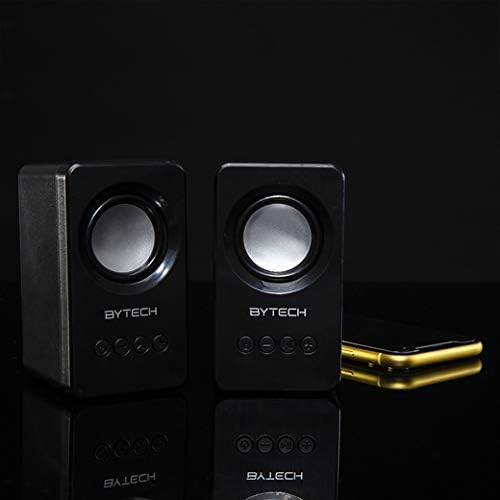
Image: The two Bytech Boost Link True Wireless Speakers positioned next to a smartphone, symbolizing their ability to connect wirelessly to each other and a device for stereo sound.
For a true stereo sound experience, you can pair both speakers together:
- Power on both Bytech Boost Link speakers. Do not connect them to your Bluetooth device yet.
- The speakers will automatically attempt to pair with each other. You will hear a confirmation sound when they are successfully linked for TWS. One speaker will become the master (left channel) and the other the slave (right channel).
- Once TWS paired, the master speaker will enter Bluetooth pairing mode (LED flashing).
- On your device, enable Bluetooth and search for "BYTECH BOOST LINK". Connect to this single entry.
- Ara tots dos altaveus reproduiran àudio en estèreo.
- Nota: If the speakers do not automatically pair, try double-pressing the Mode button on one of the speakers to initiate TWS pairing.
Funcionament de la ràdio FM
- Power on the speaker(s).
- Premeu el botó Mode button repeatedly until you hear the FM radio prompt.
- Per escanejar i desar emissores automàticament, manteniu premut el botó Reproduir/Pausa button. The speaker will scan and store available FM stations.
- Utilitza el Pista anterior i Pista següent botons per navegar entre les emissores desades.
Audio Playback and Volume Control
- Reproduir/pausa: Premeu breument el botó d'engegada.
- Pista següent: Short press the Next Track/Volume Up button.
- Pista anterior: Short press the Previous Track/Volume Down button.
- Pujar el volum: Long press the Next Track/Volume Up button.
- Baixar el volum: Long press the Previous Track/Volume Down button.
Manteniment
- Neteja: Use a soft, dry, lint-free cloth to clean the surface of the speakers. Do not use liquid cleaners, aerosols, or solvents.
- Emmagatzematge: Quan no els utilitzeu durant períodes prolongats, guardeu els altaveus en un lloc fresc i sec, allunyats de la llum solar directa i de temperatures extremes.
- Cura de la bateria: To prolong battery life, avoid fully discharging the battery frequently. Charge the speakers regularly, even if not in use.
Resolució de problemes
| Problema | Causa possible | Solució |
|---|---|---|
| L'altaveu no s'encén. | Bateria baixa. | Carregueu l'altaveu completament. |
| No es pot emparellar per Bluetooth. | Altaveu no en mode d'emparellament; Bluetooth del dispositiu desactivat; Massa lluny del dispositiu. | Ensure speaker LED is flashing; Turn on Bluetooth on your device; Move speaker closer to device (within 10 meters). |
| Sense so. | Volume too low; Speaker not connected; Incorrect mode. | Increase volume on speaker and device; Re-pair Bluetooth; Ensure correct mode (Bluetooth/FM). |
| L'emparellament TWS falla. | Speakers already connected to a device; Speakers too far apart. | Disconnect speakers from any device; Power off and on both speakers, then try TWS pairing again; Ensure speakers are close to each other. |
| Mala recepció de ràdio FM. | Senyal feble; Interferències. | Relocate the speaker to an area with better reception; Extend the charging cable (can act as an antenna). |
Especificacions
- Model: BY-AU-BS-152-BK
- Marca: Bytech
- Tecnologia de connectivitat: Sense fil (Bluetooth)
- Mode de sortida d'àudio: Envoltant
- Tipus d'altaveu: So envoltant
- Característiques especials: Wireless Bluetooth, Bass Boost, FM Radio, True Wireless Stereo (TWS)
- Usos recomanats: Per a reproductors de música
- Dispositius compatibles: Portàtil, tauleta, telèfon intel·ligent
- Tipus de controlador: Botons del dispositiu
- Dimensions del paquet: 20.7 x 16 x 9 cm
- Pes: 560 g
Garantia i Suport
Bytech products are designed and manufactured to the highest quality standards. For information regarding warranty coverage, technical support, or service inquiries, please refer to the warranty card included with your purchase or visit the official Bytech weblloc web. Si us plau, conserveu el comprovant de compra per a reclamacions de garantia.
For further assistance, please contact Bytech customer support.


