Instruccions importants de seguretat
Please read all safety instructions carefully before using this product. Failure to follow these instructions may result in electric shock, fire, or other hazards.
- No exposeu el projector a la pluja o la humitat per evitar incendis o descàrregues elèctriques.
- No obriu el projector casing. No hi ha peces a l'interior que l'usuari pugui reparar. Demaneu totes les tasques de manteniment a personal de servei qualificat.
- Assegureu-vos que hi hagi una ventilació adequada. No bloquegeu cap obertura de ventilació.
- Place the projector on a stable, flat surface to prevent it from falling.
- Feu servir només l'adaptador de corrent que s'inclou amb el projector.
- Eviteu l'exposició directa dels ulls a la lent del projector quan elamp està activat.
- Unplug the projector from the power outlet during lightning storms or when unused for long periods.
- Keep the projector away from heat sources such as radiators, heat registers, stoves, or other apparatus that produce heat.
Producte acabatview
Contingut del paquet
Verifiqueu que tots els elements que s'enumeren a continuació s'inclouen al vostre paquet:
- RCA 480P Home Movie Projector
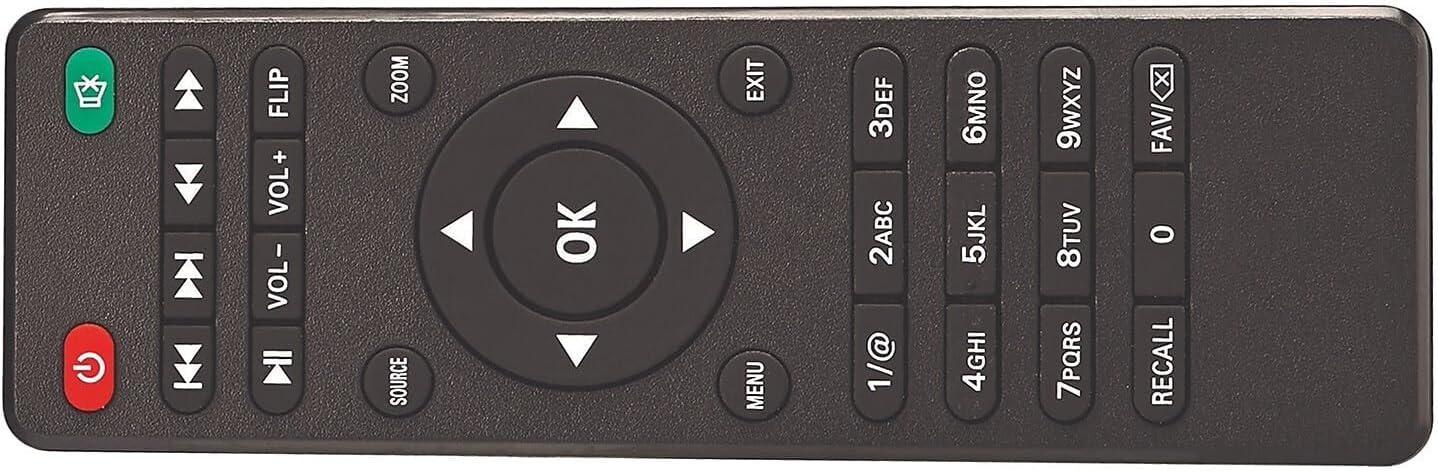
- Comandament a distància (piles no incloses)
- Tapa de la lent
- Adaptador de corrent alterna
- Manual d'usuari (aquest document)

Components del projector
Familiarize yourself with the various parts of your projector:


Configuració
Col·locació
Position the projector on a flat, stable surface. The distance from the projection surface (wall or screen) will determine the image size. The projector offers flexible projection sizes from 30 inches to 150 inches. For optimal viewing, a picture size between 37 inches and 100 inches is recommended.

Connexió d'alimentació
Connect the supplied AC power adapter to the projector's DC IN port, then plug the adapter into a standard electrical outlet. The power indicator light on the projector will illuminate.
Ajust de la imatge
- Ajust del focus: Gireu l'anell d'enfocament de la lent del projector fins que la imatge aparegui nítida i clara.
- Ajust Keystone: Use the keystone adjustment knob (if available) to correct trapezoidal distortion, ensuring the image is rectangular.
- Ajust d'alçada: Extend the footpad at the bottom of the projector to adjust the projection angle and height as needed.
Instruccions de funcionament
Dispositius de connexió
The projector supports various input sources. Ensure the projector is powered on before connecting devices.

- HDMI: Connect devices like laptops, DVD players, gaming consoles, or streaming sticks using an HDMI cable to one of the two HDMI ports. Select the corresponding HDMI input source on the projector.
- USB: Inseriu una unitat flaix USB al port USB per reproduir contingut multimèdia files (video, audio, pictures). Select the USB input source.
- VGA: Connect a computer or laptop using a VGA cable to the VGA port. Select the VGA input source.
- DE: Use the A/V input for older devices like VCRs or some DVD players. Select the AV input source.
- TF/MicroSD Card: Insert a TF or MicroSD card into the designated slot to play media files. Select the TF/MicroSD input source.
Connexió d'àudio Bluetooth
The projector features built-in Bluetooth 4.2, allowing you to connect to external Bluetooth-enabled speakers or headphones for an enhanced audio experience.
- Assegureu-vos que el dispositiu d'àudio Bluetooth estigui en mode d'emparellament.
- Al projector, navegueu fins al menú de configuració de Bluetooth.
- Seleccioneu el dispositiu Bluetooth de la llista de dispositius disponibles per emparellar-lo.
- Once connected, audio will be routed through your external Bluetooth device.

Reproducció multimèdia
After selecting the appropriate input source, the projector will display the content from your connected device or media storage. Use the remote control or onboard buttons to navigate menus, play/pause, adjust volume, and select media files.
Manteniment
- Neteja de lents: Feu servir un drap suau i sense borrissol dissenyat específicament per a lents òptiques per netejar suaument la lent del projector. Eviteu materials abrasius o productes químics agressius.
- Eliminació de pols: Periodically clean the projector's ventilation openings with a soft brush or compressed air to prevent dust buildup, which can affect performance and lifespan.
- Emmagatzematge: When not in use, store the projector in a cool, dry place, away from direct sunlight and extreme temperatures. Always replace the lens cover to protect the lens from dust and scratches.
- Cable d'alimentació: Inspect the power cord regularly for any damage. If damaged, discontinue use and replace with an authorized power adapter.
Resolució de problemes
Si teniu problemes amb el projector, consulteu els problemes i solucions més comuns següents:
- Sense energia:
- Ensure the power adapter is securely connected to both the projector and a working electrical outlet.
- Comproveu si la presa de corrent funciona connectant-hi un altre dispositiu.
- Premeu el botó d’engegada del projector o del comandament a distància.
- No Image / Blank Screen:
- Verify that the correct input source is selected (e.g., HDMI1, USB, AV).
- Check the connection cable (HDMI, VGA, etc.) between the projector and the source device. Try a different cable if possible.
- Assegureu-vos que el dispositiu font estigui encès i emeti vídeo.
- Poor Image Quality (Blurry/Distorted):
- Ajusteu l'anell d'enfocament de l'objectiu fins que la imatge sigui nítida.
- Use the keystone adjustment knob to correct any trapezoidal distortion.
- Assegureu-vos que la superfície de projecció sigui plana i llisa.
- Check the distance to the screen; adjust for optimal size (recommended 37-100 inches).
- Sense so:
- Increase the volume on both the projector and the connected source device.
- If using Bluetooth, ensure the external audio device is properly paired and its volume is up.
- Check audio settings on the source device to ensure audio is being sent to the correct output.
- Problemes de connexió Bluetooth:
- Ensure the Bluetooth audio device is in pairing mode and within range.
- Turn off and on the Bluetooth function on both the projector and the audio device, then try pairing again.
- Clear previous Bluetooth connections on both devices if necessary.
Especificacions
| Característica | Especificació |
|---|---|
| Número de model | 008-06-8991 |
| Resolució de visualització | Native 800 x 480 (Supports 1080p, 1080i, 720p, 576i, 480p, 480i via HDMI) |
| Brillantor blanc | 33 lúmens |
| Mida de projecció | 30 - 150 inches (Recommended: 37 - 100 inches) |
| Tecnologia de connectivitat | Bluetooth 4.2, HDMI (x2), USB, VGA, A/V, TF/MicroSD Card |
| Dimensions del producte | 7.9 in. L x 6.1 in. D x 3.3 in. H (6.1 x 7.9 x 3.3 inches) |
| Pes de l'article | 1 lliures |
| Ús recomanat | Home Cinema |
Garantia i Suport
For warranty information or technical support, please refer to the documentation provided at the time of purchase or visit the official RCA support weblloc web. Conserveu el comprovant de compra per a reclamacions de garantia.


