1. Introducció
This manual provides detailed instructions for the setup, operation, and maintenance of your winees M1 Mini Indoor Security Camera. Designed for indoor use, this Wi-Fi smart home IP camera offers 1080P HD video, motion detection, two-way audio, night vision, and compatibility with Alexa, making it suitable for monitoring babies, pets, or general home security.
2. Producte acabatview
2.1 Característiques clau
- Resolució HD 1080P: Provides clear video for monitoring.
- Detecció de moviment: Automatically detects human and pet motion, sending 15-second video alerts to your phone.
- Àudio bidireccional: Micròfon i altaveu integrats per a la comunicació.
- Visió nocturna: Infrared night vision for clear monitoring in low-light conditions.
- Múltiples mètodes d'instal·lació: Table stand, wall mount (screw or 3M adhesive tape), and magnetic design for flexible placement.
- Opcions d'emmagatzematge dual: Supports secure cloud service (3-month free trial) or local Micro SD card storage (up to 64GB, not included).
- Compatibilitat amb Alexa: Integrates with Amazon Alexa for voice control and live view on compatible devices.
- Connectivitat Wi-Fi: Supports 2.4 GHz Wi-Fi networks only.
2.2 Contingut del paquet
The package includes the winees M1 Mini camera unit, a desktop stand with magnetic mount, a micro USB power cable, an AC/DC power adapter, mounting screws, and a user guide.
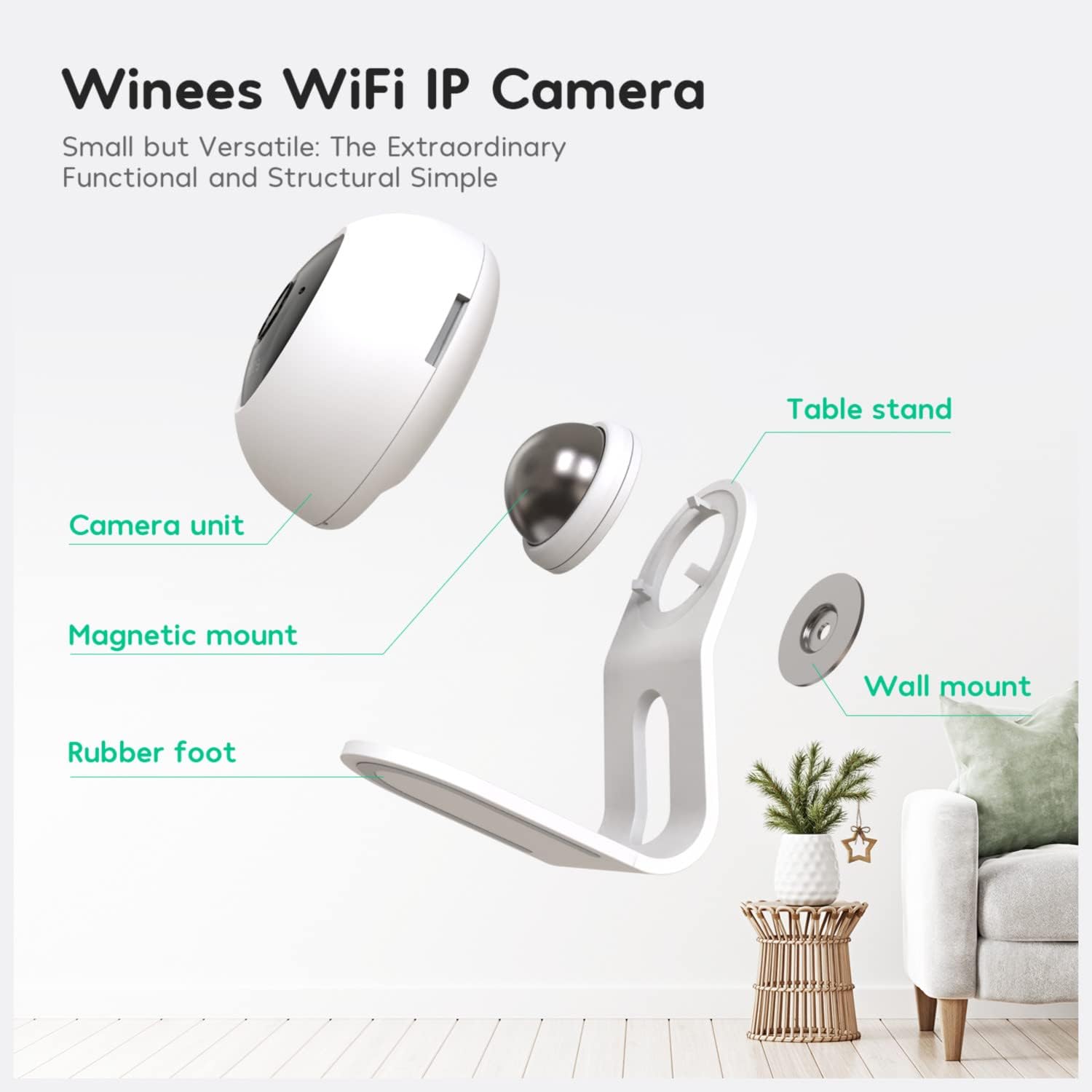
Figura 1: Explotat view of the winees M1 Mini camera components.
The image above shows the individual components: the camera unit, magnetic mount, table stand, rubber foot, and wall mount. The magnetic mount allows for easy attachment and adjustment of the camera to the stand or a wall mount.
3. Configuració
3.1 Instal·lació física
The winees M1 Mini camera offers versatile installation options:
- Suport de taula: Place the camera on any flat surface using the included stand. The magnetic connection allows for easy angle adjustment.
- Muntatge en paret: The camera can be mounted to a wall using either the provided screws or 3M adhesive tape. The magnetic base attaches to a small metal plate secured to the wall.

Figure 2: Various installation methods for the camera.
The diagram illustrates how the camera can be adapted to different surfaces like metal, glass, wood, and walls, or simply placed on a table. The magnetic design provides flexibility in positioning the camera to monitor the desired area.
3.2 Descàrrega de l'aplicació i creació de compte
- Download the "Linkind" or "AiDot" app from your smartphone's App Store.
- Creeu un compte nou i inicieu la sessió.
3.3 Connexió Wi-Fi
- Plug in the camera using the micro USB power cable and AC/DC adapter.
- Wait for the green light on the camera to start flashing.
- In the app, press the '+' button to add a new device. Select "Winees Cam mini" or "IPC" under the Surveillance category.
- Follow the on-screen prompts to connect the camera to your Xarxa Wi-Fi de 2.4 GHz. (5GHz Wi-Fi is not supported).
- Ensure your network upload speed is greater than 1 Mbps for fluent video streaming.
Video 1: Official guide on the steps for installation and connecting the winees M1 Mini camera.
This video demonstrates the process of physically installing the camera, connecting the power supply, inserting an SD card, and setting up the camera through the AiDot/Linkind app, including Wi-Fi connection steps.
4. Funcionament de la càmera
4.1 Viu View
Once connected, you can access the live 1080P HD video feed from your camera through the app. This allows you to monitor your space in real-time.
4.2 Detecció de moviment
The camera features human and pet motion detection. When motion is detected, the camera automatically records a 15-second video clip and sends a notification to your smartphone.

Figure 3: Motion detection alerts on a smartphone.
The image illustrates how motion detection alerts appear on your phone, showing a notification from the AiDot app when a person or pet is detected.
4.3 Àudio bidireccional
Utilize the built-in microphone and speaker for two-way communication. You can speak through the camera to interact with family members or pets, or issue a warning if needed.

Figure 4: Demonstrating instant two-way audio feature.
This image shows a user interacting with the camera via their smartphone, highlighting the instant two-way audio capability with a built-in anti-noise microphone and speaker.
4.4 Visió nocturna
The camera is equipped with infrared night vision, allowing it to capture clear images and videos in completely dark environments. The night vision feature activates automatically in low light conditions.

Figure 5: Night vision capability in a living room setting.
The image demonstrates the camera's night vision, showing a clear black and white view of a living room in darkness compared to a daytime view.
4.5 Opcions d'emmagatzematge
You have two options for storing your video recordings:
- Targeta micro SD: The camera supports Micro SD cards up to 64GB (card not included). You can set it for full-time continuous recording or event-based recording.
- Servei al núvol: A secure cloud service is available, offering a 3-month free trial.
4.6 Integració d'Alexa
The winees M1 Mini camera is compatible with Amazon Alexa. To enable this feature:
- Obriu l'aplicació Alexa.
- Enable the "Linkind" skill.
- Link your AiDot account with Alexa.
- You can then use voice commands like "Alexa, show me the [camera name]" to view the live feed on compatible Alexa devices (e.g., Echo Show).
Video 2: Official demonstration of the winees M1 Mini camera's features and Alexa integration.
This video highlights the camera's features, including motion detection, two-way audio, and night vision, and demonstrates how to connect it with Amazon Alexa for convenient voice control and live viewing.
5. Manteniment
5.1 Reinicialització de la càmera
If you need to reset the camera to its factory settings, or if you cannot reset it from the app's settings page:
- Ensure the power cable is plugged in.
- Locate the reset button (a small pinhole) on the back of the camera.
- Use a reset pin (or a straightened paperclip) to press and hold the reset button for 5 seconds.
- The camera will play a voice prompt: "Restoring factory settings".
5.2 Neteja
Unplug the power cord before cleaning. Do not clean the camera with any liquids, spray cleaner, or wet cloth. Use a dry, soft cloth to gently wipe the camera's exterior.
6. Solució De Problemes
- Camera fails to connect to Wi-Fi: Ensure your wireless router has internet access and the Wi-Fi signal is strong at the camera's location. The camera only supports 2.4 GHz Wi-Fi. If the LED is not flashing green, try resetting the camera.
- Micro SD card not detected: Ensure the Micro SD card is correctly inserted and formatted in FAT32.
- Limited event recording: Event recordings are typically 15 seconds long. For continuous recording, activate the "Continuous Video Recording" option in the app settings.
- Power failure beep: If there is a power failure, the camera will generate a loud beep once it reboots. This is normal operation.
- La detecció de moviment no funciona: Ensure motion detection is manually activated in the app settings.
7. Especificacions
| Característica | Especificació |
|---|---|
| Model | M1 mini |
| Resolució de captura de vídeo | 1080p |
| Tecnologia de connectivitat | Sense fil (Wi-Fi) |
| Protocol de connectivitat | Wi-Fi (només 2.4 GHz) |
| Característiques especials | Sensor de moviment, visió nocturna, àudio bidireccional |
| Dispositius compatibles | Alexa |
| Emmagatzematge | Micro SD card (up to 64GB), Cloud Service |
| Font d'alimentació | AC/DC (5 watts) |
| Tipus de muntatge | Surface Mount, Wall Mount, Stick up (Magnetic) |
| Ús interior/exterior | Interior |
| Pes de l'article | 9.1 unces |
| Dimensions del paquet | 7.24 x 5.83 x 3.27 polzades |
| UPC | 850028625040 |
8. Informació de seguretat
Please observe the following precautions for safe use of your winees M1 Mini camera:
- Use only the provided adapter to prevent product damage.
- Mantenir fora de l'abast dels nens. Aquest producte conté petits imants i altres peces petites, que poden causar sufocació o lesions si s'ingereixen.
- Do not install in wet locations, outdoors, close to heat sources, or near metal objects and mirrors that may cause radio signal interference.
- Do not disassemble or reinstall the camera, as this may cause security risks.
- Unplug the power cord before cleaning. Do not clean with liquids, spray cleaner, or wet cloth.
- The slot and opening are for ventilation and must not be blocked or covered.
9. Garantia i Suport
For any questions or support regarding your winees M1 Mini Indoor Security Camera, please contact the manufacturer directly. Refer to the product packaging or the official winees weblloc per obtenir informació de contacte.


