1. Introducció
This manual provides instructions for the Sharp Digital Alarm Clock, Model SPC547AJAMZ. This device features an easy-to-read LED display, a high-speed USB charging port, and essential alarm functions. Please read this manual thoroughly before use to ensure proper operation and to maximize the product's lifespan.

Figure 1: Sharp Digital Alarm Clock (Model SPC547AJAMZ) front view.
2. Característiques del producte
The Sharp Digital Alarm Clock offers the following key features:
- Pantalla fàcil de llegir: Large, clear green LED digits for visibility from a distance.
- High-Speed USB Charging Port: A 2 AMP USB port for rapid charging of compatible devices such as smartphones and tablets.
- Volum d'alarma ajustable: Select between high and low alarm volume settings.
- Operació senzilla: Intuitive button controls for setting time and alarm.
- Còpia de seguretat de la bateria: Maintains time and alarm settings during power outages (requires 2 AAA batteries, not included). The display will be blank during battery backup mode, but the internal clock will continue to run, and the alarm will sound at the set time.

Figure 2: Alarm clock with a smartphone connected to the USB charging port.
3. Contingut del paquet
Verifiqueu que tots els elements siguin presents al paquet:
- Sharp Digital Alarm Clock (Model SPC547AJAMZ)
- Adaptador de corrent alterna
- Manual d'usuari (aquest document)
Note: 2 AAA batteries for backup are not included and must be purchased separately.
4. Informació de seguretat
Si us plau, observeu les precaucions de seguretat següents:
- No exposeu la unitat a l'aigua ni a una humitat excessiva.
- Eviteu col·locar la unitat a prop de fonts de calor o sota la llum solar directa.
- Feu servir només l'adaptador de corrent altern proporcionat.
- No intenteu desmuntar ni modificar la unitat.
- Mantenir fora de l'abast dels nens.
- Assegureu-vos una ventilació adequada al voltant de la unitat.
5. Configuració
5.1 Connexió d'alimentació
- Plug the AC power adapter into the DC IN jack located on the back of the alarm clock.
- Plug the other end of the AC power adapter into a standard wall outlet (120V AC, 60Hz).
- The display will illuminate, and the clock will be ready for time setting.
5.2 Instal·lació de la bateria de reserva
To ensure time and alarm settings are retained during a power outage:
- Localitzeu el compartiment de la bateria a la part inferior de la unitat.
- Obriu la tapa del compartiment de la bateria.
- Insert two (2) new AAA batteries, observing the correct polarity (+ and -) as indicated inside the compartment.
- Tanqueu bé la tapa del compartiment de la bateria.
Note: Batteries are for backup only. The clock display will not be lit during a power outage when operating on battery backup, but the internal clock will continue to run, and the alarm will sound at the set time.
6. Instruccions de funcionament
Familiarize yourself with the control buttons located on the top of the unit:
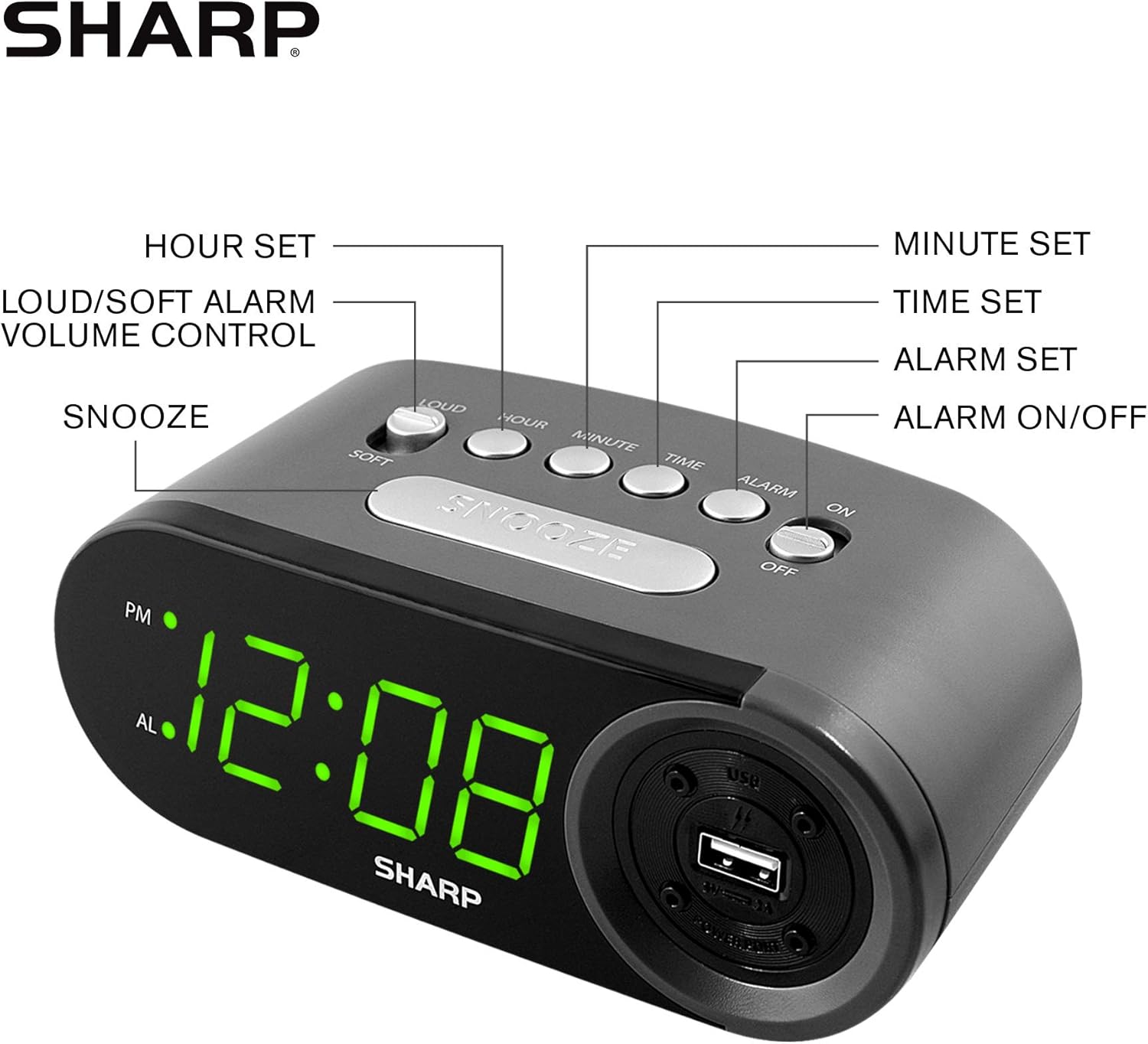
Figure 3: Top panel controls and their functions.
6.1 Configuració de l'hora actual
- Manteniu premut el botó TEMPS button until the display begins to flash.
- Premeu el botó HORA button repeatedly to set the hour. Observe the PM indicator for afternoon hours.
- Premeu el botó MINUT botó repetidament per ajustar els minuts.
- Un cop configurat el temps desitjat, premeu el botó TEMPS de nou per confirmar i sortir del mode de configuració de l'hora.
6.2 Configuració de l'hora de l'alarma
- Manteniu premut el botó ALARMA button until the alarm time display begins to flash. The "AL" indicator will also flash.
- Premeu el botó HORA button repeatedly to set the alarm hour. Observe the PM indicator.
- Premeu el botó MINUT button repeatedly to set the alarm minutes.
- Un cop configurada l'hora d'alarma desitjada, premeu la tecla ALARMA button again to confirm and exit alarm setting mode.
6.3 Activació/desactivació de l'alarma
- To turn the alarm ON, fes lliscar el ALARMA ON / OFF switch to the "ON" position. The "AL" indicator will appear on the display.
- To turn the alarm OFF, fes lliscar el ALARMA ON / OFF switch to the "OFF" position. The "AL" indicator will disappear.
6.4 Funció de repetició
Quan soni l'alarma, premeu el botó gran DORMITAR botó. L'alarma s'aturarà temporalment i tornarà a sonar al cap d'aproximadament 9 minuts.
6.5 Aturar l'alarma
To stop the alarm completely after it sounds (without using snooze), slide the ALARMA ON / OFF switch to the "OFF" position. The alarm will reset for the next day if the switch is moved back to "ON".
6.6 Ajust del volum de l'alarma
Premeu el botó FORT/SUAU button to toggle between high and low alarm volume settings.
6.7 Ús del port de càrrega USB
El 2 AMP USB charging port is located on the right side of the unit.
- Connect your device's USB charging cable (not included) to the USB port on the alarm clock.
- Connecteu l'altre extrem del cable al vostre telèfon intel·ligent, tauleta o altre dispositiu compatible amb USB.
- Ensure the alarm clock is connected to AC power for the USB port to function.
Note: Charging speed may vary depending on your device and cable.
7. Manteniment
To keep your alarm clock in optimal condition:
- Neteja: Netegeu la unitat amb un drap suau i sec. No utilitzeu productes de neteja abrasius ni dissolvents.
- Substitució de la bateria: Replace AAA backup batteries annually or when the battery low indicator (if present) appears, to ensure reliable backup functionality.
- Emmagatzematge: If storing the unit for an extended period, remove the backup batteries to prevent leakage.
8. Solució De Problemes
| Problema | Causa possible | Solució |
|---|---|---|
| La pantalla del rellotge està en blanc. | Sense alimentació de CA; s'ha de apagar el corrent.tage; unit unplugged. | Ensure AC adapter is securely plugged into the unit and a working wall outlet. Check for power outages. |
| L'alarma no sona. | Alarm is not activated; alarm time is incorrect; volume is too low. | Slide ALARM ON/OFF switch to "ON". Verify alarm time is set correctly. Adjust alarm volume using the LOUD/SOFT button. |
| El port de càrrega USB no funciona. | Clock not connected to AC power; device not compatible; faulty cable. | Ensure the clock is plugged into AC power. Try a different USB cable or device to confirm compatibility. |
| La configuració de l'hora/alarma es perd després d'un apagadatage. | Les bateries de reserva estan gastades o no estan instal·lades. | Install two fresh AAA batteries in the battery compartment, ensuring correct polarity. |
9. Especificacions
- Marca: Afilat
- Model: SPC547AJAMZ
- Tipus de visualització: LED digital (verd)
- Font d'alimentació: Cable elèctric (CA 120V, 60Hz)
- Còpia de seguretat de la bateria: 2 piles AAA (no incloses)
- Port de càrrega USB: 2 AMP (5V)
- Dimensions del producte: Aproximadament 6.2" d'amplada x 2.3" d'alçada x 3.25" de profunditat
- Pes de l'article: Aproximadament 9.6 unces
- Material: Plàstic
- UPC: 049353006000

Figura 4: Dimensions del producte.
10. Garantia i assistència
10.1 Informació de la garantia
This Sharp product is covered by a limited manufacturer's warranty. For specific warranty terms and conditions, please refer to the warranty card included with your purchase or visit the official Sharp weblloc web. Conserveu el rebut de compra com a comprovant de compra.
10.2 Atenció al client
If you have any questions, require assistance, or need to report an issue with your Sharp Digital Alarm Clock, please contact Sharp customer support. Contact details can typically be found on the official Sharp weblloc web o a l'embalatge del producte.
Per a més informació, visiteu el Botiga Sharp a Amazon.


