1. Introducció
This manual provides essential instructions for the safe and efficient operation of your Itel TV A3210IE 80cm (32-inch) HD Ready Smart TV. Please read this manual thoroughly before using your television and retain it for future reference.
2. Informació de seguretat
Per garantir un funcionament segur i evitar danys, observeu les precaucions següents:
- No exposeu el televisor a la pluja ni a la humitat per evitar incendis o descàrregues elèctriques.
- No bloquegeu les obertures de ventilació. Assegureu-vos que hi hagi prou espai al voltant del televisor per a un flux d'aire adequat.
- Col·loqueu el televisor sobre una superfície estable i plana per evitar que caigui.
- Eviteu que el cable d'alimentació sigui trepitjat o pessigat.
- Desendolleu el televisor durant tempestes o quan no l'utilitzeu durant períodes prolongats.
- Demaneu tot el servei a personal de servei qualificat.
3. Contingut del paquet
Verifiqueu que tots els elements siguin presents al paquet:
- Itel TV A3210IE 80cm (32-inch) HD Ready Smart TV
- Control remot
- TV Stand (if applicable for desktop placement)
- Cable d'alimentació
- Manual d'usuari (aquest document)
- Screws for stand assembly (if applicable)
4. Configuració
4.1 Configuració física
Your Itel TV A3210IE can be placed on a stand or wall-mounted. Ensure the TV is placed on a stable surface or securely mounted to a wall.
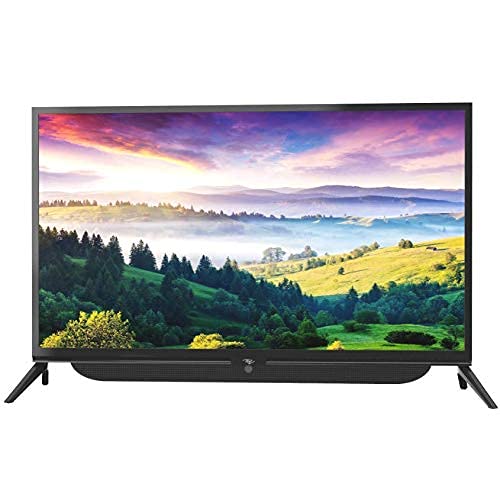
Figura 4.1: Frontal view of the Itel TV A3210IE with its stand. The television features a slim bezel design and a central stand for stable placement on a flat surface.
For wall mounting, use a compatible VESA mount (not included) and follow the instructions provided with the mount. The TV's sleek design with slim bezels allows for a modern aesthetic in any room.
Figura 4.2: lateral view of the Itel TV A3210IE, highlighting its slim profile. Això view demonstrates the television's compact design, suitable for various living spaces.
4.2 Encès inicial
- Connecteu el cable d'alimentació al televisor i després a una presa de corrent.
- Premeu el botó d'engegada del comandament a distància o del televisor mateix.
- Follow the on-screen instructions to complete the initial setup, including language selection and time zone.
4.3 Connexió de xarxa
Per accedir a les funcions de Smart TV, connecteu el televisor a Internet:
- Navigate to the "Settings" menu on your TV.
- Seleccioneu "Xarxa" o "Configuració de Wi-Fi".
- Choose your Wi-Fi network from the list and enter the password.
- Once connected, the TV will indicate a successful internet connection.
5. Funcionament del televisor
5.1 Funcions bàsiques
- Encès/apagat: Feu servir el botó d'engegada del comandament a distància o del televisor.
- Control de volum: Feu servir els botons de pujar/baixar el volum del comandament a distància.
- Font d'entrada: Press the "Source" or "Input" button on the remote to switch between HDMI, USB, and other connected devices.
- Navegació: Use the arrow keys and "OK" button on the remote to navigate menus.
5.2 Característiques del televisor intel·ligent
The Itel TV A3210IE runs on Android OS, providing access to a range of smart features:
- Serveis de streaming: Access popular streaming applications directly from the TV's home screen.
- Web Navegador: Feu servir el navegador integrat per navegar per Internet.
- App Store: Baixeu i instal·leu aplicacions addicionals des de la botiga d'aplicacions integrada.
- Replica de pantalla: Share content from compatible smartphones or tablets to the TV screen.
5.3 Connexió de dispositius externs
El televisor ofereix diverses opcions de connectivitat:
- Ports HDMI: Connect gaming consoles, Blu-ray players, set-top boxes, or laptops.
- Ports USB: Connecteu unitats USB per reproduir contingut multimèdia files (fotos, vídeos, música).
- Port VGA: Connecteu ordinadors o portàtils més antics.

Figure 5.1: A user engaged in gaming on the Itel TV A3210IE. This illustrates the TV's capability to connect with gaming consoles for an immersive entertainment experience.
6. Manteniment
Un manteniment adequat garanteix la longevitat del teu televisor:
- Neteja de la pantalla: Netegeu suaument la pantalla amb un drap suau, sec i sense borrissol. Per a marques difícils, netegeu lleugerament.ampNetegeu el drap amb aigua o amb un netejador de pantalles dissenyat específicament per a televisors. No ruixeu líquid directament sobre la pantalla.
- Neteja de l'armari: Feu servir un drap suau i sec per netejar el moble del televisor. Eviteu utilitzar productes de neteja abrasius o dissolvents.
- Ventilació: Assegureu-vos que les obertures de ventilació estiguin lliures de pols i obstruccions.
- Cable d'alimentació: Reviseu regularment el cable d'alimentació per si hi ha algun dany.
7. Solució De Problemes
Consulteu aquesta secció per conèixer els problemes comuns i les seves solucions:
| Problema | Causa possible | Solució |
|---|---|---|
| Sense poder | Cable d'alimentació desconnectat; presa de corrent no funciona | Check power cord connection; Test outlet with another device |
| No hi ha imatge, però hi ha so | Incorrect input source selected; Backlight issue | Press "Source" button to select correct input; Contact support if backlight is faulty |
| No hi ha so, però hi ha imatge | Volum silenciat o massa baix; Problema amb el dispositiu d'àudio extern | Unmute or increase volume; Check connections to external audio devices |
| El comandament a distància no funciona | Piles esgotades; Obstrucció entre el comandament a distància i el televisor | Replace batteries; Remove obstructions; Ensure remote is pointed at TV sensor |
| No es pot connectar a la Wi-Fi | Contrasenya incorrecta; Problema amb el router; TV massa lluny del router | Verify password; Restart router; Move TV closer to router or use a Wi-Fi extender |
8. Especificacions
Key technical specifications for the Itel TV A3210IE:
- Marca: Itel
- Nom del model: A3210IE
- Mida de la pantalla: 80cm (32-inch)
- Resolució: HD Ready (1366 x 768 píxels)
- Sistema operatiu: Android
- Característiques especials: Smart TV, Android OS
- Tecnologia de connectivitat: HDMI, USB, VGA
- Interfície de maquinari: USB, USB tipus C
- Mode de sortida d'àudio: estèreo
- Wattage: 16 watts
- Viewangle: 178 graus
- Relació d'aspecte: 16:9
- Tipus de muntatge: Muntatge de paret
- Pes de l'article: 6 kg 500 g
- Dimensions del paquet: 74.2 x 56.5 x 34.5 cm
9. Garantia i Suport
For warranty information and technical support, please refer to the warranty card included with your product or visit the official Itel customer support weblloc web. Conserveu el rebut de compra com a comprovant de compra per a reclamacions de garantia.


