1. Introducció
The Hombli Smart Doorbell 2 is an advanced video doorbell designed to enhance your home security. It features 1080p HD video, a 140-degree wide-angle view, two-way audio communication, motion detection, and infrared night vision. This manual provides detailed instructions for the installation, operation, and maintenance of your Smart Doorbell 2, ensuring optimal performance and security for your home.
Compared to its predecessor, the Smart Doorbell 2 offers a 25% faster response time and nearly double the battery life, along with flexible wired or wireless installation options.
2. Producte acabatview
Familiarize yourself with the components and features of your Hombli Smart Doorbell 2.

Image 2.1: Hombli Smart Doorbell 2 highlighting key features such as 140° wide-angle 1080p HD camera, motion detection, built-in 5000mAh battery, optional cloud storage, Micro SD slot, two-way audio, infrared night vision, weatherproof IP65 rating, and GDPR compliance.
- Lent de la càmera: Captures 1080p Full HD video with a 140° wide-angle view.
- Sensor de moviment: Detecta moviment davant del timbre.
- Botó del timbre: Illuminates when pressed, sending a notification to your smartphone.
- Micròfon: Per a comunicació d'àudio bidireccional.
- Ponent: Per a comunicació d'àudio bidireccional.
- Port de càrrega: Per recarregar la bateria interna.
- Botó de restabliment: S'utilitza per emparellar i reiniciar el dispositiu.
- Ranura per a targetes Micro SD: Supports local video storage up to 128GB.
3. Què hi ha a la caixa
Assegureu-vos que tots els components estiguin presents abans de continuar amb la instal·lació:
- Hombli Smart Doorbell 2
- Suport de muntatge
- Angle Mount (optional, for optimal viewangle d'ajust)
- Cinta adhesiva de doble cara 3M
- Cargols de muntatge i tacs de paret
- Cable de càrrega USB
- Manual d'usuari (aquest document)

Image 3.1: The Hombli Smart Doorbell 2 shown alongside its separate mounting bracket, illustrating how the device attaches to its base.
4. Configuració i instal·lació
4.1 Càrrega inicial
Before installation, fully charge the Hombli Smart Doorbell 2 using the provided USB cable. A full charge ensures the device is ready for immediate use and helps calibrate the battery life indicator.
4.2 Instal·lació i emparellament de l'aplicació
- Descarrega't el Hombli app des de l'App Store (iOS) o Google Play Store (Android).
- Creeu un compte o inicieu sessió si ja en teniu un.
- A l'aplicació, toca la icona "+" per afegir un dispositiu nou.
- Select "Smart Doorbell 2" from the list of devices.
- Follow the on-screen instructions to connect the doorbell to your Xarxa Wi-Fi de 2.4 GHz. Ensure your phone is connected to the same 2.4 GHz network during pairing.

Image 4.1: A smartphone displaying the Hombli app interface, showing options like screenshot, speak, record, playback, cloud storage, and buzzer, positioned next to the Hombli Smart Doorbell 2.
4.3 Muntatge del timbre
Choose a suitable location for your doorbell, typically at eye level, ensuring a clear view of your entrance. The doorbell can be installed wirelessly or wired to existing doorbell connections.
- Wireless Installation (Battery Powered):
- Netegeu bé la superfície de muntatge.
- Attach the mounting bracket to the desired location using either the provided 3M double-sided adhesive tape or screws. For a more secure installation, screws are recommended.
- If needed, use the angle mount to adjust the viewing angle for optimal coverage of your entryway.
- Feu lliscar el timbre intel·ligent Hombli 2 sobre el suport muntat fins que encaixi al seu lloc.
- Wired Installation (Continuous Power):
- Ensure power to your existing doorbell system is turned off at the circuit breaker.
- Remove your old doorbell.
- Connect the existing doorbell wires to the terminals on the Hombli Smart Doorbell 2 mounting bracket.
- Col·loqueu el suport a la paret amb cargols.
- Slide the Hombli Smart Doorbell 2 onto the mounted bracket.
- Resta l'alimentació al disjuntor.
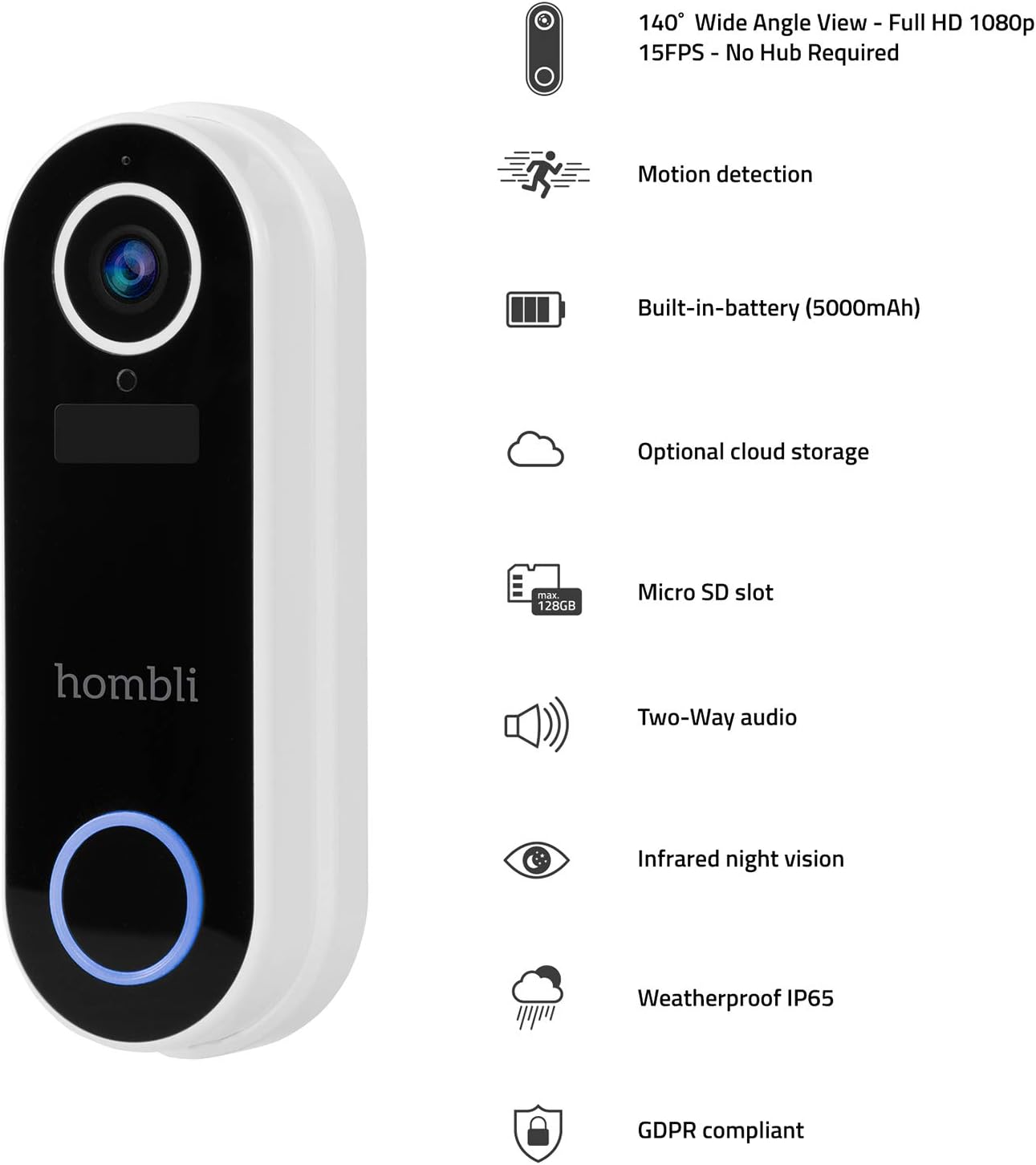
Image 4.2: The Hombli Smart Doorbell 2 is shown mounted on a brick wall, viewed from the side, demonstrating its slim profile and integration with the wall surface.

Image 4.3: The Hombli Smart Doorbell 2 is shown mounted on a brick wall, viewed from the front, highlighting its camera lens and illuminated doorbell button.
5. Operating the Smart Doorbell 2
5.1 Recepció de notificacions
When someone presses the doorbell button or motion is detected, you will receive an instant notification on your smartphone via the Hombli app. Tap the notification to view el feed en directe.
5.2 Comunicació d'àudio bidireccional
Del directe view in the Hombli app, you can use the microphone and speaker icons to engage in real-time two-way audio communication with visitors at your door, even when you are away from home.
5.3 Viu View i gravació de vídeo
Access the 1080p HD live video feed at any time through the Hombli app. You can manually record video or capture screenshots directly from the live view. The doorbell also automatically records events triggered by motion or doorbell presses.
5.4 Detecció de moviment
The integrated motion sensor detects activity in its field of view. You can adjust the motion detection sensitivity and set specific detection zones within the Hombli app to minimize false alerts.
5.5 Visió nocturna infraroja
The doorbell automatically switches to infrared night vision in low-light conditions, providing clear black-and-white video footagi fins i tot en la foscor completa.
5.6 Opcions d'emmagatzematge de vídeo
- Targeta micro SD: Insert a Micro SD card (up to 128GB, not included) into the designated slot for local storage of recorded video events.
- Emmagatzematge al núvol: Optional cloud storage plans are available through the Hombli app for secure, remote access to your video history.
5.7 Durada de la bateria
The built-in 5000mAh rechargeable battery provides 3 to 6 months of operation, depending on usage frequency and environmental factors. The Hombli app will notify you when the battery level is low.
6. Manteniment
6.1 Càrrega de la bateria
When the battery is low, remove the doorbell from its mounting bracket and charge it using the provided USB cable. Connect the cable to the charging port on the doorbell and a standard USB power adapter (not included). The charging indicator will show the charging status.
6.2 Neteja
Periodically clean the doorbell's camera lens and body with a soft, damp cloth to ensure clear video quality and proper functioning of the sensors. Avoid using harsh chemicals or abrasive materials.

Imatge 6.1: Un primer pla view of the Hombli Smart Doorbell 2's camera area, showing water droplets on its surface, demonstrating its IP65 weatherproof rating.
7. Solució De Problemes
| Problema | Causa possible | Solució |
|---|---|---|
| Doorbell not powering on | Low battery; Incorrect wired connection. | Charge the doorbell fully. For wired installation, ensure wires are correctly connected and power is on. |
| No es pot connectar a la Wi-Fi | Incorrect Wi-Fi password; Not a 2.4 GHz network; Weak Wi-Fi signal. | Verify Wi-Fi password. Ensure you are connecting to a 2.4 GHz network. Move the doorbell closer to your router or use a Wi-Fi extender. Reset the doorbell and try pairing again. |
| Poca qualitat de vídeo | Weak Wi-Fi signal; Dirty camera lens. | Millora la intensitat del senyal Wi-Fi. Neteja la lent de la càmera amb un drap suau. |
| Sense alertes de detecció de moviment | Motion detection disabled; Sensitivity too low; Incorrect detection zone settings. | Enable motion detection in the Hombli app. Adjust sensitivity settings. Configure detection zones to cover the desired area. |
| Sense notificacions al telèfon | App notifications disabled; Phone's notification settings. | Check notification settings within the Hombli app. Ensure your phone's system settings allow notifications from the Hombli app. |
8. Especificacions

Image 8.1: Technical drawing showing the dimensions of the Hombli Smart Doorbell 2: 14.2 cm height, 4.9 cm width (front), and 2.8 cm depth (side).
- Número de model: HBDB-0209
- Fabricant: Hombli
- Dimensions (L x A x A): 2.6 x 4.6 x 13 cm
- Pes: 420 grams
- Color: Blanc
- Material: Plàstic
- Voltage: 5 Volts
- Mètode d'instal·lació: Self-adhesive, Screws
- Components inclosos: Vídeo timbre
- Bateria: 5000 mAh rechargeable (included)
- Resolució de la càmera: 1080p HD
- Camp de View: Gran angular de 140°
- Visió nocturna: infrarojos
- Connectivitat: Wi-Fi de 2.4 GHz
- Resistència a la intempèrie: IP65
- Emmagatzematge: Micro SD card slot (up to 128GB), Optional Cloud Storage
9. Garantia i Suport
For warranty information, technical support, or further assistance, please refer to the official Hombli website or contact Hombli customer service directly. Details regarding specific warranty periods and support channels can typically be found on the manufacturer's official product page or within the Hombli app.
Please note that information regarding spare parts availability is not provided in this manual. For inquiries about spare parts, please contact Hombli support.


