Introducció
This manual provides essential instructions for the proper use, setup, and maintenance of your Tronsmart MUC03 Micro USB Cable. Please read this manual thoroughly before using the product to ensure optimal performance and safety.
Producte acabatview
The Tronsmart MUC03 is a high-quality Micro USB cable designed for charging and data transfer. It features a durable braided nylon material and supports fast charging up to 2.4A and data transfer speeds up to 480 Mbps.
- Model: MUC03
- Tipus de cable: Micro USB
- Material: Niló trenat
- Sortida: Fins a 2.4 A
- Transferència de dades: Fins a 480 Mbps
- Longitud: 3 metres
- Color: Negre
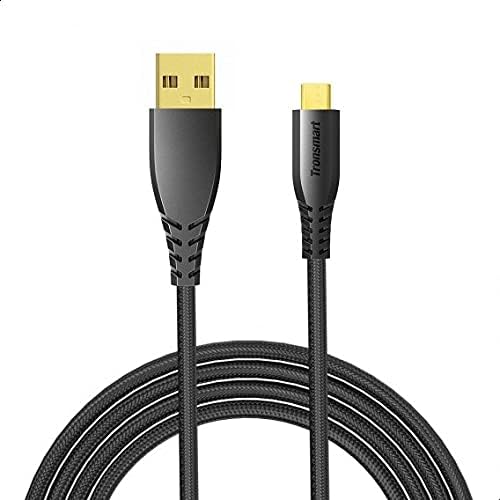
Image 1: The Tronsmart MUC03 Micro USB Cable, showcasing its black braided design and gold-plated connectors.
Configuració
Using the Tronsmart MUC03 Micro USB Cable is straightforward. Follow these steps to connect your device:
- Identifica els ports: Locate the Micro USB port on your device (e.g., smartphone, tablet, power bank) and a standard USB-A port on your charging adapter, computer, or other power source.
- Connect Micro USB: Gently insert the Micro USB connector of the cable into the Micro USB port of your device. Ensure it is oriented correctly to avoid damage.
- Connect USB-A: Insert the standard USB-A connector of the cable into the USB-A port of your power source or computer.
- Verifica la connexió: Once connected, your device should indicate that it is charging or connected for data transfer.
Instruccions de funcionament
Dispositius de càrrega
To charge your device using the Tronsmart MUC03 Micro USB Cable:
- Connect the cable as described in the "Setup" section.
- Ensure your power source (wall adapter, power bank) is active and providing power.
- Monitor your device's screen for the charging indicator. The cable supports up to 2.4A output for efficient charging.
Transferència de dades
To transfer data between your device and a computer:
- Connect the cable between your device and a computer's USB-A port.
- Your device may prompt you to select a connection mode (e.g., "File Transfer," "MTP," "PTP"). Select the appropriate mode for data transfer.
- Access your device's storage from your computer's file explorer to transfer files. The cable supports data transfer speeds up to 480 Mbps.
Manteniment i cura
To ensure the longevity and optimal performance of your Tronsmart MUC03 Micro USB Cable, follow these care guidelines:
- Emmagatzematge: Store the cable in a cool, dry place away from direct sunlight and extreme temperatures. Avoid tightly coiling or bending the cable at sharp angles.
- Neteja: If the cable or connectors become dirty, gently wipe them with a soft, dry cloth. Do not use liquid cleaners or abrasive materials.
- Manipulació: Always grasp the connector head when plugging or unplugging the cable, rather than pulling on the cable itself. This prevents damage to the internal wires and connectors.
- Evitar l'estrès: Do not subject the cable to excessive pulling, twisting, or bending, especially near the connectors. The braided nylon design offers enhanced durability, as shown in the image below.

Image 2: An illustration comparing the durability of Tronsmart cables, highlighting their robust construction and bend lifespan compared to conventional cables.

Image 3: A cross-section diagram illustrating the internal structure of the Tronsmart Micro USB cable, showing multiple protective layers including nylon braided, shielded tinned copper braid, aluminum foil, and various gauge power and data wires.
Resolució de problemes
If you encounter issues with your Tronsmart MUC03 Micro USB Cable, consider the following common solutions:
- El dispositiu no es carrega:
- Assegureu-vos que els dos extrems del cable estiguin ben connectats.
- Proveu un altre adaptador d'alimentació o port USB.
- Test the cable with another device to rule out a device-specific issue.
- Comproveu si la font d'alimentació està activa.
- Càrrega lenta:
- Ensure your power adapter provides sufficient output (e.g., 2.4A for fast charging).
- Eviteu fer un ús intensiu del dispositiu mentre es carrega.
- Check for any debris in the device's charging port or the cable's connector.
- Problemes de transferència de dades:
- Ensure your device is set to "File Mode "Transferència" o "MTP" quan es connecta a un ordinador.
- Proveu un port USB diferent a l'ordinador.
- Reinicieu tant el dispositiu com l'ordinador.
- Verify that your computer's drivers for the device are up to date.
- Danys al cable:
- Visually inspect the cable for any signs of fraying, cuts, or bent connectors. Discontinue use if damage is found.
Especificacions
| Característica | Detall |
|---|---|
| Model | MUC03 |
| Tipus de cable | Micro USB |
| Material | Niló trenat |
| Sortida (USB) | Fins a 2.4 A |
| Velocitat de transferència de dades | Fins a 480 Mbps |
| Longitud | 3 metres |
| Color | Negre |
| Fabricant | Tronsmart |
| Dimensions del paquet | 16 x 8 x 4 cm |
| Pes de l'article | 96 g |
Informació de seguretat
Si us plau, observeu les precaucions de seguretat següents:
- Do not expose the cable to water or excessive moisture.
- Avoid using the cable in environments with extreme temperatures.
- Keep the cable out of reach of children and pets.
- Do not attempt to modify or disassemble the cable.
- Use only with compatible devices and power adapters.
- If the cable shows signs of damage, discontinue use immediately to prevent potential hazards.
Garantia i Suport
For warranty information or technical support, please refer to the official Tronsmart weblloc web o poseu-vos en contacte amb el seu servei d'atenció al client. Conserveu el rebut de compra com a comprovant de compra.
Nota: Els termes de garantia específics poden variar segons la regió i el distribuïdor.


