1. Introducció
The Satlink ST5150 is a versatile field meter designed for measuring DVB-S/S2, DVB-T/T2 (H.265), and DVB-C signals. This device provides numerical and graphical representations of signal strength and quality (MER), along with signal-to-noise ratio (C/N) and Bit Error Rate (BER). It features a high-resolution 4.3-inch TFT-LCD display for real-time image quality verification.
This manual provides essential instructions for the safe and efficient operation of your Satlink ST5150 device.
2. Informació de seguretat
- Llegiu atentament totes les instruccions abans d'utilitzar el dispositiu.
- No exposeu el dispositiu a la pluja o la humitat.
- Feu servir només l'adaptador de corrent proporcionat per carregar.
- Eviteu deixar caure o sotmetre el dispositiu a forts impactes.
- No intenteu obrir ni reparar el dispositiu vosaltres mateixos. Encarregueu totes les tasques de manteniment a personal qualificat.
- Assegureu-vos una ventilació adequada durant el funcionament.
3. Contingut del paquet
Verifiqueu que tots els elements que s'enumeren a continuació s'inclouen al vostre paquet:
- Satlink ST5150 Field Meter
- Funda protectora de goma
- Adaptador de corrent endollable
- Cable de connexió de 12V
- AV Cable (3.5mm jack to 3 x RCA)
- 2 connectors F (per a preses de mesura RF/ANT)

Image 3.1: Satlink ST5150 device with its protective cover, power adapter, AV cable, and F-connectors.
4. Dispositiu acabatview
Familiarize yourself with the main components of the Satlink ST5150.
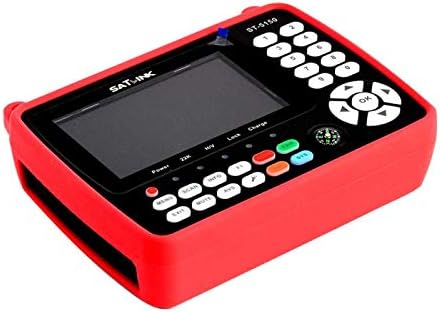
Imatge 4.1: Frontal view of the Satlink ST5150 device, showing the display, control buttons, and protective red rubber cover.

Imatge 4.2: Detallada view of the Satlink ST5150's control panel, including the 4.3-inch LCD screen, numeric keypad, navigation buttons, and function keys.
4.1. Tauler frontal
- Pantalla LCD: 4.3-inch TFT-LCD screen for viewing menus, signal data, and video.
- Teclat numèric (0-9): For entering values and channel numbers.
- Botons de navegació (amunt/avall/esquerra/dreta/d'acord): Per a la navegació i selecció de menús.
- MENÚ: Accedeix al menú principal.
- ESCANEAR: Inicia l'escaneig de canals.
- INFORMACIÓ: Displays signal information.
- SORTIDA: Torna a la pantalla anterior o surt d'un menú.
- MUT: Silencia la sortida d'àudio.
- AVS: Switches to AV input mode.
- SAT/SYS: Toggles between satellite, terrestrial, and cable modes.
- Indicador d'alimentació: LED indicating power status.
- 22K Indicator: LED indicating 22KHz tone status.
- H/V Indicator: LED indicating horizontal/vertical polarization.
- Indicador de bloqueig: LED indicating signal lock.
- Indicador de càrrega: LED que indica l'estat de càrrega de la bateria.
4.2. Side/Rear Panels (General)
- RF/ANT Input: For connecting DVB-S/S2, DVB-T/T2, or DVB-C antenna/LNB.
- Sortida HDMI: Connects to an external monitor or TV.
- AV Input/Output: 3.5mm jack for AV cable connection.
- DC IN: Power input for charging the device.
- Port USB: For software updates or data transfer (if applicable).
5. Configuració
5.1. Càrrega del dispositiu
- Connect the provided plug-in power adapter to the DC IN port on the device.
- Connecteu l'adaptador d'alimentació a una presa de corrent estàndard.
- The "Charge" indicator LED will illuminate during charging. The LED will change color or turn off when fully charged (refer to device for specific behavior).
- Allow sufficient time for a full charge before initial use.
5.2. Engegada inicial
- Manteniu premut el botó PODER botó fins que la pantalla s'encengui.
- The device will boot up and display the main menu or the last used measurement mode.
5.3. Connecting to an Antenna/LNB
- Ensure the device is powered off before making connections.
- For satellite (DVB-S/S2) measurements, connect the LNB cable from your satellite dish to the RF/ANT input using one of the supplied F-connectors.
- For terrestrial (DVB-T/T2) or cable (DVB-C) measurements, connect the antenna or cable signal to the RF/ANT input.
6. Instruccions de funcionament
6.1. Selecció del mode de mesura
Premeu el botó SAT/SYS button to cycle through DVB-S/S2, DVB-T/T2, and DVB-C measurement modes.
6.2. Satellite (DVB-S/S2) Measurement
- Select DVB-S/S2 mode using the SAT/SYS botó.
- Premeu MENÚ and navigate to "Satellite Setup" or similar.
- Select the desired satellite from the pre-programmed list (e.g., Astra 19.2E).
- Configure LNB settings (LNB type, LO frequency, 22KHz, DiSEqC, USALS, Unicable) as required for your setup. The device supports DiSEqC 1.0, 1.1, 1.2, USALS, Unicable 1.0 & 1.1, and LNB power (13/18V, 0/22kHz).
- Adjust the dish alignment while observing the signal strength and quality (MER, C/N, BER) on the display. An acoustic signal will assist in fine-tuning.
- Once a strong signal is achieved, press ESCANEAR to search for channels.
6.3. Terrestrial (DVB-T/T2) and Cable (DVB-C) Measurement
- Select DVB-T/T2 or DVB-C mode using the SAT/SYS botó.
- Premeu MENÚ and navigate to "Terrestrial Setup" or "Cable Setup".
- Enter the appropriate frequency, bandwidth, and modulation parameters for your region/provider.
- Adjust the antenna/cable connection while observing signal strength and quality.
- Premeu ESCANEAR to search for channels.
6.4. Signal Information Display
Premeu el botó INFO botó per view detailed signal parameters, including:
- Signal Level (dBµV, dBm, or dBmV)
- Carrier to Noise Ratio (C/N)
- Velocitat d’error de bit (BER)
- Modulation Error Ratio (MER)
6.5. Sortida HDMI
Connect an HDMI cable from the device's HDMI 1.4 port to an external monitor or TV to view the device's OSD menu and video output on a larger screen.
6.6. AV Input/Output and CCTV Camera Test
The 3.5mm AV jack can be used for:
- Sortida AV: Connect the supplied AV cable to an external display for analog video and audio output.
- Entrada AV: Connect an analog video source (e.g., CCTV camera) to the AV input. Press AVS to switch to AV input mode.
- CCTV Camera Power Test: The device can provide 12V power to test CCTV cameras. Refer to the device's menu for activating this function.
7. Manteniment
- Neteja: Feu servir un drap suau i sec per netejar el dispositiu. No utilitzeu netejadors líquids ni dissolvents.
- Emmagatzematge: Guardeu el dispositiu en un lloc fresc i sec, allunyat de la llum solar directa i de temperatures extremes.
- Cura de la bateria: For prolonged storage, charge the battery periodically to maintain its health.
8. Solució De Problemes
| Problema | Causa possible | Solució |
|---|---|---|
| El dispositiu no s'encén. | Problema amb la bateria baixa o l'adaptador de corrent. | Charge the device using the supplied power adapter. Ensure the adapter is properly connected and the outlet is functional. |
| No s'ha detectat cap senyal. | Incorrect antenna/LNB connection, wrong mode selected, or misaligned antenna. | Check all cable connections. Ensure the correct measurement mode (DVB-S/S2, DVB-T/T2, DVB-C) is selected. Verify antenna/dish alignment and LNB settings. |
| Poor signal quality. | Weak signal, interference, or incorrect LNB/antenna settings. | Fine-tune antenna/dish alignment. Check for obstructions. Verify LNB/antenna settings are correct for your system. |
| No video on external monitor via HDMI. | HDMI cable issue, incorrect input selected on monitor, or device not outputting. | Ensure HDMI cable is securely connected. Select the correct HDMI input on your monitor/TV. Check device settings for HDMI output. |
9. Especificacions
- Model: ST5150
- Marca: Satlink
- Estàndards compatibles: DVB-S/S2, DVB-T/T2 (H.265), DVB-C
- Visualització: TFT-LCD de 4.3 polzades
- Mesura del senyal: Level (dBµV, dBm, dBmV), C/N, BER, MER
- Potència LNB: 13V/18V, 0/22kHz
- DiSEqC Support: 1.0, 1.1, 1.2, USALS
- Unicable Support: 1.0 i 1.1
- Sortida de vídeo: HDMI 1.4, AV (3.5mm jack)
- Entrada de vídeo: Analog AV (3.5mm jack)
- CCTV Power Output: 12 V
- Pes de l'article: 600 g
- ASIN: B08XVXKSTQ


