1. Introducció
The TechniSat DIGITRADIO 21 is a compact DAB+ and FM radio designed for under-cabinet installation, ideal for kitchens or other spaces where a space-saving audio solution is desired. It features digital radio reception (DAB+), traditional FM radio, Bluetooth audio streaming, and a clear color display. This manual provides essential information for the safe and efficient use of your device.
2. Informació de seguretat
- Llegiu atentament totes les instruccions abans d'utilitzar el dispositiu.
- Keep the device away from water, moisture, and direct heat sources.
- Assegureu-vos una ventilació adequada al voltant de la unitat per evitar el sobreescalfament.
- Utilitzeu només l'adaptador d'alimentació subministrat.
- No intenteu obrir ni reparar el dispositiu vosaltres mateixos. Encarregueu totes les tasques de manteniment a personal qualificat.
- Netegeu el dispositiu amb un drap suau i sec. No utilitzeu netejadors líquids.
3. Contingut del paquet
Verifiqueu que tots els elements siguin presents al paquet:
- TechniSat DIGITRADIO 21 Unit
- Adaptador d'alimentació
- Mounting Material (screws, mounting plate)
- Manual d'usuari (aquest document)
4. Producte acabatview
4.1 Controls i pantalla del tauler frontal
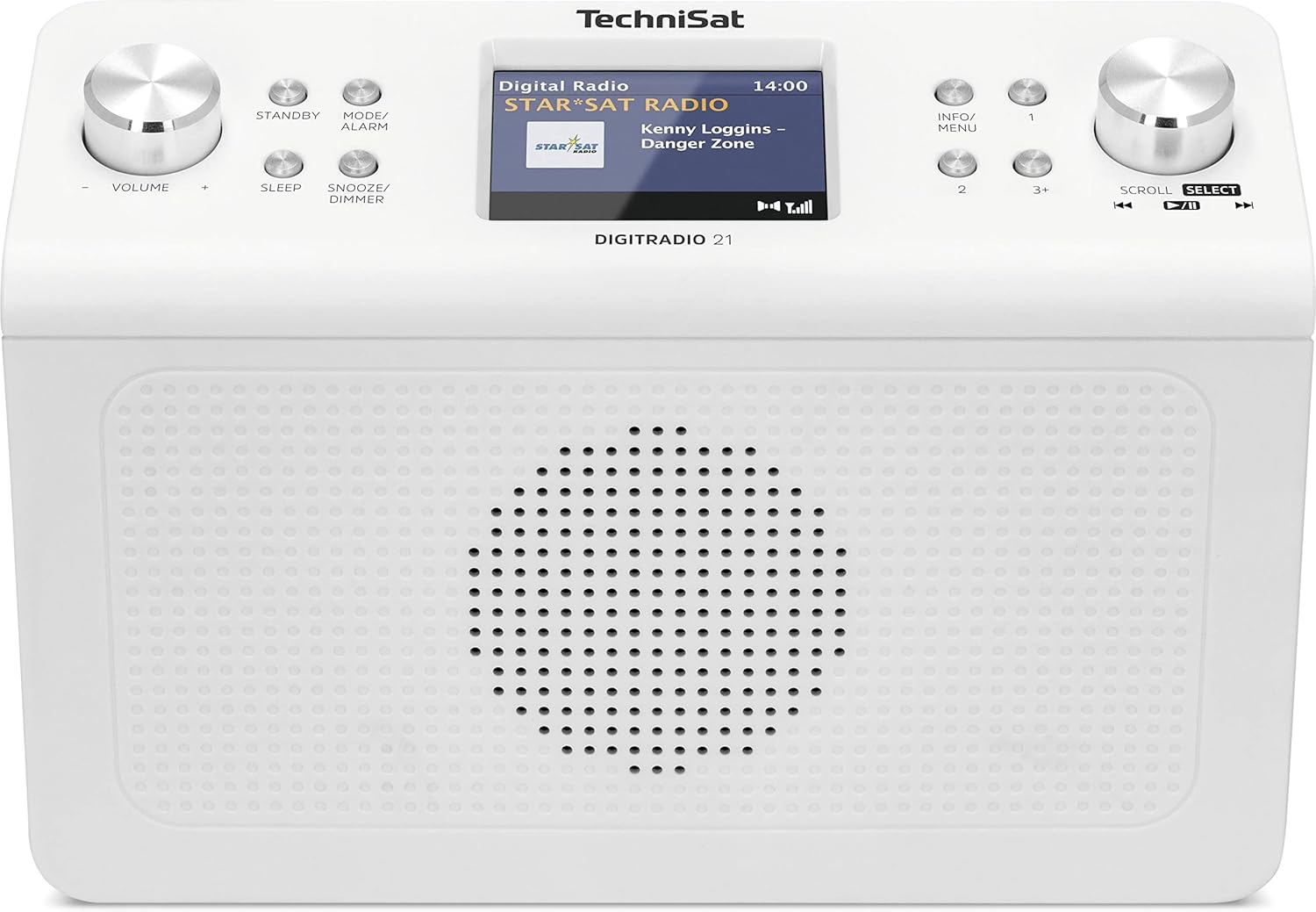
Imatge 4.1: Davant view of the TechniSat DIGITRADIO 21. This image displays the central 2.8-inch color TFT display, the large volume knob on the left, and the scroll/select knob on the right. Surrounding buttons include Standby, Mode/Alarm, Sleep, Snooze/Dimmer, Info/Menu, and preset buttons 1, 2, 3+.
- Visualització: 2.8-inch TFT color display for showing station information, time, and menu options.
- Pom de volum: Gira per ajustar el volum.
- Botó d'espera: Encén o apaga la unitat.
- Mode/Alarm Button: Switches between radio modes (DAB+, FM, Bluetooth) and accesses alarm settings.
- Botó de dormir: Activa la funció del temporitzador de son.
- Botó de posposició/regulació d'intensitat: Snoozes the alarm or adjusts display brightness.
- Botó d'informació/menú: Displays additional information or accesses the main menu.
- Botons predefinits (1, 2, 3+): Accediu ràpidament a les emissores preferides emmagatzemades.
- Scroll/Select Knob: Rotate to navigate menus or tune stations, press to confirm selection.
4.2 Connexions del panell posterior

Imatge 4.2: posterior view of the TechniSat DIGITRADIO 21. This image highlights the power input port (DC IN) and the 3.5mm headphone jack located on the back of the unit.
- DC IN: Power adapter connection port.
- Presa d'auriculars (3.5 mm): Per connectar auriculars per a una escolta privada.
5. Configuració
5.1 Muntatge de la ràdio
The DIGITRADIO 21 is designed for under-cabinet mounting. The included mounting plate and screws facilitate installation.
- Select a suitable location under a cabinet or shelf, ensuring sufficient space for the unit and access to controls.
- Position the mounting plate and mark the screw holes.
- Perforeu forats pilot si cal.
- Secure the mounting plate to the underside of the cabinet/shelf using the provided screws.
- Slide the DIGITRADIO 21 onto the mounted plate until it clicks securely into place.
Alternatively, the radio can be used as a standalone unit on a flat surface.
5.2 Connexió d'alimentació
- Connect the power adapter cable to the "DC IN" port on the rear of the DIGITRADIO 21.
- Connecteu l'adaptador de corrent a una presa de corrent adequada.
- The unit will power on or enter standby mode.
6. Instruccions de funcionament
6.1 Encès/Apagat
- Premeu el botó En espera botó per encendre o apagar la ràdio.
6.2 Selecció del mode
- Premeu el botó Mode/Alarm button repeatedly to cycle through available modes: DAB+, FM, Bluetooth.
6.3 Funcionament de la ràdio DAB+
- Seleccioneu el mode DAB+ amb el botó Mode/Alarm botó.
- The radio will automatically scan for available DAB+ stations upon first use or if no stations are found.
- Gira el Desplaçar/seleccionar knob to browse the list of available stations.
- Premeu el botó Desplaçar/seleccionar knob to select and listen to a station.
- To store a favorite station: While listening, press and hold one of the Preset buttons (1, 2, 3+) until "Preset Saved" appears on the display.
- To recall a favorite station: Briefly press the corresponding Botó preestablert.
6.4 Funcionament de la ràdio FM
- Seleccioneu el mode FM amb el botó Mode/Alarm botó.
- Gira el Desplaçar/seleccionar knob to manually tune to a frequency.
- Per cercar automàticament la següent emissora disponible, manteniu premut el botó Desplaçar/seleccionar perilla.
- To store a favorite station: While listening, press and hold one of the Preset buttons (1, 2, 3+) until "Preset Saved" appears on the display.
- To recall a favorite station: Briefly press the corresponding Botó preestablert.
Transmissió d'àudio Bluetooth 6.5
- Seleccioneu el mode Bluetooth amb el botó Mode/Alarm button. The display will show "Bluetooth Pairing".
- Al dispositiu amb Bluetooth (per exemple, un telèfon intel·ligent o una tauleta), activeu el Bluetooth i cerqueu els dispositius disponibles.
- Select "DIGITRADIO 21" from the list of devices to pair.
- Un cop emparellat, podeu reproduir àudio des del dispositiu a la ràdio.
6.6 Alarm, Sleep Timer, and Snooze
- Alarma: Manteniu premut el botó Mode/Alarm button to enter alarm settings. Use the Desplaçar/seleccionar knob to set time, source, and volume.
- Temporitzador de son: Premeu el botó Dormir button repeatedly to set a sleep timer (e.g., 15, 30, 60 minutes) after which the radio will automatically turn off.
- Dormitar: Quan soni l'alarma, premeu el botó Posposa/dimmer button to temporarily silence it for a set period.
6.7 Configuració de la pantalla
- Premeu el botó Posposa/dimmer button (when not snoozing an alarm) to adjust the display brightness.
- Premeu el botó Informació/Menú button to cycle through different display information (e.g., program type, frequency, date/time).
7. Manteniment
- Neteja: Netegeu la ràdio amb un drap suau, sec i sense borrissol. No utilitzeu productes de neteja abrasius, ceres ni dissolvents.
- Emmagatzematge: Si guardeu la unitat durant un període prolongat, desconnecteu-la de la font d'alimentació i guardeu-la en un lloc fresc i sec.
8. Solució De Problemes
| Problema | Causa possible | Solució |
|---|---|---|
| Sense poder | L'adaptador de corrent no està connectat o la presa de corrent està defectuosa. | Assegureu-vos que l'adaptador de corrent estigui connectat correctament i que la presa de corrent funcioni. |
| Mala recepció DAB+ / FM | Weak signal, antenna position. | Adjust the position of the wire antenna for better reception. Perform a full scan for stations. |
| Problemes de vinculació de Bluetooth | Device not in pairing mode, radio not discoverable. | Ensure the radio is in Bluetooth pairing mode. Check your device's Bluetooth settings and try re-pairing. |
| Sense so | Volum massa baix, auriculars connectats. | Increase volume. Disconnect headphones if external sound is desired. |
9. Especificacions
- Model: DIGITRADIO 21
- Marca: TechniSat
- Número de model: 0001/3964
- Bandes de ràdio: DAB+, FM (with RDS and PLL)
- Versió Bluetooth: 4.2
- Ponent: 2 W (RMS) Mono Speaker
- Visualització: Pantalla TFT a color de 2.8 polzades
- Favorite Station Memory: 10 for DAB+, 10 for FM
- Connexions: 3.5mm Headphone Jack, DC IN
- Característiques especials: Clock, Alarm, Sleep Timer, Snooze Function, Display Dimmer, Bluetooth Audio Streaming
- Font d'alimentació: External Power Adapter (DC 5.9 V / 1000 mA)
- Dimensions (L x A x P): 22.5 x 7.2 x 15.1 cm (aprox. 8.86 x 2.83 x 5.94 polzades)
- Color: Blanc (neutre)
10. Garantia i Suport
Specific warranty details are not provided in the product information. For warranty claims or technical support, please refer to the official TechniSat website or contact your retailer. Keep your proof of purchase for any warranty-related inquiries.
Per obtenir més ajuda, visiteu el TechniSat official weblloc.


