1. Producte acabatview
The OnePlus 9 Winter Mist is a 5G unlocked Android smartphone featuring 8GB RAM, 128GB storage, a 120Hz Fluid Display, and a Hasselblad Triple Camera system. It supports 65W Ultra Fast Charge and 15W Wireless Charge, and comes with Alexa Built-in.

Figura 1.1: Frontal view of the OnePlus 9 Winter Mist smartphone.
2. Què hi ha a la caixa
- Telèfon intel·ligent OnePlus 9
- Warp Type-C Cable
- Adaptador d'alimentació
- Eina expulsora de SIM
- Guia d'inici ràpid
- Informació de seguretat i Targeta de garantia
3. Característiques clau
- Hasselblad Camera for Mobile: Triple Camera system (48MP main, 50MP Ultra-Wide, 2MP monochrome lens) co-developed by Hasselblad for exceptional photography.
- Qualcomm Snapdragon 888: Delivers fast and smooth performance across all applications.
- Warp Charge 65T: Provides a day's power in just 15 minutes of wired charging. Supports Qi wireless charging.
- 120 Hz Fluid Display: 6.55-inch Full HD display with a 120 Hz refresh rate for effortless scrolling and entertainment.
- 5G Capable: Experience faster upload and download speeds with lower latency (compatible with T-Mobile 5G).
- Suport d'Alexa: Built-in Alexa for voice commands, calls, news, and weather.
- Designed by OnePlus: Blends creativity and premium materials into a unibody design.
4. Configuració inicial
4.1. Inseriu la targeta SIM
Locate the SIM card tray on the side of your OnePlus 9. Use the provided SIM ejector tool to open the tray. Insert your Nano-SIM card(s) into the tray with the gold contacts facing down. Ensure the tray is fully reinserted into the device.
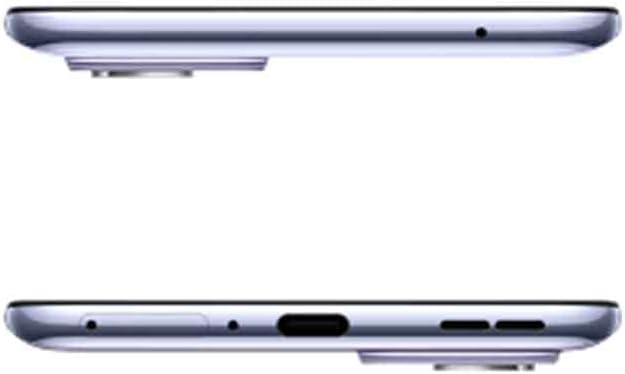
Figura 4.1: superior i inferior view of the OnePlus 9, indicating port and tray locations.
4.2. Engegada i configuració inicial
Press and hold the Power button (located on the right side) until the OnePlus logo appears. Follow the on-screen prompts to select your language, connect to Wi-Fi, sign in with your Google account, and transfer data from an old device if desired. Complete the setup wizard to begin using your phone.

Figura 4.2: lateral view of the OnePlus 9, highlighting physical buttons.
5. Com utilitzar el OnePlus 9
5.1. Pantalla i navegació
The OnePlus 9 features a 120Hz Fluid Display for smooth visuals and responsive touch. Navigate the interface using gestures or traditional navigation buttons. The Hyper Touch Display enables faster responses for swipes and taps, enhancing gaming and general use.
5.2. Funcionament de la càmera
Launch the Camera app from your home screen or lock screen. The Hasselblad Triple Camera system offers various modes including Photo, Video, Portrait, and Nightscape. Utilize the Ultra-Clear Ultra-Wide lens for expansive shots and the Natural Color Calibration with Hasselblad for true-to-life colors.

Figura 5.1: posterior view of the OnePlus 9, showcasing the Hasselblad camera system.
5.3. Càrrega
Connect the Warp Type-C Cable to the phone's USB-C port and the Power Adapter to a wall outlet for Warp Charge 65T. For wireless charging, place the phone on a Qi-compatible wireless charger. The Smart 120Hz with LTPO technology helps optimize power consumption for extended battery life.
5.4. Using Alexa Built-in
To use Alexa, ensure the Alexa app is downloaded and set up on your device. Simply say "Alexa" to activate the voice assistant and issue commands for music playback, calls, news updates, and more.
6. Manteniment i cura
- Neteja: Feu servir un drap suau i sense borrissol per netejar la pantalla i la carcassa. Eviteu productes químics agressius.
- Actualitzacions de programari: Comproveu i instal·leu regularment si hi ha actualitzacions del sistema per garantir un rendiment i una seguretat òptims.
- Cura de la bateria: Avoid extreme temperatures. For optimal battery longevity, try to keep the charge between 20% and 80% when possible.
- Gestió d'emmagatzematge: Netegeu periòdicament els innecessaris filei aplicacions per mantenir prou espai d'emmagatzematge i velocitat del dispositiu.
7. Solució De Problemes
7.1. Text Messages or Phone Call Issues
If your device is not receiving text messages or experiencing errors when making phone calls, you may need to contact your carrier's technical support. Request them to add the CDMALess feature to your account. This is a common solution for certain network configurations.
7.2. General Performance Issues
- Reinicieu el dispositiu: Un simple reinici sovint pot resoldre petits problemes de programari.
- Esborra la memòria cau: Esborra la memòria cau de les aplicacions problemàtiques o la partició de la memòria cau del sistema.
- Restabliment de fàbrica: As a last resort, if issues persist, consider performing a factory reset. Nota: Això esborrarà totes les dades del dispositiu. Fes una còpia de seguretat de la informació important abans de continuar.
8. Especificacions
| Característica | Detall |
|---|---|
| Dimensions del producte | 6.31 x 2.92 x 0.34 polzades |
| Pes de l'article | 7 unces |
| ASIN | B08Y727NMK |
| Número de model de l'article | LE2115 |
| Bateries | Necessites 1 piles de polímer de liti. (inclòs) |
| OS | OxygenOS |
| RAM | 8 GB |
| Tecnologies de connectivitat | Bluetooth, Infrared, NFC, USB, Wi-Fi |
| GPS | És cert |
| Característiques especials | 120Hz display, 48MP+50MP+2MP high resolution camera, Fingerprint Sensor, Warp Charge 65W, Wireless Charging |
| Tecnologia de visualització | AMOLED |
| Altres funcions de visualització | Sense fil |
| Entrada de la interfície humana | Micròfon, pantalla tàctil |
| Resolució de l'escàner | 2400 x 1080 |
| Altres funcions de la càmera | Front, 16MP, Rear, Triple Camera, 48+50+2 MP |
| Jack d'àudio | Sense presa per a auriculars |
| Factor de forma | Pissarra |
| Color | Winter Mist |
| Potència nominal de la bateria | 4500 |
| Temps de conversa telefònica | 3.63 dies |
| Què hi ha a la caixa | Oneplus 9, Warp Type-C Cable, Power Adapter, Ejector tool, Quick Start Guide, Safety Information and Warranty Card |
| Fabricant | ONEPLUS |
| Data de primera disponibilitat | 23 de març de 2021 |
| Capacitat d'emmagatzematge de memòria | 128 GB |
| Mida de la pantalla de peu | 6.55 polzades |
| Mida instal·lada de la memòria RAM | 8 GB |
| Capacitat de la bateria | 4500 milionsamp Hores |
| Pes | 6.95 unces |
| Temps de càrrega | 0.3 hores |
| Marca | OnePlus |
| Sistema operatiu | OxygenOS |
| Model de CPU | A-Series Eight-Core A10-5800K |
| Velocitat de la CPU | 3.4 GHz |
| Mida de la pantalla | 6.55 polzades |
| Resolució | 2400 x 1080 |
| Freqüència d'actualització | 120 Hz |
| Nom del model | OnePlus 9 |
9. Garantia i Suport
The OnePlus 9 comes with a manufacturer's warranty. Please refer to the "Safety Information and Warranty Card" included in your product box for specific terms and conditions. For further support, technical assistance, or to view the full warranty policy, please visit the official OnePlus support weblloc o poseu-vos en contacte amb el seu servei d'atenció al client.
Botiga oficial de OnePlus: Botiga OnePlus a Amazon


