1. Introducció
This manual provides instructions for the installation, operation, maintenance, and troubleshooting of the Sonicwall TZ670 Network Security Appliance. The TZ670 is designed to provide comprehensive network security for mid-sized organizations and distributed enterprises.
For additional resources and support, please visit the Sonicwall Store.
2. Producte acabatview
The Sonicwall TZ670 is a next-generation firewall (NGFW) featuring 10 Gigabit Ethernet interfaces. It offers advanced security capabilities including Capture Advanced Threat Protection, Gateway Anti-Virus, Intrusion Prevention, Application Control, and Content Filtering.
2.1. Contingut del paquet
- Sonicwall TZ670 Network Security Appliance
- Adaptador(s) de corrent
- Cable Ethernet
- RM-SW-T9 Rackmount Kit (if included with your purchase)
- Guia d'inici ràpid
2.2. Característiques del panell frontal

Figure 1: Sonicwall TZ670 Front Panel. This image displays the front panel of the Sonicwall TZ670, highlighting the USB 3.0 SuperSpeed ports, Power LEDs, Test LED, Security LED, M.2 SSD LED, LAN/MGMT X0 Port LED, WAN X1 and X2 Port LEDs, X0-X7 RJ45 Port LEDs, X8/X9 SFP/SFP+ Port LEDs, and WWAN LEDs for USB 5G/LTE connectivity.
- USB 3.0 SuperSpeed ports: Per connectar dispositius externs.
- LED d'alimentació: Indicate power status.
- LED de prova: Indicates system test status.
- LED de seguretat: Indicates security status.
- M.2 SSD LED: Indicates M.2 SSD activity.
- LED del port LAN/MGMT X0: Indicates activity on the LAN/Management port.
- LEDs dels ports WAN X1 i X2: Indicate activity on WAN ports.
- X0-X7 RJ45 Port LEDs: Indicate activity on the respective RJ45 ports.
- X8/X9 SFP/SFP+ Port LEDs: Indicate activity on the SFP/SFP+ ports.
- WWAN LEDs: For USB 5G/LTE connectivity status.
2.3. Característiques del panell posterior

Figure 2: Sonicwall TZ670 Rear Panel. This image shows the rear panel of the Sonicwall TZ670, detailing the RJ45 Console Port, Micro-USB Console Port, X8/X9 SFP/SFP+ Ports, X1 WAN RJ45 Port, X3 RJ45 Port, X2 WAN RJ45 Port, X0 LAN RJ45, X4/X5/X6/X7 RJ45 Ports, SafeMode Button, Grounding Screw, Primary Power Input, and Redundant Power Input.
- Port de la consola RJ45: For direct console access.
- Micro-USB Console Port: Alternative console access.
- X8/X9 SFP/SFP+ Ports: High-speed fiber or copper connectivity.
- X0 LAN RJ45, X1 WAN RJ45, X2 WAN RJ45, X3 RJ45, X4/X5/X6/X7 RJ45 Ports: Various Ethernet ports for LAN and WAN connections.
- Botó de mode segur: For system recovery or factory reset.
- Cargol de presa de terra: For proper grounding.
- Primary Power Input: Main power connection.
- Entrada d'alimentació redundant: For connecting a secondary power supply for redundancy.
3. Instruccions de configuració
3.1. Rackmount Installation (RM-SW-T9 Kit)
If you have the RM-SW-T9 Rackmount Kit, follow these steps to install your TZ670 appliance into a 19-inch rack.

Figure 3: Sonicwall TZ670 with RM-SW-T9 Rackmount Kit. This image shows the Sonicwall TZ670 appliance installed within the RM-SW-T9 rackmount kit, ready for integration into a 19-inch server rack. The kit provides a secure and organized mounting solution for the appliance and its cables.
- Attach the rackmount ears to the sides of the TZ670 appliance using the provided screws.
- Slide the TZ670 appliance into the rackmount tray.
- Secure the appliance to the rack using appropriate rack screws.
- Organize and secure cables using the integrated cable management features of the rackmount kit.
3.2. Connexió inicial
- Connectar l'alimentació: Connect the power adapter(s) to the Primary Power Input (and Redundant Power Input if applicable) on the rear panel and plug them into a power outlet.
- Connecta a la WAN: Connect your internet service provider's modem or router to one of the WAN ports (e.g., X1 or X2) on the TZ670.
- Connecta a la LAN: Connect a computer or network switch to one of the LAN ports (e.g., X0) on the TZ670.
- Encès: The device will power on automatically. Observe the front panel LEDs for status.
3.3. Configuració Inicial
Accediu a SonicOS web interface for initial configuration.
- Ensure your computer is connected to a LAN port of the TZ670.
- Obre a web browser and navigate to the default IP address (typically
192.168.168.168). - Inicieu la sessió amb les credencials predeterminades (nom d'usuari:
admin, contrasenya:password). Se us demanarà que canvieu la contrasenya la primera vegada que inicieu sessió. - Follow the on-screen setup wizard to configure basic network settings, security services, and administrative passwords.
4. Instruccions de funcionament
Once configured, the Sonicwall TZ670 operates as a network security gateway. Management is primarily performed through the SonicOS web interfície.
4.1. Accedint al Web Interfície
To manage your TZ670, open a web browser and enter the IP address of the device (e.g., https://192.168.168.168 or the IP address you configured). Log in with your administrative credentials.
4.2. Key Features and Services
- Regles del tallafoc: Configure rules to control network traffic.
- VPN: Set up Virtual Private Networks for secure remote access or site-to-site connections.
- Serveis de seguretat: Manage subscriptions and settings for Capture Advanced Threat Protection, Gateway Anti-Virus, Intrusion Prevention, and Content Filtering.
- Configuració de la xarxa: Configure interfaces, routing, DHCP, and DNS settings.
- Users and Authentication: Manage user accounts and authentication methods.
- Monitoring and Logging: View real-time network activity, security events, and system logs.
5. Manteniment
Regular maintenance ensures optimal performance and security of your Sonicwall TZ670.
- Actualitzacions de firmware: Regularly check for and apply the latest SonicOS firmware updates to ensure you have the most recent security patches and features.
- Configuració de còpia de seguretat: Periodically back up your device configuration to a secure location.
- Monitor Logs: Review system and security logs for unusual activity or errors.
- Inspecció física: Ensure proper ventilation and check for any physical damage or loose connections.
- Subscripcions al servei de seguretat: Ensure all security service subscriptions (e.g., TotalSecure Essential Edition) are active and up-to-date.
6. Solució De Problemes
Aquesta secció ofereix solucions a problemes comuns que podeu trobar.
- Sense energia:
- Verify power cables are securely connected to the device and power outlet.
- Check the power adapter and outlet for functionality.
- No es pot accedir Web Interfície:
- Ensure your computer is connected to a LAN port of the TZ670.
- Verify your computer's IP address is in the same subnet as the TZ670 (e.g., 192.168.168.x).
- Prova d'esborrar la memòria cau del navegador o utilitza un altre navegador.
- If the IP address was changed, try the new IP. If forgotten, a factory reset might be necessary (refer to SafeMode Button).
- Sense connexió a Internet:
- Check WAN cable connection to your modem/router.
- Verify WAN port status LEDs on the TZ670.
- Confirma que el servei del teu proveïdor d'Internet està actiu.
- Review WAN interface settings and firewall rules in the SonicOS web interfície.
- Rendiment lent:
- Check network utilization and security service logs for high traffic or attacks.
- Ensure firmware is up-to-date.
- Review system resources in the SonicOS dashboard.
For advanced troubleshooting, consult the Sonicwall support weblloc o contacteu amb l'assistència tècnica.
7. Especificacions
The following table outlines the key specifications for the Sonicwall TZ670 Network Security Appliance.

Figure 4: Sonicwall TZ Gen 7 Series System Specifications. This table provides a detailed comparison of specifications across the Sonicwall TZ Gen 7 series, with the TZ670 series highlighted. It includes information on operating system, interfaces, wireless support, PoE support, storage expansion, management, redundant power, SSO users, VLAN interfaces, and supported access points.
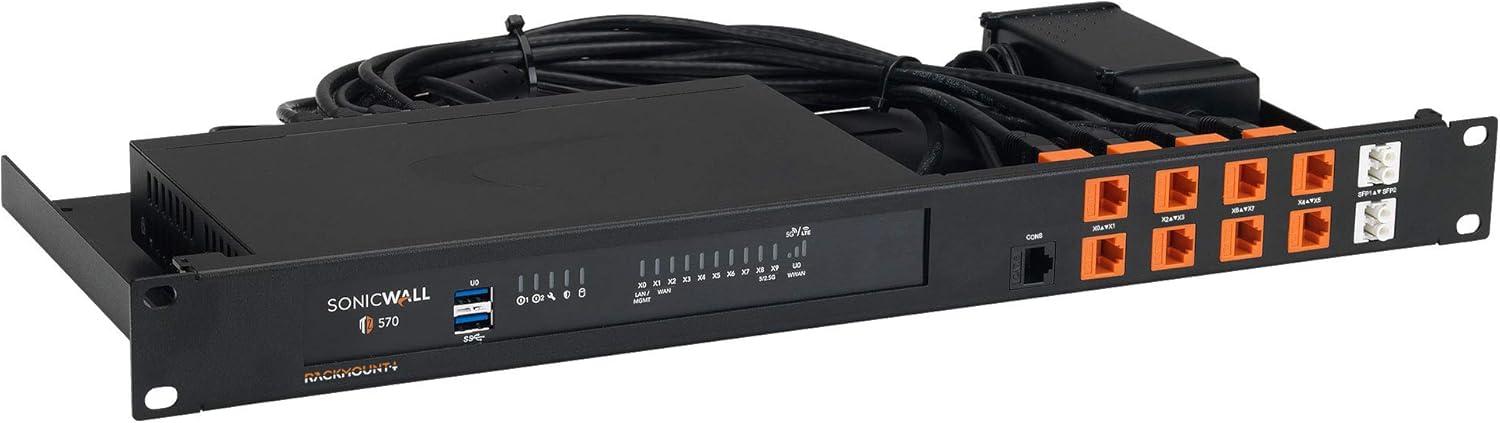
Figure 5: Sonicwall TZ Gen 7 Series Firewall and VPN Performance. This table details the firewall and VPN performance metrics for the Sonicwall TZ Gen 7 series, including the TZ670. It covers firewall inspection throughput, threat prevention throughput, IPS throughput, VPN throughput, maximum connections, site-to-site VPN tunnels, and various security and networking features.
| Característica | Especificació |
|---|---|
| Número de model | TZ670 |
| Interfícies | 8x1GbE, 2x10GbE, 2 USB 3.0, 1 Console |
| Interfícies VLAN | 256 |
| Firewall Inspection Throughput | 5.00 Gbps |
| Threat Prevention Throughput | 4.00 Gbps |
| Rendiment IPS | 2.5 Gbps |
| Rendiment VPN IPSec | 2.10 Gbps |
| Sistema operatiu | SonicOS |
| Protocol de seguretat | WPS |
| Ranura d'expansió d'emmagatzematge | Optional up to 256GB, 32GB included |
| Alimentació redundant | Sí |
8. Garantia i Suport
The Sonicwall TZ670 typically comes with a manufacturer's warranty and support services, often bundled as part of a TotalSecure Essential Edition or similar package.
- TotalSecure Essential Edition: Includes Capture Advanced Threat Protection Service, Gateway Anti-Virus and anti-spyware, Intrusion Prevention Service, Application Control, Content Filtering Service, and 24x7 Support.
- For detailed warranty information and to register your product, please visit the official Sonicwall weblloc.
- For technical assistance, contact Sonicwall support. Ensure you have your product serial number and proof of purchase available.


