Introducció
Welcome to the user manual for your Q LINK WIRELESS Scepter 8 tablet. This guide provides essential information on setting up, operating, maintaining, and troubleshooting your device. The Scepter 8 is an 8-inch Android 11 tablet designed for everyday use, featuring 1GB RAM and 16GB ROM.
Producte acabatview
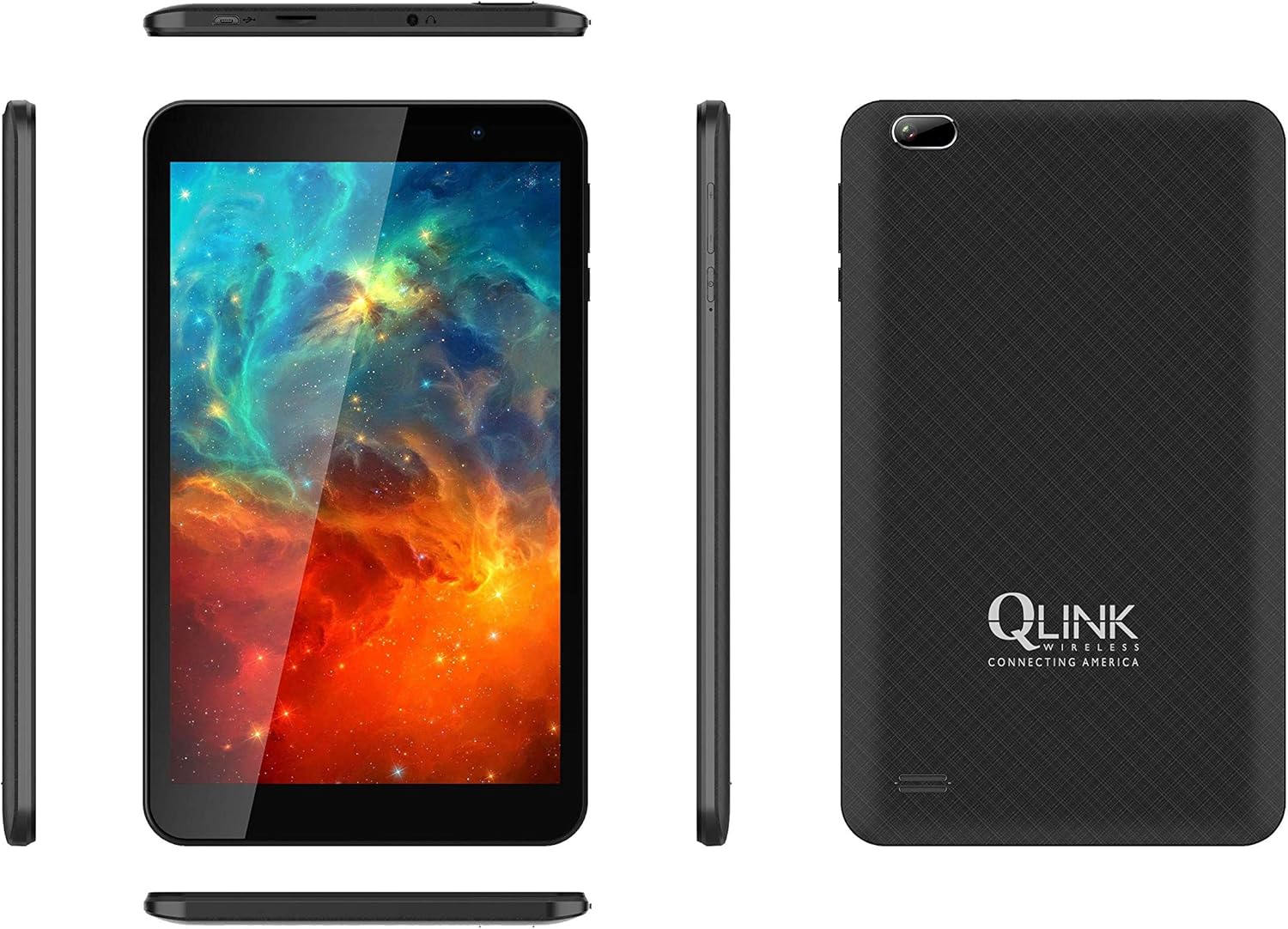
This image displays multiple views of the Q LINK WIRELESS Scepter 8 tablet, including the front with its display, the textured back panel featuring the Q LINK WIRELESS logo, and the slim side profiles showing button and port placements.

Un front clar view of the Q LINK WIRELESS Scepter 8 tablet, highlighting its 8-inch IPS display. The screen shows a vibrant, colorful abstract image.

L'esquena view of the Q LINK WIRELESS Scepter 8 tablet, showcasing its textured finish and the Q LINK WIRELESS logo. The rear camera is visible in the upper left corner.
Configuració
1. Càrrega inicial
Before first use, fully charge your Scepter 8 tablet. Connect the included charger to the tablet's charging port and plug it into a power outlet. The battery indicator on the screen will show charging progress.
2. Encès / apagat
- To power on: Press and hold the Power button until the Q LINK WIRELESS logo appears.
- Per apagar: manteniu premut el botó d'engegada i, a continuació, seleccioneu "Apagar" de les opcions.
3. Assistent de configuració inicial
Upon first power-on, the tablet will guide you through an initial setup process. This includes selecting your language, connecting to a Wi-Fi network, setting up your Google account, and configuring basic device settings.
4. Inserció d'una targeta MicroSD (opcional)
To expand storage, locate the MicroSD card slot (usually on the side or top edge). Gently insert a compatible MicroSD card until it clicks into place. Ensure the tablet is powered off before inserting or removing the card.
Funcionament de la tauleta
Conceptes bàsics de navegació
- Gestos tàctils: Toca per seleccionar, llisca per desplaçar-te, pessiga per ampliar.
- Pantalla d'inici: Accedeix a aplicacions, widgets i notificacions.
- Panell de notificacions: Feu lliscar el dit cap avall des de la part superior de la pantalla fins a view notificacions i configuracions ràpides.
- Calaix d'aplicacions: Llisca cap amunt des de la part inferior de la pantalla per accedir a totes les aplicacions instal·lades.
Connexió a Wi-Fi
- Vés a Configuració > Xarxa i Internet > Wi-Fi.
- Activa/desactiva el Wi-Fi On.
- Seleccioneu la xarxa desitjada de la llista i introduïu la contrasenya si se us demana.
Gestió d'aplicacions
- Instal·lació d'aplicacions: Baixeu aplicacions de Google Play Store.
- Desinstal·lació d'aplicacions: Press and hold an app icon on the home screen or in the app drawer, then drag it to "Uninstall" or select "App info" and choose "Uninstall".
- Closing Apps: Llisca cap amunt des de la part inferior de la pantalla i mantén premut per view recent apps, then swipe up on an app to close it.
Ús de la càmera
The Scepter 8 features a 5 MP rear camera. Open the Camera app from your home screen or app drawer. Tap the shutter button to take photos. You can switch between front and rear cameras using the icon on the screen.
Manteniment
- Neteja: Feu servir un drap suau i sense borrissol per netejar la pantalla i la carcassa. Eviteu productes de neteja o dissolvents abrasius.
- Cura de la bateria: Per allargar la durada de la bateria, eviteu les temperatures extremes. No deixeu que la bateria es descarregui completament amb freqüència.
- Actualitzacions de programari: Comproveu periòdicament si hi ha actualitzacions del sistema a Configuració > Sistema > Actualització del sistema per garantir un rendiment i una seguretat òptims.
- Gestió d'emmagatzematge: Netegeu regularment innecessaris files i desinstal·la les aplicacions que no fas servir per alliberar espai d'emmagatzematge. Ves a Configuració > Emmagatzematge gestionar.
Resolució de problemes
| Problema | Solució |
|---|---|
| La tauleta va lenta o no respon. |
|
| No es pot connectar a la Wi-Fi. |
|
| La bateria s'esgota ràpidament. |
|
| Apps crashing frequently. |
|
Especificacions
| Característica | Detall |
|---|---|
| Marca | Q LINK WIRELESS |
| Nom del model | Ceptre 8 |
| Sistema operatiu | Android 11 |
| Mida de la pantalla | 8 polzades |
| Resolució de pantalla | 1280 x 800 píxels |
| RAM | 1 GB |
| Mida de la memòria flash | 16 GB |
| Marca del processador | Qualcomm |
| posterior WebResolució de la càmera | 5 MP |
| Tipus sense fil | 802.11ac |
| Durada mitjana de la bateria | 12 hores |
| Pes de l'article | 1.06 lliures |
| Dimensions del producte | 8.2 x 4.9 x 0.36 polzades |
Garantia i Suport
For warranty information and technical support, please refer to the documentation included with your purchase or visit the official Q LINK WIRELESS weblloc web. Conserveu el comprovant de compra per a reclamacions de garantia.
Recursos en línia: For additional support, FAQs, and software downloads, please visit the Q LINK WIRELESS support page.


