Producte acabatview
The techno line WS9218 is a wireless weather station designed to provide comprehensive weather information for your home. It features a DCF-77 radio-controlled clock, 12/24 hour time display, time zone setting, calendar function, and day of the week display in 7 languages. The station monitors indoor and outdoor temperature, indoor and outdoor humidity, atmospheric pressure, and provides a weather forecast. It also includes an alarm with a 5-minute snooze function and moon phase display. The system supports up to three outdoor sensors (one TX106-TH sensor is included).
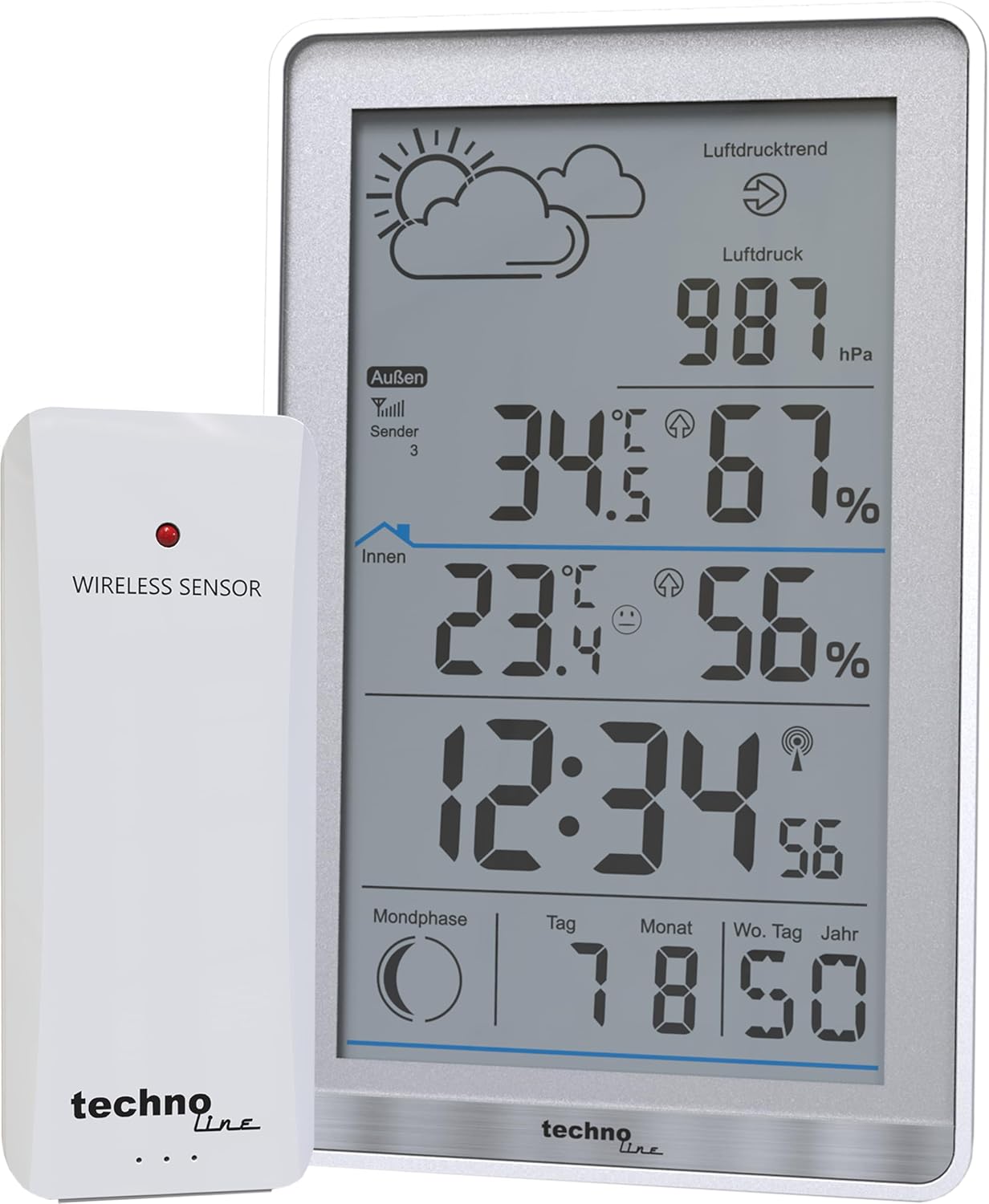
Image: The techno line WS9218 main unit and its accompanying wireless outdoor sensor.
Configuració
1. Instal·lació de la bateria
The weather station requires 4 AAA batteries for operation. Ensure correct polarity when inserting batteries.
- Outdoor Sensor (TX106-TH): Open the battery compartment on the back of the outdoor sensor. Insert the required batteries. Close the compartment securely.
- Main Unit (WS9218): Open the battery compartment on the back of the main weather station unit. Insert the required batteries. Close the compartment securely.

Image: The TX106-TH wireless outdoor sensor, where batteries are installed.
2. Sensor Pairing and Initial Data Reception
After battery installation, the main unit will automatically attempt to connect with the outdoor sensor and receive the DCF-77 radio signal for time synchronization.
- Place the outdoor sensor within 100 meters (open field) of the main unit.
- The main unit will display outdoor temperature and humidity once connected.
- The DCF-77 signal reception icon will flash during synchronization and become solid once the time is set.
3. Recomanacions de col·locació
- Unitat principal: Place the main unit on a flat surface indoors, away from direct sunlight and heat sources, for accurate indoor readings.
- Sensor exterior: Mount the outdoor sensor in a shaded, well-ventilated area, protected from direct rain and sunlight, to ensure accurate outdoor temperature and humidity measurements. Avoid placing it near large metal objects or electrical appliances that could interfere with the wireless signal.
Instruccions de funcionament
Visualització finalitzadaview

Image: The main display unit of the techno line WS9218, showing various weather parameters.
The main unit's display is organized to show various data points clearly:
- Secció superior: Weather forecast icons (sunny, cloudy, rainy), atmospheric pressure trend, and current atmospheric pressure in hPa.
- Middle-Top Section: Outdoor temperature and humidity, along with the outdoor sensor signal strength and channel number.
- Middle-Bottom Section: Indoor temperature and humidity.
- Secció inferior: Current time (radio-controlled), moon phase, and calendar (day, month, day of week, year).
Funcions clau
- Hora i data: The DCF-77 radio-controlled clock automatically sets the time and date. You can switch between 12/24 hour format and adjust the time zone. The calendar displays the day, month, and year, with the day of the week available in 7 languages (English, German, French, Italian, Spanish, Dutch, Danish).
- Temperatura i humitat: Displays current indoor and outdoor temperature (in Celsius or Fahrenheit) and humidity percentages.
- Pressió atmosfèrica: Shows the current atmospheric pressure in hPa and indicates the pressure trend.
- Pronòstic del temps: Provides a graphical weather forecast based on atmospheric pressure changes.
- Alarma amb funció de posposició: Set an alarm with a 5-minute snooze function. Refer to the specific buttons on the device for setting the alarm.
- Fases de la Lluna: Displays the current moon phase.
- Indicador de bateria baixa: An icon will appear on the display when batteries need replacement for either the main unit or the outdoor sensor.
- Sensors múltiples: The station can receive data from up to three outdoor sensors. The included TX106-TH is one such sensor.
Manteniment
- Substitució de la bateria: Replace batteries in both the main unit and outdoor sensor when the low battery indicator appears. Always replace all batteries at the same time.
- Neteja: Netegeu la pantalla i casing of the weather station and sensor with a soft, damp tela. No utilitzeu netejadors abrasius ni dissolvents.
- Protecció del medi ambient: Ensure the outdoor sensor remains protected from extreme weather conditions to prolong its lifespan and accuracy.
Resolució de problemes
- Outdoor Sensor Not Receiving Data: If the outdoor transmitter data is not displayed or is incorrect, perform a restart:
- Take both the main station and the outdoor transmitter.
- Remove all batteries from both devices.
- Wait for a few moments (e.g., 1-2 minutes).
- First, insert the batteries into the outdoor transmitter.
- Then, insert the batteries into the main station.
- The data should be received and displayed within a few minutes.
- Visualització de l'hora incorrecta: Ensure the main unit is placed in an area where it can receive the DCF-77 radio signal. Avoid placing it near electronic devices that may cause interference. Allow sufficient time for synchronization.
- La pantalla està tènue o en blanc: Check the batteries in the main unit and replace them if necessary. Ensure the display is viewed from an optimal angle.
- Lectures inexactes: Verify that both the main unit and the outdoor sensor are placed according to the recommendations in the Setup section, away from direct heat, cold, or moisture sources.
Especificacions
| Característica | Detall |
|---|---|
| Número de model | WS9218 |
| Marca | línia tecno |
| Font d'alimentació | Funciona amb piles (es necessiten 4 piles AAA) |
| Dimensions del producte (L x A x A) | 3.19 x 1.57 x 5.2 cm; 230 grams |
| Rang de temperatura interior | 0 ℃ to +50 ℃ (32 ℉ to 122 ℉) |
| Interval de temperatura exterior | -40 ℃ to +70 ℃ (-40 ℉ to 158 ℉) |
| Air Humidity Range | del 20% al 95% |
| Interval de pressió atmosfèrica | 800-1100 hPa |
| Freqüència del transmissor | 434 MHz |
| Wireless Range (Transmitter - Station) | Fins a 100 m (camp obert) |
| Tecnologia de connectivitat | Sense fil |
| Material | Plàstic |
| Característica especial | Alarma |
Garantia i Suport
Warranty information for the techno line WS9218 Wireless Weather Station is typically provided with your purchase documentation or can be found on the manufacturer's official weblloc web. Si us plau, conserveu el comprovant de compra per a reclamacions de garantia.
For further support, technical assistance, or to inquire about spare parts, please visit the official techno line website or contact their customer service department. Specific contact details are usually available on the product packaging or the manufacturer's weblloc.


