1. Introducció
The Walrus Audio MAKO Series R1 is a high-fidelity stereo reverb pedal designed to offer a wide range of reverb textures, from subtle room sounds to expansive, experimental washes. It features six studio-quality programs, extensive parameter control, and preset capabilities, making it a versatile tool for musicians across various genres.
2. Característiques clau
- Six customized, studio-quality reverb programs: Spring, Hall, Plate, BFR, RFRCT (Refract), and Air.
- Nine on-board presets, expandable to 128 via MIDI.
- Volume swell effect applicable to any program.
- Sustain and latching momentary features.
- Stereo input and output for immersive soundscapes.
- MIDI control for advanced integration.
- True preset spillover for seamless transitions between sounds.
3. Controls i connexions
3.1 Controls del panell frontal

This image displays the front panel of the Walrus Audio MAKO Series R1 pedal, showing all primary control knobs and toggle switches, along with the two footswitches and their indicator LEDs.
- Perilla de decadència: Controls the length of the reverb tail.
- Swell Knob: Adjusts the volume swell effect.
- Pom de mescla: Blends the dry signal with the wet (reverb) signal.
- Tweak Knob: Provides program-specific adjustments.
- Prog Knob: Selects one of the six reverb programs (Spring, Hall, Plate, BFR, RFRCT, Air).
- Botó d'afinació: Shapes the low and high frequencies of the reverb signal.
- Toggle Switches (Top Row):
- Rate | Depth | Pre Delay: Selects the function of the Tweak knob.
- A | B | C: Selects the preset bank.
- Lo | High | X: Selects the function of the Tune knob, with 'X' being program-specific.
- Bypass interruptor de peu: Activa o desactiva l'efecte.
- SUS/LATCH Footswitch: Engages momentary sustain or latches the reverb decay.
3.2 Side and Rear Panel Connections
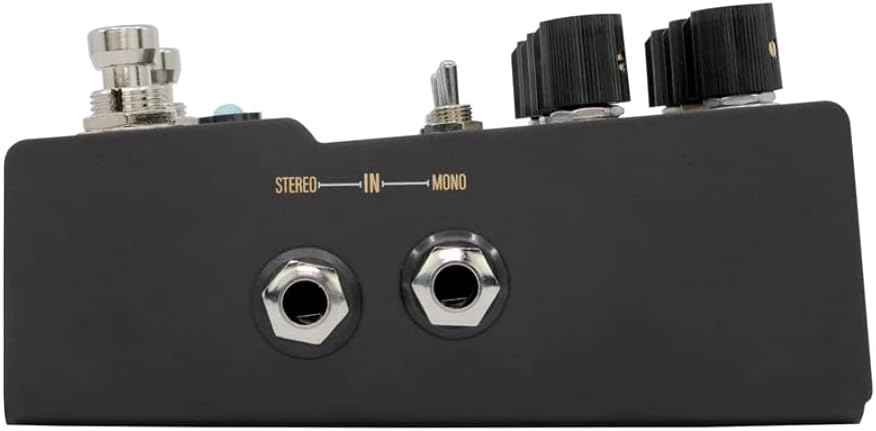
This image shows the right side of the R1 pedal, featuring the Mono and Stereo input jacks.

This image displays the left side of the R1 pedal, including the Mono and Stereo output jacks, the 9VDC power input, and the USB port for firmware updates.
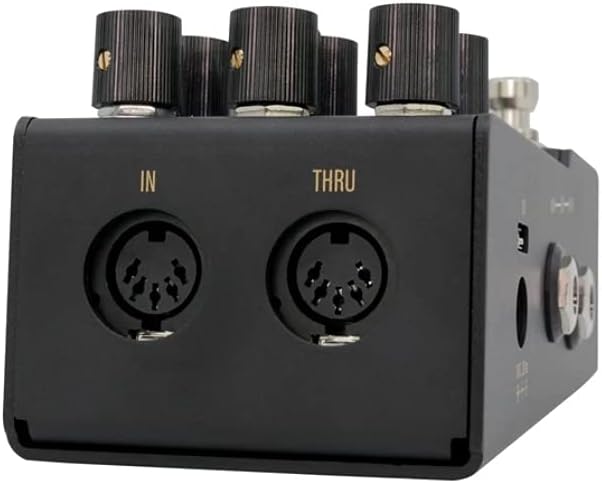
This image illustrates the rear panel of the R1 pedal, featuring the MIDI In and MIDI Thru ports for external control.
- Mono/Stereo Input Jacks: Connect your instrument or other pedals.
- Mono/Stereo Output Jacks: Connecta't al teu amplifier or next pedal in the chain.
- Entrada d'alimentació de 9 V CC: Requires 9VDC, 300mA (center negative) power supply.
- Port USB: Per a actualitzacions de firmware.
- MIDI In/Thru: For MIDI control and daisy-chaining MIDI devices.
4. Reverb Programs
The R1 offers six distinct reverb programs, each with unique characteristics and an 'X' knob function for further customization:
4.1 Primavera
Emulates a classic spring reverb found in tube amplifiers, known for its 'drip' effect. The Decay knob allows for extended reverb times beyond traditional spring tanks. The X knob adds a warm grit to the reverb decay.
4.2 Sala
Provides the acoustics of large live spaces, from concert halls to arenas. Longer decays create massive ambient washes, while shorter settings offer more intimate expressions. The X knob controls the perceived size of the room, from smaller at lower settings to larger as it increases.
4.3 Plat
Emulates a smooth, analog plate reverb with even diffusion, inspired by classic units like the EMT 140. The X knob introduces a gentle, warm grit to the front end of the program, simulating a hot signal driving the plate.
4.4 BFR (Big, F____, Reverb)
A large, lush, hall-esque reverb designed for expansive, rich decays. The X knob controls the amount of diffusion applied to the multi-tap delays that form the program. Lower settings create a more textured sound with distinct delay bounces, while higher settings diffuse these delays for a smoother, atmospheric texture.
4.5 RFRCT (Refract)
Generates unique, glitch-like textures over a diffused reverb. The Rate control on RFRCT adjusts the frequency of glitch effects, and Depth controls their overall volume. The X knob shapes the tone of the glitch effect; zero provides a lo-fi, tape-like sound, while increasing it brightens these elements with more pristine detail.
4.6 Aire
Offers a large, diffused reverb with a subtle shimmer and crisp clarity in its decay. It is suitable for slow-building sounds that complement playing without overpowering it, and also works well with keyboards and synthesizers. The X knob controls the volume of the wind and shimmer elements within the Air program; turning it clockwise increases their presence.
5. Presets
The R1 can store up to nine on-board presets, organized into three banks (A, B, C) with three presets each. An additional 128 presets are accessible via MIDI.
5.1 Accessing On-Board Presets
- Utilitza el A | B | C toggle switch to select the desired bank.
- To cycle through the three presets within a bank, press the Bypass and SUS/LATCH footswitches simultaneously. The right LED will change color (Red, Green, Blue) to indicate the active preset.
5.2 Desar preajustos
Any adjustments made to a preset will cause the tap LED to turn purple, indicating that the preset has been edited. To save your changes:
- Manteniu premuda la Bypass and SUS/LATCH footswitches simultaneously until the LEDs flash.
- Release the footswitches. The LEDs will stop flashing, confirming the preset has been saved.
5.3 Preset Spillover
The R1 features true preset spillover. When switching between presets, the new preset loads while the previous reverb tail is allowed to decay naturally, ensuring smooth transitions without abrupt cuts.
6. Fine-Tuning Parameters
Beyond the main knobs, the R1 offers additional controls for detailed sound shaping:
- Botó d'afinació: In addition to its 'X' function, the Tune knob can be set to control the amount of low or high frequencies in the reverb signal, allowing you to tailor the tonal character.
- Tweak Knob: This knob's function is determined by the 'Rate | Depth | Pre Delay' toggle switch.
- Valoració: Controls the rate of the Low-Frequency Oscillator (LFO) applied to the wet reverb signal.
- Profunditat: Controls the depth or intensity of the LFO applied to the reverb signal.
- Pre Delay: Adjusts the time delay before the reverb becomes audible after the initial dry signal, creating a sense of space.
7. Bypass Modes
The R1 offers three bypass modes to suit different preferences and signal chain requirements:
- True Bypass: When the effect is disengaged, the signal passes directly through the pedal without any electronic buffering, preserving the original tone.
- DSP+True Bypass (Trails): The signal is true bypassed, but the reverb tail from the engaged effect is allowed to naturally decay after disengagement.
- DSP Bypass (Trails): The signal is buffered when bypassed, and the reverb tail decays naturally after disengagement. This mode can be beneficial for maintaining signal integrity over long cable runs.
8. Momentary Functions
El SUS/LATCH footswitch provides powerful momentary control over the reverb:
- Momentary Sustain: Press and hold the SUS/LATCH switch to momentarily sustain the current reverb. This allows you to play over the sustained reverb through the same algorithm. Releasing the switch returns the reverb to its normal decay.
- Latching Sustain: Click the SUS/LATCH switch to latch the current reverb decay, allowing it to sustain indefinitely or until clicked again. This enables you to play over a continuously sustained reverb.
9. Configuració
Requisits d'energia de 9.1
The R1 pedal requires a standard 9VDC, 300mA (center negative) power supply. Ensure your power supply meets these specifications to prevent damage to the unit.
9.2 Connexions d'àudio
- Configuració monofònica: Connect your instrument or the output of a previous pedal to the MONO IN jack. Connect the MONO OUT jack to your amplifier or the input of the next pedal.
- Configuració estèreo: Connect your stereo signal source (e.g., another stereo pedal) to both the MONO IN and STEREO IN jacks. Connect the MONO OUT and STEREO OUT jacks to two separate amplifiers or a stereo input device.
9.3 MIDI Connection
For MIDI control, connect a MIDI cable from your MIDI controller's output to the R1's MIDI IN port. Use the MIDI THRU port to daisy-chain to other MIDI-compatible devices.
10. Instruccions de funcionament
10.1 Encès
After connecting the power supply and audio cables, the pedal will power on. The LEDs will illuminate, indicating its current state.
10.2 Selecció de programes
Gireu el Prog knob to select one of the six reverb algorithms (Spring, Hall, Plate, BFR, RFRCT, Air).
10.3 Ajust de paràmetres
Utilitza el Decay, Swell, Mix, Tweak, and Tune knobs to shape your desired reverb sound. Remember to use the toggle switches to select the function of the Tweak and Tune knobs as needed.
10.4 Ús de preajustos
Refer to Section 5 for detailed instructions on accessing and saving presets. This allows for quick recall of your favorite settings.
11. Manteniment
11.1 Neteja
Clean the pedal with a soft, dry cloth. Avoid using abrasive cleaners or solvents, as these can damage the finish and internal components.
11.2 actualitzacions de microprogramari
Walrus Audio periodically releases firmware updates to improve performance or add new features. Check the official Walrus Audio website for the latest firmware and instructions on how to update your R1 pedal via the USB port.
12. Solució De Problemes
- Sense energia: Ensure the 9VDC, 300mA (center negative) power supply is correctly connected and functioning.
- Sense so: Check all audio cable connections. Verify that the pedal is engaged (Bypass LED is on). Test with different cables and a different power supply if possible.
- Unwanted Noise or Clipping: Ensure your instrument's output level is not excessively high. Check that the power supply is clean and provides sufficient current. Some reviews indicate potential clipping with hot pickups; try adjusting input levels or using a buffer before the R1 if issues persist.
- Preset Issues: If presets are not saving or recalling correctly, ensure you are following the correct saving procedure (Section 5.2). If the tap LED turns purple, it indicates an unsaved edit.
- MIDI Control Not Working: Verify MIDI cable connections and ensure your MIDI controller is sending the correct messages. Consult the Walrus Audio website for detailed MIDI implementation charts.
13. Especificacions tècniques
| Especificació | Valor |
|---|---|
| Pes de l'article | 1.03 lliures |
| Dimensions del producte | 590.55 x 452.76 x 275.59 polzades |
| Número de model de l'article | 900-1056 |
| Interfície del maquinari | Àudio d'1/4 de polzada |
| Format del senyal | Analògic |
| Font d'alimentació | Elèctric amb cable |
| Voltage | 9 Volts |
14. Garantia i Suport
For detailed warranty information, product registration, and technical support, please visit the official Walrus Audio website. You can also find FAQs, additional resources, and contact information for customer service there.
Àudio de morsa Weblloc: www.walrusaudio.com


