1. Introducció
The D-Link DIR-825M AC1200 MU-MIMO Gigabit Router is a high-performance networking device designed to provide fast and reliable wireless connectivity for your home or small office. Featuring 802.11ac MU-MIMO wireless technology, it delivers enhanced speed, extended range, and improved efficiency for multiple devices simultaneously. This router includes four Gigabit Ethernet LAN ports for high-speed wired connections and a USB 2.0 port for convenient local network sharing. It supports various operating modes, offering flexibility to suit different networking requirements.
2. Contingut del paquet
Comproveu que el vostre paquet contingui els elements següents:
- D-Link DIR-825M AC1200 MU-MIMO Gigabit Router
- Adaptador d'alimentació
- Cable Ethernet
- Quick Installation Guide (may vary by region)
Si falta algun element o hi ha algun dany, poseu-vos en contacte amb el vostre distribuïdor local de D-Link.
3. Sobrecàrrega físicaview
Familiarize yourself with the various components and ports of your D-Link DIR-825M router.

Figura 3.1: Davant view of the D-Link DIR-825M AC1200 MU-MIMO Gigabit Router, showcasing its four external antennas and the D-Link logo on the top panel.
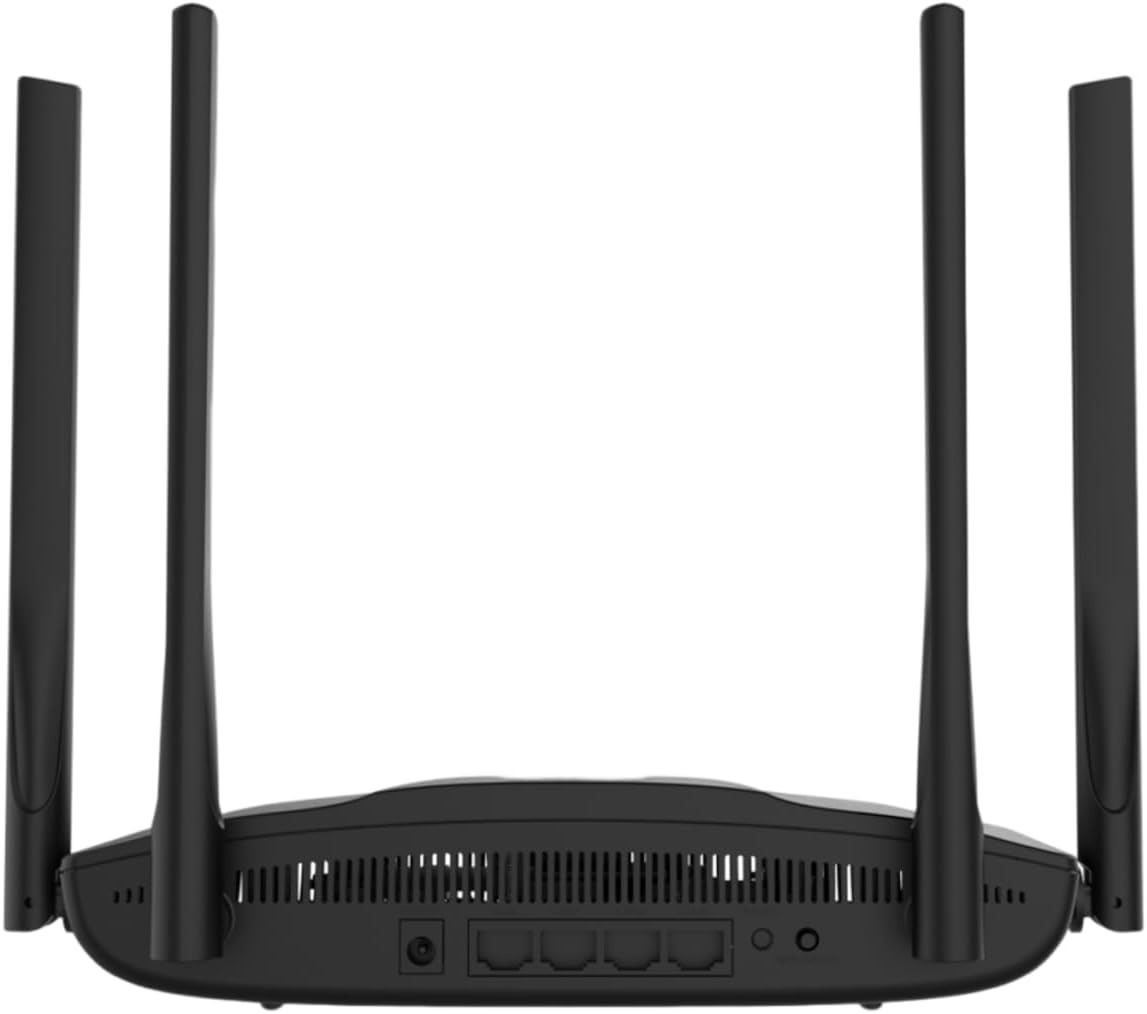
Figura 3.2: posterior view of the D-Link DIR-825M router, detailing the power input, WAN port, four Gigabit LAN ports, USB 2.0 port, Reset button, and WPS button.
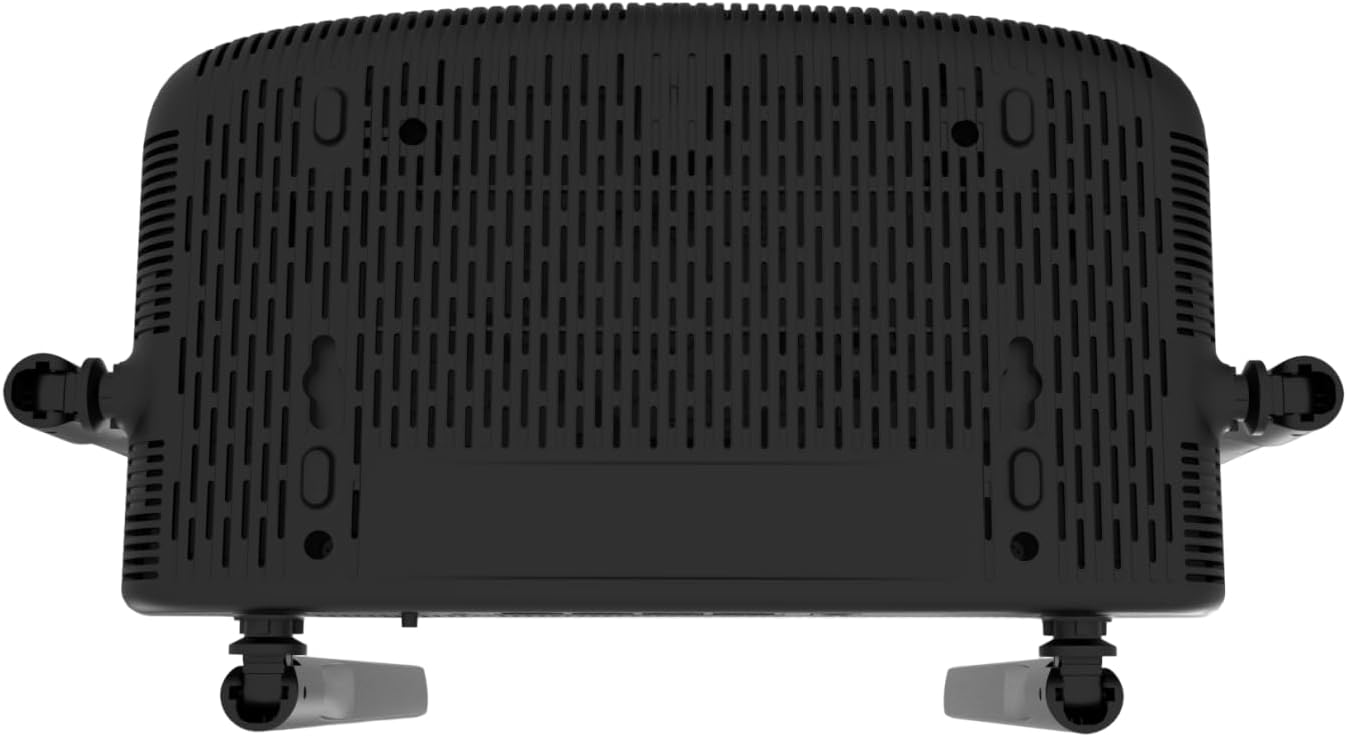
Figura 3.3: A baix view of the D-Link DIR-825M router, illustrating the ventilation grilles for heat dissipation and mounting holes for wall installation.
3.1 Indicadors del panell frontal
- LED d'alimentació: Indica l'estat d'alimentació del dispositiu.
- LED d'Internet: Shows the status of the internet connection.
- Wi-Fi LEDs (2.4GHz/5GHz): Indiqueu l'activitat de la xarxa sense fil per a cada banda.
3.2 Ports i botons del panell posterior
- Connector d'alimentació: Es connecta a l'adaptador de corrent inclòs.
- Port WAN (Internet): Connects to your modem or internet service provider's equipment.
- Ports LAN (1-4): Connect wired devices such as computers, gaming consoles, or network storage. These are Gigabit Ethernet ports.
- Port USB 2.0: Per connectar dispositius d'emmagatzematge USB per compartir files a la teva xarxa.
- Botó WPS: For quickly connecting WPS-compatible wireless devices.
- Botó de restabliment: Used to restore the router to its factory default settings. Press and hold for 10 seconds with a paperclip.
4. Configuració
Follow these steps for initial setup of your D-Link DIR-825M router.
4.1 Instal·lació de maquinari
- Posicioneu el router: Place the router in a central location in your home or office, away from obstructions and sources of interference. Adjust the antennas vertically for optimal signal coverage.
- Connectar l'alimentació: Connect the provided power adapter to the router's power connector and then plug it into a power outlet. Ensure the Power LED illuminates.
- Connectar-se al mòdem: Connect an Ethernet cable from your modem's LAN port to the WAN (Internet) port on the DIR-825M router.
- Connecteu dispositius amb cable (opcional): For wired connections, connect an Ethernet cable from your computer or other network devices to any of the LAN ports (1-4) on the router.
4.2 Configuració inicial
- Connecteu-vos al router:
- Amb cable: Ensure your computer is connected to a LAN port on the router.
- Sense fil: Connect to the default Wi-Fi network (SSID and password are typically printed on a label on the bottom of the router).
- Accés Web Interfície: Obre a web navegador (per exemple, Chrome, Firefox, Edge) i escriviu
http://dlinkrouter.localorhttp://192.168.0.1a la barra d'adreces. Premeu Intro. - Inicieu sessió: Introduïu el nom d'usuari per defecte (normalment
admin) and password (often blank oradmin, check the router label). - Executa l'assistent de configuració: Follow the on-screen instructions of the D-Link Setup Wizard. This wizard will guide you through configuring your internet connection type (e.g., DHCP, PPPoE), setting up your new Wi-Fi network name (SSID) and password, and establishing an administrator password for the router.
- Desa la configuració: After completing the wizard, save your settings and restart the router if prompted.
5. Modes de funcionament
The D-Link DIR-825M supports multiple operating modes to adapt to various networking needs.
- Mode d'encaminador (per defecte): In this mode, the device acts as a primary router, connecting to your modem to provide internet access to all connected wired and wireless devices on your local network. It performs Network Address Translation (NAT) and manages IP addresses.
- Mode de punt d'accés (AP): This mode allows the DIR-825M to extend an existing wired network with wireless capabilities. It connects to an existing router via an Ethernet cable and broadcasts a Wi-Fi signal, essentially turning a wired network into a wireless one without performing routing functions.
- Mode de repetidor: Also known as Wi-Fi Extender mode, this allows the DIR-825M to wirelessly extend the coverage of an existing Wi-Fi network. It connects to an existing Wi-Fi signal and re-broadcasts it, helping to eliminate Wi-Fi dead zones.
- WISP Repeater Mode: Wireless Internet Service Provider (WISP) Repeater mode enables the router to connect wirelessly to a WISP access point and then share that internet connection with both wired and wireless clients on your local network. This is useful in areas where wired internet access is unavailable.
- Mode de client Wi-Fi: In this mode, the DIR-825M acts as a wireless adapter for a wired device. It connects wirelessly to an existing Wi-Fi network and provides an Ethernet connection for a single wired device that does not have its own Wi-Fi capability.
You can switch between these modes through the router's web-based management interface, typically found under the 'Operation Mode' or 'System Settings' section.
6. Manteniment
Un manteniment regular garanteix un rendiment òptim i una llarga vida útil del vostre router.
6.1 actualitzacions de microprogramari
D-Link periodically releases firmware updates to improve performance, add new features, and address security vulnerabilities. It is recommended to keep your router's firmware up-to-date.
- Visit the official D-Link support weblloc per a la vostra regió.
- Cerca your model (DIR-825M) and download the latest firmware file.
- Log in to your router's web interfície de gestió.
- Navigate to the 'Tools' or 'Maintenance' section, then 'Firmware Upgrade'.
- Carregueu el firmware descarregat file i seguiu les instruccions a la pantalla. No apagueu el router durant el procés d'actualització.
6.2 Restabliment de fàbrica
A factory reset can resolve persistent configuration issues or be performed before transferring ownership of the device. This will erase all custom settings and restore the router to its original factory defaults.
- With the router powered on, locate the Reset button on the rear panel (refer to Figure 3.2).
- Using a paperclip or a similar pointed object, press and hold the Reset button for approximately 10 seconds.
- Release the button when the Power LED starts blinking or changes color.
- The router will restart with factory default settings. You will need to reconfigure it as per Section 4.2.
6.3 Neteja
To ensure proper ventilation and prevent overheating, keep the router clean and free from dust. Use a soft, dry cloth to wipe the exterior. Do not use liquid cleaners or aerosols.
7. Solució De Problemes
This section provides solutions to common issues you might encounter with your D-Link DIR-825M router.
7.1 Sense connexió a Internet
- Comproveu els cables: Assegureu-vos que tots els cables Ethernet estiguin connectats correctament als ports correctes (WAN a mòdem, LAN a dispositius).
- Estat del mòdem: Verify that your modem is working correctly and has an active internet connection. Restart your modem if necessary.
- Configuració del router: Inicia la sessió al router web interface and check your internet connection settings. Ensure the correct connection type (e.g., DHCP, PPPoE) is selected and credentials are correct if required.
- Reinicieu els dispositius: Power cycle your modem, router, and connected devices in that order.
7.2 Poor Wi-Fi Signal or Coverage
- Col·locació del router: Move the router to a more central location, away from walls, large metal objects, and other electronic devices that may cause interference.
- Ajust de l'antena: Adjust the router's antennas to different angles to optimize signal propagation.
- Interferència: Other wireless devices (cordless phones, microwaves, Bluetooth devices) can interfere with Wi-Fi. Try changing the Wi-Fi channel in the router settings.
- Obstacles: Walls, floors, and ceilings can degrade Wi-Fi signals. Consider using Repeater mode or additional access points for larger areas.
7.3 No es pot accedir al router Web Interfície
- Adreça IP: Ensure you are using the correct IP address (
http://dlinkrouter.localorhttp://192.168.0.1). - Connexió: Verify your device is properly connected to the router, either via Ethernet cable or the router's Wi-Fi network.
- Configuració IP: Assegureu-vos que l'adaptador de xarxa de l'ordinador estigui configurat per obtenir una adreça IP automàticament (DHCP).
- Memòria cau del navegador: Esborra el teu web la memòria cau i les galetes del navegador o proveu un altre navegador.
- Tallafocs/Antivirus: Desactiveu temporalment qualsevol tallafocs o programari antivirus de l'ordinador que pugui estar bloquejant l'accés.
- Restabliment de fàbrica: If all else fails, perform a factory reset (Section 6.2) and try accessing the interface with default credentials.
8. Especificacions
| Marca | D-Link |
| Model | DIR-825M |
| Estàndard sense fils | 802.11ac (Wi-Fi 5), 802.11n, 802.11g, 802.11b |
| Velocitat sense fil | AC1200 (Up to 300 Mbps on 2.4GHz, 867 Mbps on 5GHz) |
| Banda de freqüència | Doble banda (2.4 GHz i 5 GHz) |
| Ports Ethernet | 4 x 10/100/1000 Gigabit LAN Ports, 1 x 10/100/1000 Gigabit WAN Port |
| Port USB | 1 x port USB 2.0 |
| Antenes | 4 antenes externes |
| Dimensions (L x A x A) | 19.7 x 14 x 4.4 cm |
| Pes | 360 g |
| Modes de funcionament | Router, Access Point, Repeater, WISP Repeater, Wi-Fi Client |
| Entrada de potència | 230 volts (CA) |
| Dispositius compatibles | Ordinador portàtil, ordinador personal, televisor intel·ligent, tauleta |
9. Informació de seguretat
Please read and follow these safety guidelines to ensure safe operation of your device:
- Use only the power adapter supplied with the product. Using an unauthorized power adapter may damage the device and void your warranty.
- Do not expose the device to water, rain, moisture, or extreme temperatures.
- Ensure adequate ventilation around the device. Do not block any ventilation openings.
- No obriu el dispositiu casing. No hi ha peces que l'usuari pugui reparar a l'interior.
- Keep the device away from direct sunlight, heat sources, and flammable materials.
- Aquest dispositiu només està dissenyat per a ús interior.
- Mantenir fora de l'abast dels nens.
10. Garantia i Suport
For detailed warranty information, please refer to the warranty card included with your D-Link DIR-825M router or visit the official D-Link weblloc web per a la vostra regió. Els termes i condicions de la garantia poden variar segons el país.
For technical support, product registration, and access to the latest drivers and firmware, please visit the D-Link support portal:
- D-Link Global Support: https://www.dlink.com/support
You may also find contact information for local D-Link customer service on their weblloc.


