1. Introducció
Thank you for choosing the Hoco PH37 Folding Laptop Stand. This manual provides essential information for the proper setup, operation, and maintenance of your new laptop stand. Please read this manual thoroughly before using the product to ensure optimal performance and longevity.
2. Producte acabatview
The Hoco PH37 is an excellent aluminum alloy folding laptop stand designed to elevate your laptop for improved ergonomics and heat dissipation. Its foldable design makes it highly portable, while its adjustable nature allows for multiple viewing angles and heights.
Característiques principals:
- Premium Aluminum Alloy Construction: Ensures durability and a sleek, modern aesthetic.
- Disseny plegable: Compact and easy to carry, ideal for travel or storage.
- Ajust multi-angle: Allows you to set your laptop at various ergonomic heights and angles.
- Silicone Protection: Non-slip silicone pads on contact surfaces protect your laptop from scratches and ensure stability.
- Dissipació de calor millorada: Open design promotes airflow around your laptop, preventing overheating.
- Àmplia compatibilitat: Suitable for a variety of laptops, including Apple MacBook, Samsung, HP, Dell, and Lenovo models.
Components del producte:
- Main Stand Frame (Aluminum Alloy)
- Adjustable Support Arms
- Silicone Anti-Slip Pads (on top and bottom surfaces)
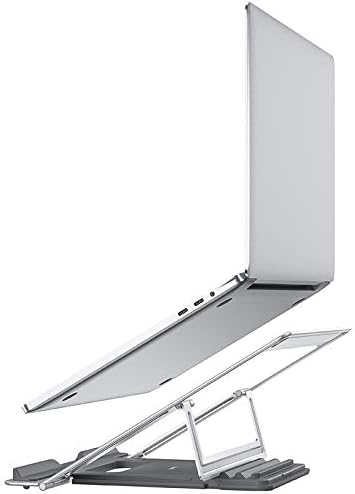


3. Instruccions de configuració
- Desplegueu el suport: Gently pull the two main sections of the stand apart until they fully extend and lock into place. The adjustable support arms will also unfold.
- Adjust Height/Angle: The stand features multiple adjustment points. Carefully lift or lower the support arms to achieve your desired viewing height and angle. Ensure both arms are adjusted to the same level for stability.
- Col·loca el teu ordinador portàtil: Carefully place your laptop onto the silicone-padded surface of the stand. Ensure it is centered and stable on the stand. The silicone pads will prevent slipping and protect your device.
Nota: Always ensure the stand is placed on a stable, flat surface before placing your laptop on it.
4. Instruccions de funcionament
Once set up, the Hoco PH37 stand provides a stable and elevated platform for your laptop. You can easily adjust its height and angle as needed:
- Ajust d'alçada: To change the height, gently lift your laptop off the stand, then adjust the support arms to a new position. Re-place your laptop once the adjustment is complete.
- Ajust d'angle: The stand's design allows for various tilt angles. Adjust the support arms to achieve the most comfortable screen angle for your posture.
The open design of the stand facilitates better airflow around your laptop, which helps in dissipating heat and maintaining optimal operating temperatures, especially during prolonged use.
5. Manteniment
To ensure the longevity and proper functioning of your Hoco PH37 laptop stand, follow these simple maintenance guidelines:
- Neteja: Netegeu el suport amb un drap suauamp cloth. For stubborn marks, a mild soap solution can be used, followed by drying with a clean, dry cloth. Avoid abrasive cleaners or solvents.
- Emmagatzematge: When not in use, fold the stand into its compact form and store it in a dry, clean place away from direct sunlight or extreme temperatures.
- Inspecció: Periodically check the joints and silicone pads for any signs of wear or damage.
6. Solució De Problemes
If you encounter any issues with your Hoco PH37 laptop stand, please refer to the following common solutions:
| Problema | Causa possible | Solució |
|---|---|---|
| La posició de peu es nota inestable. | No completament desplegat o col·locat sobre una superfície irregular. | Ensure the stand is fully extended and locked. Place it on a flat, stable desk or table. |
| Laptop slides on the stand. | Silicone pads are dirty or worn. | Clean the silicone pads with a damp cloth. If pads are severely worn, contact customer support. |
| Difficulty adjusting height/angle. | Joints are stiff. | Apply gentle, even pressure when adjusting. Avoid forcing the mechanism. |
If the problem persists, please contact Hoco customer support for further assistance.
7. Especificacions
| Característica | Detall |
|---|---|
| Marca | HOCO |
| Número de model | PH37 |
| Material | Metall (aliatge d'alumini) |
| Color | Plata |
| Factor de forma | Plegable |
| Dispositius compatibles | Multi-laptop compatibility (Apple MacBook, Samsung, HP, Dell, Lenovo) |
| Tipus de muntatge | Taula |
| Característiques especials | Adjustable, Heat Dissipation, Silicone Protection |
| Usos recomanats | Escriptori |
| Dimensions del paquet | 28 x 22.6 x 3.5 cm |
| Pes del paquet | 720 g |
8. Garantia i Suport
HOCO products are manufactured to high-quality standards. For information regarding warranty coverage, please refer to the warranty card included with your product or visit the official HOCO website. If you require technical support or have any questions not covered in this manual, please contact HOCO customer service through their official channels.
For the latest support information and contact details, please visit: www.hoco.com


