Introducció
Welcome to the user manual for your new TechniSat DIGITRADIO 380 CD IR. This compact micro-system is designed to bring a world of music into your home, offering a wide array of playback options and intuitive controls.
Whether you prefer traditional radio broadcasts via DAB+ and FM, or want to explore exotic sounds from around the globe with Internet radio, the DIGITRADIO 380 CD IR has you covered. It also supports playback from your personal music archives, including CDs, USB sticks, and streaming from your PC or smartphone via Bluetooth. Enjoy your favorite Spotify playlists with ease.
Despite its extensive features, the DIGITRADIO 380 CD IR is user-friendly, featuring intuitive rotary knob controls, a clear color display, a remote control, and convenient app control via the free TechniSat Connect app. Experience impressive stereo quality through its two powerful 20W speakers.
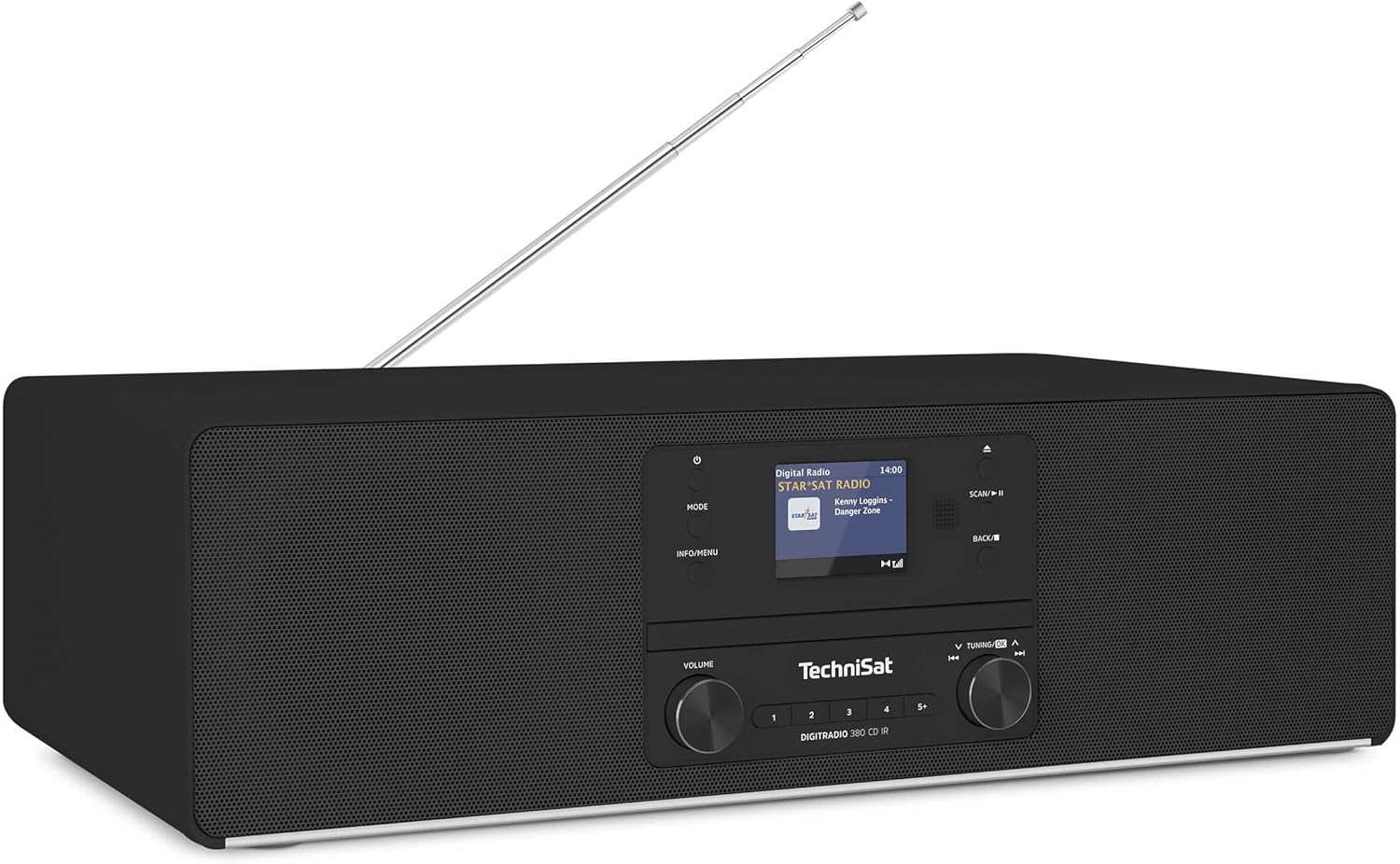
Figura 1: Davant view of the TechniSat DIGITRADIO 380 CD IR, showcasing its sleek design, display, and control knobs.
Guia de configuració
1. Desembalatge i col·locació
- Traieu amb cura tots els components de l'embalatge.
- Place the DIGITRADIO 380 CD IR on a stable, flat surface. Ensure adequate ventilation around the unit.
- Mantingueu la unitat allunyada de la llum solar directa, de fonts de calor i de la humitat.
2. Connexió d'alimentació
- Connect the power cable to the AC IN port on the back of the unit.
- Connecteu l'altre extrem del cable d'alimentació a una presa de corrent adequada.
- The unit will enter standby mode. Press the power button (⏻) per activar-lo.
3. Configuració de l'antena
- Extend the telescopic antenna fully for optimal DAB+ and FM reception.
- Adjust the antenna direction to improve signal strength if needed.
4. Network Connection (for Internet Radio & Spotify)
- Upon first power-on, the unit will guide you through the network setup.
- Select your Wi-Fi network from the list displayed on the color screen.
- Enter your Wi-Fi password using the control knobs and buttons.
- Alternatively, use the TechniSat Connect app for easier setup.

Figura 2: The 2.4-inch color display provides clear information and navigation during setup and operation.
Instruccions de funcionament
1. Controls bàsics
- Botó d'encendre (⏻): Turns the unit on/off or puts it into standby.
- Pom de volum: Ajusta el nivell de sortida d'àudio.
- Botó de mode: Switches between different audio sources (DAB+, FM, Internet Radio, CD, Bluetooth, USB, AUX-in).
- Botó d'informació/menú: Accesses information about the current track/station or enters the main menu for settings.
- Botó Escaneja/Reprodueix/Pausa: Initiates station scan in radio modes, or plays/pauses media playback.
- Back/Stop Button: Navigates back in menus or stops media playback.
- Botó d'afinació/OK: Navigates through menus, lists, or tunes radio frequencies. Press to confirm selection.
2. Radio Modes (DAB+/FM/Internet Radio)
- Premeu el botó Mode button to select DAB+, FM, or Internet Radio.
- DAB+ / FM: Utilitza el Escaneja button to automatically scan for available stations. Use the Tuning/OK knob to manually tune or select from the station list.
- Ràdio per Internet: Browse stations by genre, location, or search for specific stations. A stable Wi-Fi connection is required.
- Estacions preseleccionades: Save your favorite stations by pressing and holding one of the numbered preset buttons (1-5+). Briefly press to recall a preset.

Figura 3: Enjoy a wide variety of digital radio programs in high quality via DAB+ and FM.

Figura 4: Access a boundless variety of music from the internet via Internet Radio.
3. Reproductor de CD
- Premeu el botó Mode button to select CD.
- Gently insert a CD into the CD slot. The unit will automatically load and begin playback.
- Utilitza el Escaneja/Reprodueix/Pausa i Tornar/Aturar botons per al control de la reproducció.

Figura 5: The integrated CD player allows you to enjoy your favorite audio CDs.
4. Transmissió d'àudio per Bluetooth
- Premeu el botó Mode button to select Bluetooth. The display will show "Pairing".
- On your smartphone or tablet, enable Bluetooth and search for "DIGITRADIO 380 CD IR".
- Select the device to pair. Once connected, you can stream audio from your device to the radio.
- NFC (Near Field Communication) is also supported for quick pairing with compatible devices.

Figura 6: Enjoy wireless music streaming from your smartphone or tablet via Bluetooth.
5. Reproducció USB
- Inseriu una unitat flash USB que contingui àudio MP3 files al port USB.
- Premeu el botó Mode button to select USB. The unit will automatically detect and play compatible files.
- Use the navigation controls to browse folders and select tracks.
6. AUX-in and Headphone Jack
- Connect external audio devices (e.g., MP3 players) to the AUX-in port using a 3.5mm audio cable. Select AUX-in mode.
- Connect headphones to the 3.5mm headphone jack for private listening.
7. Spotify Free
- Ensure your unit is connected to the internet.
- Select Spotify Free mode. Follow the on-screen instructions to link your Spotify account.
- You can then browse and play Spotify content directly from the radio.
8. Alarm Clock, Sleep Timer, and Snooze
- Access these functions via the main menu (Informació/Menú botó).
- Set alarms with your preferred source (radio, buzzer).
- Configure the sleep timer to automatically turn off the unit after a set period.
- Use the snooze function to temporarily pause an alarm.
9. TechniSat Connect App Control
- Download the free "TechniSat Connect" app from your smartphone's app store.
- Ensure your smartphone and the DIGITRADIO 380 CD IR are connected to the same Wi-Fi network.
- Open the app and follow the instructions to connect to your radio.
- The app allows for convenient control of all functions, including setup, source selection, and volume.

Figura 7: Experience excellent stereo sound with 2 x 20 Watt RMS power, including an equalizer for sound customization.
Manteniment
Neteja de la unitat
- Desconnecteu sempre la unitat de la presa de corrent abans de netejar-la.
- Feu servir un drap suau, sec i sense borrissol per netejar les superfícies exteriors.
- Per a marques difícils, lleugerament dampNetegeu el drap amb aigua i eixugueu-lo immediatament.
- No utilitzeu netejadors abrasius, ceres o dissolvents, ja que poden danyar l'acabat.
- Eviteu ruixar líquids directament sobre la unitat.
CD Player Care
- Manipuleu els CD per les vores per evitar empremtes dactilars i ratllades.
- Netegeu els CD amb un drap suau i sense borrissol, netejant des del centre cap a fora.
- Do not use scratched or damaged CDs, as they may damage the player mechanism.
Resolució de problemes
| Problema | Causa possible | Solució |
|---|---|---|
| Sense poder | Cable d'alimentació no connectat; presa de corrent defectuosa. | Assegureu-vos que el cable d'alimentació estigui ben connectat. Proveu una altra presa de corrent. |
| Sense so | Volume too low; wrong source selected; headphones connected. | Augmenta el volum. Prem Mode to select correct source. Disconnect headphones if sound is desired from speakers. |
| Poor radio reception (DAB+/FM) | Antena no estesa; zona de senyal feble. | Esteneu completament i ajusteu l'antena telescòpica. Intenteu reposicionar la unitat. |
| Internet radio not connecting | Incorrect Wi-Fi password; weak Wi-Fi signal; router issue. | Re-enter Wi-Fi password. Move unit closer to router. Restart your Wi-Fi router. |
| S'ha produït un error en l'aparellament de Bluetooth | Device not in pairing mode; device too far; already connected to another device. | Ensure radio is in Bluetooth pairing mode. Keep devices within 10 meters. Disconnect from other Bluetooth devices. |
| El CD no es reprodueix | CD inserted incorrectly; CD scratched/dirty; wrong mode selected. | Re-insert CD correctly. Clean or replace CD. Ensure CD mode is selected. |
Especificacions
| Característica | Detall |
|---|---|
| Número de model | 0000/3954 |
| Dimensions (A x A x P) | 45 x 14 x 26.5 cm (17.7 x 5.5 x 10.4 polzades) |
| Pes | 4.58 kg (10.1 lliures) |
| Potència de sortida d'àudio | 2 x 20 W RMS (Total 40 Watts) |
| Tipus d'altaveu | estèreo |
| Connectivitat | DAB+, FM, Internet Radio, Bluetooth (v4.2), USB, AUX-in, Headphone (3.5mm), Wi-Fi, NFC |
| Mostra | Pantalla a color de 2.4" |
| Font d'alimentació | AC Cable (Internal Power Supply) |
| Dispositius compatibles | Smartphone, Tablet, Headphones |
| Característiques especials | CD Player (MP3 compatible), Spotify Free, Alarm Clock, Sleep Timer, Snooze, TechniSat Connect App Control, Equalizer |
Garantia i Suport
For detailed warranty information, please refer to the warranty card included with your product packaging or visit the official TechniSat weblloc.
If you encounter any issues not covered in this manual or require further assistance, please contact TechniSat customer support. Contact details can typically be found on the TechniSat weblloc web o a la documentació del producte.


