1. Introducció
This manual provides detailed instructions for setting up, configuring, and maintaining your Totolink N600R 600Mbps Wireless N Broadband Router. The N600R is designed to provide high-speed wireless connectivity for home and small office environments, supporting the IEEE 802.11n/g/b standards for 2.4GHz Wireless LAN with data rates up to 600Mbps.
2. Producte acabatview
2.1 Característiques clau
- Up to 600Mbps Wireless N speed for fast data transfer.
- Advanced MIMO technology for enhanced throughput and wireless coverage.
- One Turbo slide switch for quick Wi-Fi coverage extension.
- Supports multiple broadband functions: DHCP, Static IP, PPPoE, PPTP, and L2TP.
- Comprehensive security protocols: 64/128-bit WEP, WPA, WPA2, and WPA-Mixed.
- Easy and fast secure network connection using WPS (Wi-Fi Protected Setup).
- Supports IP, Port, MAC, URL filtering, and Port Forwarding.
- QoS (Quality of Service) for bandwidth control based on IP.
- Multi-SSID feature for creating multiple wireless networks.
- Universal repeater and WDS function for extending Wi-Fi range.
- Parental Control features for managing internet access.
2.2 Contingut del paquet
- Totolink N600R Wireless N Broadband Router
- Adaptador d'alimentació
- Cable Ethernet
- Quick Installation Guide (refer to this manual for detailed instructions)
2.3 Components del router

Figura 1: Frontal View. This image displays the front of the Totolink N600R router, featuring its sleek white casing and four prominent external antennas, two on each side, designed for optimal wireless signal coverage.

Figura 2: superior View. This image shows the top surface of the Totolink N600R router, highlighting the Totolink brand logo centrally placed on its white, curved chassis.

Figura 3: posterior View. This image illustrates the rear panel of the Totolink N600R router, clearly showing the yellow WAN port, four orange LAN ports, and the power input jack, along with ventilation slots.
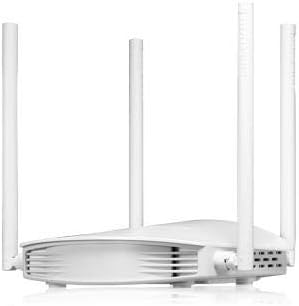
Figura 4: lateral View. Aquesta imatge presenta un avantatge secundarifile of the Totolink N600R router, emphasizing its curved design and the arrangement of its external antennas.
3. Guia de configuració
3.1 Connexió física
- Connexió d'alimentació: Connect the provided power adapter to the router's power input jack and then plug it into a power outlet.
- Connexió WAN: Connect one end of an Ethernet cable to the WAN port (usually labeled and colored differently, e.g., yellow) on the router and the other end to your modem or internet service provider's (ISP) device.
- Connexió LAN (opcional): For wired devices, connect one end of an Ethernet cable to any of the LAN ports (usually orange) on the router and the other end to your computer or other network device.
- Encès: Wait for the router to power on and for the indicator lights to stabilize, indicating a successful connection.
3.2 Configuració inicial (Web Interfície)
- Connecteu-vos al router:
- Amb cable: Assegureu-vos que l'ordinador estigui connectat a un dels ports LAN del router.
- Sense fil: Connect your wireless device (laptop, smartphone) to the router's default Wi-Fi network. The default SSID (network name) and password are typically printed on a label on the bottom of the router.
- Accés Web Navegador: Obre a web navegador (per exemple, Chrome, Firefox, Edge) al dispositiu connectat.
- Enter IP Address: In the address bar, type the default IP address of the router, which is usually 192.168.1.1 or 192.168.0.1i premeu Intro.
- Inici de sessió: A login window will appear. Enter the default username and password. These are commonly admin for both username and password, or they may be printed on the router's label.
- Segueix l'Auxiliar de configuració: Upon successful login, you will likely be guided through a Quick Setup Wizard to configure your internet connection type (DHCP, Static IP, PPPoE, etc.) and basic wireless settings (SSID, password).
- Canvia les credencials predeterminades: Per seguretat, es recomana canviar la contrasenya d'inici de sessió predeterminada del router. web interfície.
4. Instruccions de funcionament
Once the initial setup is complete, you can further customize your network settings through the router's web interfície.
4.1 Configuració sense fil
- SSID (nom de la xarxa): Navigate to the Wireless Settings section to change your Wi-Fi network name.
- Mode de seguretat: Select a strong security mode like WPA2-PSK (AES) for optimal security.
- Contrasenya sense fil: Estableix una contrasenya forta i única per a la teva xarxa Wi-Fi.
- Turbo Switch: Utilize the physical Turbo slide switch on the router to quickly extend Wi-Fi coverage when needed.
- Multi-SSID: Create separate wireless networks for guests or specific devices by configuring multiple SSIDs.
4.2 Seguretat de la xarxa
- WPS (Configuració protegida per Wi-Fi): Feu servir el botó WPS del router o la funció WPS del web interface to quickly connect WPS-compatible devices without entering the password manually.
- Tallafoc: The router includes a built-in firewall. Configure IP, Port, MAC, and URL filtering to control network access.
- Transmissió de ports: Set up port forwarding rules if you need to access specific services or devices on your local network from the internet (e.g., gaming servers, security cameras).
4.3 Funcions avançades
- QoS (Qualitat de servei): Prioritize network traffic for specific applications or devices to ensure smooth performance for critical tasks like video streaming or online gaming. This is typically based on IP addresses.
- Control parental: Manage and restrict internet access for specific devices or users based on time schedules or website filtering.
- Universal Repeater / WDS: Extend your existing Wi-Fi network's coverage by configuring the N600R as a universal repeater or using WDS (Wireless Distribution System) with other compatible routers.
5. Manteniment
- Actualitzacions de firmware: Regularly check the Totolink official weblloc web per a actualitzacions de firmware. L'actualització del firmware pot millorar el rendiment, afegir noves funcions i augmentar la seguretat.
- Reiniciant: Si teniu problemes de xarxa, proveu de reiniciar el router desendollant l'adaptador de corrent durant 10 segons i després tornant-lo a connectar.
- Restabliment de fàbrica: In case of severe configuration issues, you can perform a factory reset. This will revert all settings to their default values. Refer to the router's physical reset button or the web interface for this option.
- Col·locació: Place the router in a central location, away from obstructions and interference sources (e.g., microwaves, cordless phones) for optimal wireless coverage.
6. Solució De Problemes
6.1 Sense accés a Internet
- Check if the WAN port cable is securely connected to both the router and the modem.
- Verifiqueu que el mòdem funciona correctament i que té una connexió a Internet activa.
- Reinicieu tant el mòdem com el router.
- Ensure your internet connection settings (DHCP, PPPoE, etc.) are correctly configured in the router's web interfície.
6.2 Weak Wi-Fi Signal or Disconnections
- Relocate the router to a more central position, away from walls and large metal objects.
- Comproveu si hi ha interferències d'altres dispositius electrònics.
- Assegureu-vos que les antenes del router estiguin col·locades verticalment per obtenir un senyal òptim.
- Prova de canviar el canal sense fil a la configuració del router per evitar interferències de xarxes veïnes.
- Consider using the Turbo switch to extend coverage.
6.3 No es pot accedir als encaminadors Web Interfície
- Assegureu-vos que el dispositiu estigui connectat al router (amb cable o sense fil).
- Verify that you are using the correct IP address (e.g., 192.168.1.1).
- Esborra la memòria cau i les galetes del navegador o prova un altre navegador.
- If you forgot the login password, you may need to perform a factory reset.
7. Especificacions
| Característica | Detall |
|---|---|
| Nom de marca | Totolink |
| Nom del model | N600R |
| Tecnologia de connectivitat | Wi-Fi |
| Classe de banda de freqüència | Banda única (2.4 GHz) |
| Velocitat sense fil | Fins a 600 Mbps |
| Protocol de seguretat | WEP, WPA, WPA2, WPA-Mixed |
| Característiques especials | QoS, WPS, Turbo Switch, Parental Control, Multi-SSID, Universal Repeater, WDS |
| Dispositius compatibles | Ordinador portàtil, ordinador personal, televisor intel·ligent, tauleta |
| Usos recomanats | Home, Small Office, Family |
| Components inclosos | Encaminador |
| Dimensions del paquet | 22.4 x 14.4 x 6.7 cm |
| Pes | 456 g |
8. Garantia i Suport
For warranty information, technical support, or further assistance, please refer to the warranty card included with your product or visit the official Totolink website. You can also find updated drivers and firmware on their support pages.
Totolink Official Weblloc: www.totolink.net


