1. Introducció
This manual provides essential instructions for the safe and efficient use of your Xiaomi Poco F3 smartphone. It covers device setup, basic operations, maintenance guidelines, and troubleshooting tips. Please read this manual thoroughly before using your device to ensure optimal performance and longevity.
2. Contingut del paquet
Upon unboxing your Xiaomi Poco F3, please verify that all the following items are included:
- Xiaomi Poco F3 Smartphone
- Adaptador d'alimentació
- Cable USB-Type C
- Eina d'expulsió de SIM
- Protective Case (availability may vary by region)
- Guia d'inici ràpid
- Targeta de garantia
3. Disseny i components del dispositiu
Familiarize yourself with the physical components of your Xiaomi Poco F3.

Figura 3.1: En angle view of the Poco F3, highlighting the display and rear camera setup.
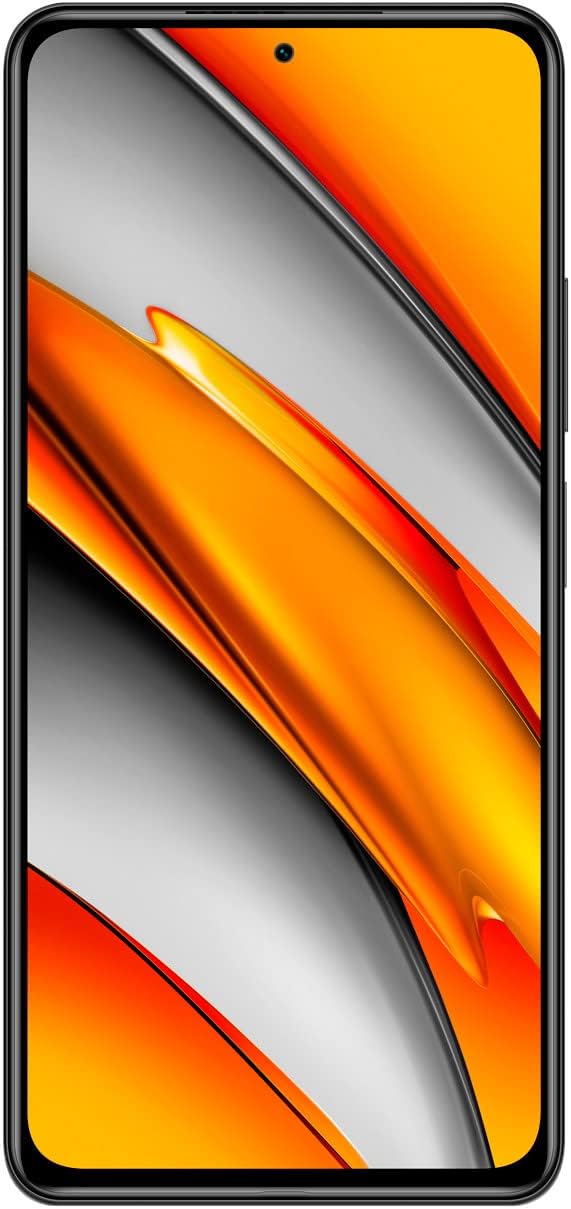
Figura 3.2: Davant view of the Poco F3, showing the full display and front camera.

Figura 3.3: posterior view of the Poco F3, detailing the triple camera system and branding.

Figura 3.4: costat dret view of the Poco F3, illustrating the power button and volume controls.

Figura 3.5: Vora inferior view of the Poco F3, displaying the SIM tray, USB-C port, and speaker.

Figura 3.6: Vora superior view of the Poco F3, showing the secondary speaker, microphone, and IR blaster.
Components clau:
- Visualització: Large AMOLED screen for vibrant visuals.
- Càmera frontal: Located at the top center of the display for selfies and video calls.
- Mòdul de càmera posterior: Houses the triple camera setup and LED flash.
- Botó d'engegada/Sensor d'empremtes dactilars: On the right side, used for power control and biometric authentication.
- Regulador de volum: Located above the power button, for adjusting audio levels.
- Safata de la targeta SIM: On the bottom edge, for inserting Nano-SIM cards.
- Port USB tipus C: On the bottom edge, for charging and data transfer.
- Altaveus: Stereo speakers located on the top and bottom edges for enhanced audio.
- Micròfons: Primary microphone on the bottom, secondary microphone on the top for noise cancellation.
- Blaster IR: On the top edge, for controlling compatible home appliances.
4. Configuració
4.1. Inserció de la targeta SIM
- Locate the SIM card tray on the bottom edge of your device.
- Insert the provided SIM eject tool into the small hole on the SIM tray. Press firmly until the tray pops out.
- Col·loqueu la targeta o targetes nano-SIM a la safata amb els contactes daurats cap avall. Assegureu-vos que l'orientació sigui correcta, tal com s'indica a la safata.
- Carefully push the SIM tray back into the slot until it is flush with the device.
4.2. Engegar el dispositiu
Manteniu premut el botó Botó d'engegada (located on the right side) for a few seconds until the Xiaomi logo appears on the screen.
4.3. Configuració Inicial
Upon first startup, follow the on-screen instructions to set up your device. This typically includes:
- Seleccionant el vostre idioma i regió.
- Connexió a una xarxa Wi-Fi.
- Inici de sessió amb el vostre compte de Google.
- Configuració del bloqueig de pantalla (PIN, patró, contrasenya o empremta digital).
- Reviewi acceptant els termes i condicions.
5. Funcionament del vostre dispositiu
5.1. Power On, Off, and Restart
- Encès: Press and hold the Power Button until the device vibrates and the logo appears.
- Apagar: Press and hold the Power Button until the power menu appears, then tap 'Power off'.
- Reinicia: Press and hold the Power Button until the power menu appears, then tap 'Restart'.
5.2. Navegació per pantalla
Your Poco F3 features a touch-sensitive display. Use the following gestures for navigation:
- Toca: Selecciona un element o obre una aplicació.
- Llisca: Desplaçar-se per pantalles o llistes.
- Pessigar: Apropa o allunya les fotos i web pàgines.
- Premsa llarga: Accedir a menús contextuals o moure icones.
5.3. Connectivitat
Manage your device's network connections:
- Wi-Fi: Vés a Configuració > Wi-Fi per connectar-se a les xarxes sense fil disponibles.
- Bluetooth: Vés a Configuració > Bluetooth per emparellar-se amb dispositius Bluetooth com ara auriculars o altaveus.
- Mobile Data/5G: Vés a Configuració > Targetes SIM i xarxes mòbils to enable or disable mobile data and manage 5G connectivity.
5.4. Camera Basics
Per utilitzar la càmera:
- Obriu el Càmera app from your home screen or app drawer.
- Toqueu el botó de l'obturador per fer una foto.
- Swipe left or right to switch between different camera modes (e.g., Photo, Portrait, Video).
- Toqueu la icona del canvi de càmera per alternar entre la càmera frontal i la posterior.
5.5. Desbloqueig de l'empremta digital
To set up fingerprint unlock:
- Vés a Configuració > Contrasenyes i seguretat > Desbloqueig amb empremta digital.
- Segueix les instruccions que apareixen a la pantalla per registrar la teva empremta digital.
- Once registered, you can unlock your device by placing your finger on the power button.
6. Manteniment
6.1. Neteja del dispositiu
To maintain the appearance and functionality of your Poco F3:
- Feu servir un drap suau i sense borrissol per netejar suaument la pantalla i la carcassa.
- Eviteu l'ús de productes químics agressius, materials abrasius o aerosols.
- Mantingueu els ports nets de pols i deixalles.
6.2. Actualitzacions de programari
Comproveu i instal·leu regularment si hi ha actualitzacions de programari per assegurar-vos que el dispositiu tingui les darreres funcions, pegats de seguretat i millores de rendiment.
- Vés a Configuració > Quant al telèfon > Versió MIUI.
- Tap 'Check for updates' and follow the prompts if an update is available.
6.3. Cura de la bateria
Per allargar la durada de la bateria:
- Use only the original charger and cable provided with your device.
- Eviteu exposar el dispositiu a temperatures extremes (calor o fred).
- Optimitza la configuració de la bateria a Configuració > Bateria i rendiment.
- Eviteu esgotar completament la bateria amb freqüència.
7. Solució De Problemes
This section addresses common issues you might encounter with your Poco F3.
7.1. El dispositiu no s'encén
- Assegureu-vos que la bateria estigui carregada. Connecteu el dispositiu al carregador durant almenys 30 minuts.
- Attempt a force restart by pressing and holding the Power Button for approximately 10-15 seconds.
7.2. Problemes de connectivitat de xarxa
- Comproveu si la targeta SIM està correctament inserida i activada.
- Toggle Airplane Mode on and off from the Quick Settings panel.
- Reinicieu el vostre dispositiu.
- Verify your mobile data plan is active and you have coverage.
7.3. Les aplicacions es bloquegen o es bloquegen
- Esborra la memòria cau i les dades de l'aplicació problemàtica mitjançant Configuració > Aplicacions > Gestiona les aplicacions.
- Assegureu-vos que l'aplicació estigui actualitzada a la seva darrera versió des de Google Play Store.
- Si el problema persisteix, prova de desinstal·lar i tornar a instal·lar l'aplicació.
7.4. Rendiment lent
- Tanca les aplicacions de fons innecessàries.
- Clear cached data regularly via Settings > About phone > Storage.
- Assegureu-vos que el dispositiu tingui prou espai d'emmagatzematge lliure.
- As a last resort, consider a factory reset (back up your data first). Go to Configuració > Quant al telèfon > Restabliment de fàbrica.
8. Especificacions
Below are the key technical specifications for the Xiaomi Poco F3 (Model: M2012K11AG):
| Característica | Especificació |
|---|---|
| Nom del model | Poco F3 |
| Número de model de l'article | M2012K11AG |
| Sistema operatiu | MIUI 12 |
| RAM | 8 GB |
| Capacitat d'emmagatzematge de memòria | 256 GB (intern) |
| Mida de la pantalla | 6.67 polzades |
| Tecnologia de visualització | AMOLED |
| Resolució | 1080 x 2400 píxels |
| Freqüència d'actualització | 120 Hz |
| Capacitat de la bateria | 4520 milionsamp Hours (typ) |
| Dimensions del producte | 6.44 x 3.01 x 0.31 polzades |
| Pes de l'article | 6.9 unces (196 grams) |
| Tecnologies de connectivitat | Wi-Fi, 5G, Bluetooth, GPS |
| Color | Nit Negra |
| Fabricant | Xiaomi |
9. Garantia i Suport
Your Xiaomi Poco F3 is covered by a limited warranty. Please refer to the warranty card included in your package for detailed terms and conditions, including warranty period and coverage.
For technical support, service, or further assistance, please visit the official Xiaomi support website or contact their customer service. Contact information can typically be found on the Xiaomi official website or in your Quick Start Guide.


