1. Introducció
Thank you for choosing the AULA F809 Wired USB Backlit Gaming Mouse. This manual provides detailed instructions on how to set up, operate, and maintain your new gaming mouse to ensure optimal performance and an enhanced gaming experience. Please read this manual thoroughly before use.
2. Producte acabatview
The AULA F809 is a high-performance wired gaming mouse designed for precision and comfort. It features adjustable DPI settings, customizable macro programming, and vibrant LED backlighting to suit various gaming styles and preferences.
Característiques principals:
- Connectivitat: USB per cable
- Botons: 7 Botons programables
- Sensor: Optical Movement Detection
- DPI: Multi-DPI Adjustable Sensitivity
- Il·luminació: Backlit with LED Color Lights (7-color breathing light)
- Material: Plàstic durador
- Orientació de la mà: Disseny ambidiestro
- Compatibilitat: PC i ordinador portàtil
Components del producte:
The package includes the AULA F809 Wired USB Backlit Gaming Mouse with an integrated USB cable.

The mouse features a comfortable ergonomic design suitable for extended gaming sessions. Its surface is made from durable plastic, ensuring longevity.
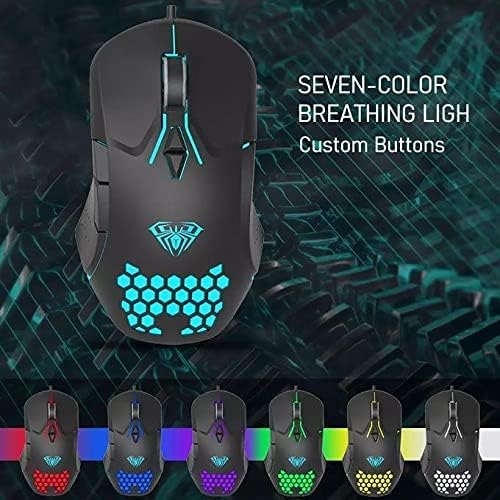
The mouse is equipped with 7 programmable buttons, allowing for personalized control and macro assignments to enhance gameplay efficiency.

3. Instruccions de configuració
Setting up your AULA F809 Gaming Mouse is a simple plug-and-play process.
- Desempaqueta el ratolí: Traieu amb cura el ratolí del seu embalatge.
- Localitza un port USB: Identify an available USB port on your computer or laptop.
- Connecteu el ratolí: Insert the USB connector of the AULA F809 mouse into the USB port.
- Instal·lació del controlador: El sistema operatiu detectarà i instal·larà automàticament els controladors necessaris. Aquest procés pot trigar uns instants.
- A punt per al seu ús: Once the drivers are installed, the mouse will be ready for immediate use. The LED backlighting will illuminate, indicating it is powered on.
4. Instruccions de funcionament
4.1 Ajust de DPI
The AULA F809 mouse features multi-DPI adjustable sensitivity, allowing you to change the cursor speed to match your preference or game requirements. The DPI button is typically located near the scroll wheel. Pressing this button cycles through different DPI settings, often indicated by changes in the LED lighting color or pattern.
- Lower DPI: Ideal for precise movements, such as sniping in first-person shooter games.
- Higher DPI: Suitable for fast-paced action or navigating multiple monitors quickly.
4.2 Programació de macros
The mouse is equipped with 7 programmable buttons. To utilize macro programming, you will typically need to download the specific driver software from the AULA official weblloc. Aquest programari us permet:
- Assign custom functions to each of the 7 buttons.
- Create and save complex macro sequences for in-game actions.
- Adjust other mouse settings such as polling rate and lift-off distance.
Refer to the software's user interface for detailed instructions on creating and assigning macros.
4.3 Retroil·luminació LED
The AULA F809 features dynamic LED backlighting with a 7-color breathing light effect. This lighting enhances the aesthetic appeal of the mouse and can be particularly useful for night gaming. While specific controls for lighting modes are usually managed through the driver software, some mice may have a dedicated button to cycle through effects or turn the lighting on/off.

5. Manteniment
To ensure the longevity and optimal performance of your AULA F809 Gaming Mouse, follow these simple maintenance guidelines:
- Neteja: Feu servir un drap suau i sec per netejar la superfície del ratolí. Per a la brutícia persistent, netegeu lleugerament.ampNetegeu el drap amb aigua o una solució de neteja suau. Eviteu productes químics agressius.
- Cura del sensor: Mantingueu el sensor òptic de la part inferior del ratolí net i lliure de pols o restes. Feu servir un bastonet de cotó o aire comprimit si cal.
- Gestió de cables: Avoid sharply bending or pulling the USB cable to prevent internal damage.
- Emmagatzematge: Quan no l'utilitzeu, guardeu el ratolí en un entorn net i sec, allunyat de temperatures extremes.
6. Solució De Problemes
If you encounter any issues with your AULA F809 Gaming Mouse, please refer to the following common troubleshooting steps:
- El ratolí no respon:
- Assegureu-vos que el cable USB estigui ben connectat a un port USB que funcioni.
- Prova de connectar el ratolí a un port USB diferent de l'ordinador.
- Reinicieu l'ordinador.
- Els llums LED no funcionen:
- Check if the mouse is properly connected and receiving power.
- If using custom software, ensure the lighting effects are enabled.
- El moviment del cursor és erràtic:
- Netegeu el sensor òptic de la part inferior del ratolí.
- Ensure you are using the mouse on a clean, non-reflective surface or a mouse pad.
- Adjust the DPI settings to a comfortable level.
- Botons que no funcionen correctament:
- If buttons are programmed, check the macro software settings.
- Assegureu-vos que no hi hagi deixalles que obstrueixin els botons.
If the issue persists after trying these steps, please contact AULA customer support for further assistance.
7. Especificacions
| Característica | Especificació |
|---|---|
| Nom de marca | AULA |
| Nom del model | F809 |
| Color | Negre |
| Tecnologia de connectivitat | USB |
| Detecció de moviment | Òptic |
| Quantitat de botons | 7 |
| Orientació de la mà | Ambidextre |
| Usos recomanats | Jocs |
| Dispositius compatibles | Ordinador personal, portàtil |
| Característiques especials | Portable, Backlit, Macro Programming, Multi DPI |
8. Garantia i Suport
For warranty information and customer support, please refer to the documentation included with your purchase or visit the official AULA weblloc web. Conserveu el comprovant de compra per a qualsevol reclamació de garantia.


