1. Introducció
This manual provides essential instructions for setting up, operating, and maintaining your ZTE MF286C LTE CAT6/4G Wi-Fi Dual Band Router. Please read this manual thoroughly before using the device to ensure proper functionality and safety.
The ZTE MF286C is a versatile router designed to provide high-speed internet access via LTE CAT6/4G networks and Wi-Fi. It features dual-band Wi-Fi connectivity and supports advanced VoLTE voice calls, making it suitable for both home and office environments.
2. Contingut del paquet
Verifiqueu que tots els elements siguin presents al vostre paquet:
- ZTE MF286C LTE CAT6/4G Wi-Fi Dual Band Router
- Adaptador d'alimentació
- Cable Ethernet
- Guia d'inici ràpid (si s'inclou)
- Bateria de ions de liti (preinstal·lada o separada)
3. Dispositiu acabatview
Familiarize yourself with the router's indicators and ports.
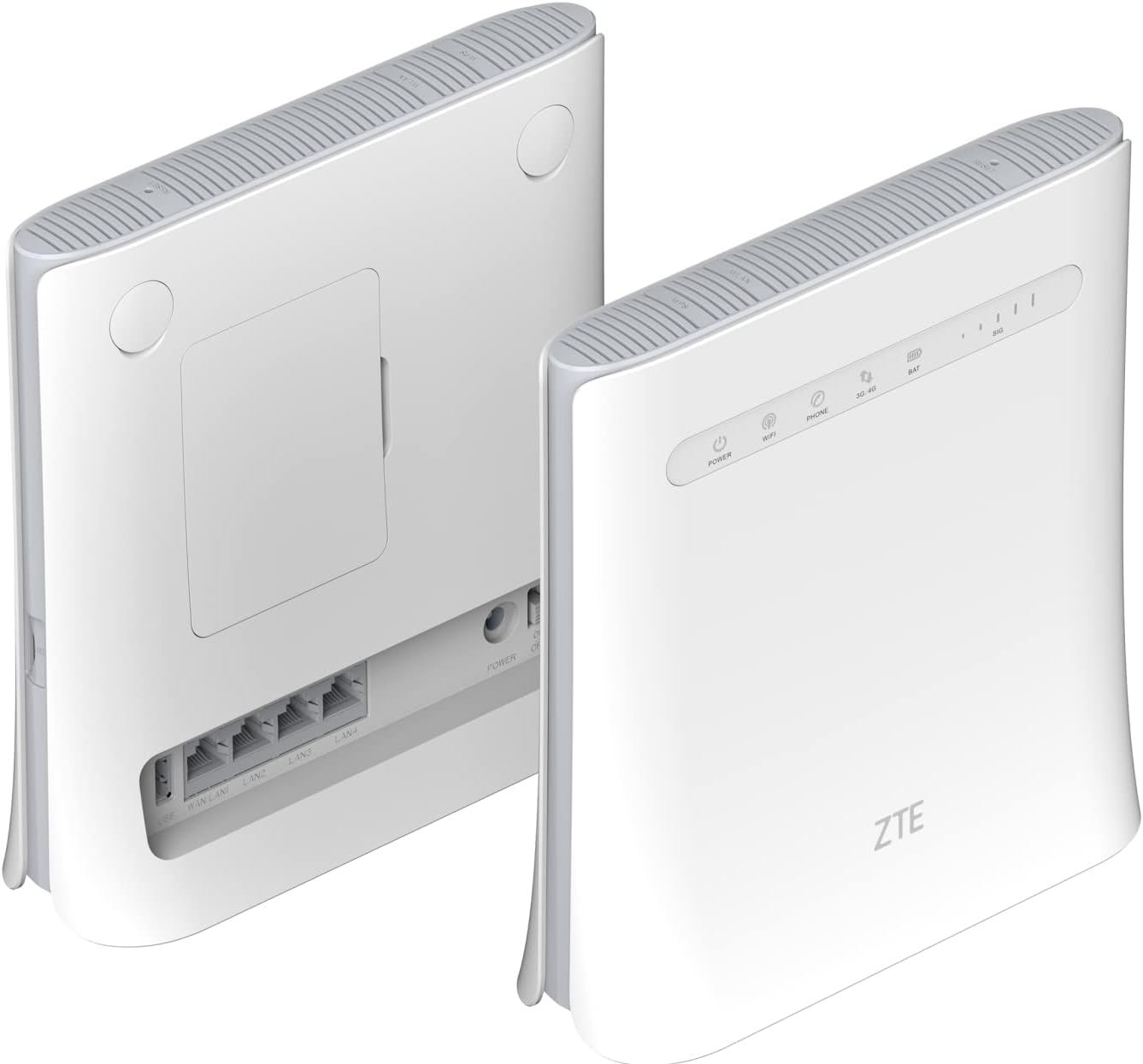
Figura 3.1: Davant i posterior View of ZTE MF286C Router. This image displays the router from both the front and rear. The front panel shows LED indicators for Power, Wi-Fi, Phone, 3G/4G network status, Battery, and Signal strength. The rear panel reveals the SIM card slot cover, multiple LAN ports, and the power input.
3.1. Indicadors LED
- Potència: Indica l'estat d'alimentació.
- Wi-Fi: Indica l'activitat de la xarxa Wi-Fi.
- Telèfon: Indicates VoLTE call status.
- 3G/4G: Indicates mobile network connection status (3G or 4G LTE).
- BAT: Indica el nivell de càrrega de la bateria.
- SIG: Indicates mobile network signal strength.
3.2. Ports i botons

Figura 3.2: Rear Panel Ports of ZTE MF286C Router. This image provides a clear view of the router's rear panel, highlighting the WAN/LAN port, three additional LAN ports, the power input, and the power on/off switch. The SIM card slot is located under a cover on the back.
- Port WAN/LAN: Connects to a modem or acts as a LAN port.
- Ports LAN (x3): Connects to wired devices (computers, printers).
- Entrada d'alimentació: Es connecta a l'adaptador de corrent.
- Botó d'encesa: Encén o apaga el dispositiu.
- Ranura per a targeta SIM: Insert your Nano-SIM card here (under the cover).
- Botó de restabliment: (Typically recessed) Used to restore factory settings.
4. Configuració
4.1. Instal·lació de la targeta SIM
- Assegureu-vos que l'encaminador estigui apagat.
- Locate the SIM card slot cover on the rear of the router.
- Traieu la tapa suaument.
- Insert a standard Nano-SIM card into the slot with the gold contacts facing down and the notched corner oriented correctly. Push until it clicks into place.
- Replace the SIM card slot cover.
4.2. Engegar el router
- Connect the power adapter to the router's power input port and then to a wall outlet.
- Press and hold the Power button until the Power LED illuminates.
- Wait for the router to boot up. The 3G/4G and Wi-Fi LEDs will indicate network and Wi-Fi readiness.
5. Instruccions de funcionament
5.1. Connexió a Wi-Fi
- On your device (smartphone, tablet, laptop), enable Wi-Fi.
- Cerca xarxes Wi-Fi disponibles.
- Select the network name (SSID) displayed on the label at the bottom of your router.
- Enter the Wi-Fi password (WPA/WPA2 key) also found on the router's label.
- Once connected, the Wi-Fi LED on the router will indicate activity.
5.2. Connecting via Ethernet Cable
- Connect one end of an Ethernet cable to a LAN port on the router.
- Connecteu l'altre extrem del cable Ethernet al port Ethernet de l'ordinador o d'un altre dispositiu amb cable.
- The device should automatically establish a wired network connection.
5.3. Accedint al Web Interfície de gestió
For advanced settings, network configuration, and monitoring, access the router's web interfície de gestió:
- Assegureu-vos que el dispositiu estigui connectat a la xarxa Wi-Fi o LAN del router.
- Obre a web navegador (per exemple, Chrome, Firefox, Edge).
- A la barra d'adreces, escriviu l'adreça IP predeterminada (normalment
192.168.0.1or192.168.1.1) o el web address printed on the router's label, then press Enter. - Enter the default username and password (typically
adminper a tots dos, o tal com s'especifica a l'etiqueta del router). - You can now configure settings such as Wi-Fi name, password, network modes, and parental controls.
5.4. Using VoLTE Voice Calls
The ZTE MF286C supports advanced VoLTE voice calls. To use this feature:
- Connect a standard analog telephone to the router's phone port (if available, not explicitly shown in images but mentioned in description).
- Ensure your SIM card supports VoLTE and that the service is activated by your mobile operator.
- You can now make and receive calls using the connected telephone, benefiting from improved call quality.
6. Manteniment
- Neteja: Feu servir un drap suau i sec per netejar el router. No utilitzeu netejadors líquids ni en aerosol.
- Col·locació: Place the router in a well-ventilated area, away from direct sunlight, heat sources, and moisture. Avoid placing it near strong electromagnetic fields.
- Actualitzacions de firmware: Reviseu periòdicament el fabricant weblloc web per a actualitzacions de firmware per garantir un rendiment i una seguretat òptims.
- Cura de la bateria: If the router has a removable battery, avoid extreme temperatures and prolonged periods of full discharge or full charge to extend battery life.
7. Solució De Problemes
| Problema | Possible solució |
|---|---|
| Sense LED d'alimentació | Ensure the power adapter is securely connected to the router and a working power outlet. Try a different outlet. |
| No Internet Connection (3G/4G LED off/red) | Check if the SIM card is correctly inserted. Verify your mobile data plan is active. Restart the router. Check network coverage in your area. |
| No es pot connectar a la Wi-Fi | Ensure Wi-Fi is enabled on the router (Wi-Fi LED on). Verify the Wi-Fi password. Restart both the router and your connecting device. |
| Velocitat d'Internet lenta | Check signal strength (SIG LED). Move the router to a location with better signal. Reduce the number of connected devices. Check for network congestion with your service provider. |
| No es pot accedir web interfície de gestió | Ensure your device is connected to the router. Verify the IP address or web address. Clear browser cache or try a different browser. |
| VoLTE calls not working | Ensure a phone is correctly connected. Verify your SIM card and service plan support VoLTE. Contact your mobile operator for assistance. |
8. Especificacions
| Model | MF286C |
| Marca | ZTE |
| Tecnologia de connectivitat | LTE CAT6/4G, Wi-Fi |
| Estàndard sense fils | 802.11b (Dual-Band Wi-Fi) |
| Max Download Speed (LTE) | Fins a 300 Mbps |
| Max Upload Speed (LTE) | Fins a 50 Mbps |
| Velocitat màxima de Wi-Fi | Fins a 1300 Mbps |
| Capacitat de la bateria | 3000 mAh de liti-ió (inclosa) |
| Battery Life (4G network sharing) | Fins a 3 hores |
| Battery Life (VoLTE call) | Fins a 4 hores |
| Ports | 1x WAN/LAN, 3x LAN, Power Input, SIM Card Slot, Phone Port (VoLTE) |
| Color | Blanc |
| Dimensions (L x A x A) | 20 x 8 x 19 cm |
| Pes | 780 g |
| Dispositius compatibles | Ordinador personal, telèfon intel·ligent, tauleta |
| Característiques especials | Remote Access, VoLTE Voice Calls, Built-in Battery |
9. Informació de seguretat
- No obriu ni modifiqueu el dispositiu.
- Feu servir només l'adaptador de corrent original que s'inclou amb el dispositiu.
- Keep the device away from water, fire, and extreme temperatures.
- Desfeu-vos del dispositiu i de la bateria de manera responsable d'acord amb la normativa local.
- Avoid placing the device near medical equipment to prevent interference.
10. Garantia i Suport
For warranty information and technical support, please refer to the warranty card included in your package or visit the official ZTE weblloc web. Conserveu el comprovant de compra per a reclamacions de garantia.


