1. Producte acabatview
The Explore Scientific Wireless Weather Station (Model WSH0002) is a compact and versatile device designed to monitor indoor and outdoor temperatures. It features a clear display, an integrated alarm clock with snooze function, and the ability to connect with up to three outdoor sensors for comprehensive temperature monitoring.
Característiques principals:
- Simultaneous display of indoor and outdoor temperatures.
- Temperature trend indicator for quick reference.
- Integrated clock with date display.
- Rellotge despertador amb funció de repetició.
- Stores minimum and maximum temperature values for the past 24 hours.
- Expandable system supporting up to three wireless outdoor sensors.
- Compact and portable design, ideal for various placements.

2. Guia de configuració
2.1 Contingut del paquet
- 1 x Explore Scientific Wireless Weather Station (Base Unit)
- 1 x Sensor exterior sense fil
- 1 x manual d'instruccions
2.2 Instal·lació de la bateria
The weather station and outdoor sensor require batteries for operation. Batteries are not included in the package.
- Unitat base: Locate the battery compartment on the back of the main unit. Open the cover and insert 4 x AAA batteries, ensuring correct polarity (+/-). Close the battery cover securely.
- Sensor exterior: Locate the battery compartment on the back of the outdoor sensor. Open the cover and insert 2 x AAA batteries, ensuring correct polarity (+/-). Close the battery cover securely.

2.3 Initial Setup and Sensor Pairing
- Place the base unit and the outdoor sensor close to each other (within 1 meter) during initial setup.
- Once batteries are inserted, the base unit will automatically begin searching for the outdoor sensor. This process may take a few minutes.
- The outdoor temperature reading should appear on the base unit's display once pairing is successful.
- If the outdoor temperature does not appear, ensure both units have fresh batteries and are within range. You may need to press the reset button (if available, typically a small hole requiring a pin) on both units and try again.
- Once paired, place the outdoor sensor in a suitable location, protected from direct sunlight and rain, and within the wireless range of the base unit (433 MHz).
3. Instruccions de funcionament
3.1 Mostra finalview
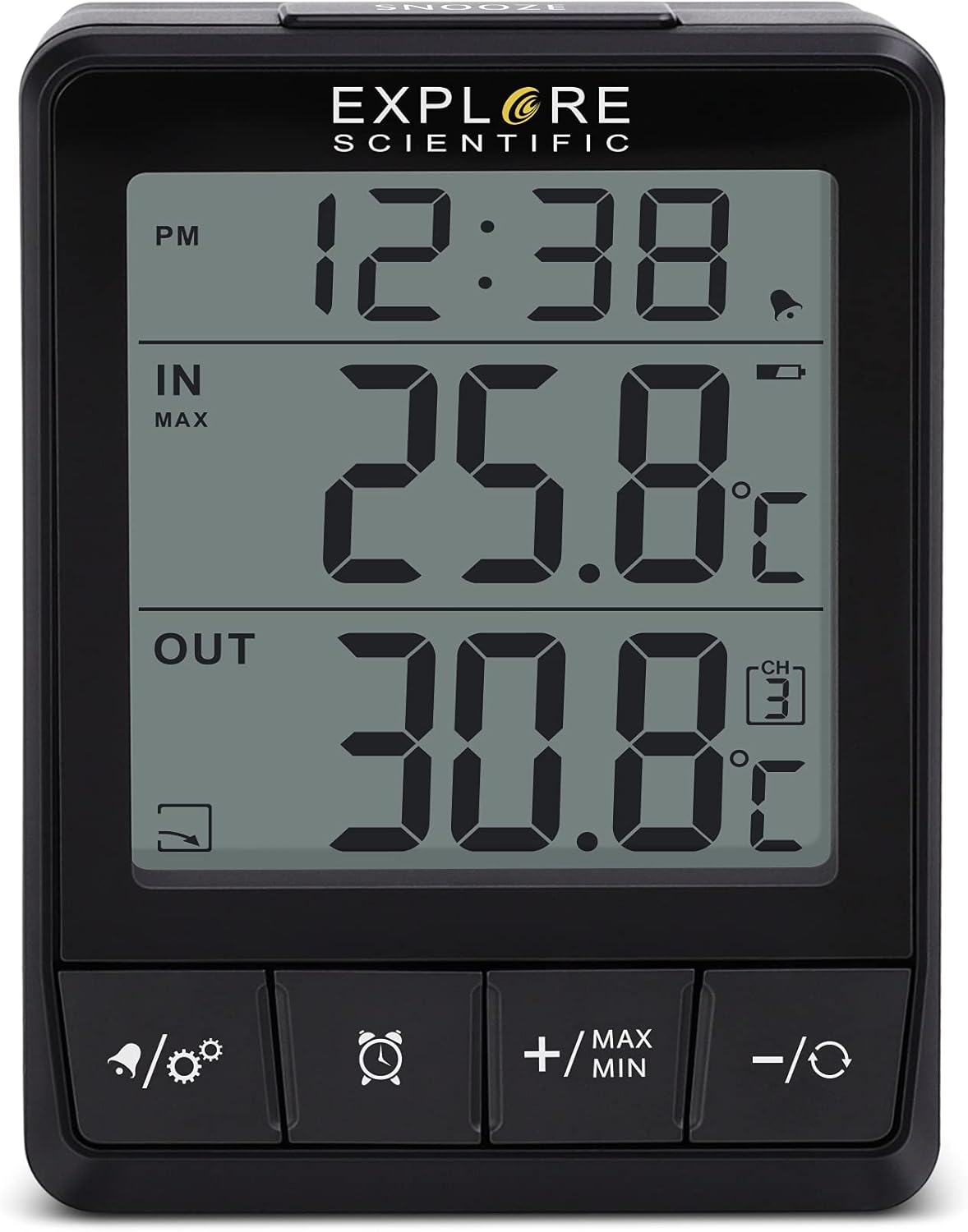
The clear LCD display is divided into three main sections:
- Upper Area: Displays the current time or date.
- Zona Mitjana: Shows the indoor temperature measured by the base unit's integrated thermometer.
- Zona baixa: Displays the outdoor temperature received from the wireless sensor. If multiple outdoor sensors are connected, you can cycle through their readings.
3.2 Configuració de l'hora i la data
Refer to the buttons on the front of the unit (e.g., 'MODE', '+/MAX MIN', '-/C/F').
- Press and hold the 'MODE' button (or similar) to enter time/date setting mode.
- Use the '+/MAX MIN' or '-/C/F' buttons to adjust the flashing value (e.g., hour, minute, year, month, day).
- Press 'MODE' again to confirm the setting and move to the next parameter.
- Repeat until all settings are complete. The unit will automatically exit setting mode after a period of inactivity or by pressing 'MODE' one last time.
- To switch between 12-hour and 24-hour format, or Celsius and Fahrenheit, briefly press the appropriate button (e.g., '-/C/F').
3.3 Funció de despertador
- Press the 'ALARM' button (or button with alarm icon) to view l'hora de l'alarma.
- Press and hold the 'ALARM' button to enter alarm setting mode.
- Use the '+/MAX MIN' or '-/C/F' buttons to set the desired alarm time.
- Press 'ALARM' to confirm each setting.
- To activate/deactivate the alarm, briefly press the 'ALARM' button. An alarm icon will appear/disappear on the display.
- When the alarm sounds, press the 'SNOOZE' button (top of unit) to activate the snooze function. The alarm will sound again after approximately 5-10 minutes. To stop the alarm, press any other button.
3.4 Viewing Minimum and Maximum Temperatures
The unit automatically records the minimum and maximum indoor and outdoor temperatures over the past 24 hours.
- Briefly press the '+/MAX MIN' button to cycle through the current, maximum (MAX), and minimum (MIN) temperature readings for both indoor and outdoor sensors.
- The display will indicate whether the shown value is current, MAX, or MIN.
3.5 Connexió de sensors addicionals
The base station can connect to up to two additional outdoor sensors (sold separately).
- Ensure the new sensor has batteries installed.
- On the base unit, press the 'CHANNEL' button (or similar, often combined with a cycle icon) to select an unused channel (e.g., CH2 or CH3).
- The base unit will then search for a new sensor on that channel.
- Once connected, you can cycle through the outdoor sensor readings by pressing the 'CHANNEL' button.
4. Manteniment
4.1 Neteja
- Wipe the unit and sensor with a soft, slightly damp tela.
- Do not use abrasive cleaners, solvents, or harsh chemicals, as these may damage the plastic components or display.
- Ensure no moisture enters the battery compartments or other openings.
4.2 Substitució de la bateria
- When the low battery indicator appears on the display, it is time to replace the batteries in the respective unit (base station or sensor).
- Seguiu els passos d'instal·lació de la bateria que s'indiquen a la secció 2.2.
- Always replace all batteries in a unit at the same time with new ones of the same type.
- Eliminar les piles velles de manera responsable d'acord amb la normativa local.
5. Solució De Problemes
If you encounter issues with your Explore Scientific Wireless Weather Station, please refer to the table below for common problems and solutions.
| Problema | Causa possible | Solució |
|---|---|---|
| No hi ha pantalla / La unitat no s'encén | Les piles estan gastades o incorrectament inserides. | Check battery polarity. Replace all batteries with fresh ones. |
| Outdoor temperature not displayed or flashing | Sensor out of range, sensor batteries low, or pairing lost. | Ensure sensor is within wireless range (max 30m/100ft in open air). Replace sensor batteries. Re-pair the sensor by resetting both units and following Section 2.3. |
| Lectures de temperatura inexactes | Sensor exposed to direct sunlight, heat sources, or poor ventilation. | Relocate the outdoor sensor to a shaded, well-ventilated area, away from direct sunlight, heat sources (e.g., walls, windows), or reflective surfaces. Allow time for readings to stabilize. |
| L'alarma no sona | L'alarma no està activada. | Ensure the alarm icon is visible on the display. If not, activate it as per Section 3.3. |
6. Especificacions tècniques
| Característica | Especificació |
|---|---|
| Número de model | WSH0002 |
| Product Dimensions (Base Unit) | 7 x 10 x 4 cm |
| Pes | 300 g |
| Power Source (Base Unit) | 4 piles AAA (no incloses) |
| Font d'alimentació (sensor exterior) | 2 x AAA batteries (not included, typical for such sensors) |
| Tecnologia de connectivitat | Sense fil, 433 MHz |
| Rang de temperatura (interior) | 0°C to +50°C (32°F to 122°F) (Typical) |
| Rang de temperatura (exterior) | -20°C to +60°C (-4°F to 140°F) (Typical) |
| Components inclosos | 1 x temperature station, 1 x outdoor sensor, instruction manual |
7. Garantia i Suport
Explore Scientific products are manufactured to high-quality standards. This product comes with a standard manufacturer's warranty against defects in materials and workmanship from the date of purchase. Please retain your proof of purchase for warranty claims.
For detailed warranty terms, technical support, or service inquiries, please visit the official Explore Scientific weblloc web o poseu-vos en contacte amb el seu departament d'atenció al client. La informació de contacte normalment es pot trobar a l'embalatge del producte o al fabricant. weblloc.
Note: Unauthorized repairs or modifications to the device may void the warranty.


